Vexlora | Multipurpose React Admin Dashboard Template
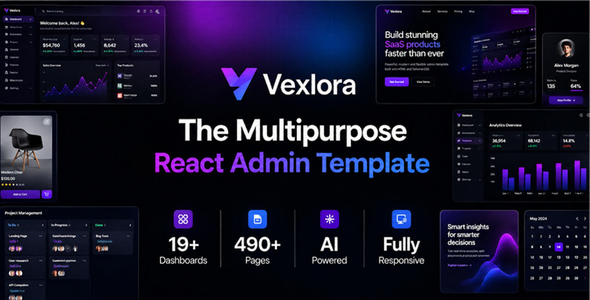

Vexlora – Multipurpose React + TypeScript + Tailwind CSS Admin Dashboard Template
Vexlora is a premium, frontend-only multipurpose admin dashboard template built with React 19, TypeScript, Tailwind CSS 4 and Vite. It brings together 19 purpose-built dashboards, 491 registered routes, business operations modules, eCommerce and marketplace interfaces, payments, developer tools, productivity applications and AI-focused administration in a reusable React application.
Vexlora is designed for developers building SaaS platforms, enterprise back offices, operational dashboards and management interfaces. Its shared UI components, configuration, layouts and feature modules are editable and ready to connect to your own services.
Current React edition: v1.0.0 | Product type: React frontend admin template | Backend: Not included
Explore the Live Showcase | View the React Application
Technology Stack
- React 19.3 and React DOM – component-driven application interface
- TypeScript 5.9 – typed components, route modules, data models and utilities
- Tailwind CSS 4.3 – responsive, utility-first styling and design tokens
- Vite 8.3 – development server and optimized production builds
- React Router DOM 7.18 – client-side navigation, nested layouts and route-level lazy loading
- Recharts 3.10 – dashboard data visualization
- TanStack React Table 9.1 – table data, column and interaction foundations
- React Hook Form 7.85 + Zod 4.4 – typed form state and validation
- Lucide React and Radix UI – reusable icons and accessible interface primitives
Versions above describe the React v1.0.0 project dependency manifest. See package.json for exact package versions.
19 Purpose-Built Dashboards
- Executive
- SaaS
- eCommerce
- CRM
- Analytics
- Finance
- Projects
- Marketing
- HR
- Support
- Logistics
- Inventory
- ERP
- Energy
- Construction
- Hospital
- Education
- Real Estate
- AI
Route count note: The 491 registered routes include application pages, reference/foundation pages and the root redirect. This number does not mean 491 separate dashboard designs.
Major Administration Modules
- SaaS operations: customers, subscriptions, pricing plans, renewals, retention, usage and trials
- ERP operations: procurement, suppliers, inventory, manufacturing, sales, payables and master data
- Analytics: acquisition, audiences, funnels, cohorts, revenue, attribution, real-time views, experiments and data quality
- CRM: customers, leads, pipeline, activities, forecasting, fulfillment and omnichannel conversations
- Finance: treasury, receivables, payables, reconciliation, planning, closing controls and invoice workflows
- Projects: intake, Kanban, tasks, timelines, milestones, members, budgets, risks, files and activity
- Marketing: campaigns, audiences, attribution, content, lifecycle, social, automation and experiments
- Specialized suites: Construction, Support, Logistics, HR, Hospital, Education, Energy and Real Estate interfaces
eCommerce & Marketplace Administration
- Products, product variants, attributes, categories, brands, collections, tags and reviews
- Orders, fulfillment, returns, refunds, cancellations and abandoned checkouts
- Inventory, stock tracking, transfers and replenishment views
- Checkout, pricing and discount administration screens
- Multi-vendor marketplace management interfaces
- Online Store administration: navigation menus, pages, blog, testimonials, contact content and popups
- Commerce-focused AI assistant and operational insight interfaces
AI Operations Platform
- AI Command Center and runtime operations dashboards
- Agent and business-copilot management interfaces
- Automations, orchestration and workflow views
- Models, providers, routing, keys and usage screens
- Knowledge and retrieval/RAG management surfaces
- Evaluations, safety controls and release assurance views
- Memory, context, governance and delegated-access interfaces
- Media, voice, multimodal and operational observability views
AI features are frontend demonstrations and integration-oriented interfaces. Access to real models, inference, storage and AI provider APIs is not included.
Payments & Developer Center
- Payments: overview, transactions, methods, provider configuration, checkout, payment links, refunds, disputes, payouts and settlements
- Developer tools: API platform, endpoints, environments, API keys, OAuth, webhooks, event catalog and request logs
- CRUD Generator: resource configuration, fields, table layouts, forms, detail views, preview and code-export workflows
- Integration examples, connection administration and audit-oriented screens
Applications, Authentication & Administration
- Calendar, chat, mail, file management, media and notification interfaces
- Login, registration, recovery, email verification, OTP and other authentication UI screens
- Users, roles, permissions, access control, teams and departments
- Security Center, organization settings, branding, localization and appearance settings
- Reusable reference/foundation pages for UI components, forms, tables and customization
React Architecture & Template Features
- Reusable React + TypeScript components with feature-based source organization
- React Router navigation, nested dashboard/auth layouts, route-level lazy loading and a custom 404 screen
- Dedicated layout context for CRUD Generator and invoice workspace flows
- Loading states and application-level error handling
- Responsive layouts for desktop, laptop, tablet and mobile
- Light and dark appearance modes, configurable accent/spacing preferences and RTL presentation support
- Shared chart, table, form, navigation, card and dialog foundations
- Centralized branding and presentation configuration for buyer customization
- Readable TypeScript source and Vite build tooling
System Requirements
- Node.js: 20.19.x or 22.12+ (Node.js 24 is also supported by the package engine range)
- npm: a compatible npm version installed with Node.js
- A code editor such as Visual Studio Code
- A modern browser such as Chrome, Edge, Firefox or Safari
- Internet access to install packages from the npm registry
Important: This is a React/Vite source project, not a collection of independent dashboard HTML files. Run its development server or production build instead of opening src/pages/*.tsx directly in a browser. Next.js is not required.
React Installation – Step by Step
- Extract the download: Unzip the buyer package and locate the React project folder containing
package.json. - Open the React project: Open that folder in your editor and in a terminal or PowerShell window.
- Check Node.js and npm: Run the commands below. Upgrade Node.js first if your installed version does not satisfy the requirement.
node -v npm -v- Install dependencies: From the folder containing
package.json, install the project packages:
npm install- Start development: Run the Vite development server:
npm run dev- Open the local URL: Use the address printed by Vite, normally
http://localhost:5173/. If port 5173 is occupied, Vite may select another available port (for example, 5174). - Explore a dashboard: Navigate in the application or open
/dashboard/executiveon the local development server.
Package-lock note: Use npm install with the provided package as described above. Use npm ci only when a compatible package-lock.json is supplied or has already been generated for the exact dependency tree.
TypeScript Validation & Production Build
Before deploying, validate the route graph and TypeScript source, then create the optimized production output:
npm run check:runtime npm run typecheck npm run buildThe production website is generated in the dist/ folder. To test that build locally:
npm run previewVite prints the URL for the preview server. The development server is not a substitute for the production build when publishing the site.
Deploying the React Application
Deploy the generated dist/ assets to a static host that supports single-page application (SPA) history fallback. This React edition uses BrowserRouter; direct URLs such as /dashboard/executive must return the app’s index.html rather than an HTTP 404.
Vercel:
- Import the React project repository or deploy the folder containing
package.json. - Use the project folder as the Root Directory. Set the framework/build settings to the Vite app if necessary.
- Install command:
npm install; build command:npm run build; output directory:dist. - Keep the included
vercel.jsonin the React project root so all React Router routes rewrite to/index.html. - Deploy and test both the homepage and a direct dashboard URL in a new browser tab.
The Vercel SPA rewrite used by this React edition is:
{ "rewrites": [ { "source": "/(.*)", "destination": "/index.html" } ] }Other hosting: For Netlify, Apache, Nginx and similar hosts, configure the equivalent SPA fallback to index.html. On subdirectory deployments, also configure the Vite base path and React Router basename to match the hosting path.
How to Customize Vexlora
src/config/product.ts– central product identity and branding defaultssrc/config/presentation.ts– theme presentation settings such as accent, radius, font and densitysrc/globals.css– shared Tailwind/CSS theme tokens and global stylingsrc/react-app.tsx– React Router route registration and layout compositionsrc/pages/– route-level React pagessrc/features/– feature-specific modules, components, data and interactionssrc/components/– reusable UI components, providers and shared patternspublic/– static images, brand assets and other browser-served filesvite.config.ts– Vite plugins, aliases and development configuration
To connect live data, replace sample/browser-local data at the relevant feature boundaries and call your own secured APIs. Keep credentials, privileged operations and payment/provider secrets on your server rather than embedding them in client-side React code.
Documentation & Asset Credits
The React source includes README.md with setup, build, routing and deployment instructions and ASSET_CREDITS.md with font, photography and third-party asset information. Review the asset register before distributing preview imagery in a commercial project. Documentation and route-reference screens help buyers locate and customize the application.
What Is Not Included
Vexlora is a frontend React admin dashboard template; it is not a complete hosted SaaS product, production backend, customer-facing storefront or payment platform. The download does not include a production database, authentication server, live payment processor, real AI inference access, private provider credentials or backend API infrastructure. Workflow demonstrations and sample data illustrate frontend behavior; buyers implement and secure their own integrations.
React Edition v1.0.0
- Initial React + TypeScript + Tailwind CSS 4 + Vite edition of Vexlora
- 19 purpose-built dashboards and 491 registered React application routes
- Shared layouts, forms, charts, tables, application pages and enterprise operation interfaces
- React Router navigation, lazy-loaded page modules and SPA deployment guidance
- Built-in runtime, TypeScript and production-build verification commands

Official Product Support
Purchased Vexlora on ThemeForest and need assistance?
Use the official ThemesDeveloper Support Center to verify your eligible ThemeForest purchase and request product support.
- Product documentation and usage guidance
- ThemeForest purchase verification
- Technical support tickets
- Reported product issue assistance
- Update and compatibility guidance
Open ThemesDeveloper Support Center →
Support is provided according to the applicable Envato Item Support Policy and the buyer’s active support period.


