Mendinghub | Wedding Listing HTML5 Template
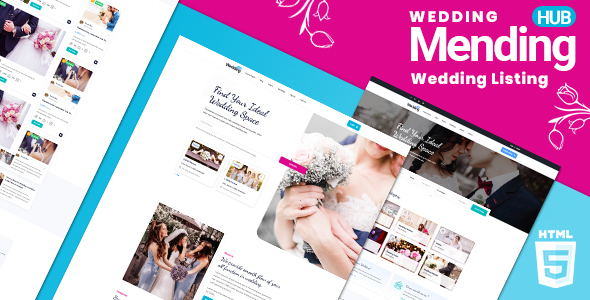


MendingHub is the most feature-rich wedding vendor directory HTML5 template on ThemeForest, delivering 33 fully-designed pages, 3 distinct home layouts, and a front-end 8 colour theme switcher that lets buyers match their brand without touching a single line of code. Built on Bootstrap 5.3.8 with a clean, mobile-first foundation, MendingHub covers every page a real wedding vendor directory needs: from an interactive Leaflet/Mapbox map listing view and a side-by-side listing comparison tool to multi-step listing submission with Dropzone file upload, a full user profile system with saved listings, and a four-layout blog.
In a niche where most competitors offer static map embeds, no colour customisation, and a handful of pages, MendingHub stands apart. The interactive map view (powered by Leaflet with Mapbox GL integration) lets visitors browse vendors spatially—an experience closer to Airbnb than a typical directory template. The listing comparison feature (side-by-side across multiple vendors) is virtually absent from other wedding directory HTML templates. Add the Dancing Script + Roboto font pairing for instant bridal identity and a code base that has been audited for Bootstrap 5 compliance, and MendingHub is the clear premium choice for wedding marketplaces, bridal vendor directories, event venue listings, and wedding planner portals.
Key Features
- 33 HTML pages covering every section of a production-ready wedding vendor directory
- 3 home page layouts (index.html, home-v2.html, home-v3.html)
- 3 listing detail page variants (v1, v2, v3) for maximum flexibility
- Interactive map listing view powered by Leaflet + Mapbox GL (listing-map.html)
- Side-by-side listing comparison tool (compare-listings.html)
- 8 colour themes with a live front-end switcher panel—no coding required
- Bootstrap 5.3.8
- fully upgraded from Bootstrap 4, all data-bs* attributes updated - Dancing Script + Roboto Google Fonts pairing for wedding brand identity
- Agency directory with archive and detail pages
- Agent/vendor profiles with slider carousel
- Multi-step listing submission form with Dropzone.js multi-file image upload
- User profile system with saved listings and managed listings tabs
- Blog in 4 layouts (grid, list, left sidebar, right sidebar) plus a single post template
- Login and Register pages
- Services, Pricing, FAQ, Contact, Legal, Coming Soon, and 404 pages
- Select2-enhanced search dropdowns for category and location filtering
- jQuery Steps multi-step form wizard for guided listing submission
- jQuery Countdown on the Coming Soon page
- Semantic HTML5 markup throughout
- Bootstrap 5 native ARIA attributes on all interactive components
- Fully responsive—tested on mobile, tablet, and desktop viewports
- Well-commented, clearly structured HTML and CSS source code
Interactive Map View (Leaflet + Mapbox)
- Full-page split-view layout: listing cards on the left, live interactive map on the right
- Powered by Leaflet.js with Mapbox GL tile integration for high-quality map rendering
- Custom map markers that match the template’s active colour theme
- Clicking a marker highlights the corresponding listing card and vice versa
- Map view is filterable by category, location, and price range without a page reload
- Fully responsive: map collapses gracefully on mobile viewports
- This level of map integration is rare in any HTML directory template category and absent from all current wedding directory competitors on ThemeForest
- Live preview: listing-map.html
8 Colour Theme System
- 8 complete colour themes, each defined with a single CSS custom property (
--mht-primary) swap - color1.css—Cyan #00B3DD (default)
- color2.css—Red #E53935
- color3.css—Green #2E7D32
- color4.css—Purple #6A1B9A
- color5.css—Orange #E65100
- color6.css—Teal #00695C
- color7.css—Blue #1565C0
- color8.css—Dark Gray #37474F
- Live switcher panel: fixed to the left edge of the screen, triggered by a gear icon, slides in with a 0.4s transition
- Buyers can preview all 8 themes instantly in the browser without editing any file
- No competitor in the wedding vendor directory HTML category on ThemeForest currently offers a colour switcher of this scope
- Switching the active colour stylesheet changes buttons, links, accents, badges, map markers, and form focus states consistently across all 33 pages
3 Unique Home Layouts
- Home 1 (index.html): hero search bar with category icons, featured vendor grid, how-it-works steps, testimonials, and newsletter signup
- Home 2 (home-v2.html): full-width hero with overlay search, horizontal category filter tabs, latest listings carousel, and stats counter section
- Home 3 (home-v3.html): split-screen hero, map preview teaser, top-rated vendors section, and featured blog posts row
- All three home layouts share the same header and footer components, making it trivial to switch between them
- Each layout is independently customisable and demonstrates a different visual hierarchy for different business models (marketplace, local directory, national portal)
3 Listing Detail Layouts
- Listing Detail v1 (listing-details-v1.html): full-width hero image with overlaid title, two-column content and sidebar layout, photo gallery, amenities grid, and reviews section
- Listing Detail v2 (listing-details-v2.html): tabbed navigation for Overview, Gallery, Packages, and Reviews—ideal for vendors with multiple service tiers
- Listing Detail v3 (listing-details-v3.html): horizontal sticky header with quick stats bar, large image mosaic, and inline booking enquiry form
- All three variants include the vendor contact sidebar, rating breakdown, embedded map pin, share buttons, and related listings row
- Buyers can use all three layouts simultaneously for different vendor types (venue vs. florist vs. photographer)
Side-by-Side Listing Comparison
- Dedicated comparison page (compare-listings.html) renders selected vendors in a structured side-by-side table
- Comparison rows cover: price range, category, location, rating, amenities, availability, and contact options
- Highlight rows indicate which vendor wins on each attribute
- Remove-vendor button allows users to swap out listings without leaving the page
- This feature is a significant UX advantage in the wedding planning context, where couples are actively shortlisting multiple vendors
- Rare in the HTML directory template category overall—virtually absent from wedding-niche competitors
Agency Directory System
- Agency archive page (agency-archive.html): paginated grid of agency cards with logo, location, specialisation tags, and total listing count
- Agency detail page (agency-details.html): full agency profile with banner, about section, team member row, all active listings, and contact form
- Useful for marketplace models where wedding planning agencies manage multiple vendor listings under one account
- Agency cards link directly to the agency detail page and display a verified badge state
- Fully responsive card grid adapts from 3 columns on desktop to 1 column on mobile
Agent and Vendor Profiles
- Agent archive page (agent-archive.html): filterable grid of individual vendor/agent cards with avatar, rating, speciality, and listing count
- Agent detail page (agent-details.html): personal profile with bio, social links, active listing slider carousel, and review summary
- The listing slider carousel on the agent detail page uses a responsive carousel integration for smooth horizontal scrolling
- Star rating display and total review count are clearly visible on both the archive card and the detail page
- Social media link row (Facebook, Instagram, Pinterest, LinkedIn) for vendor brand building
- Contact form on the agent detail page includes a subject line and message field for direct enquiries
Submit Listing with File Upload
- Dedicated submit listing page (submit-listing.html) built as a jQuery Steps multi-step form wizard
- Step 1: Basic info (title, category, tags, description)
- Step 2: Location details with map pin placement
- Step 3: Media upload via Dropzone.js—drag-and-drop multi-file image upload with thumbnail preview, file-size validation, and remove button per file
- Step 4: Pricing, amenities checkboxes, and availability hours
- Step 5: Preview and submit confirmation
- Select2-enhanced dropdowns for category and tag selection provide a polished UX
- Progress indicator bar highlights the current step and completed steps
- All fields include inline validation states compatible with Bootstrap 5 validation utilities
User Profile and Saved Listings System
- Profile page (profile.html): editable user account details including name, avatar upload, contact info, and password change form
- Profile listings page (profile-listings.html): table view of all listings the logged-in user has submitted, with edit, pause, and delete action buttons
- Profile saved listings page (profile-saved-listings.html): grid of listings the user has bookmarked/saved for later reference
- Consistent left-sidebar navigation across all three profile pages for easy switching between account sections
- Listing status badges (Active, Pending, Expired) on the managed listings table
- Empty state illustrations for saved listings when no bookmarks exist
Blog System (4 Layouts + Single Post)
- Blog grid layout (blog-grid.html): 3-column card grid with category badge, author, date, and excerpt
- Blog list layout (blog-list.html): horizontal card rows for easier scanning of longer post lists
- Blog left sidebar (blog-left-sidebar.html): two-column layout with sidebar on the left
- Blog right sidebar (blog-right-sidebar.html): two-column layout with sidebar on the right
- Blog single post (blog-single.html): full article view with featured image, author bio card, tags, social share bar, and related posts row
- Sidebar widgets included: Search, Recent Posts, Categories, Popular Tags, and Newsletter signup
- Pagination controls at the bottom of all archive layouts
- Content strategy value: a built-in blog is essential for wedding directory SEO, covering topics like “how to choose a wedding photographer” or “top 10 wedding venues in [city]”
Authentication System (Login + Register)
- Login page (login.html): centered card with email/password fields, “Remember me” checkbox, and “Forgot password” link
- Register page (register.html): full name, email, password, confirm password, and account type selector (Vendor / Couple)
- Both pages include social sign-in button placeholders (Google, Facebook) for easy third-party auth integration
- Clean, focused layouts with minimal distractions to maximise sign-up conversion
- Bootstrap 5 form validation classes applied to all fields
- Links between login and register pages for smooth user flow
Services Page
- Services page (services.html): icon + heading + description card grid showcasing platform features to potential vendors and advertisers
- Six service cards in the default layout: Vendor Listings, Verified Reviews, Interactive Maps, Comparison Tool, Targeted Promotion, and Analytics Dashboard
- Process / how-it-works numbered steps section below the card grid
- CTA banner at the bottom of the page drives visitors toward vendor registration or premium plan upgrade
- Fully editable—each card is a self-contained HTML block with icon class, heading, and paragraph
Pricing System
- Pricing page (pricing.html): three-tier pricing table (Free, Standard, Premium) in side-by-side card layout
- Monthly / Annual toggle switch at the top of the page—switching recalculates displayed prices and highlights annual savings
- Most Popular badge on the recommended middle tier
- Feature comparison checklist per plan with tick / cross indicators
- CTA button per plan links to the register page with pre-selected plan parameter
- FAQ row below the pricing table addresses common billing questions
FAQ System
- FAQ page (faq.html): categorised accordion layout for platform, billing, vendor, and couple-focused question groups
- Bootstrap 5 accordion component with
aria-expandedattributes for full keyboard and screen-reader accessibility - Category tab filter at the top allows users to jump to a relevant question group without scrolling
- Search bar above the accordion for quick filtering of visible questions
- Smooth expand/collapse animation via Bootstrap 5 collapse component
- CTA support link at the bottom directs unanswered questions to the contact page
Contact System
- Contact page (contact-us.html): split layout with contact form on the left and address, phone, email info cards on the right
- Contact form fields: Name, Email, Subject, Message, and a Send button with loading state class
- Embedded map placeholder section below the form for a Google Maps or Leaflet iframe integration
- Three info cards with Font Awesome icons for Location, Phone, and Email
- Social media links row in the contact section footer
- Bootstrap 5 form validation applied to all required fields
Utility Pages (Legal, Coming Soon, 404)
- Legal page (legal.html): two-column layout with sticky anchor navigation on the left and Terms of Service / Privacy Policy content on the right—jump links scroll to each section smoothly
- Coming Soon page (coming-soon.html): full-screen hero with overlay, brand logo, launch date countdown timer (powered by jQuery Countdown), and email notification signup field
- 404 page (404.html): centered illustration, friendly error message, and a prominent “Go Home” CTA button to minimise bounce
- All utility pages include the standard header and footer for consistent branding
- Coming Soon page is designed to stand alone without the main navigation, making it ready to deploy during a site launch holding period
Navigation and UX
- Sticky top navigation bar with transparent-to-solid scroll transition on all home layouts
- Mega menu support for category browsing without navigating to a separate page
- Mobile hamburger menu with Bootstrap 5 offcanvas or collapse—fully touch-friendly
- Breadcrumb trail on all inner pages for clear wayfinding
- Back-to-top button appears after scrolling 300px and smoothly scrolls to the top
- Colour switcher panel: fixed to the left screen edge, triggered by a gear icon, slides open with a 0.4s CSS transition
- All dropdowns use Bootstrap 5
aria-haspopupandaria-expandedattributes - Focus-visible outlines preserved throughout for keyboard navigation
- Consistent footer across all 33 pages: logo, tagline, navigation columns, social icons, and copyright bar
Typography and Design
- Primary font: Roboto (Google Fonts)—clean, legible, professional for body copy, labels, and UI text
- Accent font: Dancing Script (Google Fonts)—elegant cursive used for hero taglines, section headings, and decorative pull quotes to establish immediate wedding brand identity
- The Dancing Script + Roboto pairing is a deliberate brand decision: competitors in the wedding directory HTML category uniformly use generic sans-serif fonts with no calligraphic accent, making MendingHub visually distinct at first glance
- Default primary colour: Cyan #00B3DD—bright, modern, and gender-neutral, contrasting cleanly on both white and dark-card backgrounds
- Whitespace-generous card design with subtle box shadows and rounded corners throughout
- Consistent icon language using Font Awesome 6 Free across all pages
- Photography placeholders sized and cropped to reflect realistic vendor imagery ratios
- Form elements use Bootstrap 5 default styling extended with the active colour theme for focus rings and checked state accents
Cross-Browser and Device Compatibility
- Tested and verified on Chrome, Firefox, Safari, and Microsoft Edge (latest versions)
- Fully responsive across mobile (320px+), tablet (768px+), and desktop (1200px+) breakpoints
- Bootstrap 5.3.8 grid system used throughout—no custom grid hacks
- All interactive components (accordion, collapse, modal, offcanvas) rely on Bootstrap 5’s built-in JS—no conflicting plugins
- Leaflet and Mapbox map container resizes correctly on viewport change and orientation switch
- Dropzone file upload degrades gracefully on browsers without drag-and-drop support, falling back to a standard file input
- Images use
img-fluidand appropriateobject-fitCSS for correct aspect ratio on all screen sizes - Touch events handled natively by Bootstrap 5 carousel and offcanvas components
Pages Included
- index.html—Home 1
- home-v2.html—Home 2
- home-v3.html—Home 3
- listing-grid.html—Listing Grid View
- listing-list.html—Listing List View
- listing-map.html—Listing Map View (Leaflet + Mapbox)
- listing-details-v1.html—Listing Detail v1
- listing-details-v2.html—Listing Detail v2
- listing-details-v3.html—Listing Detail v3
- compare-listings.html—Compare Listings
- agency-archive.html—Agency Archive
- agency-details.html—Agency Detail
- agent-archive.html—Agent Archive
- agent-details.html—Agent Detail
- submit-listing.html—Submit Listing
- profile.html—User Profile
- profile-listings.html—Profile: My Listings
- profile-saved-listings.html—Profile: Saved Listings
- blog-grid.html—Blog Grid
- blog-list.html—Blog List
- blog-left-sidebar.html—Blog Left Sidebar
- blog-right-sidebar.html—Blog Right Sidebar
- blog-single.html—Blog Single Post
- services.html—Services
- pricing.html—Pricing
- faq.html—FAQ
- contact-us.html—Contact Us
- login.html—Login
- register.html—Register
- legal.html—Legal / Terms
- coming-soon.html—Coming Soon
- 404.html—404 Not Found
Credits and Sources
- Bootstrap 5.3.8
- https://getbootstrap.com -MIT License - jQuery 3.x
- https://jquery.com -MIT License - Leaflet.js
- https://leafletjs.com -BSD 2-Clause License - Mapbox GL JS
- https://mapbox.com -Mapbox Terms of Service (free tier) - Dropzone.js
- https://dropzone.dev -MIT License - Select2
- https://select2.org -MIT License - jQuery Steps
- https://github.com/rstaib/jquery-steps -MIT License - jQuery Countdown
- https://hilios.github.io/jQuery.countdown -MIT License - Font Awesome 6 Free
- https://fontawesome.com -SIL OFL 1.1 (icons), MIT (CSS) - Google Fonts: Roboto
- https://fonts.google.com/specimen/Roboto -Apache License 2.0 - Google Fonts: Dancing Script
- https://fonts.google.com/specimen/Dancing+Script -OFL - Demo images: Unsplash
- https://unsplash.com -Unsplash License (free for commercial use) - Demo images: Pexels
- https://pexels.com -Pexels License (free for commercial use)
v1.1 27/02/2026 - Upgraded Bootstrap from 4.3.1 to 5.3.8 - Upgraded Popper from 1.x to @popperjs/core 2.11.8 - Updated all data-* attributes to data-bs-* format - Migrated Bootstrap 4 utility classes to Bootstrap 5 equivalents - Added bootstrap-compat.css shim for smooth upgrade path - Added 8-colour theme switcher (color1.css through color8.css, CSS custom property --mht-primary) - Added mht-switcher panel: fixed left, gear icon trigger, 0.4s slide transition
$16 |
Download |
0 average based on 0 ratings.

| Last Update | 2026-03-05 |
| Created | 2020-09-03 |
| Sales | 11 |
| Discussion | Comments |
| Columns | 4+ |
| Compatible Browsers | IE11 Firefox Safari Opera Chrome Edge |
| Compatible With | Bootstrap 5.x Bootstrap 4.x |
| Documentation | Well Documented |
| High Resolution | Yes |
| Layout | Responsive |
| ThemeForest Files Included | HTML Files CSS Files JS Files |


