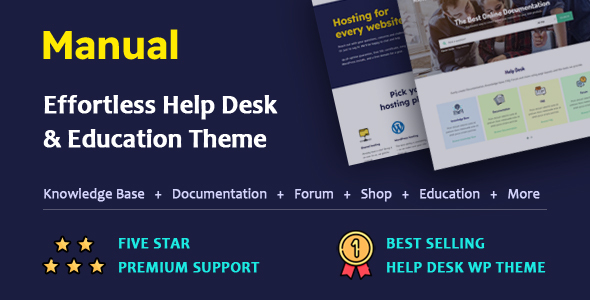
Manual - Documentation, Knowledge Base & Education WordPress Theme

Manual version 7.6 is live! – 26th Nov 2026 – view changelog
 |  |  |  | |
WordPress 6.4.X Ready.
Compatible With WooCommerce Version 8.4.X
Compatible With Elementor Page Builder Plugin
Automatically Update the Manual theme by 1-Click with Envato Market Plugin
Fully RTL supported
Fully WPML Compatible
Child theme included


Are you on the hunt for a WordPress theme that can beautifully showcase your documents, tutorials, or any other content? Look no more! Meet Manual, the game-changer in online content presentation. With Manual, you can effortlessly display your materials in an elegant and user-friendly way, making it easier for your audience to navigate and engage with your content. Say goodbye to complicated website setups and hello to a seamless experience for both you and your visitors. Let Manual revolutionize the way you showcase your content online, making your website stand out with its simplicity and effectiveness.
Why Choose Manual WordPress Theme?
- Robust Features: Manual is packed with powerful features designed to enhance your online documentation experience. From documentation, knowledge base, FAQ, portfolio, learning system, and forum to WooCommerce, Manual has everything you need to create a professional and feature-rich website
- Efficiency: Manual makes things easy. It helps you create professional-looking manuals, guides, and tutorials quickly. No more wasting time on formatting or manual updates – with Manual, everything is fast and simple.
- Branding: With Manual, you can make your documents look unique. You can add your own logos, colors, fonts, and styles to match your brand’s look and feel.
- Versatility: Manual is flexible and can be used for many things. Whether you’re making user manuals, guides, help systems, or training materials, Manual can handle it all. It’s adaptable to suit your needs perfectly.
- Responsive and Mobile-Ready: In today’s digital age, responsiveness is key. Manual is fully responsive and mobile-ready, ensuring that your content looks stunning and functions flawlessly across all devices and screen sizes.
- User-Friendly Interface: With its intuitive navigation and user-friendly interface, Manual makes browsing through your documentation a seamless experience for your audience. Engage your visitors and keep them coming back for more.
- Sleek Design: Impress your audience with a modern, clean, and visually appealing design. Manual ensures that your content stands out, captivating visitors from the moment they land on your site.
What Can You Do With Manual WordPress Theme?
- Create user-friendly manuals and guides for your products or services.
- Share tutorials, guides, FAQs, and knowledge bases.
- Showcase portfolios, case studies, or client testimonials.
- Start a blog and share valuable insights with your audience.
- Build landing pages to promote your products or services.
Feature-Rich and Versatile
- Fully responsive
- Compatible with WPML
- Documentation, Knowledgebase, FAQs, and Portfolio fully prepared.
- Full compatibility with WooCommerce (online shop)
- Full compatibility with LearnPress (education)
- Fully compatible with BBpress (forum)
- Fully compatible with Elementor
- Fully compatible with Contact Form 7
- Fully compatible with Wpbakery, including pro files ($64 value).
- Pro files for Ultimate Addons for WPBakery Page Builder included ($26 value)
- Includes translation-ready .po files
- Compatible with Child Theme, included in the package
- One-click demo import
- Excellent built-in SEO features
- Fully customizable (with styling options and more)
- Thoroughly documented
- Built on the Bootstrap framework
- Utilizes HTML5 & CSS3
- Outstanding support
- Advanced Theme Option Panel
Overall Manual Theme Features
- Build online documentation.
- Establish an online knowledge base.
- Develop an online FAQ section.
- Showcase an online portfolio.
- Set up an online shop.
- Implement an online education system.
- Establish an online forum.
- Plus, many more possibilities!
- LIVE SEARCH
- Utilize AJAX or standard search functionality.
- Automatically highlight search terms for improved visibility.
- Customize the design of the search box.
- Experience live search functionality.
- Easily show or hide private articles in live search results.
- Display trending searches below the search box.
- Utilize post type targeted search and target category search for knowledge base and documentation posts.
- Filter search to include only titles.
- Filter search to include only content.
- Filter search to include only excerpts.
- Search within selected taxonomies.
- Conduct searches based on authors’ posts.
- Exclude older search results when searching articles.
- Customize SQL relations (AND/OR) between search terms.
- Specify whether to match search queries exactly or partially.
- And many more features to explore!
- DOCUMENTATION
- Easily create and manage documentation.
- Choose to make single posts or all posts under the documentation category public, accessible only to logged-in users, or restricted to specific logged-in users with special permissions.
- Benefit from unlimited file attachment capability per post.
- Customize the page title bar for the documentation section.
- Modify the slug name for single documentation posts.
- Control whether attached files to documentation posts are public or accessible only to logged-in users.
- Adjust the slug name for documentation categories.
- Customize tag slug names.
- Activate or disable the custom field box when creating article posts.
- Activate or disable the Gutenberg editor.
- Customize the breadcrumb name for documentation.
- Tree Menu
- Control the visibility of private articles in the menu.
- Automatically expand the tree menu.
- Implement a menu scrollbar once the tree menu reaches a specific height.
- Adjust the display order of documentation records.
- Documentation Page
- Option for loading pages using AJAX or normal article load methods.
- Customize the page layout for your documentation page.
- Select the post title tag.
- Choose the location to display the tree menu sidebar on your documentation page.
- Option to include a Table of Contents (TOC) inside post.
- Enable or disable article voting.
- Control access to article voting.
- Turn comments on or off.
- Option to turn/off the contact us link.
- Choose to display related posts or not.
- Enable or disable next/previous links.
- Show or hide the notification bar.
- Customize the design options for the title.
- KNOWLEDGE BASE
- Easily create and manage knowledgebase.
- Choose to make single posts or all posts under the knowledgebase category public, accessible only to logged-in users, or restricted to specific logged-in users with special permissions.
- Benefit from unlimited file attachment capability per post.
- Customize the page title bar for the knowledgebase page/category section.
- Modify the slug name for single knowledgebase posts.
- Control whether attached files to knowledgebase posts are public or accessible only to logged-in users.
- Adjust the slug name for knowledgebase categories.
- Customize tag slug names.
- Activate or disable the custom field box when creating article posts.
- Activate or disable the Gutenberg editor.
- Customize the breadcrumb name for knowledgebase.
- Category Page
- Choose whether to display or hide the sidebar.
- Option to show or disable all child category records within the parent category.
- Customize the display order of knowledge base records.
- Customize the design options for the title.
- Single Page
- Select the post title tag.
- Choose whether to display or hide the sidebar.
- Option to include a Table of Contents (TOC) inside post.
- Turn comments on or off.
- Conditional display of comment box. (Show comment box only when user clicks on the thumbs down feedback button)
- Option to turn/off the contact us link.
- Enable or disable article voting.
- Control access to article voting.
- Choose to display related posts or not.
- Enable or disable next/previous links.
- Customize the design options for the title.
- PORTFOLIO PACK
- Easily create and manage portfolio.
- Modify the slug name for single portfolio posts.
- Adjust the slug name for portfolio categories.
- Activate or disable the custom field box when creating article posts.
- Activate or disable the Gutenberg editor.
- Control whether attached files to portfolio posts are public or accessible only to logged-in users.
- Enable or disable next/previous links.
- Customize the breadcrumb name for portfolio.
- FAQ
- Easily create and manage FAQ.
- Choose to make FAQ category public, accessible only to logged-in users, or restricted to specific logged-in users with special permissions.
- Modify the slug name for single FAQ posts.
- Customize the page title bar for the FAQ section.
- Adjust the slug name for FAQ categories.
- Activate or disable the custom field box when creating article posts.
- Enable/Diasble hash search for FAQs, displaying results on the same FAQ page.
- Activate or disable the Gutenberg editor.
- Customize the breadcrumb name for FAQ.
- FAQ Page
- Choose whether to display or hide the sidebar.
- Adjust the display order of FAQ records.
- Design FAQ records.
Get Started Today!
Ready to take your online documentation to the next level? Purchase Manual now and unlock endless possibilities for showcasing your content in style. Join thousands of satisfied customers who trust Manual to power their websites and enhance their online visibility..
Don’t miss out on this opportunity to stand out from the crowd and leave a lasting impression on your audience. Get Manual today and start building your dream website!
UPDATES
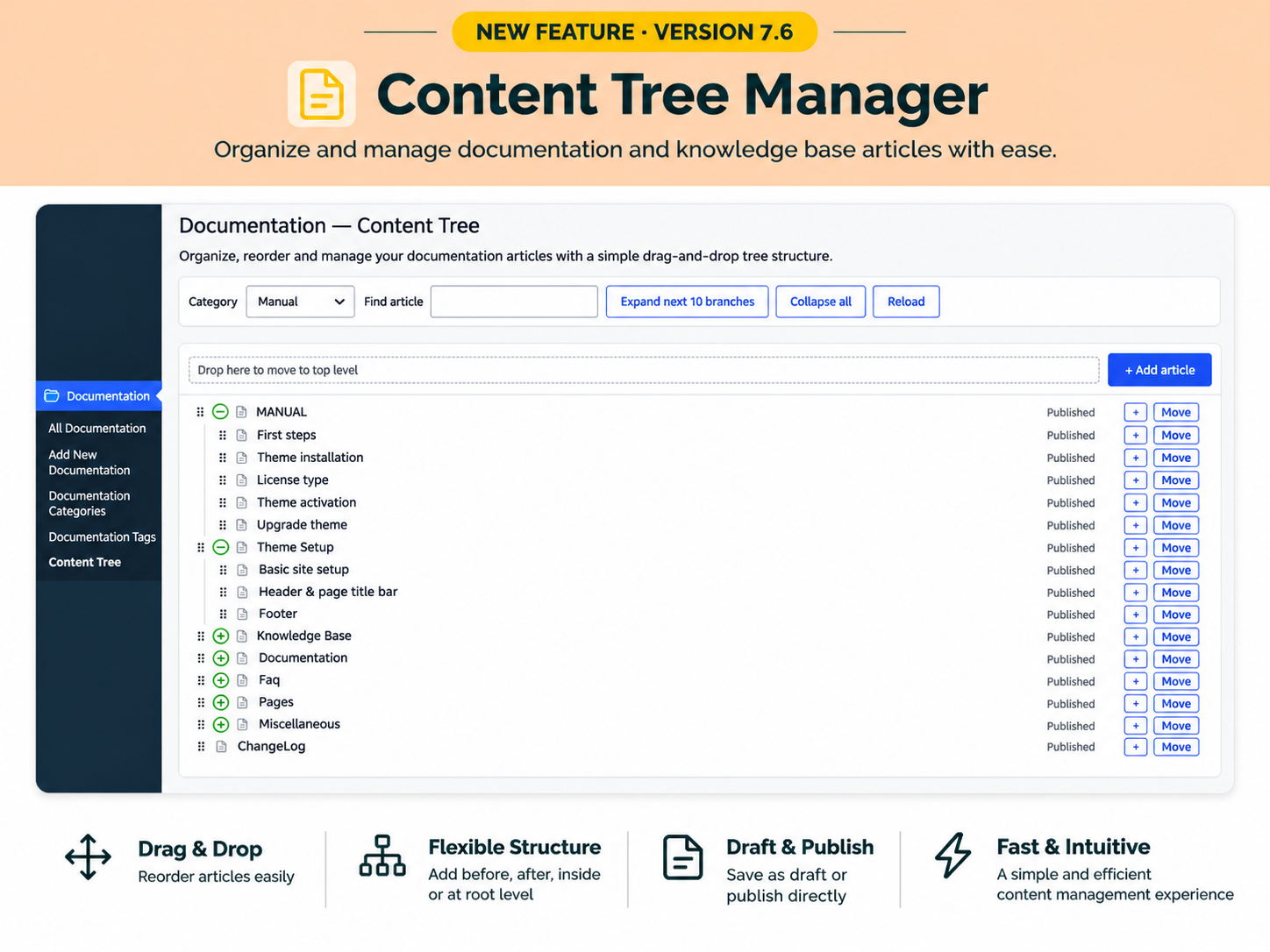
Version 7.6 — 26th/11/2026 New Features - Introduced a built-in Content Tree Manager for Documentation and Knowledge Base. - Added drag-and-drop article ordering and parent-child management. - Added article creation before, after, inside or at root level. - Added Draft and Publish options directly from the Content Tree. - Added category filtering, article searching and lazy loading. - Added WPBakery PHP compatibility warnings and version-specific notification dismissal. - Added native WordPress custom logo, header and background support. - Added native WordPress block style and documentation pattern support. Improvements - Updated WPBakery Page Builder to 9.2. - Updated Manual Framework to 5.0.20. - Improved WordPress compatibility. - Improved admin dashboard layout and responsive behavior. - Improved LearnPress styling, pagination and course navigation. - Improved database queries, asset loading and overall performance. - Improved plugin installation, activation and update processes. - Improved security, input validation and output escaping. - Improved translation handling and updated the language catalog. - Improved WordPress Coding Standards compliance. - Improved accessibility and keyboard navigation. - Optimized theme and plugin package sizes. Bug Fixes - Fixed WPBakery update and activation issues. - Fixed TGMPA bulk plugin installation issues. - Fixed PHP warnings, notices and deprecated function usage. - Fixed premature translation-loading warnings. - Fixed Mega Post Grid taxonomy errors. - Fixed Elementor and WPBakery documentation rendering issues. - Fixed WooCommerce checkout and widget output issues. - Fixed administrative page header and content positioning. - Fixed LearnPress pagination and course category styling. Removed - CMS Tree Page View plugin requirement. - Ultimate Addons plugin requirement. - WPCustom Category Image plugin registration. - Taxonomy Terms Order plugin registration. - Envato Market plugin registration. - Paid Membership Pro plugin registration. - LearnPress Paid Membership Pro Integration package. - Manual Job and Manual Sports demo imports. - Unnecessary remote plugin version checks. - Unused Font Awesome assets and legacy code. Updated Versions - Manual Theme: 7.6 - Manual Framework: 5.0.20 - WPBakery Page Builder: 9.2 - Available demo websites: 18
Version 7.5.4 - 24th/05/2024 [REMOVE 1]: Removed the need for 'Print-O-Matic' plugin; the theme now has its own print function for better performance. [IMPORTANT]: Please disable the 'Print-O-Matic' plugin after upgrading the theme to the latest version.
Version 7.5.3 - 12th/03/2024 [FEATURE 1]: Introducing the latest addition: "Conditional Access" to the tree menu. This empowers users to choose whether to display private article titles exclusively to logged-in users or keep them entirely hidden. To use it, just go to 'Theme Option > Documentation > Tree Menu' and make sure the 'Private Articles' setting is set to 'Invisible'. [FIX ISSUE 1]: The theme layout is breaking because of a code issue when logged-in users attempt to view records that are not accessible to them.
Version 7.5.2 - 7th/03/2024 [FEATURE 1]: Introducing the latest addition: the ‘Theme Default Login Form’ section within ‘Theme Options > Theme Default Login Form’ in theme settings. With this option, users can customize everything in the login box, such as text labels. Users can also set up their own links for resetting passwords, registering, and logging in. [FEATURE 2]: The portfolio section now includes a new attachment feature, where users can attach files to their portfolio articles. Additionally, they can choose to hide these attachments from people who aren’t logged in.
Version 7.5.1 - 6th/03/2024 [FEATURE 1]: The theme provides the option to hide or show the search bar that appears with the hamburger menu for special sections such as 404 pages, bbPress, documentation, FAQs, knowledge base, LearnPress, posts, search pages, pages, WeDocs, and WooCommerce, if activated globally throughout the entire site. You can hide the 'Search Box in Hamburger Menu' while configuring the 'Page Title Bar' in the 'Customize the Header Menu' section using the 'Theme options'. To access this feature for pages, navigate to 'Header Menu' and then turn on 'Customize the Header Menu'.
Version 7.5 - 5th/03/2024 [CHANGES 1]: The theme options have been completely redesigned, with changes to control locations, removal of most of the old controls, and the addition of new controls from the ‘Header Menu’, 'Page Title Bar' and 'Footer' sections. The 'Page Title Bar' settings for search, 404, bbpress, Documentation, FAQ, Knowledgebase, Learnpress, Post, Search, Wedocs, and Woocommerce have been relocated to their own sections. Specifically, you can now find the 'Page Title Bar' settings within the Documentation/Knowledegabse/Faq section, respectively. Each section of the 'Page Title Bar', 'Header Menu', and 'Footer' has been rewritten, removing old code and introducing new controls to offer users more options and flexibility. [CHANGES 2]: In the page section (Pages > Add New Page), all previous meta options have been removed and replaced with new meta controls for the 'Header Menu', 'Page Title Bar', and 'Footer'. [FEATURE 1]: In the documentation tree view, you now have the ability to decide whether to display or hide private articles (Theme Options > Documentation > Tree Menu). Additionally, for the private articles that are visible, you will see a lock icon displayed before the title. [FEATURE 2]: In the knowledgebase tree view shortcode (both WPBakery and Elementor), you'll notice a lock icon appearing before the title for private articles. WARNING: Upon upgrading the theme to version 7.5, the settings for the 'Header Menu', 'Page Title Bar' (both for the page and page title bar controlled via theme options), and 'Footer' will be reset to default. It's necessary to reconfigure the theme settings for 'Header Menu', 'Page Title Bar', and 'Footer' after upgrading to version 7.5.
Please feel free to check the change log at: https://smartwpthemes.com/documentation/changelog/ for previous updates.
$79 |
Download |
4.1 average based on 112 ratings.

| Last Update | 2026-11-26 |
| Created | 2015-11-05 |
| Sales | 4326 |
| Discussion | Comments |
| Columns | 4+ |
| Compatible Browsers | IE9 IE10 IE11 Firefox Safari Opera Chrome Edge |
| Software Version | WordPress 7.1.x WordPress 7.0.x WordPress 6.9.x |
| Compatible With | bbPress 2.6.x Visual Composer WooCommerce 8.x.x WooCommerce 7.x.x WooCommerce 6.x.x |
| Documentation | Well Documented |
| Framework | |
| Gutenberg Optimized | No |
| High Resolution | Yes |
| Layout | Responsive |
| ThemeForest Files Included | PHP Files CSS Files JS Files |
| Widget Ready | Yes |


