Dance Studio - Elementor Template Kit
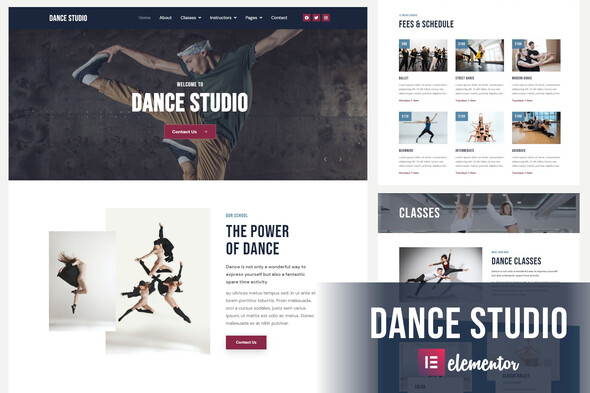

Dance Studio is an Elementor Template Kit for quickly and easily creating websites for your business using the Elementor Page Builder plugin for WordPress. it was designed to help you create your Dance related website easily. Dance Studio is 100% Responsive and includes 13 ready made templates that are very easy to edit! This kit has been optimized for use with the free Hello Elementor theme but may be used with most themes that support Elementor.
Template Features
- 100% Responsive
- True no-code customization with drag and drop visual builder
- Customize fonts and colors in one place or fine-tune on individual elements
- Modern, professional design
- Fast-loading
- Works with most Elementor themes.
Required Addons (installed with kit)
- Elementor
- Prime Slider
- Elementor – Header, Footer & Blocks
- MetForm
- Essential Addons for Elementor
- Premium Addons for Elementor
How to Install:
Steps to install a Envato Template Kit:
- Download the Template Kit zip file from Envato Market
- Download , upload and install the Template Kit Import plugin: https://wordpress.org/plugins/template-kit-import/
- Locate Tools -> Template Kit in your /wp-admin/
- Click Upload Template Kit ZIP File
How to Import Metforms
- Import the metform block templates
- Import the page template where the form appears and right-click to enable the Navigator
- Locate and select the Metform widget and click Edit Form. Choose New, then Edit Form. The builder will appear
- Click ‘Add Template’ grey folder icon.
- Click ‘My Templates’ tab.
- Choose your imported metform template, then click ‘Insert’ (click No for page settings).
- Once the template is loaded, make any desired customizations and click ‘Update & Close’ The form will appear in the template
- Click Update
Setup Global Header and Footer in Header Footer & Blocks plugin
- Import the header and footer template
- Go to Appearance > Header Footer and click Add New button
- Give it a title and select Header, Display on Entire Site and click Publish
- Click Edit with Elementor
- Click the gray folder icon to access My Templates tab and select the header template to import and Update.
- Repeat for Footer
Images
This Template Kit uses demo images from Envato Elements. You will need to license these images from Envato Elements to use them on your website, or you can substitute them with your own.- https://elements.envato.com/image-YTKA5W7
- https://elements.envato.com/image-PRLSYAA
- https://elements.envato.com/image-P6XX8NC
- https://elements.envato.com/image-ZPDBMW5
- https://elements.envato.com/image-PSN2QXR
- https://elements.envato.com/image-PASNMPH
- https://elements.envato.com/the-silhouette-of-one-hip-hop-male-break-dancer-da-PPD9GN8
- https://elements.envato.com/image-456FRPH
- https://elements.envato.com/image-LDEA2JX
- https://elements.envato.com/image-9CJSMPT
- https://elements.envato.com/image-8XQ7Q3Q
- https://elements.envato.com/image-FQNC4Y3
- https://elements.envato.com/image-VUAHZRR
- https://elements.envato.com/image-PL2AMG7
- https://elements.envato.com/image-W4S5GL3
- https://elements.envato.com/image-P7AVTN3
- https://elements.envato.com/image-KNACS6D
- https://elements.envato.com/image-TVQSRJP
- https://elements.envato.com/image-PCZDS5D
- https://elements.envato.com/image-PSPBKEA
- https://elements.envato.com/image-7CSQDBN
- https://elements.envato.com/image-428823C
- https://elements.envato.com/image-PYKHZPK
- https://elements.envato.com/image-5Z3D8HM
- https://elements.envato.com/image-P89H3ZU
- https://elements.envato.com/image-5PZN7CA
- https://elements.envato.com/image-NATZCQN
- https://elements.envato.com/image-5PD67BQ
- https://elements.envato.com/image-SGTB8VL
- https://elements.envato.com/image-PWG24S9
- https://elements.envato.com/image-CK3N5BN
- https://elements.envato.com/image-B8RCS5L
- https://elements.envato.com/image-PTXN3VH
- https://elements.envato.com/image-9QABMVP
- https://elements.envato.com/image-72U3XCM
- https://elements.envato.com/image-PA6XM6N
- https://elements.envato.com/image-RJYGB4X
- https://elements.envato.com/image-6TVSB67
- https://elements.envato.com/image-PLQE4TT
- https://elements.envato.com/image-PUQHWHD
- https://elements.envato.com/image-PYYCNXL
- https://elements.envato.com/image-PT4VNCD
- https://elements.envato.com/image-QBAYLKK
- https://elements.envato.com/image-P4B3V6T
- https://elements.envato.com/image-GE885AG
- https://elements.envato.com/image-AJHGSFC
- https://elements.envato.com/image-PJ7ZCDZ
- https://elements.envato.com/image-DVSQ9V3
- https://elements.envato.com/image-PT44BAT
- https://elements.envato.com/image-AB9T8V8
- https://elements.envato.com/image-PXLPTAC
- https://elements.envato.com/image-TNEK965
- https://elements.envato.com/image-N56C77U
- https://elements.envato.com/collage-of-contemp-dancer-in-different-positions-o-FDLH2KU
- https://elements.envato.com/image-JAU9H34
- https://elements.envato.com/image-PUEJQ23
- https://elements.envato.com/image-ATNSBR5
- https://elements.envato.com/image-PMTX67S
- https://elements.envato.com/image-P728HRA
- https://elements.envato.com/image-PSTXPYZ
- https://elements.envato.com/image-6D2Z3X7
- https://elements.envato.com/image-K4R7TVY
- https://elements.envato.com/image-PGZ9DBN
- https://elements.envato.com/image-PMVRAWB
- https://elements.envato.com/image-52JQYEH
- https://elements.envato.com/image-K5P8D9W
- https://elements.envato.com/image-YQBCBHQ
- https://elements.envato.com/image-V4C635L
- https://elements.envato.com/image-FEMBV7E
Updates:
17 May 2024 - updated and tested with new WP and Elementor versions 31 May 2023 - updated and tested with new WP and Elementor versions 18 July 2022 - Fixed accordion icon issue after WP update 02 March 2022 - updated and tested with new WP and Elementor versions
$18 |
Download |
0 average based on 0 ratings.

| Last Update | 2024-05-17 |
| Created | 2021-04-07 |
| Sales | 84 |
| Discussion | Comments |
| Requires Premium Plugins | |
| Software Version | Elementor 3.10.x Elementor 3.8.x Elementor 3.6.x |
| Template Kit Type | Envato Template Kit |
Search themes
Browse Categories


