Arclure - Interior Design & Architecture Elementor Template Kit
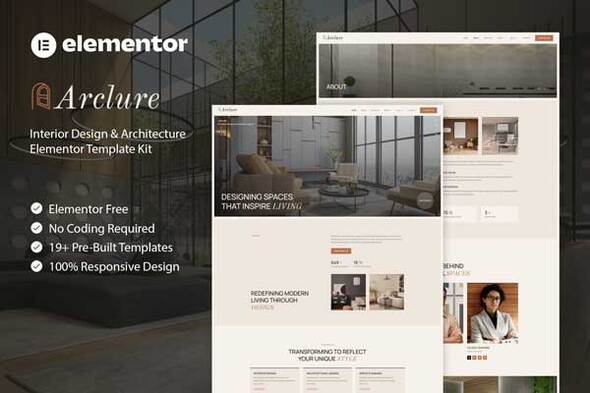

Arclure – Interior Design & Architecture Elementor Template Kit is a modern and elegant solution crafted specifically for interior designers, architecture studios, home decor brands, and creative design agencies. Designed with a refined aesthetic and thoughtful layout structure, Arclure combines minimal sophistication with strong visual storytelling to showcase projects, services, and brand identity in a compelling way. Every section is carefully structured to highlight portfolios, case studies, and client testimonials with clarity and style.
Built with Elementor, Arclure ensures seamless customization without requiring any coding knowledge. The template kit includes professionally designed pages and reusable components that maintain consistency across your entire website. Fully responsive and optimized for performance, Arclure delivers a smooth browsing experience on all devices while helping businesses establish a strong and credible online presence.
Important: This is an Elementor Template Kit. Do not use WordPress Tools > Import. Install the Template Kit Import plugin (Plugins > Add New > search “Template Kit Import” by Envato), then go to Tools > Template Kit to import.
Features:
- For Interior Design & Architecture
- Fully With Elementor Free Version (Elementor Pro is not required)
- Simple, Modern and Clean Design
- No Coding Knowledge Required
- 19+ Ready To Use Templates
- Easy & Fully Customizable
Templates Include:
- Global Kit Style
- Home
- About Us
- Services
- Projects
- Project Detail
- Process
- Our Team
- Gallery
- Testimonials
- Blog
- Single Blog
- FAQ
- Contact Us
- Metform Contact
- 404 Page
- Coming Soon
- Header
- Footer
Plugins installed with kit:
- Jeg Elementor Kit
- MetForm
How to Use Template Kits:
This is not a WordPress Theme. Template kits contain the design data for Elementor and are imported using the Template Kit Import plugin via Tools > Template Kit.
- Plugins > Add New → search “Template Kit Import” (by Envato) → Install & Activate
- Go to Tools > Template Kit
- Upload your Template Kit ZIP
- Click “Install Requirements”
- Import “Global Kit Styles” first, then the pages/parts you need
Help & Support
Need more help? Choose an option below:
For further support, go to Elementor > Get Help in WordPress menu.
How To Import Metform Custom Form
- Import metform template
- Import the template where the form appears, then edit in Elementor
- Click the Metform widget in the column where the form should be and click Edit Form
- Select New, leave blank selected then click Edit Form button
- Click ‘Add Template’ grey folder button
- Click ‘My Templates’ tab
- Choose your imported metform template, then click ‘Insert’
- Once the template is loaded, click ‘Update’
How to setup header in Jeg Elementor Kit plugin If you have Elementor Pro, headers and footers may be customized under Theme Builder.
- Go to Jeg Elementor Kit menu item > Header Template
- Click Add New Header
- Add condition > All Site and click Create
- Click the pencil icon to Edit and elementor will appear
- Click gray folder icon to access My Templates tab
- Insert the header template.
- Customize and Save.
Images This Template Kit uses demo images from Envato Elements. You will need to license these images from Envato Elements to use them on your website, or you can substitute them with your own.
$21 |
Download |
0 average based on 0 ratings.

| Last Update | 2026-02-20 |
| Created | 2026-02-20 |
| Sales | 2 |
| Discussion | Comments |
| Kit Certified | No |
| Requires Premium Plugins | |
| Software Version | Elementor 3.10.x |
| Template Kit Type | Envato Template Kit |


