Zoom Meeting Integration .Net core 7.0 + Full Source Code

Zoom Meeting Integration .Net core 7.0 + Full Source Code
Version v2.0
Introduction
Complete integration with zoom meeting application with saving log data and meetings in database, so you can easily add this amazing feature to your application.
This web based application is developed on .Net core 7.0 using ASP.Net Core, C#, Entity framework core, JavaScript, jQuery, JSON, Bootstrap, HTML, CSS and SQL Server.
Framework: .Net Core 7.0
Features :
- Creating Zoom Meeting
- Ending Zoom Meeting
- Deleting Zoom Meeting
- Save Log Data
- Save Meetings data
- Clean Code
- Clean Architecture
- Ready to add to any .net core application
- Sample Code that you can follow
Quick Start Guide
How to Generate Database Tables
- Open [Package manager console] and in the [Default project] list .. select [SampleApplication.Persistance] project
- Write the below commands
- add-migration sampleApp -context SampleAppDbContext
- update-database -context SampleAppDbContext
- Open [Package manager console] and in the [Default project] list .. select [Zoom.Persistance] project
- Write the below commands
- add-migration zoom -context ZoomDbContext
- update-database -context ZoomDbContext
- Congratulations , just run the project .
How to configure Zoom Api
Enter Zoom APi Developer URL https://marketplace.zoom.us/develop/create and in JWT Section click [Create] , complete the data and copy ApiKey and ApiSecret and past them in appsetting.json file in project [ZoomIntegration.Web] , also write your email in appsetting.json file
Json object will be like this :-
“ZoomConfig”: {
“HostEmail”: “write your email here”,
“ApiKey”: “write your api key here”,
“ApiSecret”: “write your api secret here”
}
How To Use
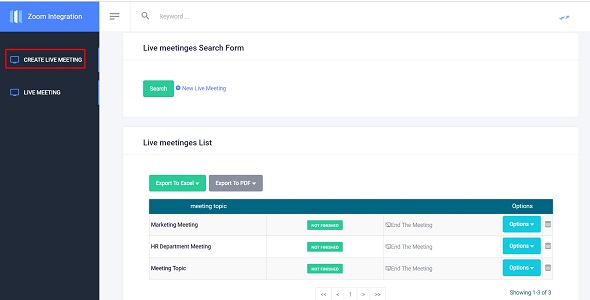
- Create Live Meeting
- Create Live Meeting – > New Live Meeting
- Join Live Meeting
- Live Meeting – > if there is live meeting ,you will see the join url in the page
0 average based on 0 ratings.


