Zestify - Multi-Tenant Restaurant SaaS with AI Chat
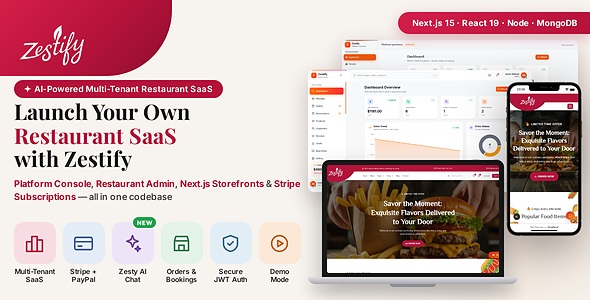

Zestify – Multi-Tenant Restaurant SaaS with AI Chat
Skip 6 months of development. Ship a production-ready Restaurant SaaS today.
Zestify is a complete, production-ready multi-tenant restaurant management SaaS — version 2.0.0 ships a four-application stack (API, admin, onboarding, client storefront) written in TypeScript with full HTML documentation. Built-in dual AI assistants: Zesty (customer chat) searches menus, books tables, and adds items to cart; Manager (admin chat) answers ops questions with real tool-calling (introduced in v1.1, included in v2.0.0).
Live demos:
- Platform operator: https://zestify-v2-admin.vercel.app/platform/login
- Tenant dashboard (demo store): https://zestify-v2-admin.vercel.app/login?store=zestify
- Client storefront: https://zestify-v2-client.vercel.app/zestify
- Onboarding app: https://zestify-onboarding.vercel.app/
- API (Render): https://zestify-v2-api.onrender.com/ · health: https://zestify-v2-api.onrender.com/api/health
- Example pages: https://zestify-v2-client.vercel.app/zestify/shop · https://zestify-v2-client.vercel.app/zestify/menu
Path-based multi-tenancy: each restaurant lives at /{store-slug}/... on your client domain.
Demo Credentials
Try the live demo instantly with these credentials:
- Demo Admin: use One Click Login on the admin login page (read-only)
- Storefront customer: demo@zestify.com / Demo123! (register or sign in before checkout — guest browsing only, no guest checkout)
Note: Demo admin accounts are read-only. All write operations are blocked in demo mode. Online orders require a logged-in customer account.
What’s new in v2.0.0 vs v1.x
v1.x was multi-tenant in the database and admin — you could create many restaurants from one super admin — but it was not a complete public SaaS product out of the box: each live storefront behaved like a single-restaurant site, and operators still had to wire tenant IDs, deploy per brand, or build signup/billing themselves. v2.0.0 closes those gaps so one platform owner can host many restaurants on one client URL, sell subscriptions, and deploy to production with a documented checklist.
What v1.x lacked as a true SaaS (and how v2.0.0 fixes it)
- One storefront = one restaurant. v1 client routes were
/shop,/menu, etc., and requiredNEXT_PUBLIC_TENANT_IDin env — a second restaurant meant another client deploy or manual env swap.
v2 fix: Shared client at/{store-slug}/...; tenant comes from the URL andX-Tenant-Slug, not a baked-in ID. - No self-serve signup or plan checkout. v1 had no onboarding app; new tenants were created only inside admin.
v2 fix: onboarding/ app with plans, Stripe subscription checkout, and platform tenant provisioning APIs. - Weak platform operator story. v1 super admin could manage tenants but lacked a full platform console, subscription plans, audit, and migration path for CodeCanyon upgrades.
v2 fix: Platform auth, plans, billing webhooks, dashboard, and api/MIGRATION.md for grandfathering v1 buyers. - Production storefront trust was fragile. v1 SSR often called the API with tenant ID only; cross-origin cookies, proxy misconfiguration, and missing
CLIENT_APP_URLbroke slug/host validation on live hosts.
v2 fix: Same-origin/apiproxy, explicitAPI_PROXY_TARGET,NEXT_PUBLIC_SITE_URL,TRUST_PROXY_HOPS, and publictenant-by-slugresolution tied to the storefront hostname. - Storefront did not scale per visitor. Home and catalog pages fired many uncached API requests; one IP hit a single strict rate limit for admin writes and public reads alike.
v2 fix:storefront-homebootstrap, in-memory public read cache +Cache-Control, split rate limits (RATE_LIMIT_MAXvsRATE_LIMIT_PUBLIC_MAX), optional Next.js fetch and Router cache env vars (see DEPLOY.md). - Checkout and session edge cases on live. v1 could leave carts repopulated after payment and relied on full page reloads from payment return URLs.
v2 fix: Cart clear + server sync after success, payment-return URL cleanup, and client navigation once Stripe/PayPal query params are removed. - Branding and CMS. v1 layout was fixed; customization was limited.
v2 fix: Per-tenant logo, colors, favicon, and Page Builder sections from admin — one consistent restaurant storefront layout. - Bookmarked v1 URLs. Old links without a slug prefix no longer work on the v2 client (slug-only SaaS).
v2 note: Point old bookmarks at/{slug}/shopvia your CDN, reverse proxy, or marketing redirects — the client app does not ship a built-in/shop→/{slug}/shopmiddleware redirect.
Core restaurant features from v1.x — orders, reservations, Stripe/PayPal diner checkout, blog, gallery, coupons, OTP auth, and (from v1.1) Zesty + Manager AI — are retained in v2.0.0. The upgrade is platform and storefront SaaS readiness, not a rewrite of day-to-day restaurant tools.
Side-by-side summary
| Area | v1.x (previous package) | v2.0.0 (this release) |
|---|---|---|
| Applications | 3 apps: API, admin, client | 4 apps: API, admin, onboarding (signup / plans), client |
| Storefront URLs | Flat paths (/shop, /menu) tied to one restaurant via NEXT_PUBLIC_TENANT_ID | Path-based SaaS: /{store-slug}/shop, /{store-slug}/menu — unlimited restaurants on one client deploy |
| Tenant resolution | x-tenant-id header from env | X-Tenant-Slug from URL + trusted storefront host (CLIENT_APP_URL) |
| Platform / billing | Tenant admin + super admin basics | Platform console, plans, Stripe subscription onboarding, migration tools (api/MIGRATION.md) |
| Production deploy | Per-app docs only | DEPLOY.md checklist (Vercel + Render, webhooks, smoke tests) |
| Storefront performance | Many SSR API calls per page | storefront-home bootstrap, public read cache, split rate limits, Next.js fetch / Router cache options |
| Storefront look | Single layout | Same layout for all tenants; per-tenant branding and Page Builder content |
| AI chat | Added in v1.1 (Zesty + Manager) | Included unchanged; slug-aware tenant context in v2 |
| Legacy v1 URLs | Flat /shop, /menu, … | Slug-only paths only; configure external redirects if you need old URLs |
Existing v1.x buyers: follow api/MIGRATION.md to backfill tenant slugs, platform operator setup, and grandfather plans before switching the client app to slug URLs.
What Is Included
The download contains four deployable applications (plus optional marketing landing page source), fully wired documentation, and a Postman collection.
- Zestify API (api/) – Node.js and Express.js REST API. Dual AI engine (Zesty + Manager personas), authentication, multi-tenancy, orders, reservations, payments, OTP email flows, and all business logic. Everything else depends on this running first.
- Admin Dashboard (admin-dashboard/) – React and Vite management interface for restaurant owners and staff. Includes Manager AI assistant at /assistant, tenant management, menu and product management, orders, reservations, blog, gallery, coupons, customer management, and settings.
- Client App (client-app/) – Next.js multi-tenant storefront. Each restaurant at
/{store-slug}/.... Zesty AI chat, shop, checkout (Stripe / PayPal), reservations, blog, customer dashboard. Same-origin/apiproxy for production. - Onboarding App (onboarding/) – Next.js marketing and signup flow: plans, Stripe subscription checkout, tenant provisioning hooks into the platform API. Dev port 3001 (client uses 3000).
- Landing page (landing-page/) – Optional marketing site source (not required to run the SaaS).
A Postman collection is included in the root of the download to test every API endpoint immediately after setup.
Core Architecture – True Multi-Tenancy
The central feature of Zestify is its true multi-tenant architecture. One installation of the platform can serve unlimited restaurants simultaneously. Each tenant gets isolated data, admin access, and a public storefront path (/{slug}) on a shared client app, managed from one codebase and platform operator console.
- Slug storefronts – One client deployment serves every restaurant at
https://your-domain.com/{slug}/...with isolated data and branding per slug. - Data Isolation – Each restaurant tenant’s data is fully separated. No cross-contamination between tenants at any level.
- Role-Based Access Control – Super admin, tenant admin, and customer roles each with appropriate permission sets.
- Unlimited Tenants – Add as many restaurants as needed without performance loss or code changes.
- Centralised Control – Manage all restaurants from one super admin account with full visibility across tenants.
- Production-Ready Architecture – Architecture decisions made for real-world scale from day one.
How the Applications Connect
The API is the single source of truth. Admin, onboarding, and client apps talk to the API over REST/JSON only — never to each other directly. Default local ports: API 5000, Admin 5173, Client 3000, Onboarding 3001.
Start the API first, then admin and/or onboarding, then the client app. Open the storefront under /{store-slug}/... (e.g. http://localhost:3000/your-slug/menu) — tenant context comes from the URL, not env. See client-app/.env.example and DEPLOY.md.
Admin Dashboard Features
- Dashboard overview with revenue, order counts, customer totals, and sales trend charts built with Recharts
- Platform overview for super admins — aggregate stats across all tenants with tenant switcher
- Tenant management – create and manage multiple restaurant tenants from a single super admin account
- Orders management – view, filter by status and payment status, update order and payment status
- Reservations management – view bookings, filter by date, source tracking, confirm or cancel
- Menu and product management – categories, stock, nutrition, allergens, images, prices, tags, and featured toggle
- Cloudinary image uploads – reusable upload input across products, gallery, blogs, chefs, partners, services, and page builders; upload a file or paste an image URL
- Customer management – accounts, order history, addresses, loyalty points, and PDF export
- Coupons and discounts – percentage or fixed-amount codes with usage limits and expiry dates
- Blog management – posts with rich content, slugs, categories, images, and comment moderation
- Gallery management – upload, categorise, and preview restaurant photos
- Chef profiles – team pages with photos, bios, roles, and social links
- Page Builder – Landing, Menu, and Layout builders without touching code
- Partners and services management
- Testimonials and reviews
- Notification centre for orders, reservations, messages, low stock, and system events
- Newsletter subscriber list
- Contact message inbox with reply, read, and importance flags
- Restaurant settings including business hours, tax, delivery fee, loyalty program, branding, and social links
- Admin profile and password management
- One-time super-admin setup UI and OTP-based login with optional bypass for development
- HttpOnly cookie sessions with CSRF protection
- Manager AI Assistant – Full chat UI at /assistant with session history. Read-only ops tools: order stats, revenue, inventory alerts, pending reservations, top sellers
- AI Settings – Choose provider (Gemini / Groq / Claude) in Settings; API keys configured server-side in api/.env
Client App Pages and Features
- CMS-driven homepage with configurable section order from the Admin Page Builder — storefront home loads via a single public bootstrap API call (
GET /api/public/storefront-home) with server-side caching - Menu page with category browsing from CMS / API
- Shop with product grid, filters, search, sort, nutrition, reviews, and related products
- Cart and wishlist — guests can browse and keep a local cart; logged-in customers sync cart and wishlist to the server. Checkout requires a registered customer account (sign in or register before placing an order).
- Checkout with Stripe, PayPal, cash on delivery, coupon codes, and loyalty point redemption (logged-in customers only); order success page clears cart and supports client-side navigation back to the shop after payment confirmation
- Table reservation form with available-slot checking
- Zesty AI Chat – Floating chat bubble (bottom-right) on all pages plus dedicated /chat page with session history
- Interactive menu cards in chat — Add to Cart and Add to Wishlist buttons wired to the same cart state as the shop
- AI-powered reservation booking via chat (checkAvailability → bookReservation in one conversation)
- Customer auth with HttpOnly cookies, CSRF, and optional OTP
- Forgot password flow with two-step OTP verification
- Customer dashboard with overview, orders, favorites, addresses, and settings
- Blog listing and detail pages with threaded comments, replies, and likes
- Gallery page with image lightbox
- Chef team page and individual chef profile pages
- Services and partners pages
- Contact page with form submission
- Fully responsive across desktop, tablet, and mobile
- SEO-friendly with Next.js App Router, metadata, and Open Graph tags
- Per-tenant branding — logo, colors, favicon, and Page Builder sections from admin (single storefront layout)
Technology Stack
API and Backend: Node.js, Express.js 5, MongoDB, Mongoose, TypeScript, JWT with HttpOnly cookie sessions and CSRF, Stripe, PayPal, Resend for transactional email and OTP, Cloudinary signed uploads, Winston for logging, Jest and Supertest for testing, Docker support with included Dockerfile and docker-compose, AssistantEngine with Gemini / Groq / Anthropic providers and iterative tool-calling
Admin Dashboard: React 19, TypeScript, Vite 7, Tailwind CSS 4, Recharts for analytics charts, React Router DOM 7, jsPDF and AutoTable for PDF exports, React Toastify for notifications, Lucide React for icons
Onboarding App: Next.js 15, plan selection, Stripe subscription checkout, customer account creation, same-origin API proxy pattern as the client.
Client App: Next.js 15 with App Router, React 19, TypeScript, Tailwind CSS 4, Swiper for carousels, React Toastify, SSR and SEO optimised
Security: Helmet, CORS with credentials support, CSRF protection, HttpOnly cookie sessions for admin and customer apps, HPP protection, split express-rate-limit buckets in production (generous cap for cached storefront catalog GETs; stricter cap for auth, admin writes, checkout, and customer profile APIs), bcrypt password hashing, input validation with Validator, signed Cloudinary uploads (API secret server-side only), environment variable management with dotenv
API Endpoints Included
The API covers authentication (including one-time super-admin setup and demo account management), customer authentication, signed image uploads via Cloudinary, products and menu (including reviews and nutrition), blog posts and comments, chef profiles, orders, reservations, coupons, loyalty points, Stripe payments, PayPal payments, gallery, testimonials, partners, settings, services, CMS pages (home and menu), dashboard analytics, platform analytics, notifications, tenant management, messages, newsletter subscriptions, public storefront bootstrap (/api/public/storefront-home, /api/public/tenant-by-slug), AI chat (/api/chat/zesty/* for customers, /api/admin/chat/manager/* for admins), and a health check endpoint. Full endpoint list is documented in the included API documentation and Postman collection.
Testing
The API ships with a Jest-based test suite covering health checks, authentication flows, tenant isolation, and an end-to-end product workflow. Tests run against an in-memory MongoDB instance using mongodb-memory-server so no live database is required to run them. Watch mode and coverage reporting are supported via npm scripts.
Deployment Options
API: Docker and Docker Compose files are included. Supports deployment on Render free tier, Railway, DigitalOcean, AWS EC2, Hetzner, Linode, or any Linux VPS. Includes a built-in self-ping keep-alive for Render free tier. Nginx configuration example is included in the documentation.
Admin Dashboard: Static SPA built with Vite. Deploys to Vercel, Netlify, Cloudflare Pages, or any static host. SPA routing configuration is pre-configured for Netlify via a _redirects file.
Onboarding App: Next.js on Vercel (or similar). Set API_PROXY_URL to the API host without a /api suffix.
Client App: Next.js application requiring a Node.js runtime. Recommended deployment target is Vercel for zero-configuration Next.js hosting. Netlify is also supported. Use same-origin /api proxy (API_PROXY_TARGET = API host only, no /api suffix) plus NEXT_PUBLIC_SITE_URL for production SSR.
Production performance and rate limits
The included DEPLOY.md is the canonical production checklist (API on Render/Railway, admin and client on Vercel, Stripe webhooks, smoke tests). Key API environment variables for multi-tenant storefronts:
-
RATE_LIMIT_MAX(default 100 per 10 minutes per IP) — admin CRUD, login, checkout,/customers/me, newsletter subscribe, and other non-catalog traffic. Raise temporarily (e.g. 300–500) while testing admin and storefront on live from the same browser. -
RATE_LIMIT_PUBLIC_MAX(default 2000) — cached storefront reads: products, pages, settings,storefront-home,tenant-by-slug, etc. -
PUBLIC_READ_CACHE_*— in-memory API cache andCache-Controlfor public catalog responses (per API instance). -
CLIENT_APP_URL— exact storefront HTTPS origin (no path); required so SSR and tenant-by-slug trust the storefront host. -
TRUST_PROXY_HOPS=1— behind Render/Railway/Vercel proxy.
Optional client env: STOREFRONT_TENANT_REVALIDATE_SEC, STOREFRONT_HOME_REVALIDATE_SEC, STOREFRONT_ROUTER_DYNAMIC_STALE_SEC (Next.js fetch and Router Cache for repeat visits within the same store).
If you see “Too many requests from this IP” on the storefront while editing content in the admin, the strict limiter was exhausted — wait for the window to reset or increase RATE_LIMIT_MAX on the API. Catalog browsing alone uses the separate public limit.
Requirements
- Node.js v18 or higher
- npm v9 or higher
- Git (any recent version)
- MongoDB Atlas account – free M0 tier is sufficient for development and testing; a live restaurant with real order and customer volume will need a paid M10+ cluster once free-tier storage and connection limits are exceeded (see included documentation for details)
- Resend account for OTP email – free tier allows up to 100 emails per day; higher-volume restaurants will need a paid Resend plan once that limit is exceeded. Required only when OTP authentication is enabled
- Stripe developer account – required only when enabling card payment processing. Stripe charges a per-transaction processing fee on successful payments, billed directly to the account owner
- PayPal developer account – required only when enabling PayPal checkout. PayPal charges a similar per-transaction processing fee, billed directly to the account owner
- Cloudinary account – optional, needed for in-dashboard image file uploads (pasting an image URL still works without it)
- Docker Desktop – optional, only needed for containerised local development or Docker-based deployment
- AI provider API key – at least one of Google Gemini, Groq, or Anthropic Claude (Groq offers a generous free tier for development). Keys are set in api/.env only — never exposed to the frontend
Documentation
All applications ship with detailed HTML documentation. Each doc covers installation, environment variables, features, deployment, and troubleshooting.
- README.html – Start here. Overview, setup order, architecture, links to app docs.
- DEPLOY.md – Production checklist (v2): API, Vercel frontends, rate limits, Stripe webhooks, smoke tests.
- api/MIGRATION.md – Upgrade path from v1.x single-tenant / tenant-ID storefront to slug-based SaaS.
- api-doc/index.html – API endpoints, env vars, Docker, multi-tenancy, platform billing, FAQ.
- admin-dashboard-doc/index.html – Admin features, setup, deployment, troubleshooting.
- client-app-doc/index.html – Storefront pages, slug routing, auth, cart, payments, deployment, FAQ.
- onboarding-doc/index.html – Signup app, plans, Stripe subscription flow, deployment.
- Zestify.postman_collection.json – Postman collection for testing API endpoints.
Best For
- Developers needing a scalable, well-structured multi-tenant SaaS starter with Node.js, React, and Next.js
- SaaS founders building a restaurant platform product to sell as a service
- Agencies developing restaurant management systems for clients
- Multi-branch food businesses that need centralised management with per-branch data isolation
- Restaurant and cafe owners needing a complete management and ordering platform
Third-Party Libraries and Services
- Node.js and npm – JavaScript runtime and package manager
- Express.js – Web framework for the REST API
- MongoDB Atlas – Managed cloud database
- Mongoose – MongoDB object modelling for Node.js
- React and React DOM – Admin dashboard UI library
- Next.js – Client app framework with App Router and SSR
- Vite – Admin dashboard build tool
- Tailwind CSS – Utility-first styling system used across both frontends
- Recharts – Charts and analytics visualisations in the admin dashboard
- Stripe – Card payment processing
- PayPal – Alternative payment gateway
- Resend – Transactional email and OTP delivery
- Cloudinary – Signed server-side image uploads
- Google Gemini – Primary AI provider for Zesty and Manager chat
- Groq – Alternative AI provider with generous free tier
- Anthropic Claude – Alternative AI provider
- jsPDF and AutoTable – PDF export in the admin dashboard
- Swiper – Carousel and slider component in the client app
- Winston – Server-side logging
- Helmet, HPP, express-rate-limit – Security middleware
- bcryptjs – Password hashing
- jsonwebtoken – JWT authentication tokens
- Jest and Supertest – API testing suite
- mongodb-memory-server – In-memory MongoDB for isolated test runs
- Lucide React – Icon library used in the admin dashboard
- React Toastify – Toast notification system
Changelog
- v2.0.0 – Major SaaS release (this package). Fourth app: onboarding with plans and Stripe subscription signup. Client storefront uses
/{store-slug}/...instead of v1NEXT_PUBLIC_TENANT_ID+ flat URLs. Platform console, migration guide, DEPLOY.md, publictenant-by-slugandstorefront-homebootstrap, split rate limits and public read cache, production SSR proxy and cookie/CSRF fixes, checkout cart clear and post-payment navigation improvements. See comparison table above. - v1.1.0 – Dual AI assistants (Zesty + Manager), multi-provider AI (Gemini, Groq, Claude), tool-calling loop, security and landing updates. Still 3 apps; client used tenant ID env (v1 architecture).
- v1.0.0 – Initial CodeCanyon release: API, admin, and client with multi-tenant admin, orders, reservations, Stripe/PayPal, OTP, blog, gallery, coupons, and HTML docs. No AI chat.
Support
For questions, support requests, or licensing enquiries, please use the CodeCanyon comments section or contact the author directly via the support email listed on the CodeCanyon profile page.


