ZappyInvoice | Offline Invoice Management System for Windows
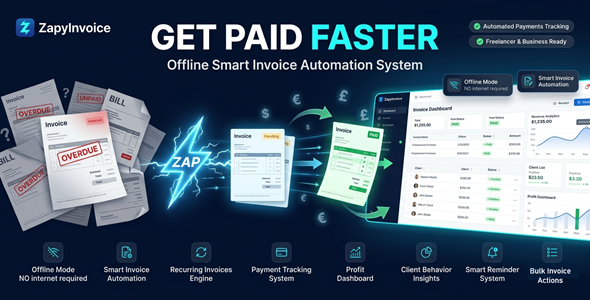

Stop Losing Money to Missed Invoices & Late Payments
Most invoicing tools lock your data in the cloud — and charge you monthly just to access it.
ZappyInvoice gives you a fast, private, fully offline billing system on your Windows desktop.
No subscriptions. No internet required. Your data stays yours — forever.



Perfect For
✔ Freelancers who want to get paid faster
✔ Agencies managing multiple clients
✔ Consultants billing on retainer
✔ Small businesses replacing expensive SaaS tools
✔ Anyone who values privacy and offline-first workflows
Features
 | Smart Invoice Management Create, edit, duplicate, and manage invoices in seconds. Track every status: Draft, Sent, Paid, Partially Paid, and Overdue. |
| Professional PDF Export Generate polished, branded invoice PDFs instantly. Add your logo, payment terms, and custom notes — ready to send. |
| Recurring Invoice Automation Set daily, weekly, monthly, or yearly schedules. Invoices generate automatically in the background — hands-free. |
| Client Management System Store full client profiles, payment history, and behavior data. Instantly spot your high-value clients and late payers. |
| Quote & Estimate System Create professional quotes and convert them to invoices in one click. Track statuses: Draft, Sent, Accepted, Rejected, or Converted. |
| Smart Payment Reminders Automated alerts before, on, and after due dates. Fewer late payments. Less awkward follow-ups. |
| Dashboard & Analytics See revenue, overdue totals, and top clients at a glance. Monthly insights to grow smarter, not just harder. |
| Bulk Operations Bulk export PDFs, update statuses, duplicate, or tag invoices. Handle dozens of tasks in one action. |
| 100% Offline & Private All data stored locally in a SQLite database. No cloud. No leaks. No monthly fees. |
| Dark & Light Themes + Branding Customize the interface to match your style. Add your logo, adjust invoice numbering, and backup your data anytime. |
Why You Need This
❌ Tired of paying monthly SaaS fees just to send an invoice?
❌ Worried about client data stored on someone else’s servers?
❌ Losing track of who owes you money and when it’s due?
❌ Wasting hours chasing late payments manually?
ZappyInvoice solves all of this — in one lightweight desktop app.
Install it once. Use it forever. No internet, no subscription, no stress.
You get complete control over your billing, your clients, and your cash flow.
Your data stays on your machine. Period.
How You Can Profit
✔ Bill clients instantly and look 100% professional from day one
✔ Automate recurring invoices so you get paid even while you sleep
✔ Reduce overdue invoices with smart automated reminders
✔ Convert more quotes to paid projects with a seamless estimate flow
✔ Analyze your top clients and most profitable services
✔ Save $200–$500/year by ditching cloud invoicing subscriptions
This is not just a tool — it’s your entire billing department in one app.
⚡ Fast Results
Install in under 2 minutes.
Create your first invoice in under 60 seconds.
Set up recurring billing once — and never think about it again.
Export a professional PDF instantly. Send. Get paid.
From setup to first invoice: under 5 minutes.
Simple 3-Step Setup
 | Step 1 – Download & Install Run the installer on your Windows PC — no internet or account needed. |
 | Step 2 – Add Your Business & Clients Enter your company details, logo, and add your first client in seconds. |
 | Step 3 – Create & Send Invoices Build your invoice, export to PDF, and start getting paid faster. |
Requirements before installing:
✔ Windows 10 or Windows 11 (64-bit)
✔ Minimum 4 GB RAM (8 GB recommended)
✔ At least 200 MB free disk space
- Version 1.0.0 – Initial release with full features: Invoice Management, PDF Export, Recurring Billing, Client CRM, Quote System, Smart Reminders, Dashboard Analytics, Bulk Operations, and Offline SQLite storage.
 | Does ZappyInvoice require an internet connection? No. It is 100% offline. All data is stored locally on your PC. No cloud account, no login, no internet needed — ever. |
| Is there a monthly subscription fee? No. You pay once and use it forever. No recurring charges, no hidden fees. |
| Which Windows versions are supported? ZappyInvoice runs on Windows 10 and Windows 11. |
| Can I add my company logo and branding? Yes. You can upload your logo, customize invoice numbering, and add payment terms and notes to every PDF. |
| Does it support recurring invoices? Yes. Set daily, weekly, monthly, or yearly schedules. Invoices are generated automatically in the background. |
| Can I back up and restore my data? Yes. ZappyInvoice includes a built-in backup and restore system. Your data is always safe and fully portable. |
0 average based on 0 ratings.

| Last Update | 2026-05-12 |
| Created | 2026-05-12 |
| Sales | 0 |
| Discussion | Comments |
| Application Runtime | Native |
| High Resolution | |
| Compatible OS Versions | Windows 11 Windows 10 |
| Video Preview Resolution |


