WP Glossary - Encyclopedia / Lexicon / Knowledge Base / Wiki / Dictionary

DESCRIPTION
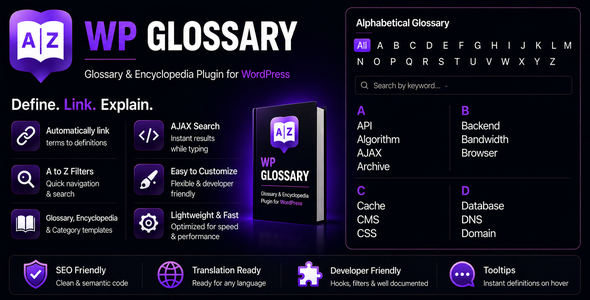
The “WP Glossary” plugin helps you build a fully featured glossary of terms for your website – whether it’s an Encyclopedia, Lexicon, Knowledge Base, Wiki, or Dictionary. Built on a custom post type, it gives you a complete WordPress editor for every term. Already using an existing post type? No problem – WP Glossary lets you use any existing post type instead of the plugin’s default one.
Terms are automatically linked wherever they appear across your content, with optional tooltips that show the definition on hover – so your readers never have to leave the page to understand a term.
HIGHLIGHTS
- Unlimited glossary terms, categories and tags
- Automatic term linking across your entire site
- Hover tooltips with instant definitions
- Filterable A–Z index with instant search
- Fully customizable colors and font sizes – no CSS knowledge required
- Mobile friendly (responsive) and touch device ready
- Supports custom filter letters and alphabets, making it easy to build glossaries in any language (e.g. Hebrew, Greek, Cyrillic)
- Translation ready – every string in the plugin can be translated
- WPML and Polylang compatible
- BuddyPress compatible
- Accessible tooltips with keyboard and screen reader support
- Highly compatible with WordPress themes and plugins
- Boosts Search Engine Optimization by automatically linking each highlighted term back to its dedicated definition page
FEATURE: GLOSSARY INDEX PAGE
This module allows you to create and display a beautifully animated glossary of terms on any page or post using a simple shortcode.
- Add unlimited glossary terms with an easy-to-use interface
- Filter terms by alphabet or category with smooth animation effects
- Instant search as you type – with options to set search position and customize the search label
- Supports custom and existing post types
- Allows you to use any existing post type instead of the plugin’s default one
- Allows you to customize the glossary term slug/SEO keyword
- Allows you to choose the layout for the glossary terms listing page – from one to five columns
- Allows you to show or hide empty alphabets and categories from the filter list
- Allows you to enable or disable animation on the Glossary Index Page
- Allows you to customize the label for the “All” filter button
- Allows you to open glossary term links in a new tab
- Allows you to disable links on glossary terms entirely – terms remain highlighted but are not clickable
- Allows you to show a “Back to Glossary Index Page” link on glossary term detail pages with a customizable label
- Allows you to disable the glossary archive to share a URL slug between the Glossary Index Page and the Glossary Slug
- Allows you to exclude a specific glossary term from appearing on the Glossary Index Page
FEATURE: GLOSSARY LINKIFY
This module automatically hyperlinks glossary terms wherever they appear across your pages and posts, linking each occurrence back to its dedicated definition page. This helps users quickly navigate to term definitions and enhances Search Engine Optimization through improved internal linking.
- Allows you to enable or disable linkify globally
- Allows you to choose specific post types to enable linkify for
- Allows you to enable or disable linkify for specific sections – post content, excerpts, category/term descriptions, text widgets, and comments
- Allows you to disable linkify on the home page
- Allows you to open linkified term links in a new tab
- Allows you to disable links on linkified terms – terms remain highlighted but are not clickable
- Allows you to add synonyms/tags for glossary terms so those are linkified too
- Allows you to limit the maximum number of times each term gets linked
- Allows you to apply the linkify limit per term across the full page or per section only (e.g. post content, comments, widgets)
- Allows you to enable or disable case-sensitive matching for glossary terms
- Allows you to exclude specific HTML tags from being linkified
- Allows you to disable linkify on a specific page or post without affecting the rest of your site
- Allows you to exclude a specific glossary term from being linkified
FEATURE: GLOSSARY TOOLTIP
This module shows a tooltip window when a user hovers over a linkified glossary term, giving them a quick overview of the term without having to leave the current page.
- Allows you to enable or disable tooltips globally
- Allows you to disable tooltip on the Glossary Index Page only, while keeping it active everywhere else
- Allows you to disable tooltip on a specific page or post without affecting the rest of your site
- Provides multiple tooltip themes to choose from
- Allows you to show or hide the term title inside the tooltip, with an option to format the title style
- Allows you to show a short description (excerpt) or full description in the tooltip
- Allows you to execute shortcodes within tooltip content
- Allows you to limit the maximum number of words shown in the tooltip
- Allows you to show a “Read More” link inside the tooltip, with a customizable label
- Provides multiple animation types to choose from
- Provides multiple tooltip positions to choose from
- Allows you to show or hide the tooltip arrow
- Allows you to set the minimum and maximum width of the tooltip window
- Allows you to set the animation speed (in milliseconds)
- Allows you to set a delay before the tooltip appears (in milliseconds)
- Allows you to enable or disable tooltips on touch devices
- Accessible by keyboard and screen readers
FEATURE: RELATED POSTS WIDGET
This module adds a widget to glossary term detail pages that lists every page and post on your website where the term is mentioned. It is an excellent internal linking tool and helps visitors discover related content in context.
- Automatically finds all content that mentions the current glossary term
- Allows you to set a custom widget title
- Allows you to choose how many related posts to display
- Allows you to choose which post types to search
- Results are cached for fast page loading
FEATURE: GLOSSARY CUSTOM STYLES
This module allows you to easily customize the appearance of your glossary without requiring any CSS knowledge. Use the built-in color pickers and font size controls to match the glossary with your website’s design.
- Allows you to choose font colors for filter buttons, headings, and terms
- Allows you to choose hover and active font colors for filter buttons and terms
- Allows you to choose background and font colors for term headings
- Allows you to choose colors for tooltip background, border, content, headings, and links
- Allows you to set custom font sizes for filter buttons, headings, and terms
TRANSLATION & DEVELOPERS
WP Glossary is built to work in any language and to stay out of your way when you need to customize it.
- Every string in the plugin is translation ready
- Compatible with WPML and Polylang – each language keeps its own set of glossary terms
- Custom filter letters and alphabets for any language, across multiple rows
- Over 20 WordPress filters for customizing markup and queries without editing plugin files
- Clean, semantic and well documented code
- Full documentation included, plus a built-in User Guide inside your dashboard
GLOSSARY SHORTCODE
Basic shortcode: [wpg_list]
Use this shortcode anywhere on a page or post to display your glossary. There are several optional attributes available with this shortcode listed below. Not all attributes are required – add only what you need. If an attribute is not provided, the shortcode falls back to your Plugin Settings.
Full shortcode: [wpg_list title=”” layout=”one_column/two_column/three_column/four_column/five_column” alphabet_set=”A,B,C,D,E,...” hide_empty=”yes/no” hide_all=”yes/no” hide_numeric=”yes/no” post_type=”glossary” template=”alphabet/category” taxonomy=”glossary_cat” taxonomy_terms_to_include=”optional/1,2,3..” taxonomy_terms_to_exclude=”optional/1,2,3..” uncategorized_term_name=”“]
- title: Reserved for future use.
- layout: Set the number of columns per row on the Glossary Index Page. Defaults to three columns. Available options:
- one_column
- two_column
- three_column
- four_column
- five_column
- alphabet_set: By default, the plugin uses A–Z as the filter alphabet set. Use this attribute to change the order, show only specific letters, use a different character set, or support another language (e.g. Hebrew, Greek). Separate values with commas. For multiple rows, use a new line (Enter).
Example:
A,B,C,D,E,F
M,N,O,P,Q,R - hide_empty: Some alphabets in the filter list may have no glossary terms assigned to them. These appear as disabled by default. Enabling this option removes them from the list entirely. Options:
- yes
- no
- hide_all: By default, the filter list includes an ALL button at the start, which displays all glossary terms when clicked. For example, after clicking the letter A to filter terms starting with A, clicking ALL brings back the full list. Set this to yes to remove the ALL button from the filter list. Options:
- yes
- no
- hide_numeric: Works in the same way as Hide “All” Filter but for the 0-9 button, which appears just after ALL in the filter list and groups all terms that start with a number. Set this to yes to remove it. Options:
- yes
- no
- post_type: By default, the plugin uses its own custom post type. Use this attribute to display terms from WordPress’s built-in post types (Page, Post) or any other custom post type on your website.
- template: The plugin supports two glossary layouts – Alphabet Glossary and Category Glossary. Use alphabet (default) to group terms by their starting letter, or category to group terms by their taxonomy/category. Options:
- alphabet
- category
- taxonomy: Works best in combination with template=”category”. Use this to specify which taxonomy to load posts from.
Example: Use taxonomy=”product_cat” to list WooCommerce products grouped by category. - taxonomy_terms_to_include: By default, the plugin loads posts from all categories within the selected taxonomy. Use this attribute to limit the glossary to specific categories only by entering their IDs as a comma-separated list. You can also pass current to automatically include only the categories from the current archive page.
- taxonomy_terms_to_exclude: By default, the plugin loads posts from all categories within the selected taxonomy. Use this attribute to exclude specific categories by entering their IDs as a comma-separated list. The remaining categories will still be shown.
- uncategorized_term_name: When using template=”category”, posts without any category assigned are hidden from the glossary by default. Use this attribute to display those uncategorized posts under a custom category name of your choice.
DEMO
- Alphabets Glossary
- Categories Glossary
- Custom Post Type Glossary
- Linkify – Blog Page
- Linkify – Single Page, Widget, Comments
- WP Glossary Widget
CHANGELOG
= 3.4 = * Improved overall plugin performance on sites with large glossaries * Improved tooltip loading for faster page rendering * Improved tooltip support for keyboard and screen reader navigation * Improved compatibility with page builders and third party themes * Improved how settings changes are applied across the site * Improved compatibility with WPML and Polylang multilingual sites * Improved overall plugin security * Added full translation support = 3.3 = * Improved overall plugin security * Improved overall plugin performance * Improved output consistency across the plugin = 3.2 = * Fixed a conflict introduced in v3.0 affecting content output on some setups = 3.1 = * Updated MixItUp library to the latest version * Updated Tooltipster library to the latest version * Added new "Borderless" tooltip theme = 3.0 = * Improved overall plugin performance by caching glossary terms and related queries * Improved performance by reducing database queries for glossary term tags * Improved frontend asset loading by conditionally enqueuing scripts and styles only when needed * Fixed PHP 8.2 deprecation notice * Fixed potential content corruption in linkify module * Improved linkify module performance by reducing DOM cycles = 2.9 = * Tested and fixed compatibility issues with the latest versions of WordPress, WooCommerce, and PHP * Fixed tweaks with the linkify module to work with widgets = 2.8 = * Fixed minor issues from the previous update = 2.7 = * Fixed compatibility issues with the latest versions of WordPress, WooCommerce, and PHP * Fixed JS errors * Fixed slow performance when linkify tags are disabled = 2.6 = * Fixed compatibility issues with the latest version of WordPress * Fixed JS errors * Fixed "Disable Tooltip/Linkify on this page/post" feature for custom post types = 2.5 = * Fixed compatibility issues with the latest versions of PHP and WordPress * Added support for archive (category or term) templates to load glossary indexes via shortcode - parameter: taxonomy_terms_to_include="current" * Fixed taxonomy_terms_to_include to support child categories when using template="category" * Added support for slugs in the "Glossary Page/Post" option * Added option to disable tooltip on a specific page or post * Added option to disable linkify on a specific page or post * Added option to exclude a glossary term from the Glossary Index Page * Added option to exclude a glossary term from being linkified = 2.4 = * Improved Glossary Index Page performance when using taxonomy_terms_to_exclude * Fixed search on Glossary Index Page * Fixed term ordering on Glossary Index Page when using a custom alphabet set * Fixed WPML conflict * Added more filter parameters for add-on and custom script developers * Fixed PHP 7.x warnings and conflicts * Fixed double-tap tooltip conflict on touch devices * Fixed "WP Glossary - Related Posts" widget incorrectly including the current glossary term * Fixed glossary term detail pages incorrectly inheriting the base slug from default post types = 2.3 = * Added Glossary Search * Updated jQuery MixItUp library * Fixed active class issue for the filter list * Fixed post title issues when titles contain HTML tags * Fixed custom URL issue with special characters * Fixed additional BuddyPress conflicts = 2.2 = * Updated jQuery MixItUp library * Fixed PHP 7.x conflicts * Fixed BuddyPress conflicts * Fixed various scripting issues for smoother performance * Added option to limit linkify occurrences per term across the full page or per section (e.g. post content, comments, widgets) * Added option to disable tooltip on the Glossary Index Page only * Fixed conflict when a longer term contains a shorter term = 2.1 = * Updated jQuery MixItUp library * Added WordPress filters for custom post type and taxonomy query arguments * Added option to change the "Glossary" title across the entire website * Added option to customize labels for glossary phrases such as "All", "Read More", and "Back to Glossary Index Page" * Added "author" support for the glossary custom post type * Added option to disable the glossary archive to allow sharing a slug between the Glossary Index Page and the Glossary Slug * Added option to disable animation on the Glossary Index Page * Added option to exclude specific HTML tags from being linkified * Added option to customize tooltip colors and styles * Fixed conflicts when multiple glossary indexes appear on the same page * Added "Tags" submenu under the "Glossary Terms" menu * Terms on archive pages are now sorted by title * Replaced PHP strtolower with mb_strtolower for better multi-language support * Fixed various PHP warnings = 2.0 = * Optimized plugin code and improved overall performance * Added option to execute shortcodes within tooltip content * Added a widget for glossary term detail pages showing all pages and posts where the term appears - great for internal linking * Added option to open glossary term links in a new tab on both the Glossary Index Page and in linkified content * Added option to permanently disable links on glossary terms across the Glossary Index Page and linkified content * Added option to show a "Back to Glossary Index Page" link on glossary term detail pages * Added option to show a "Read More" link inside the tooltip * Added inline help tooltips for every option on the Plugin Settings page - no need to refer to external documentation * Added a User Guide for full documentation reference * Added support for the <!--more--> tag in tooltip excerpts, consistent with how WordPress handles it * Added shortcode option to display uncategorized posts under a default category when using the category template * Added option to redirect visitors to an external URL when clicking a glossary term instead of going to the term detail page * Redesigned the Plugin Settings panel with a more user-friendly interface * Fixed typos throughout the plugin * Fixed term list to match the sorting order of the filter list * Fixed the category template to work correctly with non-English languages = 1.9 = * Fixed new tab issue introduced in version 1.8 within the linkify module * Fixed linkify incorrectly affecting the glossary page itself = 1.8 = * Improved linkify module accuracy * Optimized overall plugin performance * Fixed automatic letter case changes for glossary terms * Fixed double-click issue for glossary terms with tooltips * Added option to enable or disable auto hyperlinking of term tags * Added option to format the tooltip title * Fixed "Linkify Limit per Term" option not working correctly = 1.7 = * Added option to enable linkify within the glossary post type itself * Added option to use a custom post title for glossary terms * Fixed hide "All" option when using the category template = 1.6 = * Fixed lowercase letter issue with the filter * Fixed filter to show only first-letter terms when "Hide All Filter" is enabled * Added support for multiple rows of term filters = 1.5 = * Added option to set a custom alphabet/filter set from the settings panel - supports non-English languages (e.g. Hebrew, Greek) * Added option to hide the "All" filter * Added option to hide the "0-9" filter = 1.4 = * Added support for multiple tags per glossary term * Fixed various PHP warnings = 1.3 = * Added linkify module to automatically hyperlink glossary terms in pages and posts * Added tooltip module to display an info box on hover = 1.2 = * Added custom color options for the glossary list * Added custom font size options for the glossary list = 1.1 = * Added additional shortcode attributes including taxonomy_terms_to_include and taxonomy_terms_to_exclude * Added support for taxonomies with existing post types * Added option to filter terms by category = 1.0 = * Initial release
$39 |
Download |
5 average based on 160 ratings.

| Last Update | 2026-08-11 |
| Created | 2016-05-10 |
| Sales | 2264 |
| Discussion | Comments |
| Compatible Browsers | IE7 IE8 IE9 IE10 IE11 Firefox Safari Opera Chrome Edge |
| Software Version | WordPress 7.0.x WordPress 6.9.x WordPress 6.8.x WordPress 6.7.x WordPress 6.6.x WordPress 6.5.x WordPress 6.4.x WordPress 6.3.x WordPress 6.2.x WordPress 6.1.x WordPress 6.0.x WordPress 5.9.x WordPress 5.8.x WordPress 5.7.x WordPress 5.6.x WordPress 5.5.x WordPress 5.4.x WordPress 5.3.x WordPress 5.2.x WordPress 5.1.x WordPress 5.0.x WordPress 4.9.x |
| Compatible With | WooCommerce 10.x.x WooCommerce 9.x.x WooCommerce 8.x.x WooCommerce 7.x.x WooCommerce 6.x.x WPML |
| Gutenberg Optimized | |
| High Resolution | |
| Files Included | JavaScript JS CSS PHP |
| Video Preview Resolution |


