WooLTV Analytics — LTV & Cohort Insights for WooCommerce
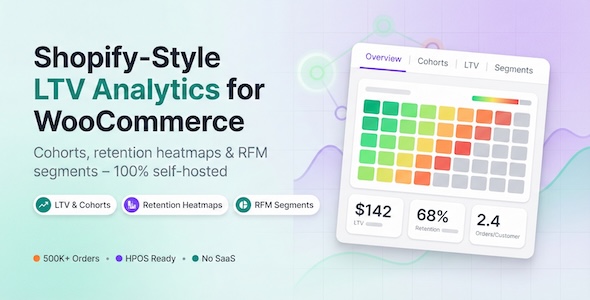

WooLTV Analytics — Self‑Hosted LTV & Cohort Analytics for WooCommerce
Measure customer value and retention — inside WooCommerce.
WooLTV Analytics adds Shopify‑style LTV and cohort retention analytics to your WordPress admin. Everything runs on your own site (no SaaS, no external order/customer data services).
At a glance
- Dashboard: windowed LTV (configurable), lifetime LTV, retention, active customers, and indexed order totals.
- Cohorts: cohort table + drill‑down detail panel with retention and revenue/LTV curves.
- Segments: system segments (VIP/Active/At Risk/Churned) + custom rule builder with live preview counts.
- Customers: directory + customer profile with key metrics and indexed order history.
- Exports: export any segment to CSV via background jobs (Action Scheduler). Downloads expire after a retention window (default: 7 days).
- Indexing: full index + optional incremental indexing for new orders, refunds, status changes, and deletions.
- Privacy: analytics stored locally; includes WordPress privacy exporter/eraser integration for WooLTV Analytics data.
Screenshots
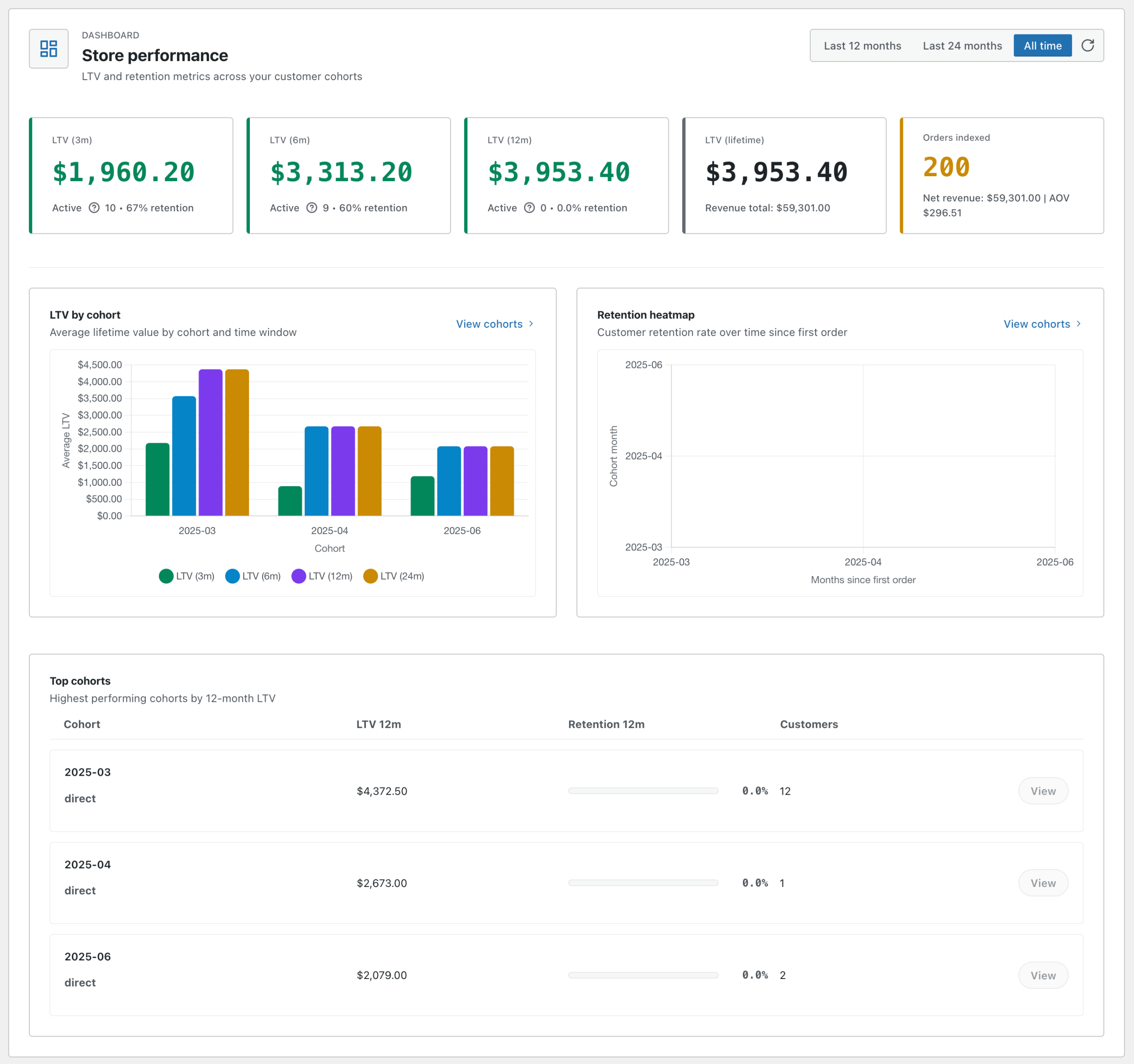
Dashboard: LTV windows, retention, and cohort insights inside wp‑admin.
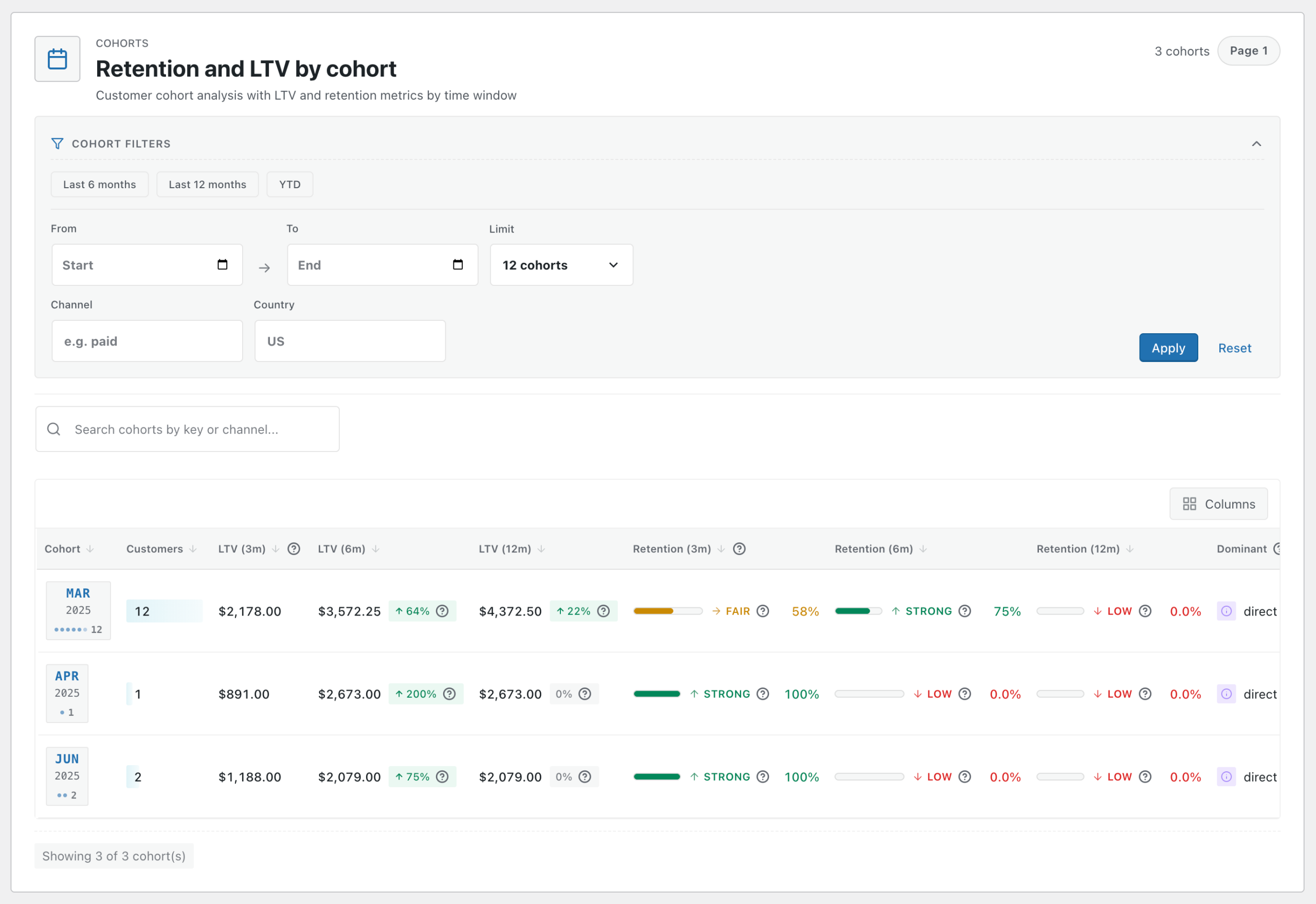
Cohorts: cohort table + retention heatmap by cohort month and months since first order.
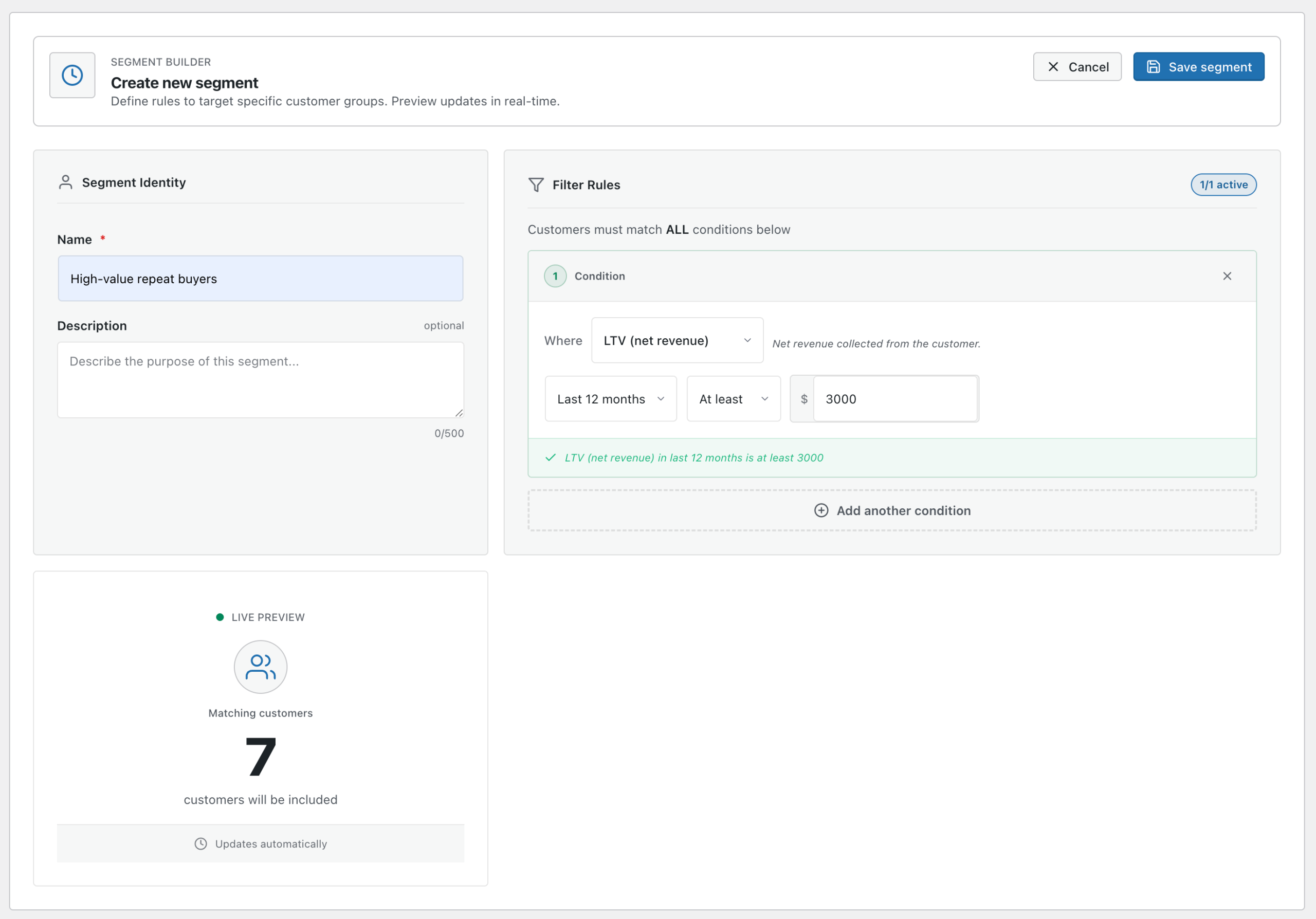
Segments: build rules with AND logic and preview the matching customer count before saving.
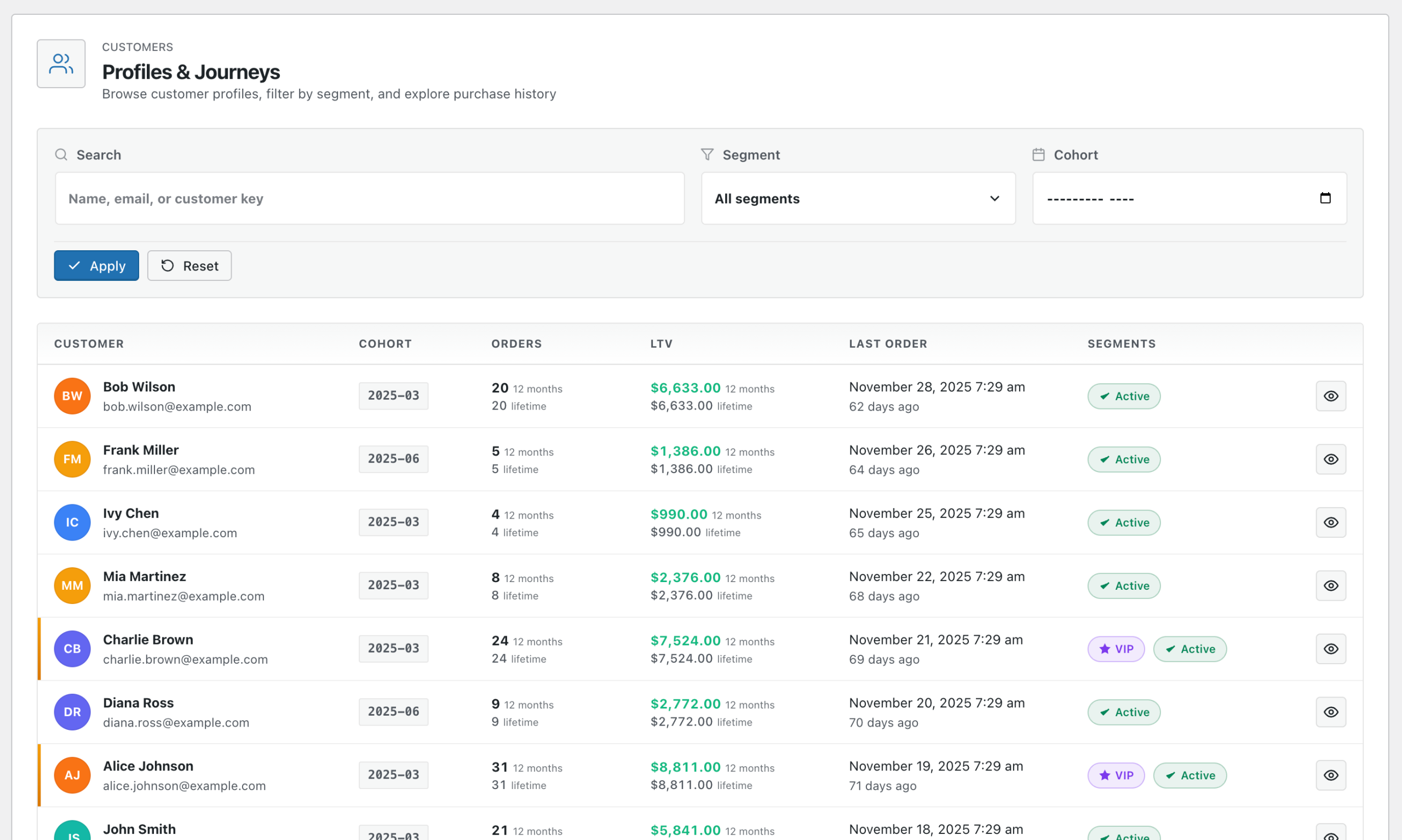
Customers: browse/search customers and view key metrics plus segment membership.
Features
| Area | Highlights |
|---|---|
| Dashboard | Cohort range presets (12m/24m/all), KPI cards (windowed + lifetime LTV), LTV by cohort, retention heatmap, and Top cohorts table. |
| Cohorts | Cohort list table with configurable columns (LTV/retention windows) + cohort detail panel with retention curve and revenue/LTV curves. |
| Segments | System segments (VIP/Active/At Risk/Churned) + custom segments with AND logic and live preview counts. |
| Exports | CSV exports run via Action Scheduler, with status tracking + downloads (standard schema; no field selection in the UI). |
| Customers | Customer directory with search + cohort/segment filters and a customer detail panel with LTV/orders and indexed order history. |
| Indexing | Run/cancel full index, tune batch size, enable/disable incremental indexing, and quick resync recent orders from Settings. |
How it works
- Install & activate the plugin.
- Onboarding wizard: choose revenue settings (qualifying order statuses, shipping/tax inclusion, and LTV windows).
- Run the first full index: analytics tables are built in the background via Action Scheduler.
- Explore: Dashboard, Cohorts, Segments, and Customers.
- Export: export any segment to CSV for your marketing tools.
Common use cases
- Marketing spend decisions: compare cohorts to understand long‑term value, not just short‑term ROAS.
- Channel quality: filter cohorts by acquisition channel (when present) and compare LTV/retention.
- Win‑back campaigns: export “At‑Risk” and “Churned” segments for reactivation workflows.
- VIP retention: identify your best customers and build segments for loyalty perks.
- Agency reporting: deploy on client stores (per Envato licensing) for repeatable LTV/retention reporting.
Metric definitions
- Included order statuses: configurable. Defaults include
processingandcompleted. - Net revenue (default for LTV): discounted line item totals (plus fees), adjusted for refunds. Shipping and tax are excluded by default but can be enabled in settings.
- Cohort key: customers grouped by the month of their first qualifying order (YYYY‑MM).
- Retention: % of customers in a cohort who place at least one qualifying order within each month offset since first order.
Requirements & compatibility
| Requirement | Minimum | Recommended |
|---|---|---|
| WordPress | 6.0+ | Latest |
| WooCommerce | 7.0+ | Latest |
| PHP | 8.0+ | 8.1+ |
- HPOS: compatible with WooCommerce High‑Performance Order Storage (HPOS), enabled or disabled.
- Multisite: supported per‑site (each site maintains its own analytics tables). No network‑wide roll‑up in v1.
- Currency: WooLTV assumes a single store currency for totals. Orders in other currencies are excluded from aggregates (multi‑currency stores need a conversion strategy).
- Background jobs: indexing and exports require Action Scheduler and a working WP‑Cron (or a server cron that hits wp‑cron.php).
Installation & first-time setup
- Go to Plugins → Add New → Upload Plugin
- Upload the plugin ZIP and click Install Now
- Activate the plugin
- Open WooLTV Analytics from the wp‑admin menu
- Complete onboarding and start initial indexing
Note: Indexing and exports run via WooCommerce’s Action Scheduler. If WP‑Cron is disabled on your server, configure a real cron so background jobs can run reliably.
What’s included
- WooLTV Analytics WordPress plugin (ZIP)
- Onboarding wizard + settings
- Documentation (setup, metric definitions, troubleshooting)
- Updates via CodeCanyon (as new versions are released)
FAQ
Does this send my customer/order data to external servers?
No. WooLTV Analytics is self‑hosted — analytics data stays inside your WordPress database and there are no public analytics endpoints in v1.
Does it work with WooCommerce HPOS?
Yes. WooLTV is built to support HPOS enabled or disabled by using WooCommerce’s official order APIs.
How does “acquisition channel” work?
WooLTV can derive an acquisition channel from common UTM/order meta keys (if your store saves them). If no channel data is present, it falls back to “direct”.
How is LTV calculated?
WooLTV uses qualifying orders and calculates LTV from net revenue by default (discounts and refunds accounted for). Shipping and taxes are excluded by default but can be enabled in settings.
Can I choose which fields to export?
No — exports use a standard CSV schema (there is no field selection in the UI). This keeps exports consistent for marketing imports.
Do you offer direct Mailchimp/Klaviyo integrations?
Not in v1. WooLTV exports CSV files that you can import into most email/SMS platforms that support CSV imports.
Is multi-currency supported?
WooLTV assumes a single store currency for totals. Orders in other currencies are excluded from aggregates (multi‑currency stores need a conversion strategy).
Does it integrate with WordPress privacy tools?
Yes. WooLTV Analytics registers a WordPress privacy data exporter and eraser for WooLTV Analytics customer analytics data.
What happens to data on uninstall?
WooLTV includes an option to delete its own analytics tables/options on uninstall. By default, data is retained unless you enable removal.
Support & updates
Support is provided through CodeCanyon. We aim to respond within 2 business days (Mon–Fri). Support covers setup questions and bug reports. Customization/feature work is not included.
Changelog
v1.1.0 — UX & reliability update
- Theme-token based styling for charts and tooltips (consistent with the admin UI theme)
- Keyboard navigation for Segments/Exports and Settings tabs (Arrow keys + Home/End, RTL-aware)
- Onboarding redirect to Dashboard when onboarding is required (keeps WordPress submenu highlight aligned)
- Maintenance and test coverage improvements
v1.0.0 — Initial release
- LTV dashboards (configurable windows + lifetime; defaults include 3/6/12)
- Cohort retention heatmap + cohort performance views
- System segments + advanced custom segments
- Customers screens
- CSV export (background processing)
- Background indexing + incremental updates
- HPOS compatible (supports HPOS enabled/disabled)
Ready to measure customer value with real LTV?
If you want Shopify‑style LTV and cohort retention analytics inside WooCommerce — without an external SaaS — WooLTV Analytics is built for that workflow.
Live Demo: View Demo (demo/demo)
$79 |
Download |
0 average based on 0 ratings.
.png)
| Last Update | 2026-02-15 |
| Created | 2026-01-29 |
| Sales | 0 |
| Discussion | Comments |
| Compatible Browsers | |
| Software Version | WordPress 6.9.x WordPress 6.8.x WordPress 6.7.x WordPress 6.6.x WordPress 6.5.x WordPress 6.4.x WordPress 6.3.x WordPress 6.2.x WordPress 6.1.x WordPress 6.0.x |
| Compatible With | WooCommerce 9.x.x WooCommerce 8.x.x WooCommerce 7.x.x |
| Gutenberg Optimized | |
| High Resolution | |
| Files Included | JavaScript JS HTML CSS PHP |
| Video Preview Resolution |


