WooCommerce Variation Master - Variation Dropdown, Variable Products, Variation Swatches/Attributes.







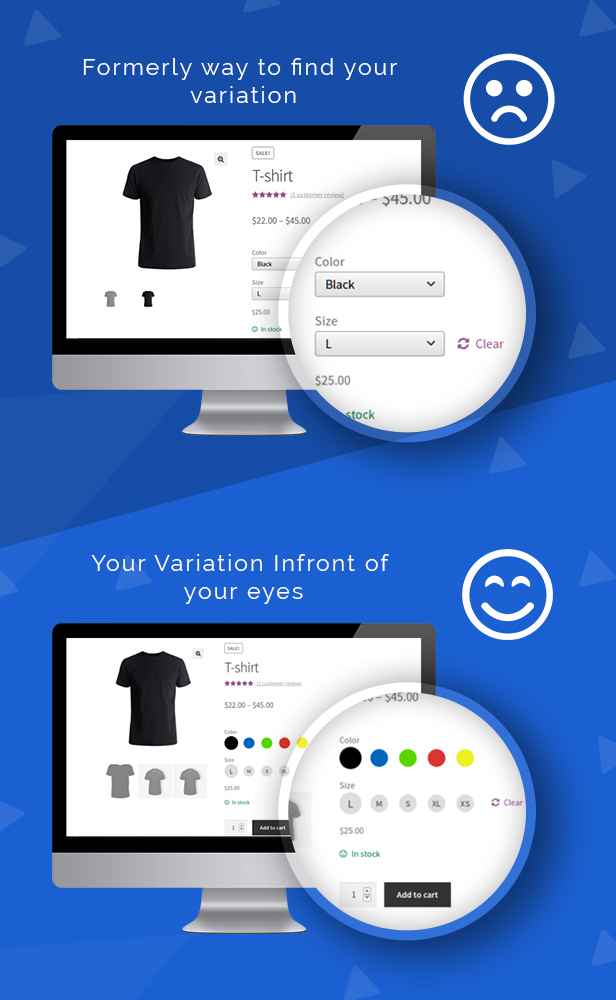
Replace the default WooCommerce dropdown with visual variation swatches — colour circles, image swatches, and label buttons — so customers see exactly what they are buying before they click Add to Cart.
WooCommerce Variation Swatches Plugin by WP Swings transforms how variable products look and work on your store. Instead of a plain text dropdown, shoppers see clickable colour swatches, product image thumbnails, or styled text buttons for every attribute — size, colour, material, style, or any custom option. The result is a faster, more confident buying decision and fewer abandoned carts.
Trusted by 1,000+ WooCommerce stores worldwide.

Feature Demo

Why WooCommerce Stores Switch from Dropdowns to Swatches
The default WooCommerce variable product uses a plain dropdown select — customers must open it, read through text options, and guess what each one looks like. Visual swatches remove that friction entirely. Shoppers see colour, texture, or image for each option at a glance. They pick faster, hesitate less, and abandon less.
Variation Master gives you three swatch types — colour circles, image thumbnails, and text label buttons — and lets you display them on the product page, shop page, archive pages, and category pages. No coding required. Configure everything from your WooCommerce admin panel.
Features
Colour, Image & Label Variation Swatches
Replace the WooCommerce variation dropdown with colour circles, product image swatches, or text label buttons — or mix types across different attributes. Works with any WooCommerce attribute, global or custom.
Variation Swatches on Shop, Archive & Category Pages
Display WooCommerce variation swatches directly on your shop and category pages — not just on the product detail page. Customers can select a variation and add it to cart without ever clicking through to the product. Reduces friction and increases impulse purchases.
Price & Stock Preview on Hover
When a customer hovers over any variation swatch, the price and available stock for that variation appear instantly — no page reload. Customers get the information they need to decide right where they are. (New in v3.2.1)
Bestseller Badges on Variation Attributes
Mark any product attribute as a bestseller, new arrival, or custom label. Badge text and colour are fully configurable. A direct nudge toward your highest-converting variants without any custom code. (New in v3.2.0)
Variation Gallery Images
Add multiple gallery images per variation. When a customer selects a colour or style swatch, the product gallery updates to show images specific to that variation. Customers visualise exactly what they are buying — reducing returns and increasing purchase confidence.
Out-of-Stock Variation Handling
Unavailable variation swatches are displayed with a strikethrough style rather than hidden. Customers see the full product range, understand what is out of stock, and are not left confused about missing options.
Update Variable Product Variations from the Cart
Customers can change their selected variation directly on the cart page — no need to navigate back to the product. Reduces cart abandonment caused by wrong variation selections at checkout.
Low Stock Alert on Variable Products
Set a minimum stock quantity to trigger a low-stock message on variable products. Customise the alert text and styling. Creates urgency at the point of selection without requiring a separate plugin.
Attribute Text Labels & Tooltips
Display the selected attribute name above swatches or as a tooltip on hover. Improves accessibility and helps customers browsing unfamiliar product attributes understand their options clearly.
Social Sharing per Variation
Customers can share a specific product variation — with that variation pre-selected — on Facebook, Twitter, WhatsApp, and Gmail. Useful for fashion, home decor, and gifting stores where colour and style choice matters.
Import / Export Variation Swatches & Gallery Images
Export and import variation gallery images and attribute colour and image swatches via CSV. Saves hours when managing large catalogues or migrating data between WooCommerce stores.
HPOS Compatible
Fully compatible with WooCommerce High-Performance Order Storage (HPOS). Your store performance is not affected during high-volume sales periods.
WooCommerce Cart & Checkout Blocks Compatible
Works seamlessly with the WooCommerce Cart and Checkout Blocks introduced in WooCommerce 8.x. No compatibility issues with modern WooCommerce setups running the block-based checkout.
Compatible with Major WooCommerce Themes
Tested and confirmed working with Astra, OceanWP, Flatsome, Storefront, Avada, Divi, and Btheme. Works with any theme that follows the standard WooCommerce thumbnail DOM structure.
WPML & Multisite Compatible
Includes .mo and .po language files for full translation support. Compatible with WPML and WordPress Multisite setups out of the box.
No Coding Required
Every swatch type, size, style, and display rule is configured from your WooCommerce admin settings panel. No developer needed to set up or customise.
Compatibility
- WooCommerce 6.x, 7.x, 8.x, 9.x, 10.x
- WordPress 5.1 through 6.8
- PHP 8 compatible
- HPOS compatible
- WooCommerce Cart and Checkout Blocks compatible
- WPML compatible
- WordPress Multisite compatible
- Browsers: Chrome, Firefox, Safari, Edge, Opera
Easy Installation
- Log in to your WordPress admin dashboard.
- Navigate to Plugins > Add New and click Upload Plugin.
- Browse to the downloaded variation-master.zip file and click Install Now.
- Activate the plugin and configure swatches from WooCommerce > Settings.
Live Demo
Frontend demo: Click here
Backend demo: Click here
What customers say
★★★★★ Alexvideo89
“I had visualisation problems due to my theme — they solved everything very quickly and fulfilled all my requests. Kind, efficient, fast. More and more satisfied with my purchase.”
★★★★★ Enoncie
“The support for this plugin is by far the best I have ever had across any plugin or theme. They give a good name to professional developers. I will buy more products from them. Strongly recommended.”
★★★★★ LinkOutz
“Easy to use — installed in 10 minutes and got used to it straight away. Top plugin, I recommend it to everyone.”
★★★★★ Zaidirahman
“Good support and easy to use. This is the second plugin I bought from WP Swings. Hope to continue to see great plugins.”
Frequently Asked Questions
Do WooCommerce variation swatches increase conversions?
Yes. Replacing the default dropdown with visual swatches removes guesswork from product selection. Customers see colour, size, and style options at a glance — reducing hesitation and cart abandonment. Stores using visual swatches consistently report faster add-to-cart decisions compared to standard dropdown selects.
Can I show variation swatches on the WooCommerce shop page, not just the product page?
Yes. Variation Master displays colour and image swatches on shop pages, archive pages, and category pages. Customers can select a variation and add it to cart directly from the listing — without clicking through to the product detail page.
How does the plugin handle out-of-stock WooCommerce variations?
Out-of-stock variation swatches are displayed with a strikethrough style rather than hidden. Customers can see the full range of available options and understand which variations are currently unavailable — reducing confusion and support queries.
What swatch types does the plugin support?
Three types: colour circles, product image thumbnails, and text label buttons. You can mix types across different attributes — for example, colour swatches for colour attributes and label buttons for size attributes — on the same product.
Is this WooCommerce variation swatches plugin compatible with HPOS and Blocks?
Yes. Fully compatible with WooCommerce High-Performance Order Storage (HPOS) and the WooCommerce Cart and Checkout Blocks introduced in WooCommerce 8.x.
Does the variation gallery work with my theme?
The variation gallery works with any theme that follows the standard WooCommerce thumbnail DOM structure — including Astra, OceanWP, Flatsome, Storefront, Avada, and Divi. For heavily customised themes, contact our support team and we will assess compatibility at no charge where possible.
Can customers change their variation selection after adding to cart?
Yes. Customers can update their selected variation directly on the WooCommerce cart page — no need to go back to the product. This reduces cart abandonment caused by wrong selections at checkout.
Is it GDPR compliant?
Yes. This plugin does not store any personal data. It only processes product attribute and variation data within your own WordPress and WooCommerce installation.

This plugin does not store any sensitive personal data and is not subject to GDPR compliance requirements. It only holds information related to product attributes and variations within your WordPress and WooCommerce installation.
Support & Resources
Documentation: docs.wpswings.com
Support: wpswings.com/submit-query — 24/7 customer support
Community: WP Swings Forums
WooCommerce Services: wpswings.com/woocommerce-services
Changelog
08.10.2025 - Version 3.2.1 New: Price & Stock Preview on Hover for variation swatches New: Compatible with WP 6.8.3 & WC 10.2.2 13.08.2025 - Version 3.2.0 New: Bestseller badges on product attribute terms New: Compatible with WP 6.8.2 & WC 10.0.4 Fix: Conditional errors 05.05.2025 - Version 3.1.11 New: Compatible with WP 6.8.1 & WC 9.8.3 12.02.2025 - Version 3.1.10 New: Compatible with WP 6.7.2 & WC 9.6.1 06.09.2024 - Version 3.1.9 New: Compatible with WP 6.6.1 & WC 9.2.3 Fix: WooCommerce compatibility issues 10.05.2024 - Version 3.1.8 New: Compatible with WP 6.5.3 & WC 8.8.3 18.03.2024 - Version 3.1.7 New: Compatible with WP 6.4.3 & WC 8.6.1 Fix: CSV import for attributes and gallery images Fix: Gallery image slider issue 01.01.2024 - Version 3.1.6 New: Compatible with WP 6.4.2 & WC 8.4.0 New: Cart and Checkout Blocks compatible Fix: Shop page loading time Fix: Theme compatibility (Flatsome, Divi, OceanWP, Betheme) 09.10.2023 - Version 3.1.5 New: Compatible with WP 6.3.1 & WC 8.1.1 New: HPOS compatible New: Compatible with Storefront, Btheme, Avada, Flatsome, OceanWP 15.09.2023 - Version 3.1.4 New: Compatible with WP 6.3.1 & WC 8.0.3 Fix: Design issues 02.05.2023 - Version 3.1.3 New: Image on tooltip New: Custom colours for remaining stock messages New: Compatible with WP 6.2.0 & WC 7.6.1 27.03.2023 - Version 3.1.2 New: Social sharing per variation New: Increase text size inside swatches New: Compatible with WP 6.1.1 & WC 7.5.1
$35 |
Download |
4.6 average based on 55 ratings.

| Last Update | 2025-10-08 |
| Created | 2016-08-17 |
| Sales | 1023 |
| Discussion | Comments |
| Compatible Browsers | IE9 IE10 IE11 Firefox Safari Opera Chrome Edge |
| Software Version | WordPress 6.9.x WordPress 6.8.x WordPress 6.7.x WordPress 6.6.x WordPress 6.5.x WordPress 6.4.x WordPress 6.3.x WordPress 6.2.x WordPress 6.1.x WordPress 6.0.x WordPress 5.9.x WordPress 5.8.x WordPress 5.7.x WordPress 5.6.x WordPress 5.5.x WordPress 5.4.x WordPress 5.3.x WordPress 5.2.x WordPress 5.1.x |
| Compatible With | WooCommerce 9.x.x WooCommerce 8.x.x WooCommerce 7.x.x WooCommerce 6.x.x WooCommerce 5.x.x |
| Gutenberg Optimized | Yes |
| High Resolution | |
| Files Included | JavaScript JS HTML CSS PHP |
| Video Preview Resolution | 1280x578 |


