WooCommerce Variable Pricing Calculator – Measurement Based Price for Variations




WooCommerce Variable Pricing Calculator can allow you to set each variation pricing table itself, No hassle for setting each variation price with a single table. Still, you can add your Pricing Ranges for every variation you have in your Variable Product.
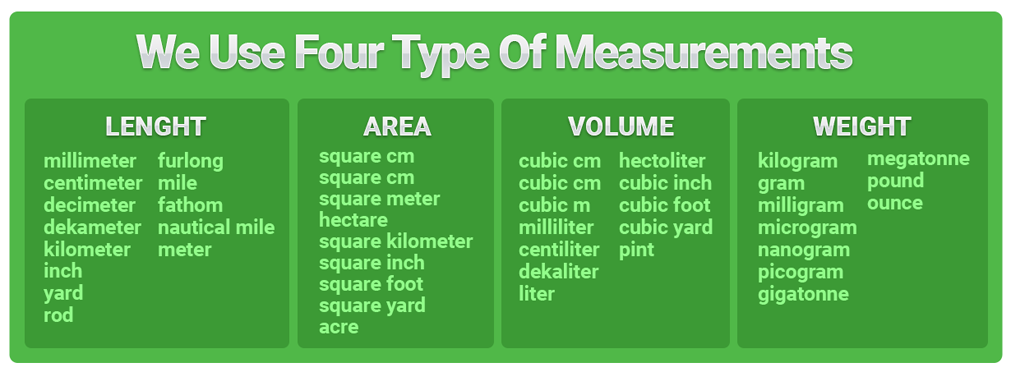
With WooCommerce Variable Pricing Calculator, you can sell your product in any Measurement of Units (Weight Units, Length Units, Area Units, Volume Units), etc.
We offer a variety of Demo with WooCommerce Variable Pricing Plugin, so with this, you can quickly see how it works.







Features of WooCommerce Variable Pricing Calculator (Measurement Pricing)
- Each variation have its pricing table
- Variation pricing based on Measurement units (how much you require)
- No limitation for single parent product pricing table
- Easily set dynamic pricing for each variation
- Stock Management for Variable product (each variation itself )
- Each product have its pricing and ranges
- Full of Measurement Units available
- Length, Width, Area, Volume
- Minimum & Maximum validation over each variation (not parent product)
- Very easy to use and understandable how it works
Do you want to add videos to your Products & Shop Pages ?
Check out our Video Plugin WooCommerce Product Video Plugin.
Want to use Pricing Calculator with Simple product type here is the addons WooCommerce Pricing Calculator (Simple Product)
What kind of Measurement Units we sell ?
How to Configure Variable Product with plugin ?
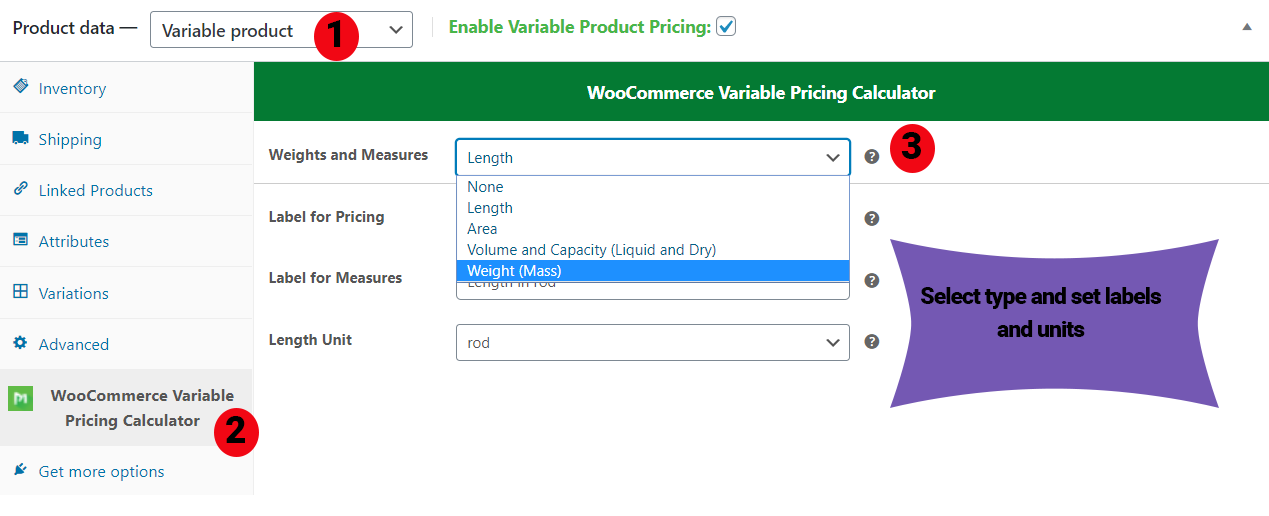
Once you are on Add new Product/Edit Product page, Follow the below steps.
- Select Product type Variable.
- Then select WooCommerce Variable Pricing Tab (in green text).
- In the last set, your Measurement type and Units with Labels.
- Don’t forget to check the above checkbox, which says (Enable Variable Pricing Product)
- Once done, see below
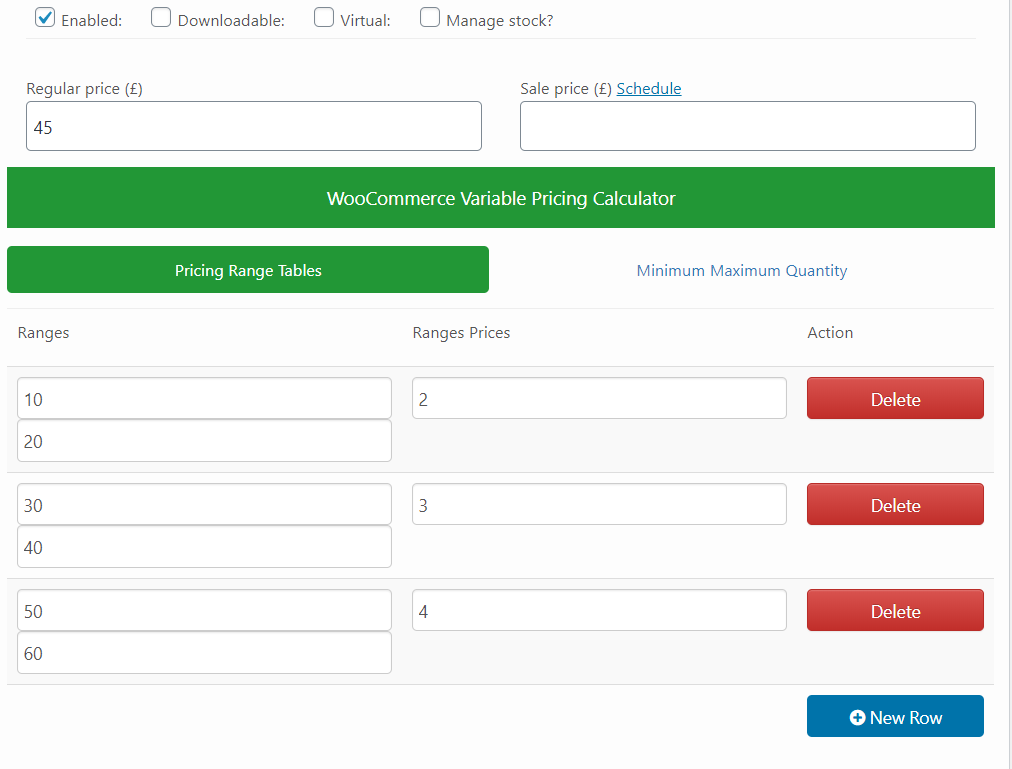
Pricing Range Table (For each Variation)
Now you have a Pricing Ranges Table for each variation like below to set your product with variation and their Range Pricing no limitation to use your Mother Product Pricing Table.
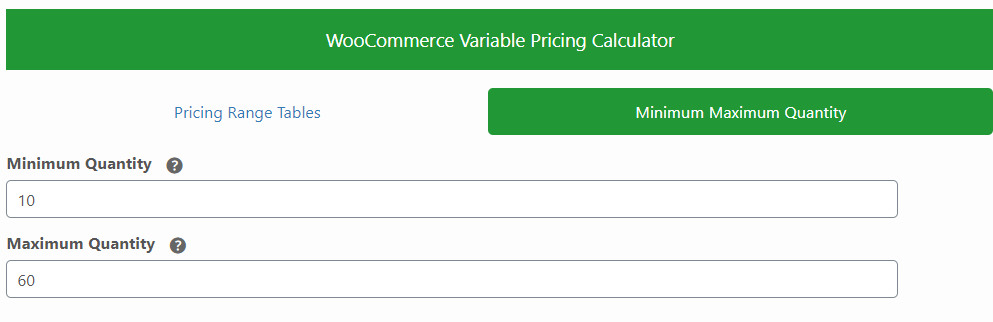
Minimum & Maximum Validation
So once you have all set up with variation pricing, You can also set minimum & maximum quantity validation for each of your variations like below in the second tab. Once done, update or publish the product.
Visit Products by Measurement Unit Categories
- Weight & Mass Base Measurement Products Demo
- Length Base Measurement Products Demo
- Volume Base Measurement Products Demo
- Area Base Measurement Products Demo
FAQ’s
1. Are pricing based on measurement units?
Answer:Yes, pricing based on measurement units.
2. What measurement units are used in this plugin?
Answer:The measurement units used in this plugin are Length, Area, Volume & Weight.
3.Is it Easy to configure with the Same Variable Pricing Data Tabs?
Answer:Yes, it is easy to configure with the Same Variable Pricing Data Tabs
4. Can we see which measurement the client bought and how much on the cart and order page?
Answer:Yes, Admin can easily see the order measurement and quantity. In the backend order page.
5. Does this plugin also support Simple products?
Answer:Yes, we have addons that let you sell your simple product as a measurement. Simple Addons

Pre-Translated Languages

Change log:
Version 2.2.0 Compatibility checks & fixes with the latest woo and wp
Version 2.1.9 Compatibility checks & fixes with the latest woo and wp
Version 2.1.8 Compatibility checks & fixes with the latest woo and wp
Version 2.1.7 Compatibility checks & fixes with the latest woo and wp
Version 2.1.6 Compatibility checks & fixes with the latest woo and wp High-Performance Order Storage Compatibility
Version 2.1.5 WooCommerce & WordPress Latest Version Compatible check Version updated to 2.1.5
Version 2.1.4 WooCommerce & WordPress Latest Version Compatible check Fixes on variation saved row deletion Version updated to 2.1.4
Version 2.1.3 WooCommerce & WordPress Latest Version Compatible check Adding new settings in per variation pricing table If not sale then regular set for the price Version updated
Version 2.1.2 WooCommerce & WordPress Latest Version Compatible check New Measurement unit added Version updated
Version 2.1.1 WooCommerce & WordPress Latest Version Compatible check Images added. Additional css and js fixes
Version 2.1.0 Kg, sq cm, and mi new measurement added Additional ranges check Front page validation check
Version 1.0.9 Compatibility check with WooCommerce subscription Latest version of WP & WOO check
Version 1.0.8 WooCommerce & WordPress Latest Version Compatible check
Version 1.0.7 Measurement Product shop page redirection to Product page for measurement Order meta display on Cart and Checkout Latest Version check with WordPress & WooCommerce
Version 1.0.6 Add Simple product add-ons for this Variable Pricing Decimal allow on quantity addition
Version 1.0.5 Additional Tabs for min and max quantity validation Cart validation checks
Version 1.0.4 WooCommerce & WordPress Latest Version Compatible check
Version 1.0.3 Compatible with WooCommerce Variable Pricing Calculator (Addons Simple Product) Version update WooCommerce & WordPress Latest Version Compatible check
Version 1.0.2 Js fixing for price format
Version 1.0.1 Php check for two dimension products.
Version 1.0.0 Initial release
$29 |
Download |
5 average based on 42 ratings.

| Last Update | 2026-05-13 |
| Created | 2020-02-25 |
| Sales | 294 |
| Discussion | Comments |
| Compatible Browsers | Firefox Safari Opera Chrome Edge |
| Software Version | WordPress 6.9.x WordPress 6.8.x WordPress 6.7.x WordPress 6.6.x WordPress 6.5.x WordPress 6.4.x WordPress 6.3.x WordPress 6.2.x WordPress 6.1.x WordPress 6.0.x WordPress 5.9.x WordPress 5.8.x WordPress 5.7.x WordPress 5.6.x WordPress 5.5.x WordPress 5.4.x WordPress 5.3.x WordPress 5.2.x WordPress 5.1.x WordPress 5.0.x WordPress 4.9.x |
| Compatible With | WooCommerce 9.x.x WooCommerce 8.x.x WooCommerce 7.x.x WooCommerce 6.x.x |
| Gutenberg Optimized | Yes |
| High Resolution | Yes |
| Files Included | JavaScript JS JavaScript JSON HTML CSS LESS PHP SQL Layered PSD Layered PNG |
| Video Preview Resolution |


