Mix and Match Products for WooCommerce

Create, customize, and sell product bundles with WooCommerce mix and match!
Bundling products together is one of the most effective ways to boost store revenue, and the WooCommerce Mix and Match plugin gives you everything you need to do it well. Create product bundles across any category, set flexible pricing structures, and let customers build their own selections.
The plugin supports dynamic pricing, product variations, quantity limits, and personal gift messages, giving you full control over how bundles are presented and sold. Whether you are running a food store, a clothing shop, or a gift-based business
Features
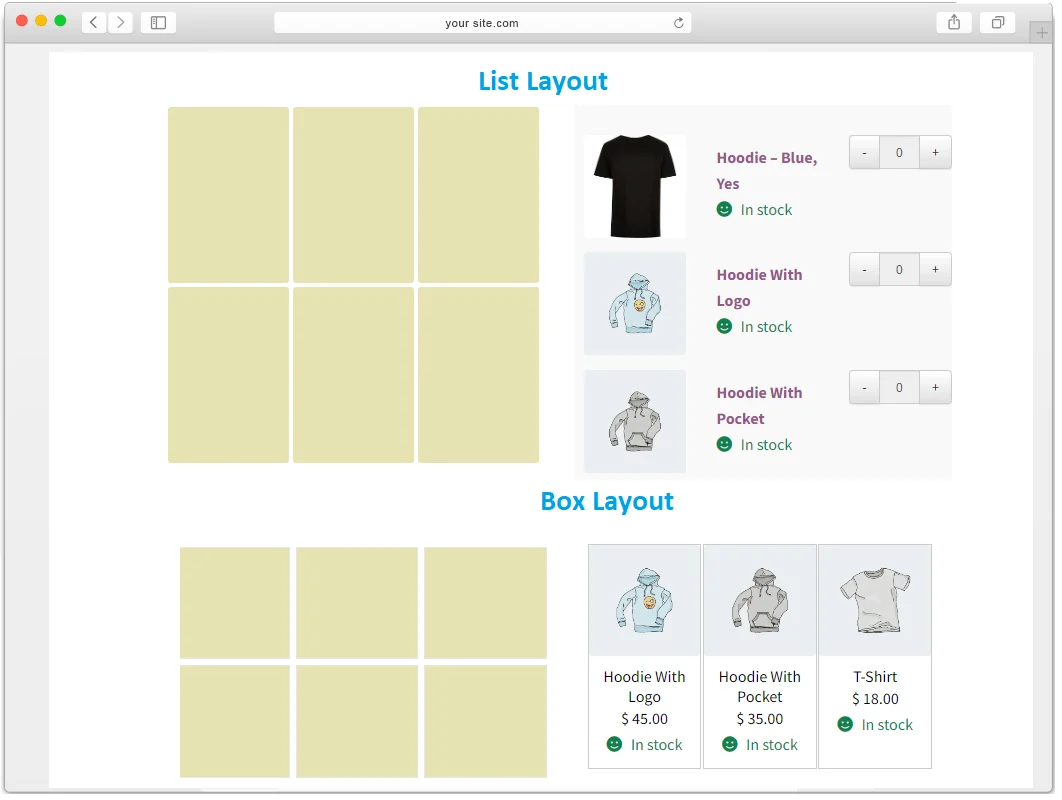
- Multiple layouts i.e Box and List view
- Default layout displays boxes below the product image and description
- Dynamic pricing with fixed box price and per product price options
- Responsive and Mobile Ready Design
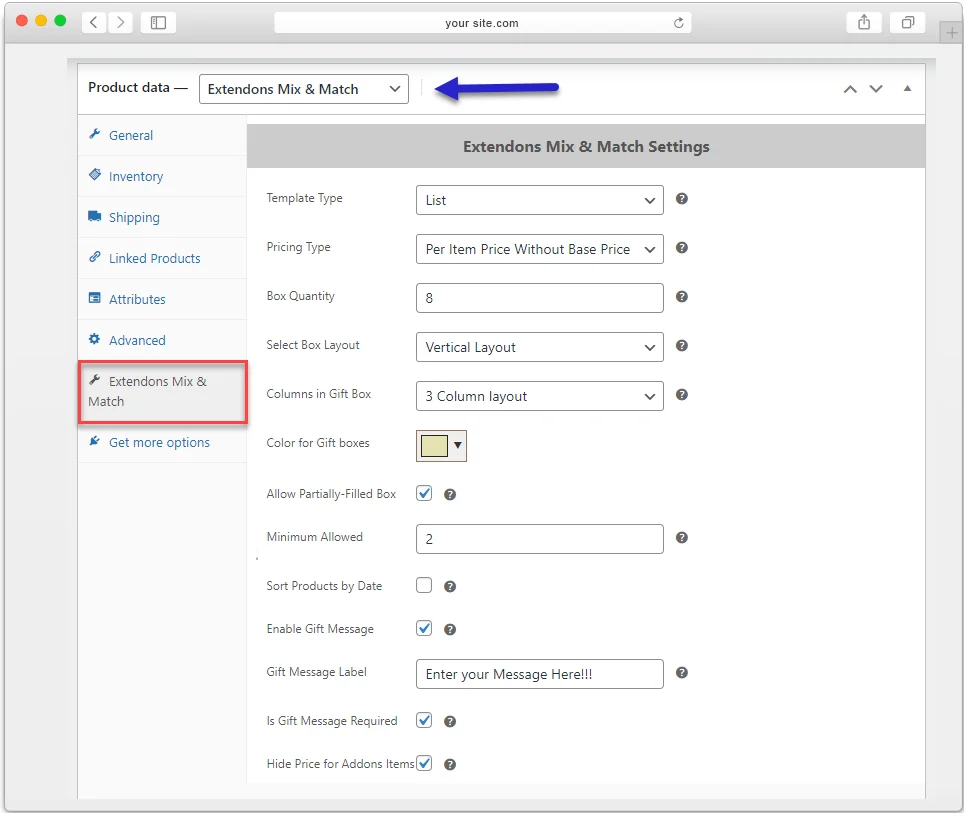
- Customers can attach a personal message to their bundle
- Set quantity limits for each bundle
- Compatible with product variations
- Set a minimum number of products required to complete a bundle
- Compatible with WooCommerce Product Addons Plugin
Create Multiple Mix and Match Products
The WooCommerce Mix and Match plugin lets customers build their own assortment from the products you offer. You can create bundles across any category, whether that is shirts, drinks, perfumes, or office items. All available products are displayed clearly so customers can browse and select with ease.
Multiple Layout Options
The plugin offers two layout styles for displaying product bundles: box view and list view. Each layout presents your products in a clean, browsable format, and you can choose whichever fits your store’s design.
Dynamic Pricing Options
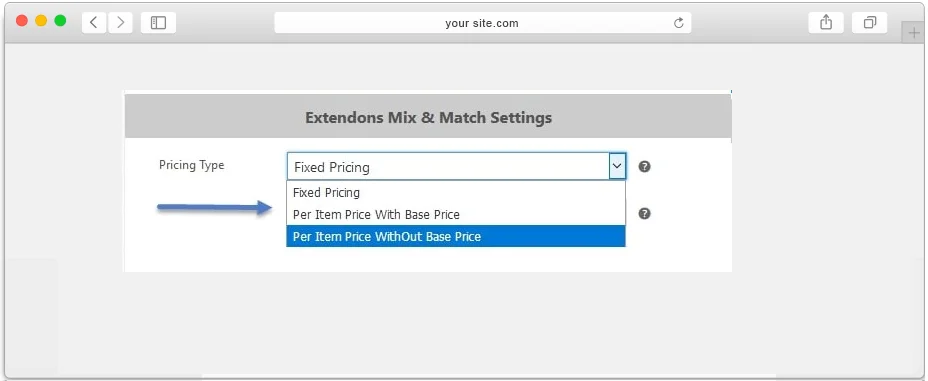
WooCommerce Mix and Match supports flexible pricing structures so you can charge for bundles in the way that works best for your store. Choose from fixed pricing, per product pricing with a base price, or per product pricing without a base price.
Fixed Pricing
Set a single fixed price for the entire bundle. Regardless of which products the customer adds or how many items they select, the total price remains the same throughout the process.
Per Product with Base Price
The box price can be added to the product price with WooCommerce mix and match if you also want to charge for the box, so that the total price of the bundle is the product price plus the box price.
Per Product without Base Price
This option calculates the total based only on the products a customer adds to their bundle, without factoring in any base or box price.
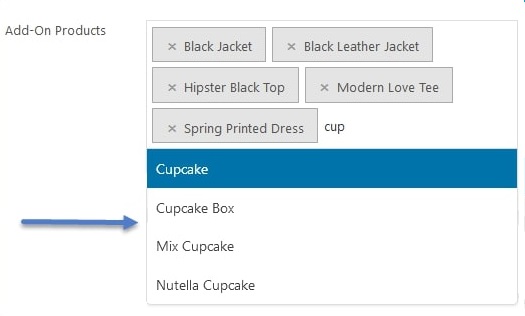
Attach Specific Products and Variations
Mix and match products for WooCommerce allows you to add simple products to product inventory or add whole category of the products so customers can create their own combination without being forced to buy items that don’t interest them.
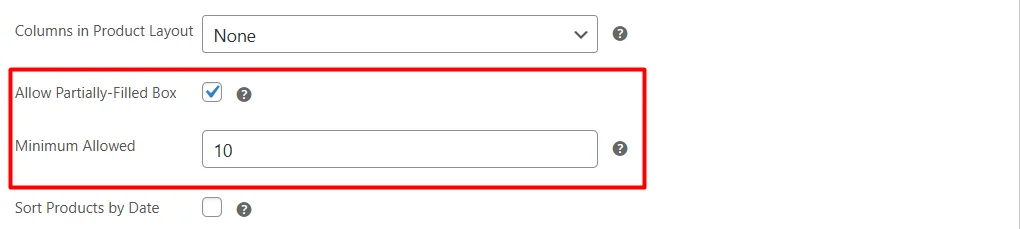
Option to Sell Partially Filled Bundle
The plugin gives you the option to sell partial bundles, making it easier for customers to purchase what they need without being required to fill every slot.
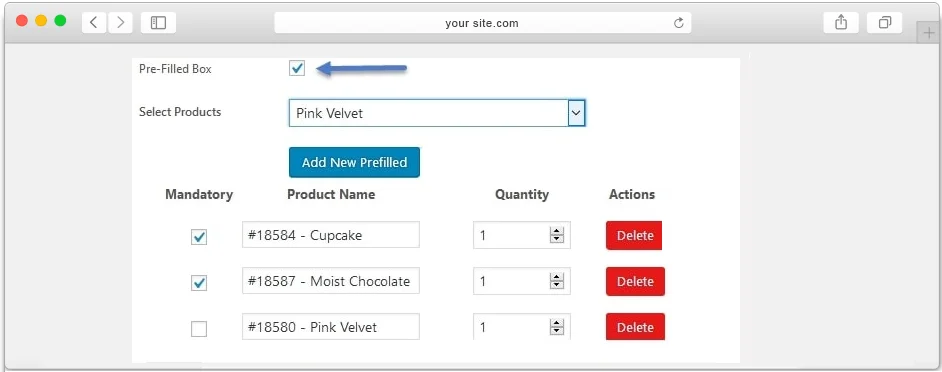
Option to Pre-fill Boxes with Products
Pre-fill bundles partially or fully with specific items and mark each one as mandatory or optional. Customers can remove optional pre-filled items and replace them with other available products
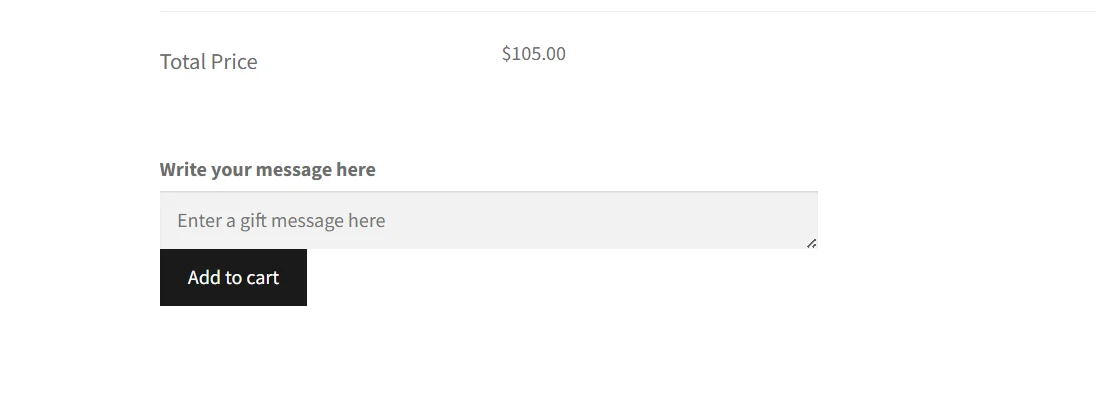
Allow Customers to Attach a Personal Message with Bundle
Mix and match for WooCommerce gives your customers the privilege of sending a personal message along with the bundle to their loved ones.
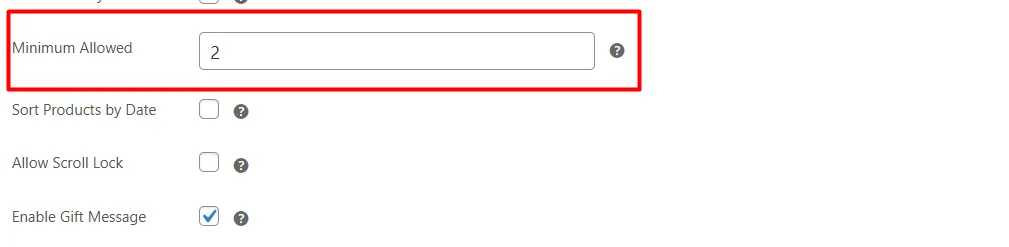
Set Minimum Product Limit to Buy Bundle
Define the minimum number of products a customer must select before they can add a bundle to their cart. When the customer meets the minimum limit then he can add a bundle to the cart.
FAQs
1. What types of products can be included in a mix and match box?
Ans. WooCommerce mix and match supports various product types, including simple products and product variations as a product.
2. Does it provide dynamic pricing options?
Ans. Yes, WooCommerce mix and match products plugin provides dynamic pricing options such as box price, product price, fixed price + product price.
3. Does WooCommerce mix and match plugin allow customers to choose product of their choice from options?
Ans. Yes, you can allow customer to choose the product product of their choice to create a mix and match box.
4. Can I limit the number of items a customer can include in a mix and match box?
Ans. Yes, mix and match products for WooCommerce allows you to set minimum and maximum quantity rules for each product in a custom box.
Description in Dutch
U kunt de WooCommerce mix en match-plug-in gebruiken om uw klanten in grote hoeveelheden te laten kopen. Het is een effectieve methode om uw omzet met gemiddeld 30% te verhogen.
Met de plug-in voor mix & match-producten van WooCommerce kunnen uw klanten hun artikelen kiezen om hun assortiment van voorkeur te maken.
Bovendien kunt u met maatwerk verschillende prijsstructuren implementeren en persoonlijke berichten toevoegen aan geschenkverpakkingen. Het helpt uw klanten tijd en geld te besparen tijdens het winkelen.
Functielijst van WooCommerce Mix en Match plug-in
- Klanten toestaan nieuwe doos toe te voegen zodra vorige doos vol is (nieuw)
- Box View-indeling (nieuw)
- Standaardlay-out: weergavevakken onder productafbeelding en -beschrijving (nieuw)
- Toont aangeboden producten in een lijstweergave
- Dynamische prijsoptie
- Vaste doosprijs instellen
- Per productprijs
- Vaste prijs + prijs per product
- Responsief en mobiel klaar ontwerp
- Klanten kunnen een persoonlijk bericht bijvoegen
- Beperk de producthoeveelheid voor elke bundle
- Compatibel met productvariaties
- Stel het minimale aantal producten in dat nodig is om een bundel te kopen
Description in French
Vous pouvez utiliser le plugin WooCommerce mix and match pour permettre à vos clients d’acheter en grande quantité. C’est une méthode efficace pour augmenter vos ventes de 30% en moyenne.
Le plugin WooCommerce mix & match products permet à vos clients de choisir leurs articles pour faire leurs assortiments de préférence.
De plus, la personnalisation vous permet de mettre en place différentes structures de prix et de joindre des messages personnels aux coffrets cadeaux. Il aide vos clients à gagner du temps et de l’argent lors de leurs achats.
Liste des fonctionnalités du plugin WooCommerce Mix and Match
- Autoriser les clients à ajouter une nouvelle boîte une fois que la boîte précédente est pleine (nouvelle)
- Disposition de la vue de la boîte (nouveau)
- Disposition par défaut : affichage des cases sous l’image et la description du produit (nouveau)
- Affiche les produits proposés dans une vue de liste
- Option de tarification dynamique
- Définir le prix de la boîte fixe
- Prix par produit
- Prix fixe + prix par produit
- Conception réactive et prête pour le mobile
- Les clients peuvent joindre un message personnel
- Limitez la quantité de produits pour chaque lot
- Compatible avec les variantes de produits
- Définir le nombre minimum de produits requis pour acheter un lot
Description in Italian
Puoi utilizzare il plug-in WooCommerce mix and match per consentire ai tuoi clienti di acquistare in grandi quantità. È un metodo efficace per aumentare le vendite in media del 30%.
Il plug-in WooCommerce Mix & Match Products consente ai tuoi clienti di scegliere i loro articoli per creare i loro assortimenti di preferenza.
Inoltre, la personalizzazione ti consente di implementare diverse strutture di prezzo e di allegare messaggi personali con confezioni regalo. Aiuta i tuoi clienti a risparmiare tempo e denaro durante lo shopping.
Elenco delle funzionalità del plug-in WooCommerce Mix and Match
- Consenti ai clienti di aggiungere una nuova casella una volta che la casella precedente è piena (nuova)
- Layout vista riquadro (nuovo)
- Layout predefinito: caselle di visualizzazione sotto l’immagine e la descrizione del prodotto (novità)
- Visualizza i prodotti offerti in una visualizzazione elenco
- Opzione di prezzo dinamico
- Imposta il prezzo fisso della scatola
- Prezzo per prodotto
- Prezzo fisso + prezzo per prodotto
- Design reattivo e pronto per dispositivi mobili
- I clienti possono allegare un messaggio personale
- Limita la quantità di prodotti per ogni pacchetto
- Compatibile con le varianti del prodotto
- Imposta il numero minimo di prodotti necessari per acquistare un pacchetto
Description in Spanish
Puede usar el complemento WooCommerce mix and match para permitir que sus clientes compren en grandes cantidades. Es un método efectivo para aumentar tus ventas en un promedio de 30%.
El complemento de productos de mezcla y combinación de WooCommerce permite a sus clientes elegir sus artículos para hacer sus surtidos de preferencia.
Además, la personalización le permite implementar diferentes estructuras de precios y le permite adjuntar mensajes personales con cajas de regalo. Ayuda a sus clientes a ahorrar tiempo y dinero durante las compras.
Lista de características del complemento WooCommerce Mix and Match
- Permitir que los clientes agreguen una nueva caja una vez que la caja anterior esté llena (nueva)
- Diseño de vista de cuadro (nuevo)
- Diseño predeterminado: cuadros de visualización debajo de la imagen y descripción del producto (nuevo)
- Muestra los productos ofrecidos en una vista de lista
- Opción de precios dinámicos
- Establecer precio de caja fijo
- Precio por producto
- Precio fijo + precio por producto
- Diseño receptivo y listo para dispositivos móviles
- Los clientes pueden adjuntar un mensaje personal
- Limite la cantidad de productos para cada paquete
- Compatible con las variaciones del producto
- Establecer el número mínimo de productos necesarios para comprar un paquete
Description in German
Sie können das Mix-and-Match-Plugin von WooCommerce verwenden, damit Ihre Kunden in großen Mengen einkaufen können. Es ist eine effektive Methode, um Ihren Umsatz um durchschnittlich 30 % zu steigern.
WooCommerce Mix & Match-Produkt-Plugin ermöglicht es Ihren Kunden, ihre Artikel auszuwählen, um ihre bevorzugten Sortimente zu erstellen.
Darüber hinaus können Sie durch die Anpassung unterschiedliche Preisstrukturen implementieren und persönliche Nachrichten mit Geschenkboxen anhängen. Es hilft Ihren Kunden, beim Einkaufen Zeit und Geld zu sparen.
Funktionsliste des WooCommerce Mix and Match Plugins
- Kunden erlauben, eine neue Box hinzuzufügen, sobald die vorherige Box voll ist (neu)
- Box-Ansicht-Layout (neu)
- Standardlayout: Anzeigefelder unter Produktbild und -beschreibung (neu)
- Zeigt angebotene Produkte in einer Listenansicht an
- Dynamische Preisoption
- Legen Sie einen festen Boxpreis fest
- Preis pro Produkt
- Festpreis + Preis pro Produkt
- Responsives und für Mobilgeräte geeignetes Design
- Kunden können eine persönliche Nachricht anhängen
- Begrenzen Sie die Produktmenge für jedes Bundle
- Kompatibel mit Produktvariationen
- Legen Sie die Mindestanzahl an Produkten fest, die zum Kauf eines Pakets erforderlich sind
Change Log
Version 2.0.9 Fixed PHP 8+ deprecation warning for optional parameters order in bundled add-to-cart method. Fixed fatal error in Grid/List templates when prefilled product object is invalid (`get_parent_id()` on bool). Fixed WooCommerce Cart Block critical error by ensuring cart item `key` is always set for bundle child/session items. Fixed incorrect Mix & Match pricing (with base / without base) for prefilled items by recalculating total from selected bundle items on server side. Fixed admin Pre-Filled dropdown behavior: live refresh on Apply To / category / product changes and correct multi-category combined results. Fixed category-based Pre-Filled dropdown to show variable product variations as separate selectable entries with proper variation labels.
Version 2.0.8 fixed price issue for normal products.
Version 2.0.7 Add box option to list layout Add enable/display prices for addons items Add checkbox for gift message textbox to set is required or keep optional Add functionality to attach addons product by category Enable to show stock label for addons items Add functionality to show the price for addon product in cart page Fixed the bugs
Version 2.0.6 Minor Issue Resolved
Version 2.0.5 Made compatible with WordPress multisite
Version 2.0.4 fixed line item quantity issue for list style
Version 2.0.3 Minor Bug fixes
Version 2.0.2 Minor Bug fixes
Version 2.0.1 : Following issues are fixed 1- Enable disable add to cart was not working with partially filled. 2- Enable disable add to cart was not working with prefilled. 3- Enable disable add to cart was not working correctly 4- Image size of gift box was not correct. 5- List layout products and number of products issues 6- Scroll issue resolved. 7- Prefilled products max quantity set to box quantity. and displayed accordingly on fronted. 8- Some fields were not hidden when layout set to list
Version 2.0.0 : New Features 1. Allow Customers to Add New Box Once Previous Box is Full 2. Box View Layout 3. Default Layout: Display Boxes Below Product Image & Description
Version 1.2.1 JS issues fixes
Version 1.2.0 Updated: New Feature Added: 1 - Compatible with WooCommerce Subscriptions Plugin
Version 1.1.0 Updated: New Features Added: 1 - List View 2 - Min and Max Quantity 3 - Compatible with Extendons WooCommerce Product Addions
Version 1.0.0: 1) Initial release of plugin.
$29 |
Download |
4.4 average based on 26 ratings.

| Last Update | 2026-04-22 |
| Created | 2019-03-20 |
| Sales | 397 |
| Discussion | Comments |
| Compatible Browsers | IE11 Firefox Safari Opera Chrome Edge |
| Software Version | WordPress 6.9.x WordPress 6.8.x WordPress 6.7.x WordPress 6.6.x WordPress 6.5.x WordPress 6.4.x WordPress 6.3.x WordPress 6.2.x WordPress 6.1.x WordPress 6.0.x WordPress 5.9.x WordPress 5.8.x WordPress 5.7.x WordPress 5.6.x WordPress 5.5.x WordPress 5.4.x WordPress 5.3.x WordPress 5.2.x WordPress 5.1.x WordPress 5.0.x WordPress 4.9.x |
| Compatible With | WooCommerce 9.x.x WooCommerce 8.x.x WooCommerce 7.x.x WooCommerce 6.x.x WooCommerce 5.x.x |
| Gutenberg Optimized | |
| High Resolution | |
| Files Included | JavaScript JS HTML CSS PHP |
| Video Preview Resolution |


