Composite Products for WooCommerce

Add WooCommerce Composite Products Plugin to Facilitate your Customers with a Dynamic Experience!
The plugin lets you create fully configurable products where customers select individual components, set quantities, and put together exactly what they need before placing an order. It works for any store selling custom PC builds, configured furniture, made-to-order product sets, or any product that requires customers to choose multiple parts before purchasing. Customers can save their build, share it with others, and download it as a PDF, making it suitable for considered purchases where customers may need time or input before committing to checkout.
Key Features
- Create Composite Products with Unlimited Configurable Components
- 7 Builder Layout Options to Display Components on the Product Page
- Display Components as Thumbnail Grid or Dropdown with Column Control
- Set Individual Pricing Per Component with Adjustment Types
- Min-Max Price Range Display on Shop and Archive Pages
- Set Minimum, Maximum, and Step Quantity Controls Per Component
- Base Price Plus Components Pricing Model
- Flexible Assembled or Per-Component Shipping Configuration
- Live Build Summary Panel with Running Total
- Review Step Before Adding to Cart
- Save Build for Later with My Account Tab and Guest Cookie Support
- Share Exact Build Configuration via a Copyable Link
- Download Build as a Branded PDF with Custom Logo and Paper Size
Allow Customers to Compose Products on their own
Set the product type to Composite Product and add as many components as needed from the Components tab. Each component represents a configurable slot with its own name, description, placeholder image, and product scope. Customers move through each component step by step on the product page and select from the options you have defined for each slot.
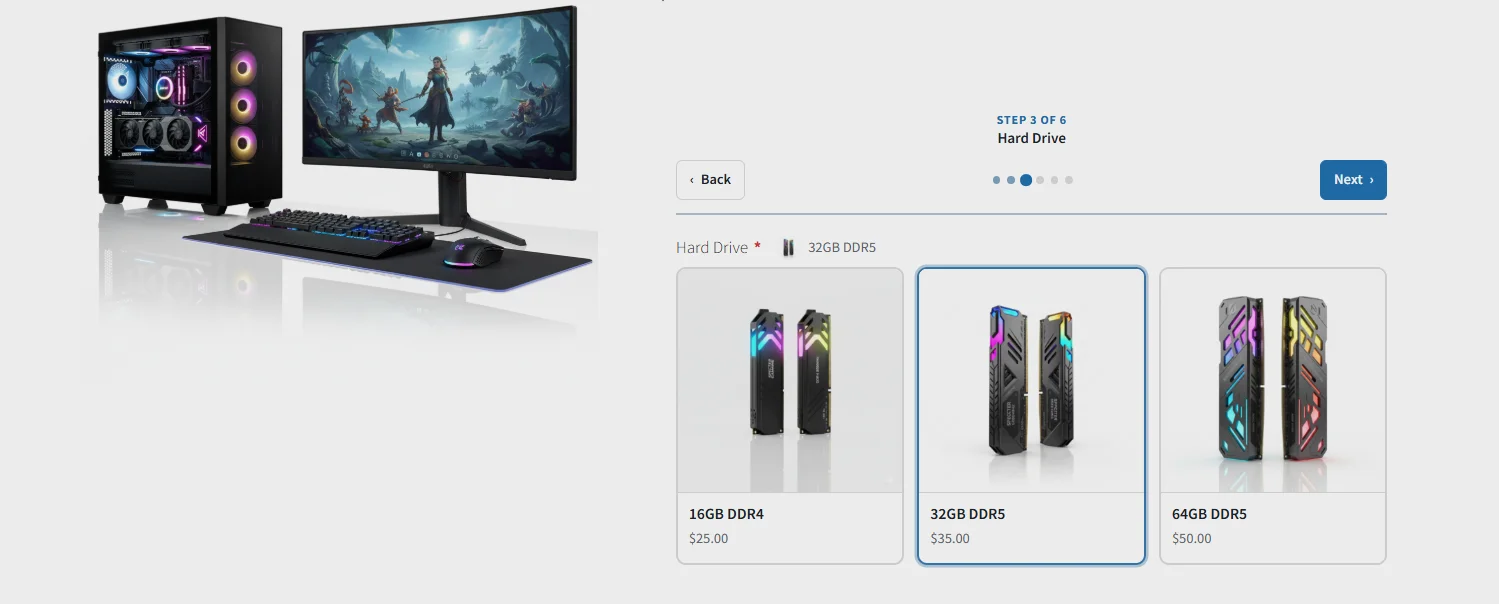
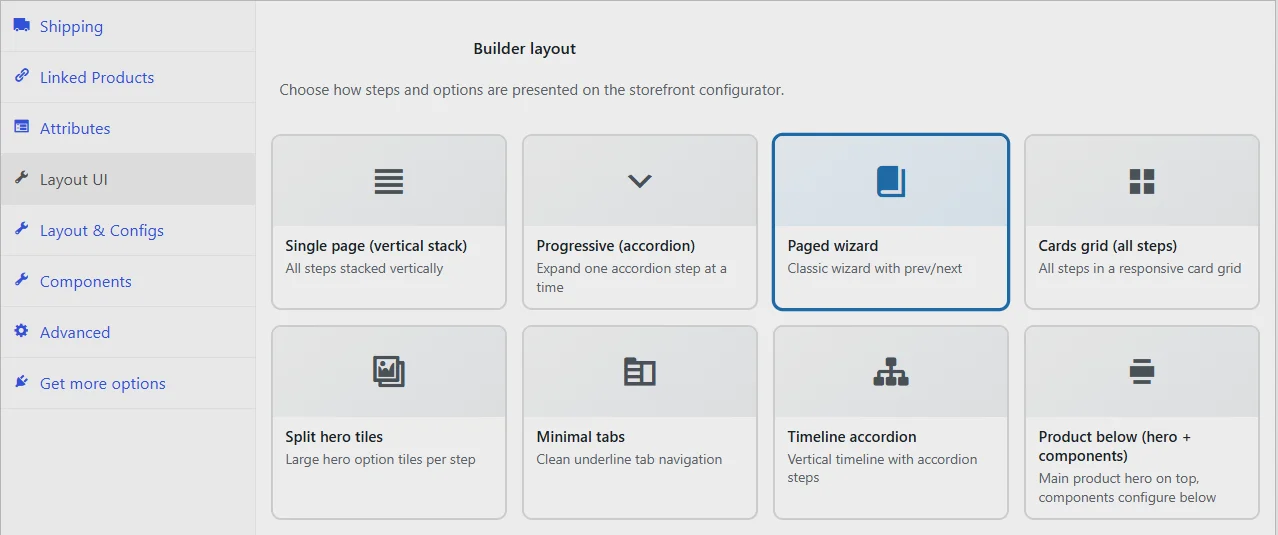
7 Builder Layouts to Display Components
The Layout UI tab gives you seven ways to present the composite builder on the product page. You can choose from Single Page vertical stack, Progressive accordion, Paged wizard, Cards grid, Split hero tiles, Minimal tabs, Timeline accordion, and Product below with hero and components. Each layout changes how steps and options are presented to customers on the storefront, so you can match the builder experience to your product type and store design. You can also set a custom accent color to align the builder with your brand.
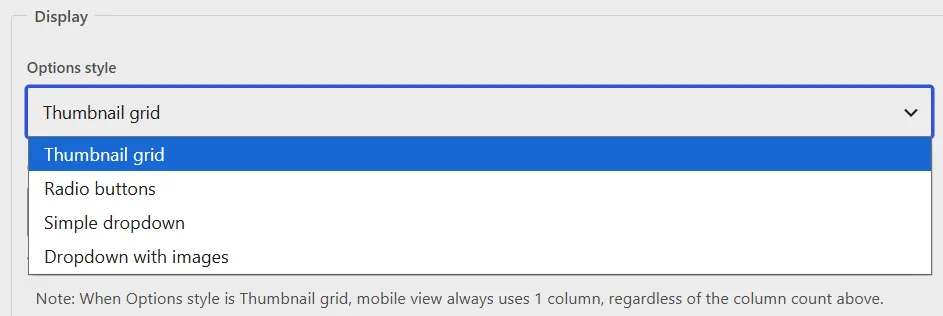
Display Components as Thumbnail Grid or Dropdown
Each component can be displayed as a thumbnail grid showing product options as image cards, or as a dropdown select field. For the thumbnail grid, you can configure the number of columns displayed, with mobile view automatically switching to a single column. You can also enable customer filters within each component so shoppers can narrow down available options before making a selection.
Per-Component Pricing with Adjustment Types
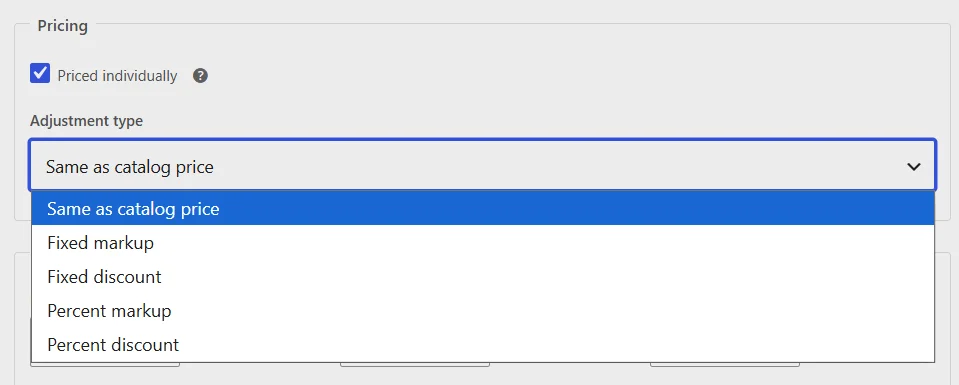
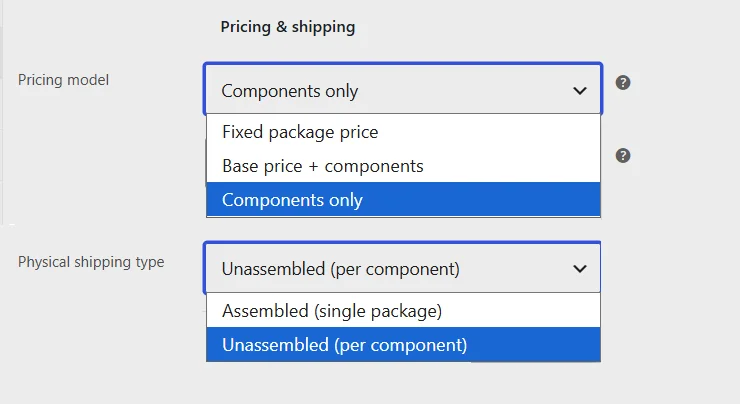
Each component can be priced individually using one of five adjustment types: same as catalog price, fixed markup, fixed discount, percent markup, or percent discount. This gives you precise control over how each component contributes to the final total. The pricing model at the product level can be set to components only or base price plus components, where a fixed base price is added on top of the selected component prices.
Quantity Controls Per Component and Container
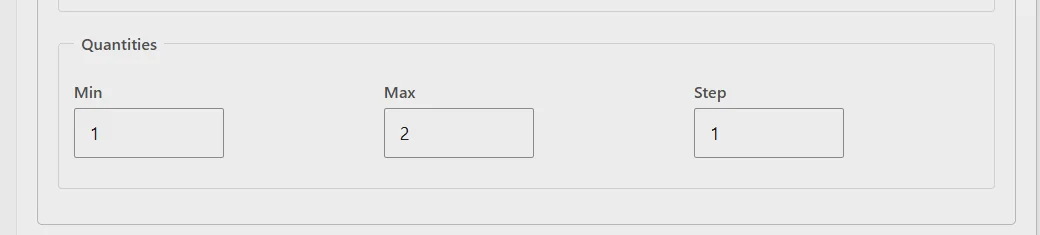
At the component level, you can set a minimum, maximum, and step value to control how many units of that component a customer can select. At the container level, you can set the minimum and maximum number of composite units a customer can order along with a quantity step increment, keeping the overall order within defined limits.
Flexible Pricing and Shipping Configuration
The physical shipping type can be set to Unassembled to charge shipping per component separately, or Assembled to apply a single shipping fee to the product as a whole. This lets you align shipping costs with how your products are actually packed and dispatched.
Live Build Summary Panel
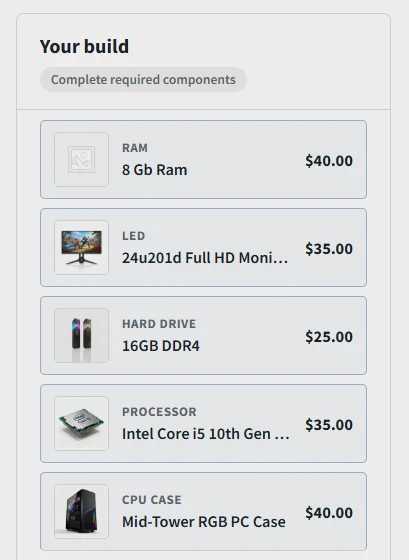
Enable the summary panel to show customers a live view of their build as they make selections. The panel updates in real time with each chosen component’s name, image, and price alongside a running total, so customers always know what they are building and what it will cost.
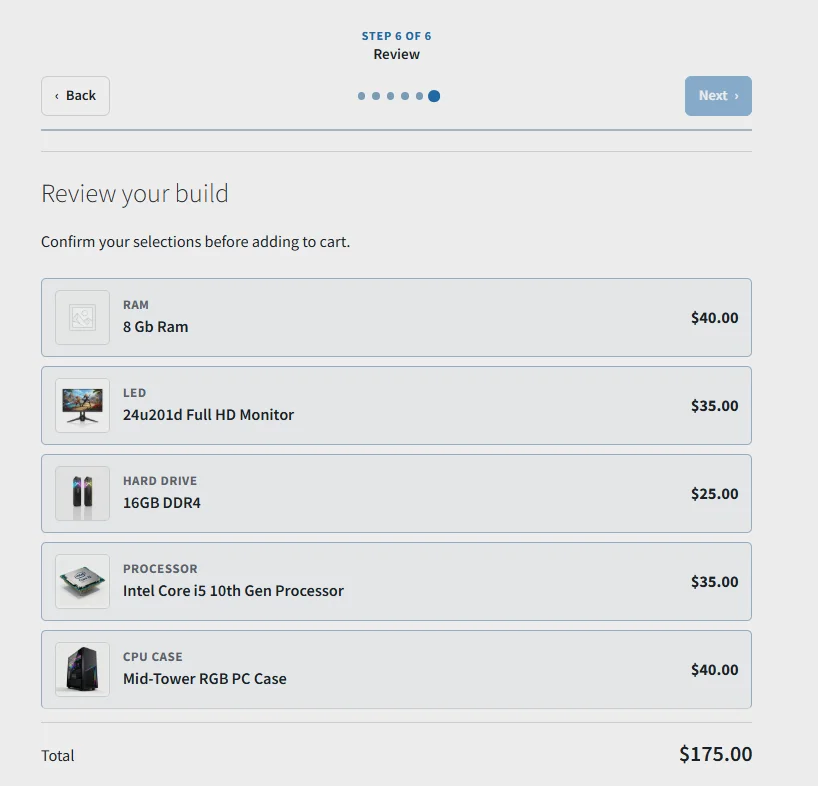
Review Step Before Add to Cart
Enable the review step within the summary panel to show customers a full confirmation of every component they have selected before the product is added to cart. This reduces errors and gives customers confidence that their build is exactly what they intended.
Save Builds for Later
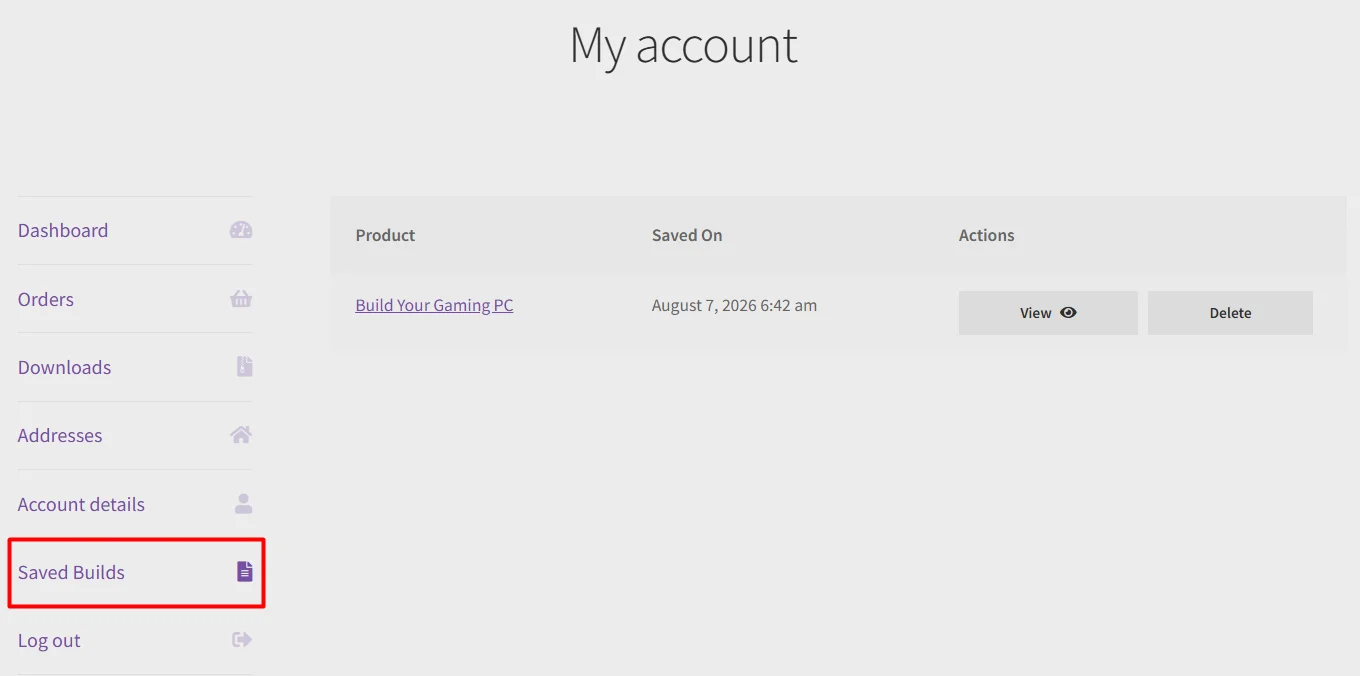
Customers can save their current build using the Save Build button and return to it from their My Account page under a configurable tab label. You can set the maximum number of saved builds a logged-in customer can store. Guest users have their builds retained in a browser cookie for a configurable number of days so they do not lose their configuration between sessions without an account.
Share Build Configuration
A shareable link can be copied directly from the product page, loading the exact same build configuration for anyone who opens it. This is useful for customers who want input from someone else before committing to a purchase, or for B2B scenarios where a configuration needs approval before ordering.

Download Build as PDF
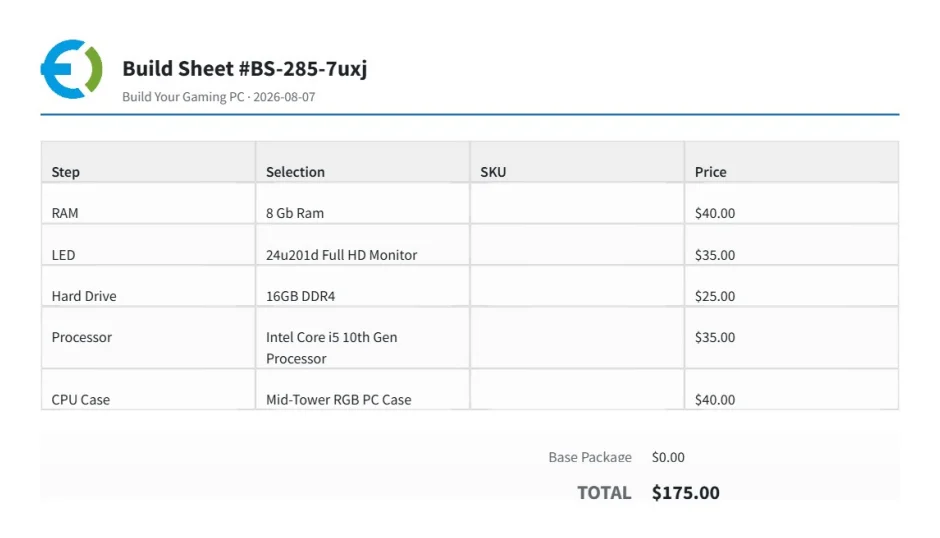
Customers can download their build as a PDF build sheet showing all selected components and the total. The PDF includes a custom logo uploaded from the plugin settings and can be generated in a configurable paper size and orientation, making it easy to review or share the configuration offline.
How WooCommerce Composite Product Can Benefit You?
- Increases store sales by letting customers personalize products and build exactly what they need before ordering
- Simplifies the shopping experience by bringing the entire configuration process onto a single product page
- Adds value to your store by supporting complex product types like computers, bicycles, and furniture that involve multiple parts
- Reduces purchase hesitation with save, share, and PDF features that give customers time and flexibility before committing
- Encourages higher order values by giving customers full visibility of component pricing as they build
FAQs
1. Can I set specific pricing for individual components within a WooCommerce composite products?
Ans. Yes, the composite product allows you to set the price for individual components. You can apply the per-item pricing.
2. Is it possible to limit the number of components customers can choose for a product?
Ans. Absolutely! The WooCommerce composite plugin provides options to set minimum and maximum limits for the number of components customers can add to their woo composite products.
3. Does the composite products plugin support conditional logic for component visibility?
Ans. Yes, you can apply conditional logic on the component and also woo composite products.
4. Can we make component mandatory for the customers?
Ans. WooCommerce composite products allow you to make the component mandatory or optional.
5. It is compatible with variable products?
Ans. Yes, WooCommerce composite plugin allows you to add variable products in the components.
Change Log
Version 2.0.0 Complete plugin overhaul with a redesigned architecture. (Previous version discontinued.) Added 7 builder layouts (previously 3). Added thumbnail grid & dropdown component views. Added 5 pricing adjustment types. Added live build summary and review step. Added save, share, and PDF export for builds. Added advanced quantity controls (min, max, step). Added assembled & unassembled shipping options. Improved pricing model with base price + components support. Improved builder UI and mobile experience. Added My Account support for saved builds.
Version 1.1.2: Fixed the js error to update the price of the composite if the setting has the per item pricing set. Fixed the undefined issues on the cart page Make it compatible with the block cart Fixed the minor issues
Version 1.1.1: Fix CSS issues Fixed functionality of Steps layout Fixed the functionality of Replace thumbnail Fixed the functionality of hide component product/condition for product thumbnail Added functionality of hide component Added functionality of detail visibility of product title/description/thumbnail/price
Version 1.1.0: Made compatible with multi site
Version 1.0.9: Multi language support
Version 1.0.8: *Minor issues fixed
Version 1.0.7: *compatible with variable products
Version 1.0.6: * Fix add to cart product out of stock validation issue.
Version 1.0.5: * Fix product price issues in cart
Version 1.0.4: * Fix Add_to_cart Button validation for Out of Stock Product. * Show Out Of Stock message on Products that are out of stock(instead of Product Link)
Version 1.0.3: Bugs Fixed
Version 1.0.2: Fixed composite type product issues Fixed product quantity issues
Version 1.0.1: JS issues fixes
Version 1.0.0: Initial Release
4.6 average based on 11 ratings.

| Last Update | 2026-08-11 |
| Created | 2019-08-30 |
| Sales | 209 |
| Discussion | Comments |
| Compatible Browsers | IE10 IE11 Firefox Safari Opera Chrome Edge |
| Software Version | WordPress 7.0.x WordPress 6.9.x WordPress 6.8.x WordPress 6.7.x WordPress 6.6.x WordPress 6.5.x WordPress 6.4.x WordPress 6.3.x WordPress 6.2.x WordPress 6.1.x WordPress 6.0.x WordPress 5.9.x WordPress 5.8.x WordPress 5.7.x WordPress 5.6.x WordPress 5.5.x WordPress 5.4.x WordPress 5.3.x WordPress 5.2.x WordPress 5.1.x WordPress 5.0.x WordPress 4.9.x |
| Compatible With | WooCommerce 10.x.x WooCommerce 9.x.x WooCommerce 8.x.x WooCommerce 7.x.x WooCommerce 6.x.x WooCommerce 5.x.x |
| Gutenberg Optimized | |
| High Resolution | |
| Files Included | JavaScript JS HTML CSS PHP |
| Video Preview Resolution |


