Custom Checkout Fields Manager for WooCommerce

Take full control of your checkout experience with the WooCommerce Checkout Field Editor and collect the right information from customers!
The WooCommerce Checkout Field Editor plugin lets you add up to 15 different field types directly to your checkout form, so you get the information you actually need without overwhelming your customers.
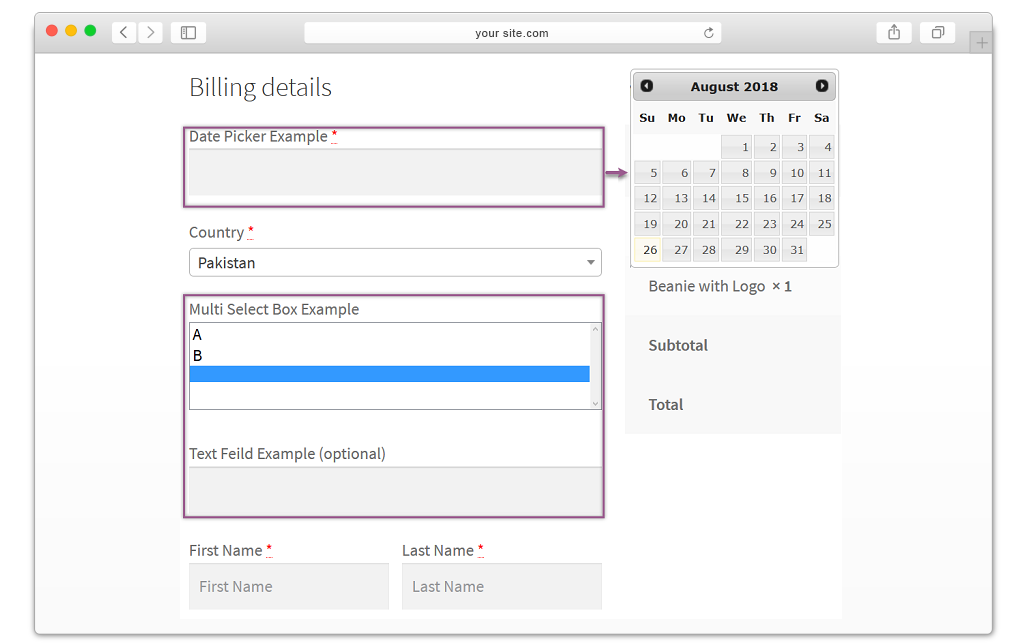
The plugin supports text fields, text areas, select boxes, multi-select boxes, checkboxes, radio buttons, date pickers, time pickers, passwords, file uploads, image uploads, heading fields, message fields, country lists, color palettes, number fields, and phone numbers.
Apply these fields anywhere across your checkout, including billing, shipping, or the additional information section, and the collected data will automatically appear on invoice emails, order detail pages, and the My Account page.
Adding new fields, editing existing ones, or removing default checkout fields is completely straightforward. You only ask for what matters, which keeps the checkout page clean and helps bring down cart abandonment rates.
conditional fields let you show or hide specific fields based on customer input, keeping the experience smooth and clutter-free. Rearranging fields is just as easy, simply drag and drop them into place, customize the labels, and sort the order
- Features:
- Manage Default Checkout Fields (Edit, Hide, Required/Optional, Set Order)
- Add 15 Types of Fields to Customize Checkout Page
- Add Conditional or Dependable Fields
- Set Price for Each Field
- Add fields to Any Checkout Step / Section
- Drag and Drop to Add New Fields
- Sort the Order of New Fields
- Display Fields in Invoice Email, Order Detail Page, My Account
- Placeholder for fields
- Compatible with WooCommerce Direct Checkout Plugin
Add Conditional / Dependant Fields on Checkout Page
The WooCommerce checkout page editor enhances the user experience by enabling conditional logic within fields. Hidden fields appear automatically once specific conditions are fulfilled, making the checkout process more intuitive and responsive to customer input.
Set Price for Each Field
You can assign a custom price to each checkout field to charge customers based on their selections. This works particularly well for stores that offer personalization or customization services, giving you a simple way to manage additional costs at checkout.
Drag & Drop to Extra Fields and Sort their Order
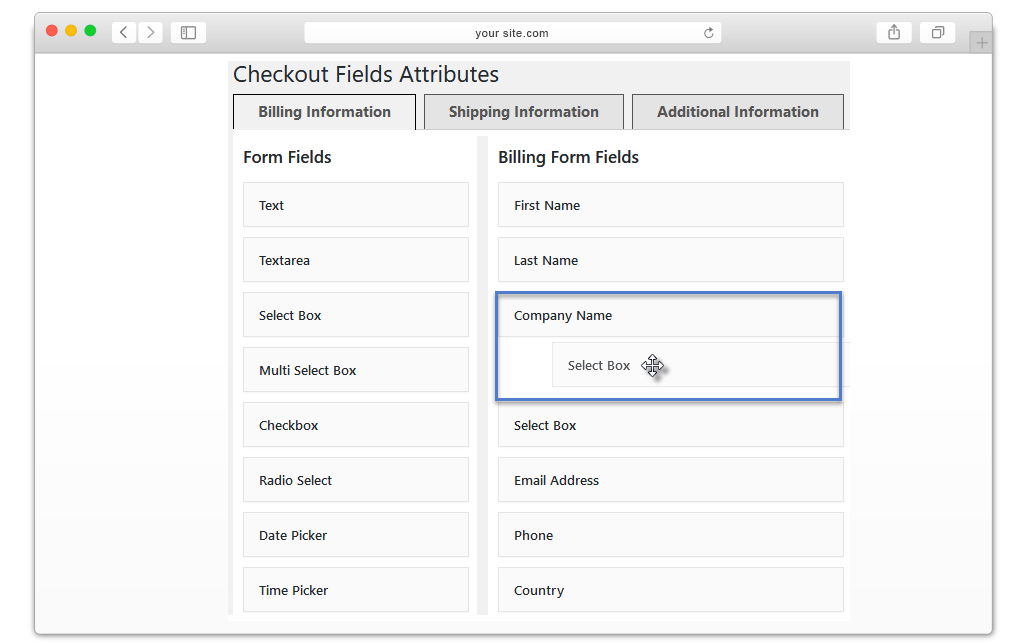
The WooCommerce checkout fields plugin offers an intuitive drag and drop interface. You can add fields to the checkout form, customize their labels, and reorder both new and existing fields with ease, all without touching a single line of code.
Edit, Hide & Reposition the Default WooCommerce Checkout Fields
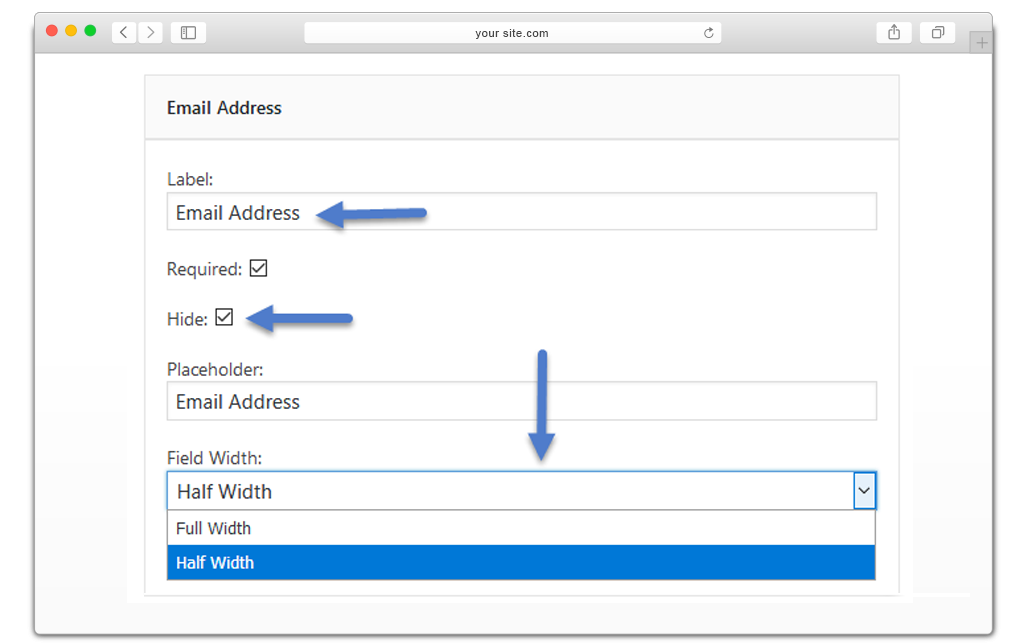
You get complete control over the default checkout fields. Edit or hide them, mark them as mandatory or optional, and rearrange their display order to match your store’s specific requirements.
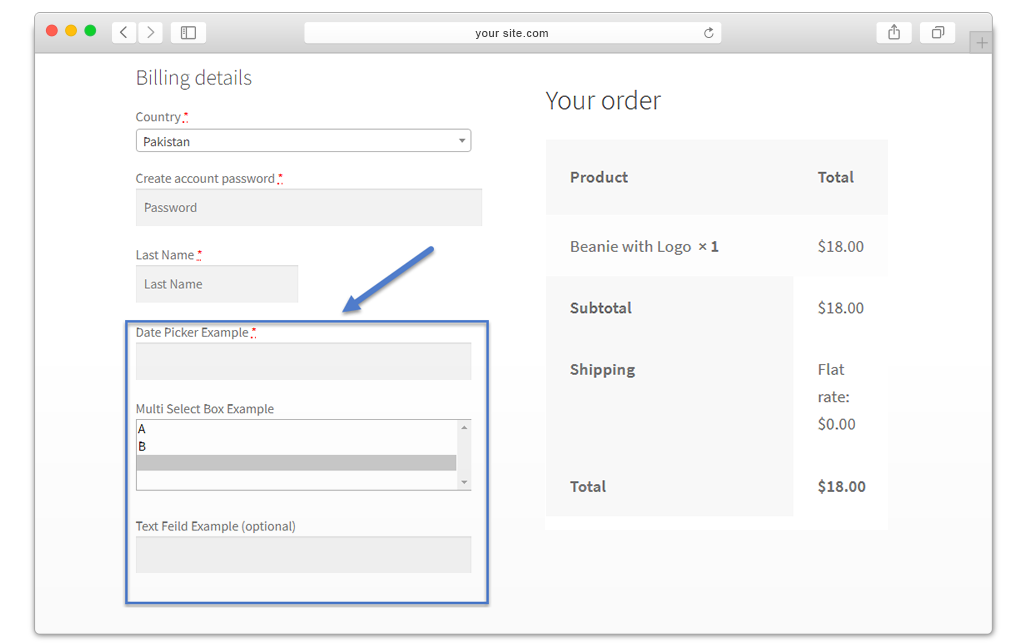
Add Fields in Billing Section to Get Extra Billing Details
The WooCommerce checkout field editor lets you insert new fields into the billing section to capture additional billing information from customers, such as company addresses, company phone numbers, and any other details relevant to your business.
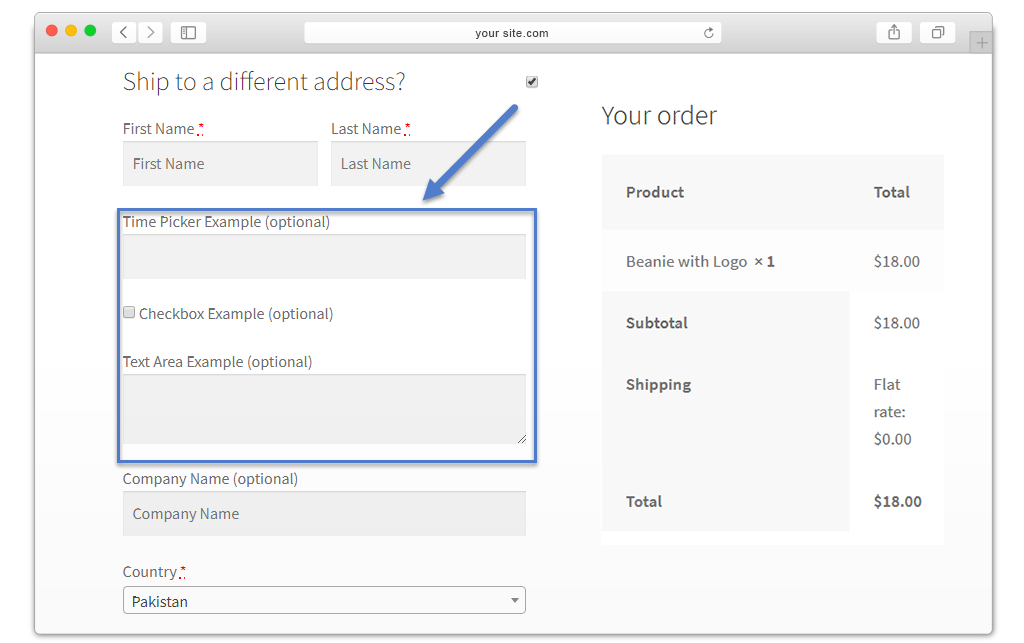
Add Fields in Shipment Section to Ask More Shipping Details
Getting extra shipping information from customers is simple with custom WooCommerce checkout fields. You can add dedicated fields to the shipment section to collect details like alternate email addresses, mobile numbers, and any other shipping related information you need.
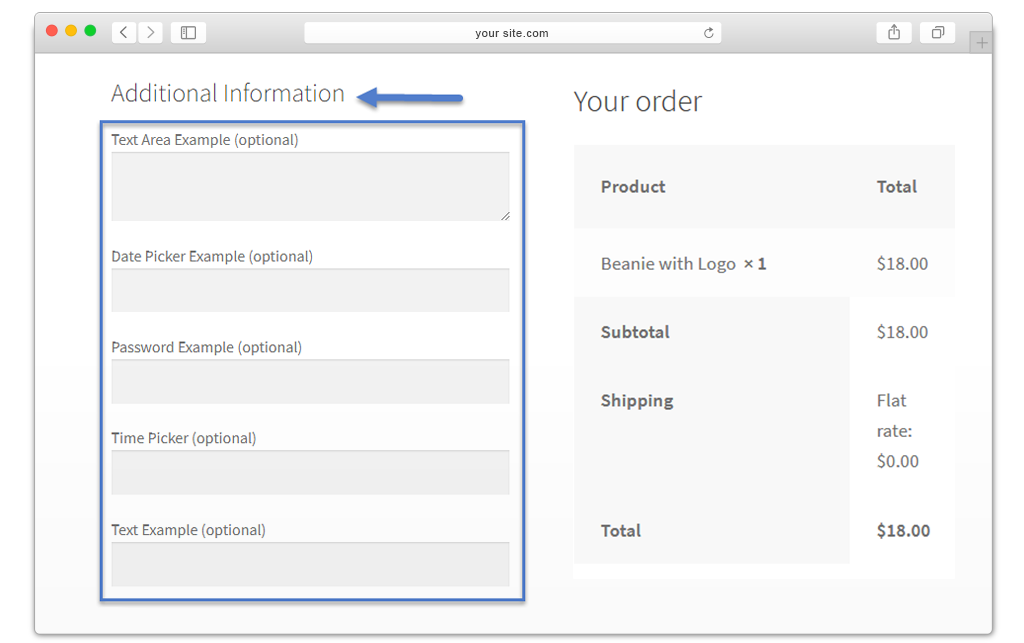
Add Fields in Additional Information Section of Checkout Page
If you need to collect data beyond billing and shipping details, you can add custom fields to the additional information section. This is a great way to request order notes, comments, gift wrapping preferences, and much more, all managed through the WooCommerce checkout field editor.
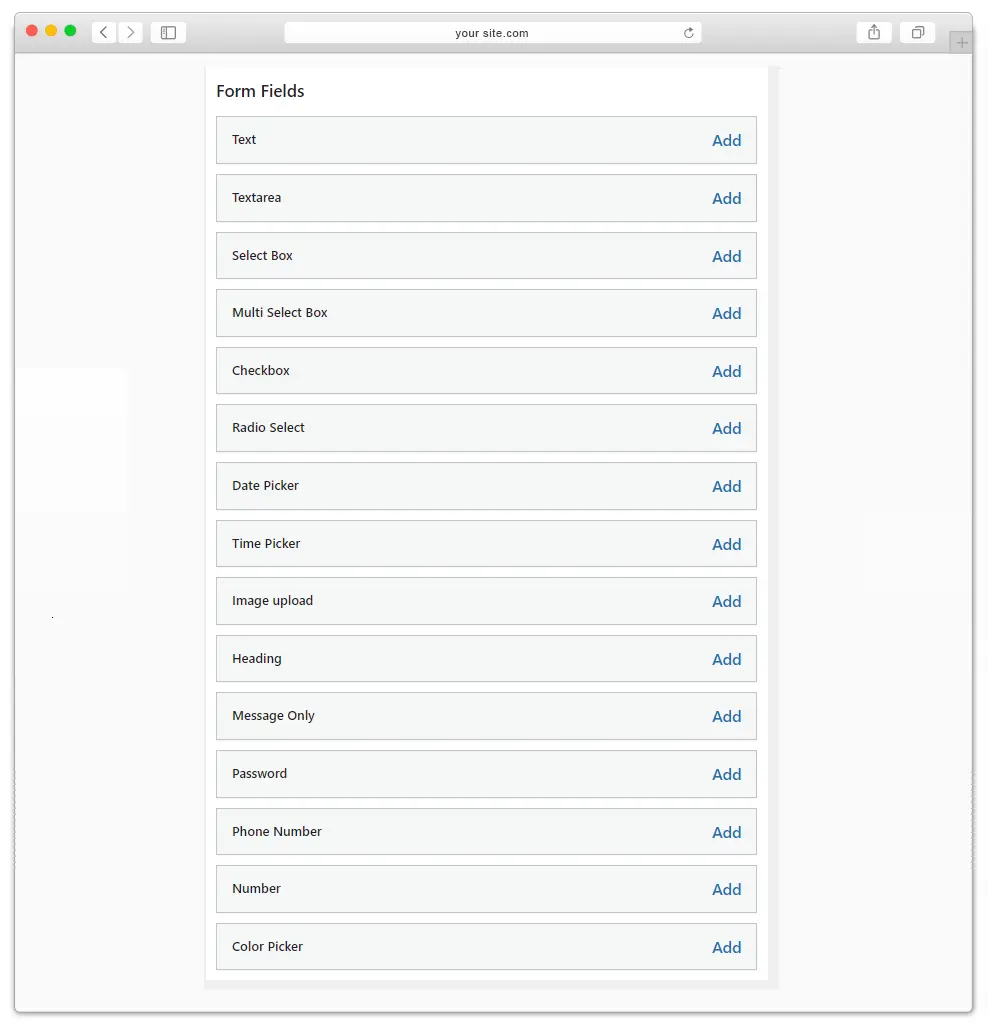
Supports 15 Types of Fields to Add on Checkout Page
The WooCommerce checkout field editor supports 15 distinct field types, giving you the flexibility to ask virtually any type of question during the checkout process and personalize the experience for your customers.
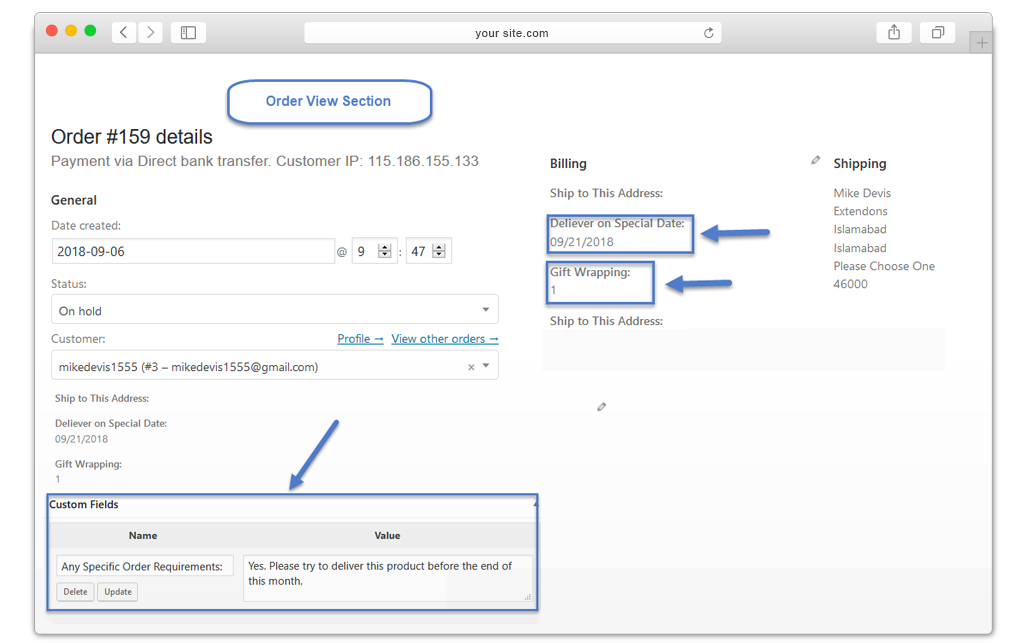
Extra Fields are Displayed in Order Detail Page
Administrators can view all additional fields and the supplementary data submitted by customers directly from the WooCommerce order detail page, making it easy to stay on top of every order.
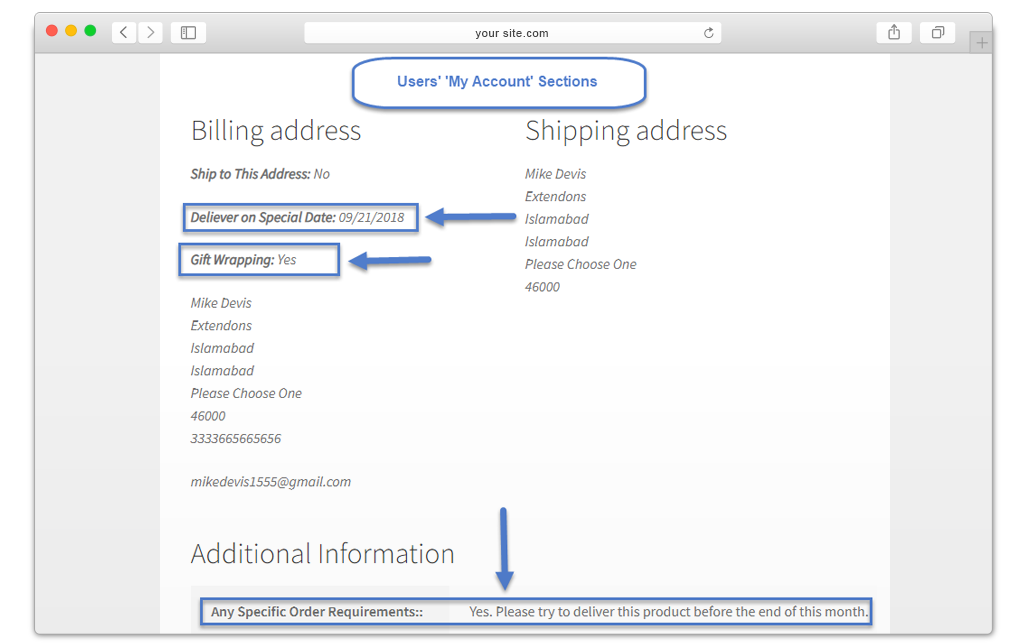
Additional Fields are Displayed in Invoice Email & My Account
All additional fields added through the WooCommerce checkout page editor also appear in invoice emails sent to customers. Customers can also view these fields in their My Account section.
Additional Features of WooCommerce Checkout Manager Plugin
- Add the fields and customize the field labels
- Mark the fields mandatory or optional
- Custom fields are also shown on Order and Thank you page
- Display fields in full-width or half-width layout
- Option to hide fields whenever needed
FAQs
1. What types of custom fields can I add with WooCommerce checkout field editor?
Ans. You can add 15 different types of fields, including text fields, dropdown menus, radio buttons, checkboxes, file uploads, and date pickers
2. Where can I add WooCommerce checkout fields?
Ans. You can add custom fields to any checkout step, including billing, shipping, and additional sections.
3. Can I rearrange the order of the checkout fields?
Ans. Yes, you have full control over the order of the WooCommerce custom checkout fields. Using the intuitive drag-and-drop interface in the plugin settings you can easily rearrange the fields.
4. Is it possible to make a checkout field mandatory for customers to fill out?
Ans. Absolutely! WooCommerce Checkout Fields Manager enables you to set WooCommerce custom fields as required or optional.
5. Can I create conditional logic for checkout fields?
Ans. Yes, WooCommerce checkout manager plugin supports conditional logic. You can configure fields to appear or disappear based on the values entered by customers in other fields.
6. Will custom checkout fields be displayed on the customer’s order details and email notifications?
Ans. WooCommerce checkout field editor plugin seamlessly integrates custom fields into order details, making sure you get all the information you need without any hassle.
7. Can I remove default WooCommerce checkout fields with WooCommerce checkout manager?
Ans. You cannot remove the default fields. However, you can hide and edit the default WooCommerce checkout fields.
Change Log
Version 1.2.0: Fixed undefined variable checks and resolved fatal errors to improve overall plugin stability. Fixed an issue where data from multiple fields under the “Additional Information” section was not being properly saved or displayed in the order details. Fixed issues with the image field extension logic and resolved layout/design breaking problems on the order summary page. Resolved conditional logic issues to ensure fields and conditions work as expected.
Version 1.1.9: Conditional issues fixed Tab Redirecting issue fixed Other minor issues fixed
Version 1.1.8: Fixed price issue of the new field
Version 1.1.7: Minor Issue Resolved
Version 1.1.6: Made compatible with multisite
Version 1.1.5: Minor issues resolved
Version 1.1.4: Added WooCommerce HPOS compatibility
Version 1.1.3: Minor Issues Resolved
Version 1.1.2 Updated: Resolved to add an extra field Bug in the shipping and billing section
Version 1.1.1 Updated: Solve compatibility issues with WordPress 5.6
Version 1.1.0 Updated: New Features Added: (1) Add Conditional Fields (2) Set Price Per Field (3) New Fields: Image Upload , Heading fields, Display Only, Message Field, Country List, Color Palettes, Number Fields, & Phone Number Field
Version 1.0.0: 1) Initial release of plugin.
$25 |
Download |
3.8 average based on 10 ratings.

| Last Update | 2026-05-11 |
| Created | 2018-09-05 |
| Sales | 323 |
| Discussion | Comments |
| Compatible Browsers | IE10 IE11 Firefox Safari Opera Chrome Edge |
| Software Version | WordPress 6.9.x WordPress 6.8.x WordPress 6.7.x WordPress 6.6.x WordPress 6.5.x WordPress 6.4.x WordPress 6.3.x WordPress 6.2.x WordPress 6.1.x WordPress 6.0.x WordPress 5.9.x WordPress 5.8.x WordPress 5.7.x WordPress 5.6.x WordPress 5.5.x WordPress 5.4.x WordPress 5.3.x WordPress 5.2.x WordPress 5.1.x WordPress 5.0.x WordPress 4.9.x |
| Compatible With | WooCommerce 9.x.x WooCommerce 8.x.x WooCommerce 7.x.x WooCommerce 6.x.x WooCommerce 5.x.x |
| Gutenberg Optimized | No |
| High Resolution | |
| Files Included | JavaScript JS HTML CSS PHP |
| Video Preview Resolution | 1050x650 |


