User Registration for WooCommerce – Custom Fields, Role Control & Approval


WooCommerce All in one Registration Plugin enables you to add default registration fields in the user registration form for your WooCommerce/WordPress store registration fields likewise First Name, Last Name, Company, Phone, Country, State, Address, Postal Code, and City.

Using WooCommerce All in One Registration Plugin, the store owner or admin can create a custom user role from the Registration (My-Account) form. These users requested position can be approved manually or automatically. The admin can also show user roles selection through a drop-down menu on the registration page. In this way, the user can select which parts best outfit for them.
This All in one Registration Plugin also enables the admin to endorse new user registrations manually. It also provides you the functionality to send customizable email notifications for both Admin and Customers.



Features of Plugins:
- WooCommerce User Registration Default fields
- Enable user role field on Registration
- Manually approve user registration
- Filter users by approval status
- Send Email notification on user status change
- Send Email notification on user registration
- Set user registration status pending and active
- Fully control of admin over user registration
- Disallow users to login if they are not approved
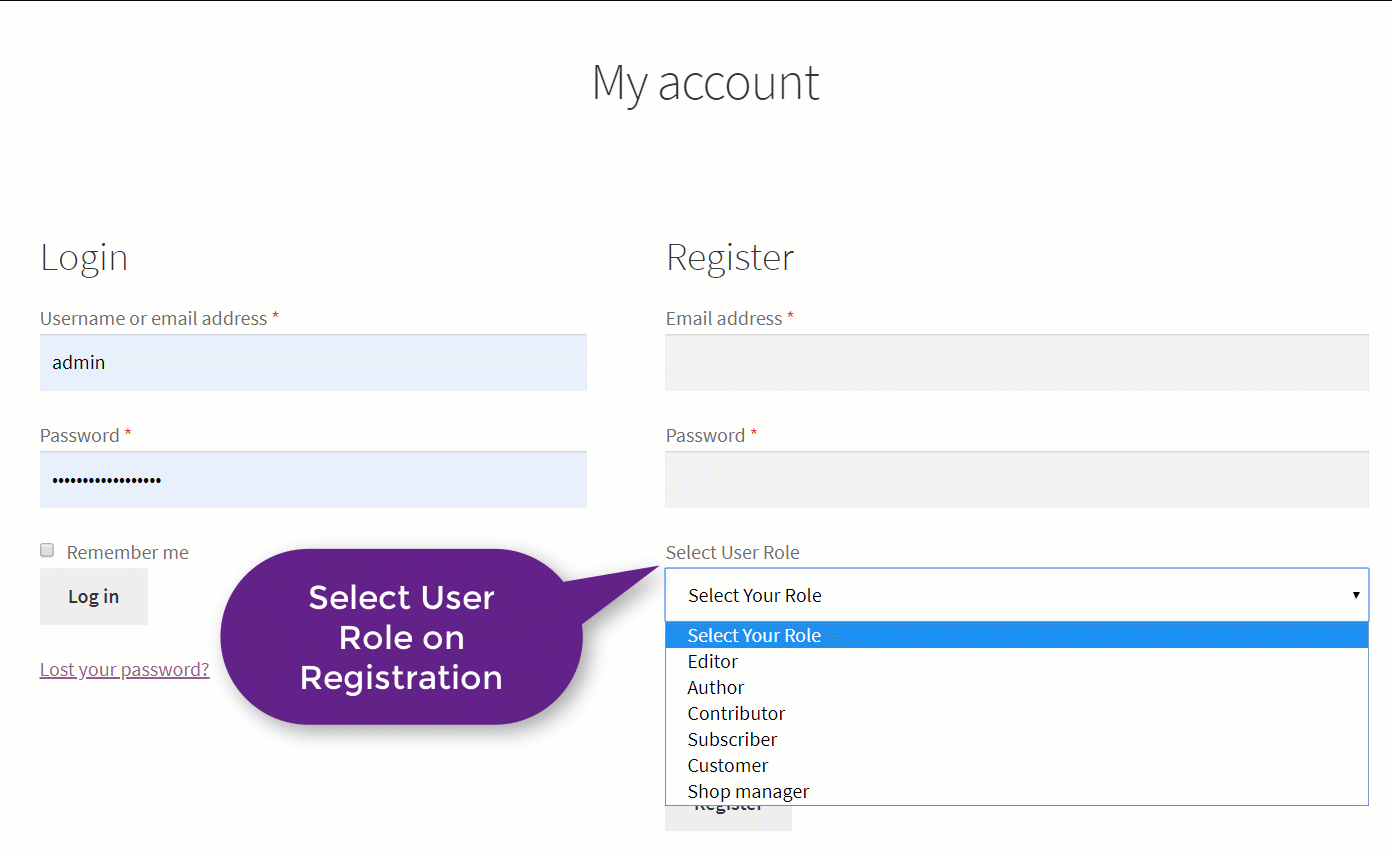
1) Enable User Role on Registration
By enabling user roles on the registration form through the drop-down menu allows the customer to select the user role they want to register. The admin can also show the customized message to know the user once the role is assigned after approval.
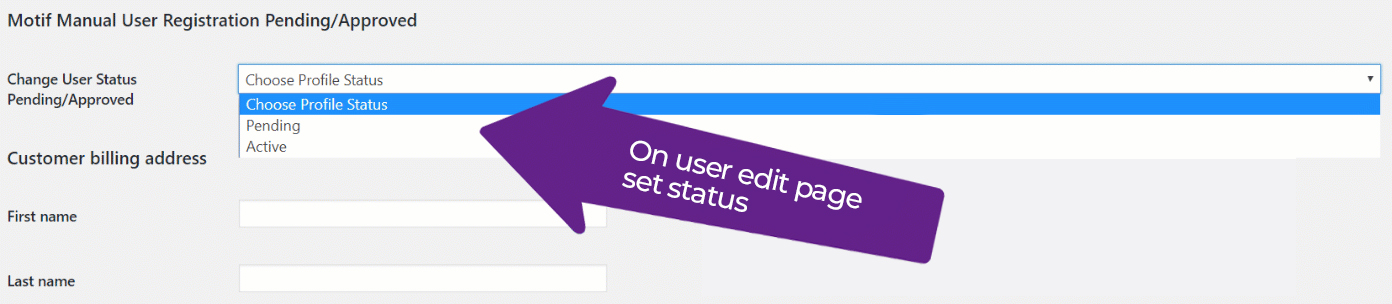
2) Approved or Unapproved User By Admin
The admin can approve new user registration accounts and enable or disable user login access. And the user can notify once the Registration is done.
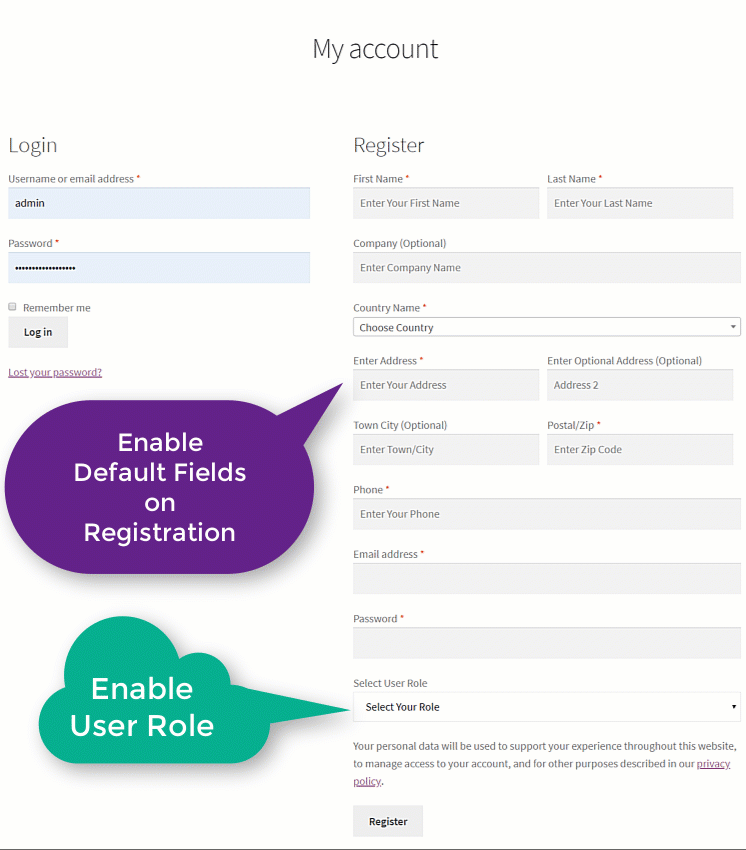
3) Default Registration Fields Enable
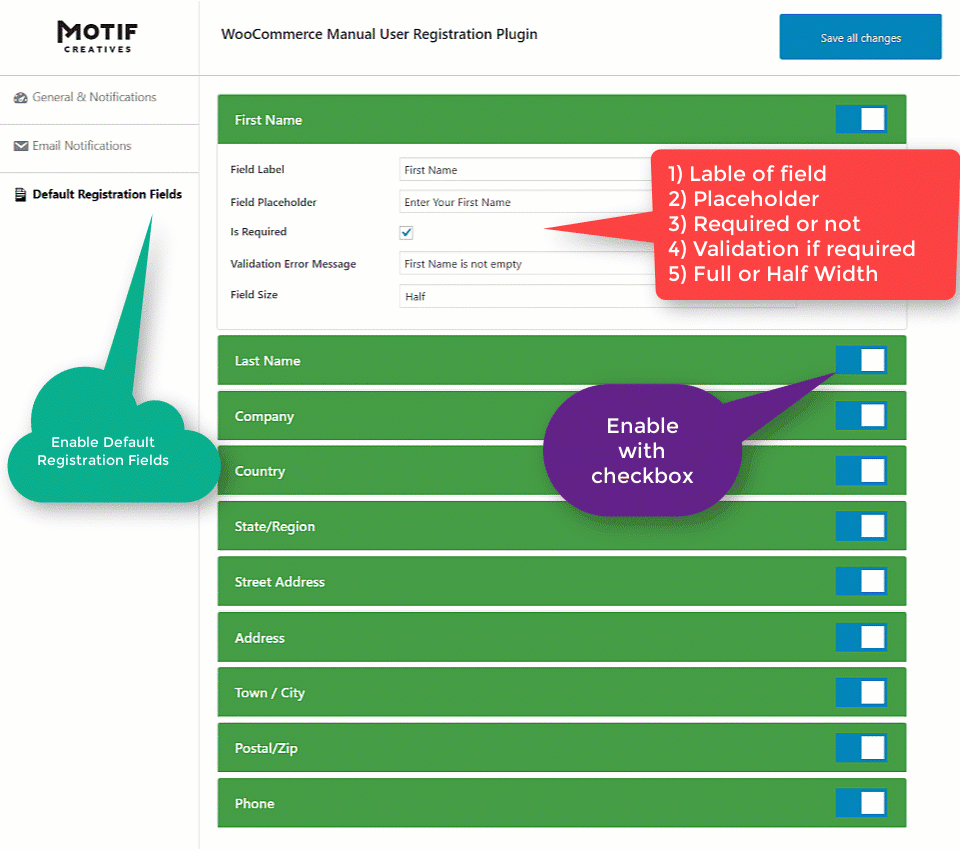
The store admin can enable default user fields on the registration form, for example, First Name, Last Name, Company, Phone, Country, State, Address, Postal Code, and City. The admin can also enable or disable these default fields.
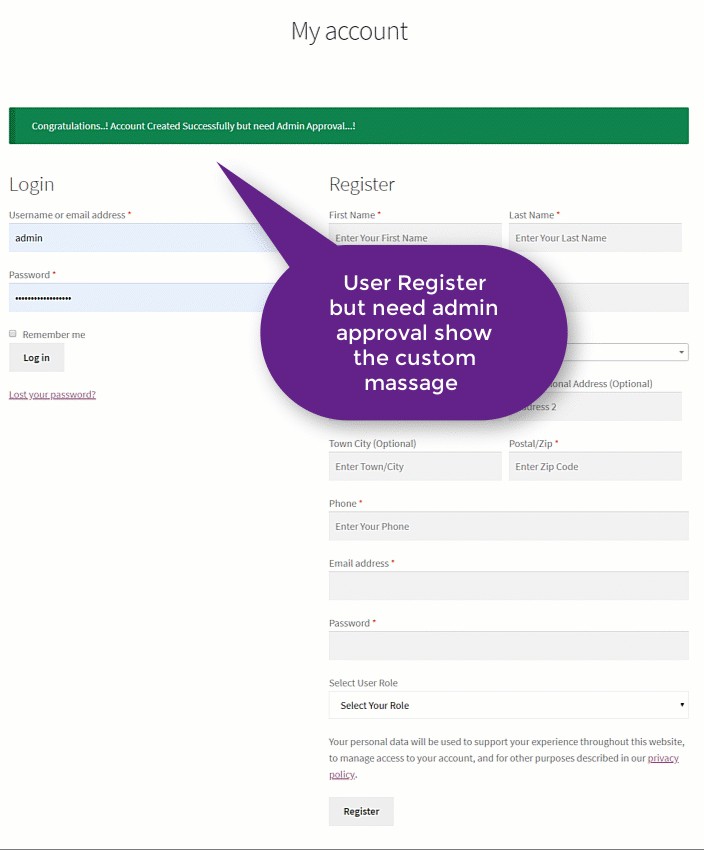
Custom Notification After Registration
The store owner or admin can send a customized email notification to the customer once they registered. These notifications can get both customers and admin.
Enable Both Default fields & User Role Field
You can also enable both Default fields & User Role Field (Dropdown) at once for Registration on My-Account Page. This means with or without Default Fields; you can allow your customers to register.
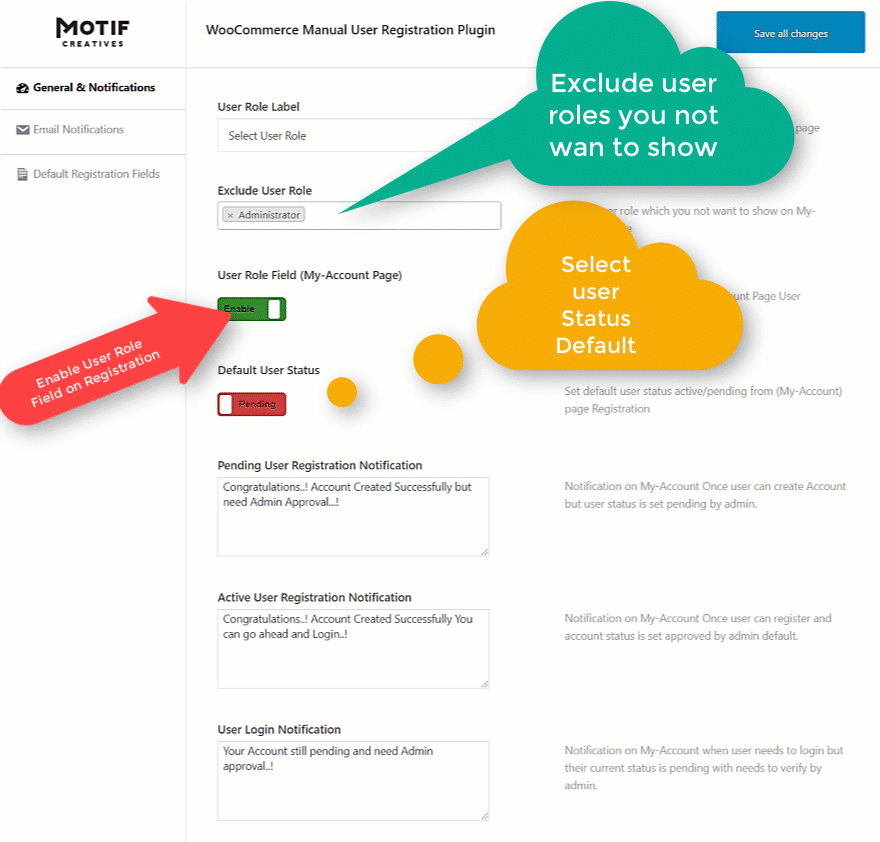
General Setting Options
- Set User Role Field Label
- Exclude User Roles to not Display
- Enable User Role Field
- Set New User Registration Status
- Pending User Registration Notification
- Active User Registration Notification
- User Login Notification
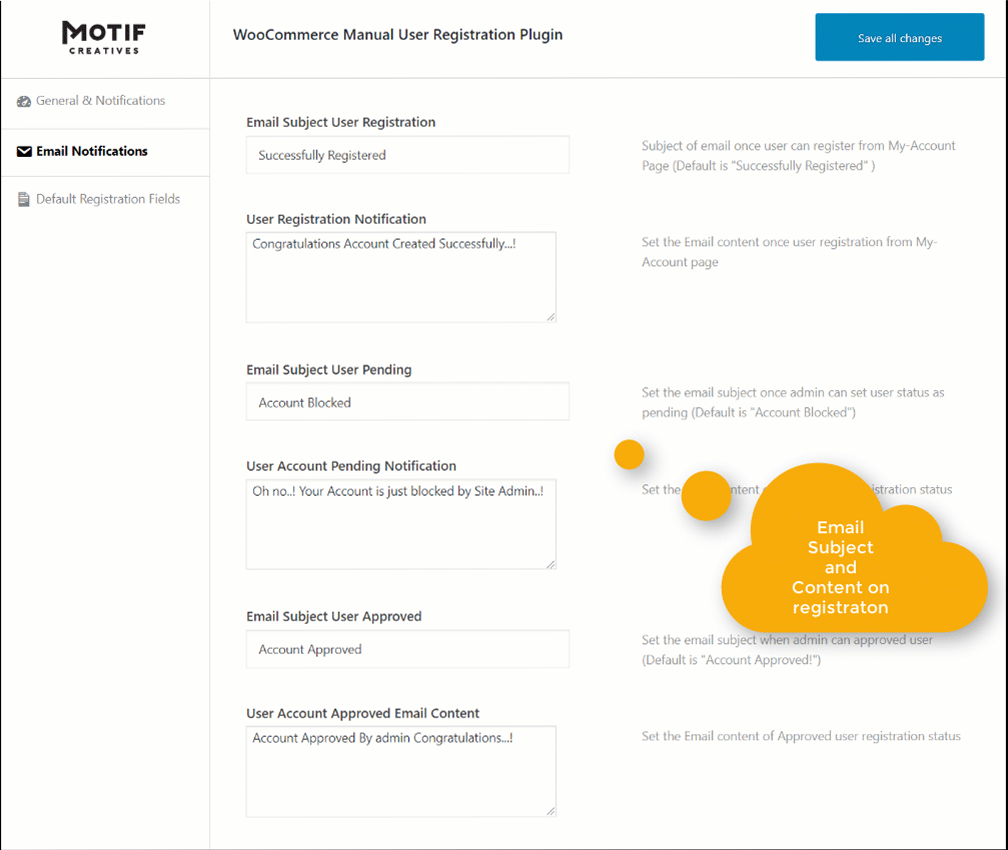
Email Notifications
- Email Subject User Registration
- User Registration Notification
- Email Subject User Pending
- User Account Pending Notification
- Email Subject User Approved
- User Account Approved Email Content
Enable Default Registration Fields
- First Name
- Last Name
- Company
- Billing Country
- Billing State
- Address 1
- Address optional
- Town
- Zip Code
- Phone Number
Pre-Translated Languages

Change log:
Version 2.0.7 Compatibility checks & fixes with the latest woo and wp Fixed Settings Options errors to allow users save settings
Version 2.0.6 Compatibility checks & fixes with the latest woo and wp
Version 2.0.5 Compatibility checks & fixes with the latest woo and wp
Version 2.0.4 Compatibility checks & fixes with the latest woo and wp
Version 2.0.3 Compatibility checks & fixes with the latest woo and wp
Version 2.0.2 Compatibility checks & fixes with the latest woo and wp High-Performance Order Storage Compatibility
Version 2.0.1 Latest Version compatibility check with WooCommerce Version update
Version 2.0.0 Latest Version compatibility check with WooCommerce Version update
Version 1.0.9 Latest Version compatibility check with WooCommerce Accordion layout js fixes Version update
Version 1.0.8 Latest Version compatibility check with WooCommerce Registration user validation settings Version update
Version 1.0.7 Latest Version compatibility check with WooCommerce Version update
Version 1.0.6 Latest Version compatibility check with WooCommerce Accordion layout fix on small devices Version update
Version 1.0.5 Language files updated Version updated
Version 1.0.4 My account endpoint fixes Email on user registration Version updated
Version 1.0.3 Chinese language updated in .pot file Version updated
Version 1.0.2 Pot language file updated
Version 1.0.1 Notification to admin on User Registration fixes
Version 1.0.0 Initial release
$19 |
Download |
0 average based on 1 ratings.

| Last Update | 2026-05-13 |
| Created | 2019-07-16 |
| Sales | 45 |
| Discussion | Comments |
| Compatible Browsers | Firefox Safari Opera Chrome Edge |
| Software Version | WordPress 6.9.x WordPress 6.8.x WordPress 6.7.x WordPress 6.6.x WordPress 6.5.x WordPress 6.4.x WordPress 6.3.x WordPress 6.2.x WordPress 6.1.x WordPress 6.0.x WordPress 5.9.x WordPress 5.8.x WordPress 5.7.x WordPress 5.6.x WordPress 5.5.x WordPress 5.4.x WordPress 5.3.x WordPress 5.2.x WordPress 5.1.x WordPress 5.0.x WordPress 4.9.x |
| Compatible With | WooCommerce 9.x.x WooCommerce 8.x.x WooCommerce 7.x.x WooCommerce 6.x.x |
| Gutenberg Optimized | Yes |
| High Resolution | Yes |
| Files Included | JavaScript JS JavaScript JSON HTML CSS PHP Layered PNG |
| Video Preview Resolution |


