WooCalc – WooCommerce Bulk Variation Pricing & Attribute Manager


WooCalc – WooCommerce Bulk Variation Pricing & Attribute Manager
Stop pricing WooCommerce variations one by one. Set a base price, add modifiers for attributes such as size, material or finish, and let WooCalc calculate the prices for your variation combinations.
WooCalc brings attribute-based pricing and bulk variation recalculation into your WooCommerce product workflow. Reuse global modifiers across products, override them for individual products, and review the results before applying changes.
Beyond pricing, WooCalc helps you calculate variation weights, dimensions and stock quantities, and generate SKUs from reusable patterns. Spend less time entering repetitive values and more time managing your catalog.
What You Can Do with WooCalc
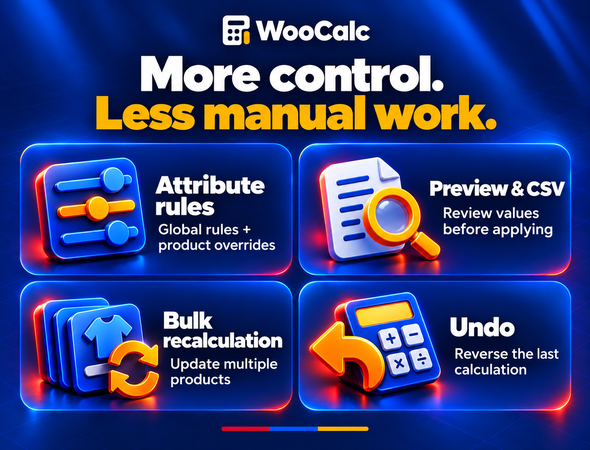
- Calculate variation prices in bulk: use base values and attribute modifiers for regular and sale prices.
- Reuse pricing rules: set global attribute-term modifiers and apply product-specific overrides when needed.
- Review before you apply: preview sample calculations or export a dry-run CSV with before-and-after values.
- Undo the last calculation: restore the previous variation values if you need to reverse that calculation.
- Recalculate multiple products: run the Products bulk action or queue background calculations.
- Automate more variation data: calculate weight, dimensions and stock, and build consistent variation SKUs.
Ideal for Products with Attribute-Based Prices
WooCalc is especially useful when variation values follow a repeatable rule:
- Jewelry and accessories: prices that vary by material, size, stone or finish.
- Furniture and home goods: combinations of dimensions, materials and finishes.
- Apparel and fashion: price adjustments for size, fabric or customization.
- Made-to-order products: configurable options represented by WooCommerce variations.
- Large variation catalogs: products with many combinations that would otherwise require repetitive editing.
One Base Price. Clear Attribute Rules.
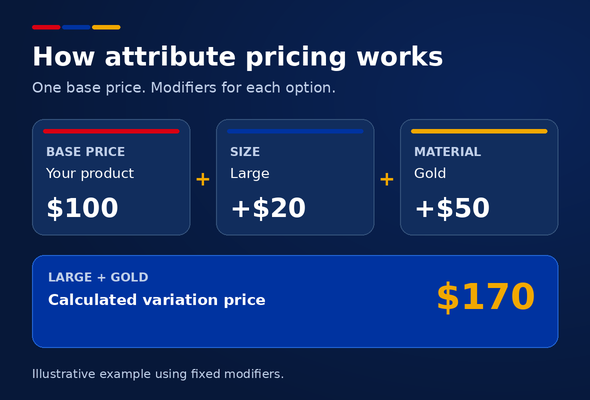
For fixed modifiers, the calculation is easy to follow:
Variation price = Base price + Applicable attribute modifiers Base price: $100 Size: Large +$20 Material: Gold +$50 --------------------------------- Price for Large + Gold: $170
Set the base value and modifiers, then use Save & calculate to write the calculated values to your variations. WooCalc also supports percentage modifiers for adjustments that need to scale with value.
Key Features
Bulk Variation Pricing
- Calculate regular prices and sale prices from base values and attribute modifiers.
- Use positive or negative fixed modifiers, such as
10and-5. - Use percentage modifiers, such as
10%and-5%. - Control rounding with nearest-step, round-up, round-down and banker’s rounding options.
- Set optional minimum and maximum price limits.
Global Rules and Product-Level Flexibility
- Assign reusable modifiers to global WooCommerce attribute terms.
- Override global modifiers for individual products.
- Leave a product override empty to fall back to the global value.
- Use custom, product-specific attributes with local modifiers on the WooCalc tab.
- Optionally trigger automatic recalculation when global attribute modifiers change.
Preview, Dry Run and Undo
- Preview sample formulas before applying a calculation.
- Export a dry-run CSV with before-and-after values for every variation, without writing changes.
- Review duplicate SKU flags in the dry-run export.
- Undo the last calculation to restore previous variation values.
Smart Variation SKU Builder
Generate variation SKUs from a reusable template using product information and attributes. For example:
{parent}-{attr_slug:pa_color}-{attr_slug:pa_size} - Supported tokens include
{main},{parent},{product_sku},{product_id}and{variation_id}. - Attribute tokens include
{attr:…},{attr_slug:…}and{attr_mod:…}. - Configure the separator, letter case and maximum SKU length.
- Support for repeatable recalculation without fatal duplicate-SKU errors.
Weight, Dimensions and Stock Calculations
Apply the calculation workflow to variation weight, length, width, height and stock quantity as well as pricing. This is useful when product attributes determine these values.
Tools for Larger Catalogs
- Recalculate selected products from the WooCommerce Products list.
- Process background jobs through Action Scheduler, with a WP-Cron fallback.
- Track calculation progress and estimated completion time.
- Cancel a running calculation.
- Adjust the WooCommerce variation creation batch size.
Faster Setup and Reusable Settings
- Start with Default, Jewelry, Furniture or Apparel templates, including sample SKU patterns.
- Copy WooCalc settings from another product by its ID.
- Import and export global attribute modifiers with CSV tools.
- Follow the setup checklist on the product’s WooCalc tab.
- Use unified Save all actions and notices that explain when a product needs saving or reloading.
How It Works
- Prepare your variable product. Add global or custom attributes and generate the variations in WooCommerce.
- Save and reload. Update the product and reload the edit screen so WooCalc can load its attributes.
- Define your rules. Open Product data → WooCalc, enter base values and configure global modifiers or product-level overrides.
- Configure optional settings. Add a SKU pattern and choose rounding or price limits where needed.
- Review the results. Use Preview sample or Export dry-run CSV.
- Apply the calculation. Click Save & calculate to update the variation values.
When you need to update several products, use Recalculate with WooCalc from the Products bulk actions or queue background jobs.
Frequently Asked Questions
Will WooCalc overwrite my existing variation prices?
Yes. Applying a calculation writes the calculated values to variations. Review a sample preview or dry-run CSV first. The Undo feature lets you reverse the last calculation.
Can I check the results without changing my products?
Yes. Preview sample calculations or export a dry-run CSV. The dry-run export shows before-and-after values for every variation without writing changes, and includes duplicate SKU flags.
Can different products use different modifiers for the same attribute?
Yes. Define global attribute-term modifiers for reuse, then override them on individual products. Empty product overrides fall back to the global values.
Does WooCalc support custom product attributes?
Yes. Custom attributes are supported through per-product modifiers on the WooCalc tab. If you add or change attributes, save the product and reload the edit screen so the new attribute list can load.
Can I use percentages instead of fixed adjustments?
Yes. WooCalc supports both fixed and percentage modifiers, including positive and negative adjustments.
Can I use WooCalc with existing variable products?
Yes. Configure base values and modifiers for the product’s attributes, review the calculated results, and apply them to its variations.
Can I recalculate a large catalog?
WooCalc includes bulk recalculation, background processing, progress tracking and batch controls for larger catalogs. Processing time depends on your hosting environment and the number of products and variations.
Does it calculate prices in the admin or at checkout?
WooCalc calculates and writes values to WooCommerce variations from the administration workflow. Configure your rules, review the results and run the calculation to update the stored variation values.
Can WooCalc generate SKUs automatically?
Yes. The Smart SKU builder combines supported product and attribute tokens in a template, with optional separator, case and length settings.
Does WooCalc require WooCommerce, and is HPOS supported?
WooCommerce must be installed and active. WooCalc works with variable products and declares compatibility with High-Performance Order Storage (HPOS).
Requirements and Technical Details
- WordPress 6.0 or higher.
- WooCommerce 8.0 or higher, installed and active.
- PHP 7.4 or higher.
- WooCommerce variable products using global attributes, custom attributes or both.
- HPOS compatibility declared.
- Background jobs use Action Scheduler with a WP-Cron fallback.
- AJAX actions include nonce validation and capability checks.
Where to Find the Controls
- Product data → WooCalc: base values, product modifiers and calculation controls for variable products.
- Products → Attributes → Edit term: global attribute-term modifiers.
- WooCommerce → WooCalc: plugin settings, CSV tools and batch-size controls.
- Products → Bulk actions → Recalculate with WooCalc: recalculation for selected products.
What’s Included
- WooCalc WordPress plugin as an installable ZIP.
- Documentation and usage guidance.
Update availability and author support are shown in the CodeCanyon purchase panel.
Changelog
Version 2.1.0
- Added full calculation support and per-product modifiers for custom product attributes.
- Added Smart SKU builder tokens, separator, case and maximum-length settings.
- Added dry-run CSV export with before-and-after values and duplicate SKU flags.
- Added save-and-reload notices after attribute changes and sample SKU patterns in templates.
Version 2.0.0
- Added Save all, setup checklist, preview, progress tracking, estimated completion time, cancellation and undo.
- Added sale price, dimension, SKU and stock tools, percentage modifiers, rounding and price limits.
- Added templates, copying settings, bulk recalculation, background jobs and CSV import/export.
- Improved AJAX security, declared HPOS compatibility and added settings under WooCommerce.
Version 1.0.2
- Initial price and weight calculation features and variation batch-limit controls.
Support
For assistance, use the CodeCanyon item’s Support or Comments section. Include your WordPress, WooCommerce and WooCalc versions, a short description of the issue and the steps needed to reproduce it.
Turn Repetitive Variation Editing into a Repeatable Workflow
Set your base values. Define your attribute rules. Preview the results. Let WooCalc calculate the combinations.
Bring attribute-based pricing, reusable settings and bulk recalculation to your WooCommerce catalog with WooCalc – WooCommerce Bulk Variation Pricing & Attribute Manager.
$19 |
Download |
0 average based on 0 ratings.

| Last Update | 2026-10-05 |
| Created | 2022-12-17 |
| Sales | 7 |
| Discussion | Comments |
| Compatible Browsers | |
| Software Version | WordPress 7.0.x WordPress 6.9.x WordPress 6.8.x WordPress 6.7.x WordPress 6.6.x WordPress 6.5.x WordPress 6.4.x WordPress 6.3.x WordPress 6.2.x WordPress 6.1.x WordPress 6.0.x |
| Compatible With | WooCommerce 10.x.x WooCommerce 9.x.x WooCommerce 8.x.x WooCommerce 7.x.x WooCommerce 6.x.x |
| Gutenberg Optimized | |
| High Resolution | |
| Files Included | JavaScript JS CSS PHP |
| Video Preview Resolution |


