WaTurbo | Marketing and Automation Suite for WhatsApp Windows App


WaTurbo | Marketing and Automation Suite for WhatsApp Windows App
Sending personalized WhatsApp messages one by one doesn’t scale. This all-in-one WhatsApp marketing tool helps you validate numbers, extract contacts, manage accounts, and send personalized bulk messages — safely, efficiently, and fully under your control.
Built on WhatsApp Web (non-API), it is designed for stable day-to-day operations. No risky shortcuts. No API dependency. Just clean and controlled automation.
Top Highlights
- ✔ Operates via WhatsApp Web — No API required, no risky shortcuts
- ✔ All-in-One WhatsApp Automation — bulk messaging, group joining, contact & group member extraction
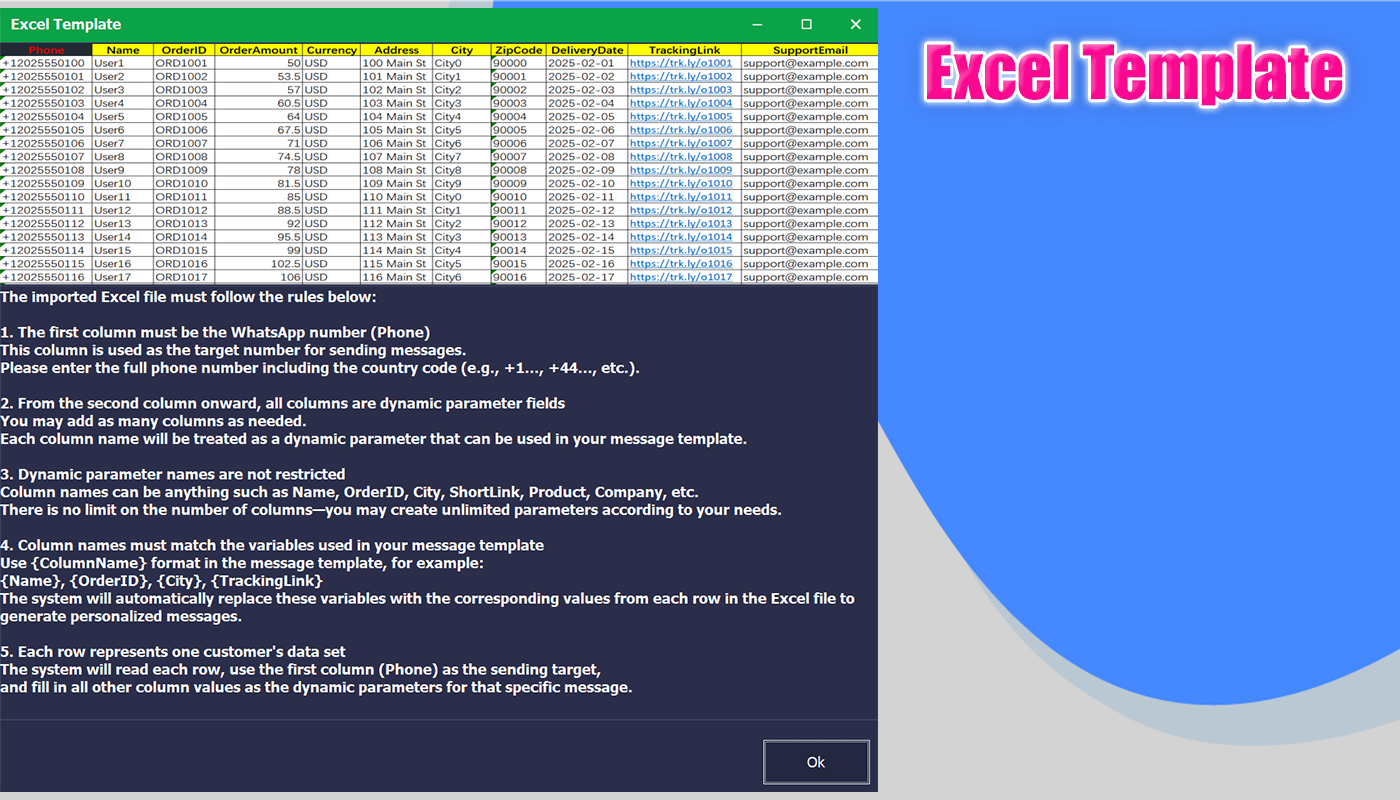
- ✔ Excel-Based Dynamic Templates — unlimited variables, use any column names (
phonerequired) - ✔ Personalized Bulk Messaging — each recipient receives the correct message automatically
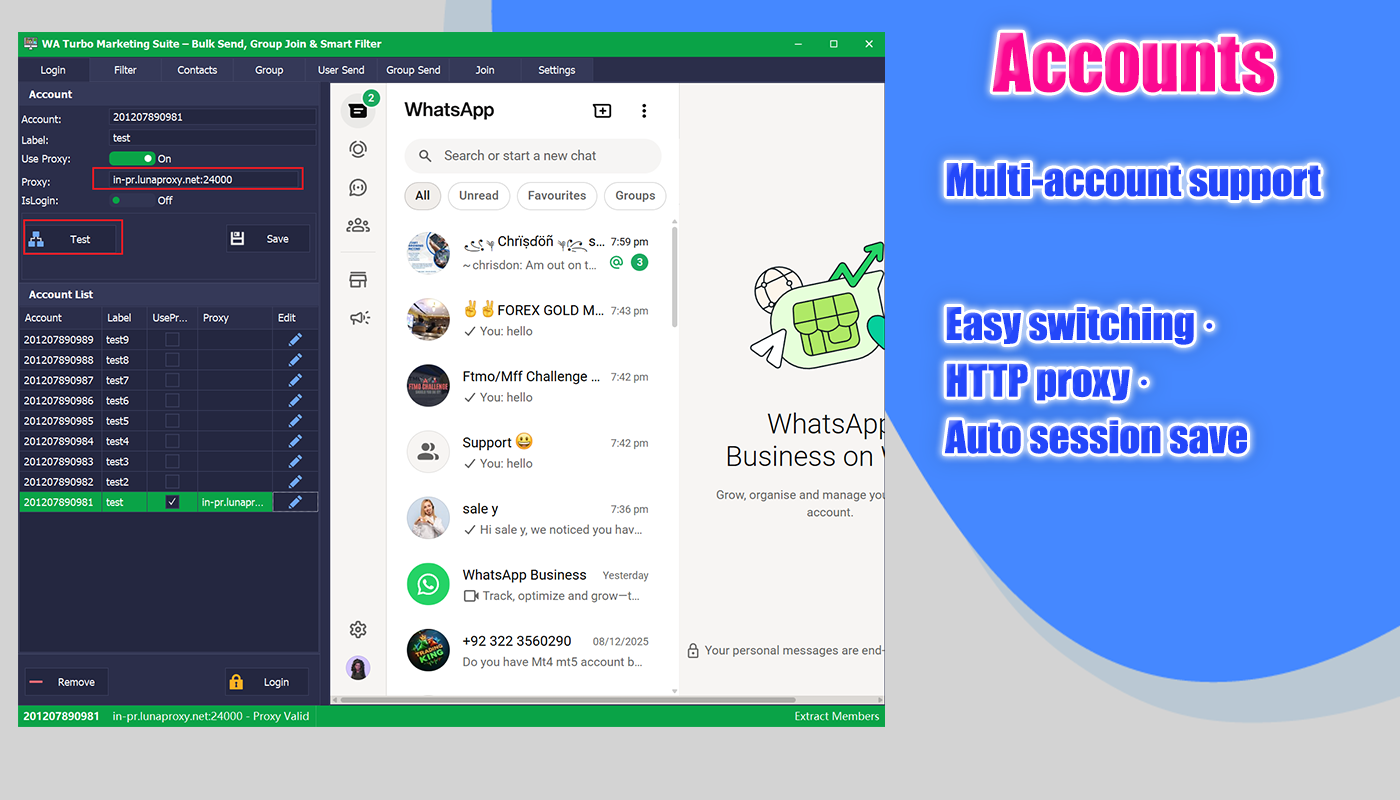
- ✔ Multi-Account Ready — manage and switch accounts easily
- ✔ HTTP Proxy Support — http proxies supported(non-username/password), automatic fallback to direct connection
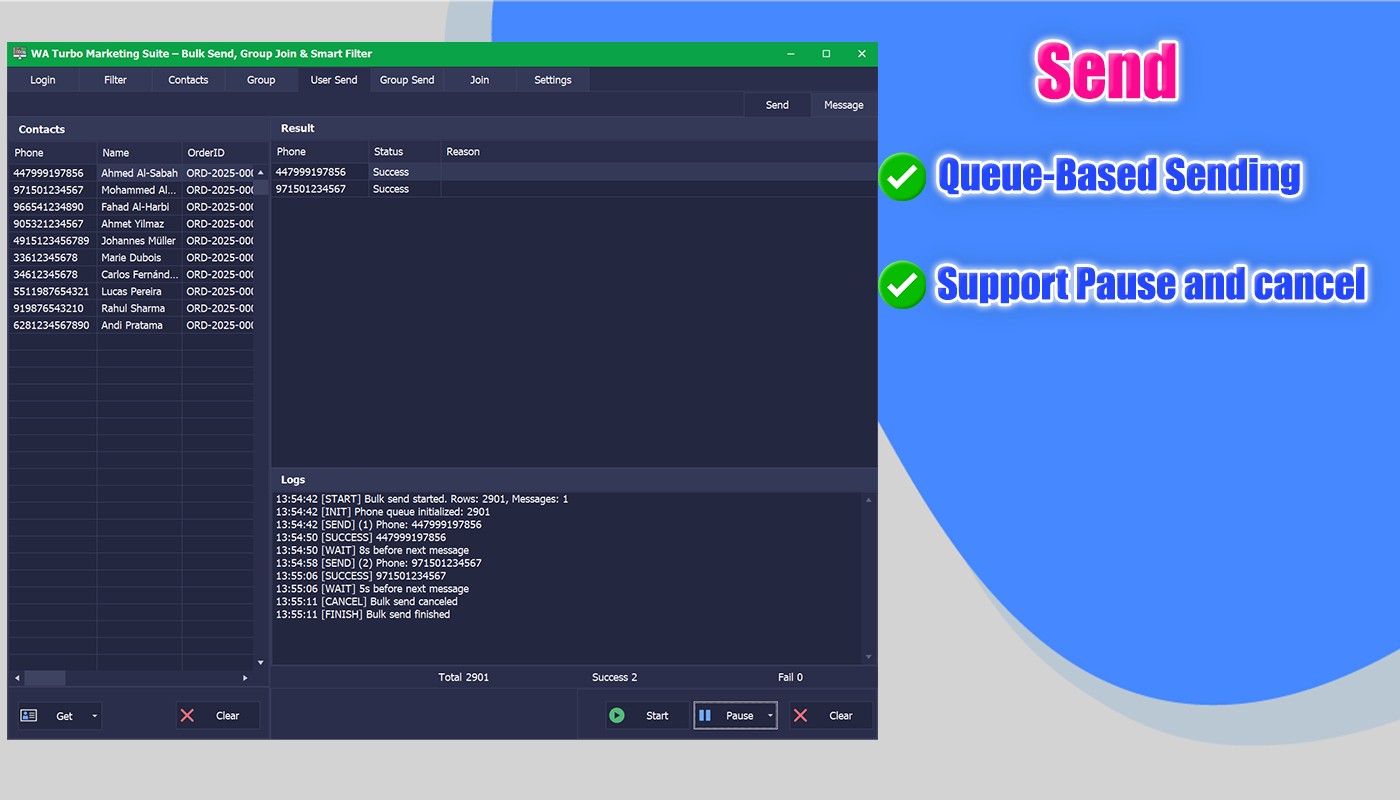
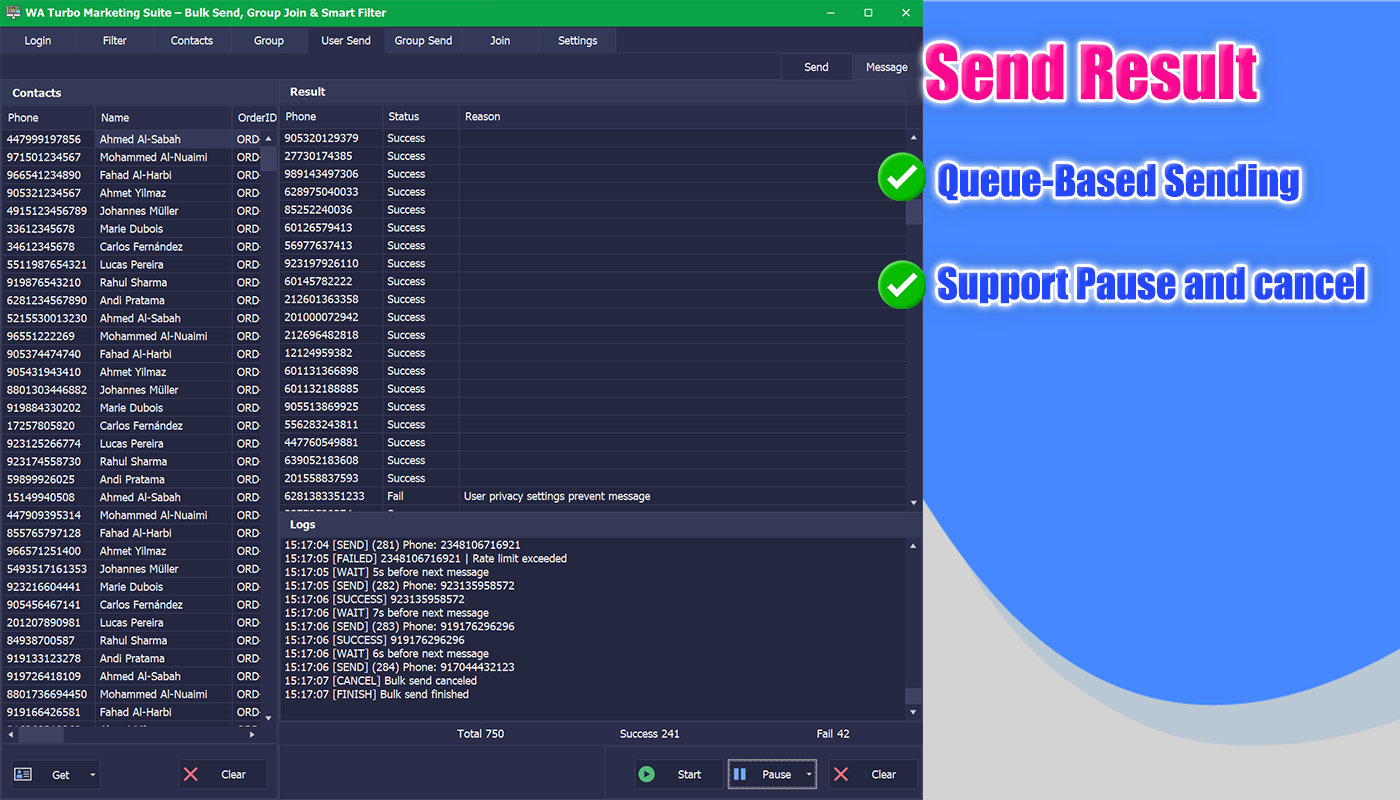
- ✔ Queue-Based Sending — real-time logs, full control, pause or cancel anytime
- ✔ Built for safety, stability, and long-term daily use
Youtube Online Video


Product Overview
Sending personalized WhatsApp messages one by one doesn’t scale. This all-in-one WhatsApp marketing tool helps you validate numbers, extract contacts, manage accounts, and send personalized bulk messages — safely, efficiently, and fully under your control.
Built on WhatsApp Web (non-API), it is designed for stable day-to-day operations. No risky shortcuts. No API dependency. Just clean and controlled automation.
✅ Key Features
1) Account Management
- Automatically saves successful WhatsApp login sessions
- Manage multiple WhatsApp accounts without repeated QR scanning
- Quickly switch between accounts when needed
- Only one account works at a time for maximum stability and safety
- Optimized for long-term daily usage via WhatsApp Web (non-API)
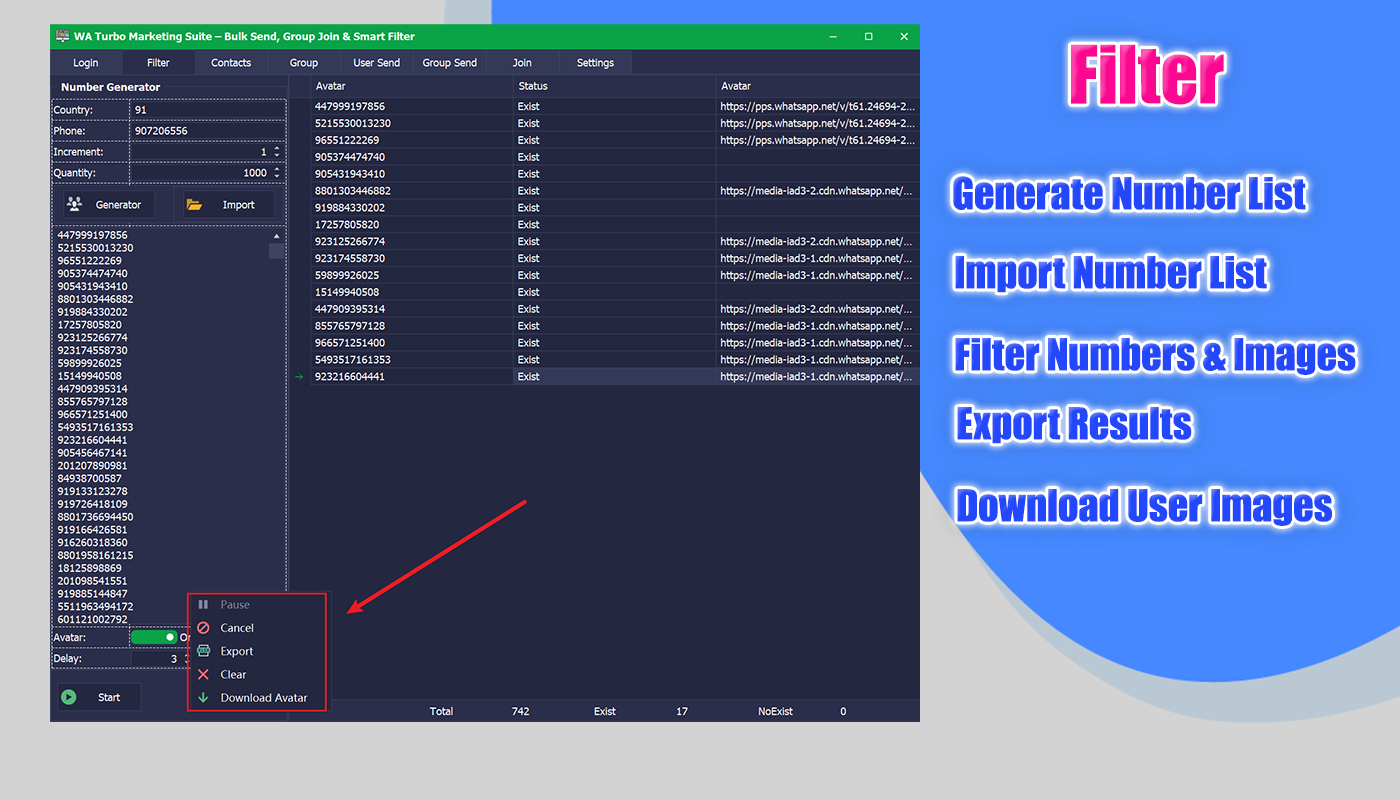
2) Advanced Number Validation & Filtering
- Instant Validation — verify active WhatsApp numbers in real time
- Smart Filtering — remove duplicates, invalid formats, landlines, and non-WA numbers
- Profile Image Downloader — automatically download WhatsApp profile photos for lead enrichment
- Bulk Number Generator — generate country-specific phone numbers in one click
3) HTTP Proxy Support
- Built-in HTTP proxy support
- Supports HTTP proxies only (IP:PORT format, no username/password)
- Test proxy availability before use
- Automatically falls back to direct connection if a proxy is unavailable
- Helps improve stability when managing multiple accounts
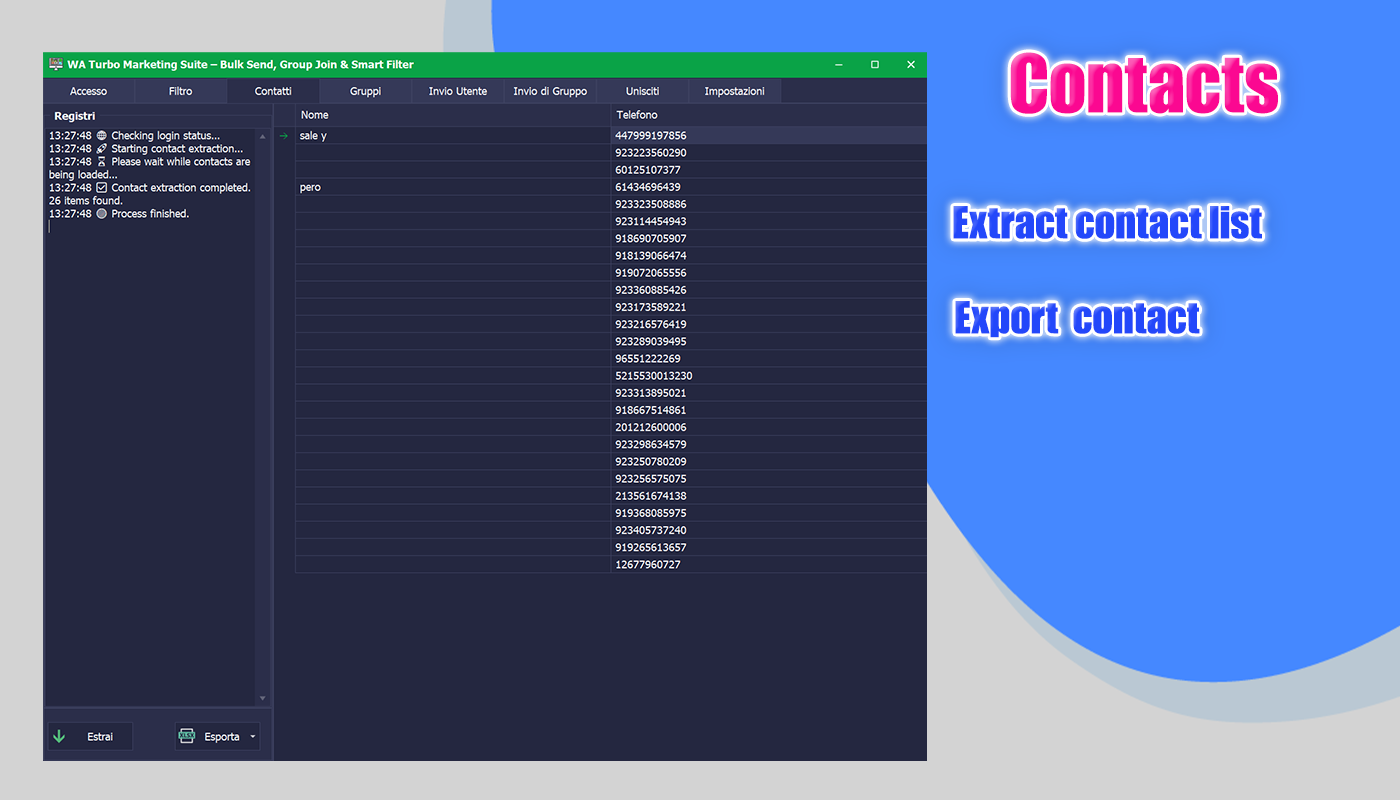
4) Contact Extraction & Export
- Extract WhatsApp contact numbers efficiently
- Clear, real-time extraction logs for full progress visibility
- Export results for follow-up marketing or CRM workflows
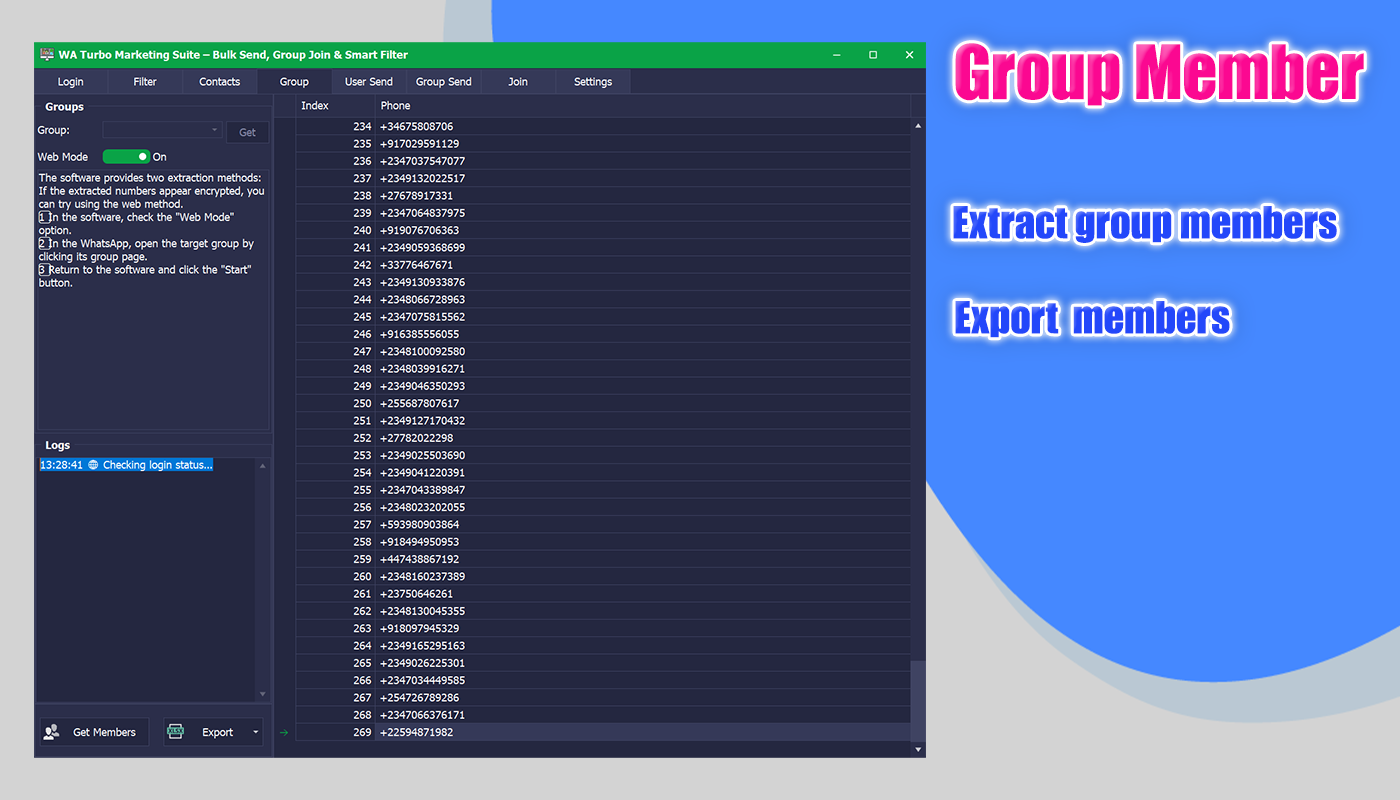
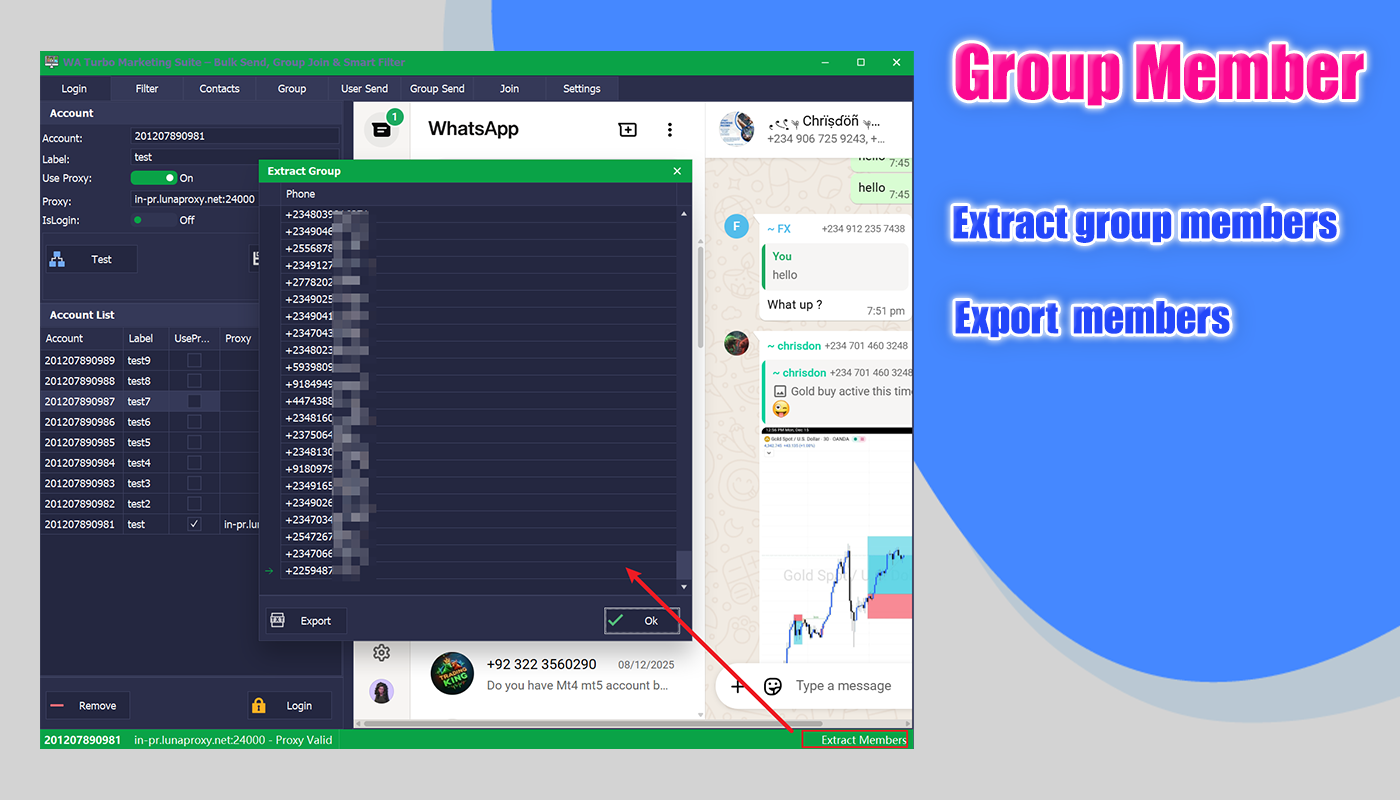
5) Group Member Extraction & Export
- Extract WhatsApp group member lists with ease
- Built-in two extraction methods for different group privacy scenarios
- Alternative method available when privacy restrictions apply
- Export results in a clean, structured format
- Excel export supported for immediate reuse
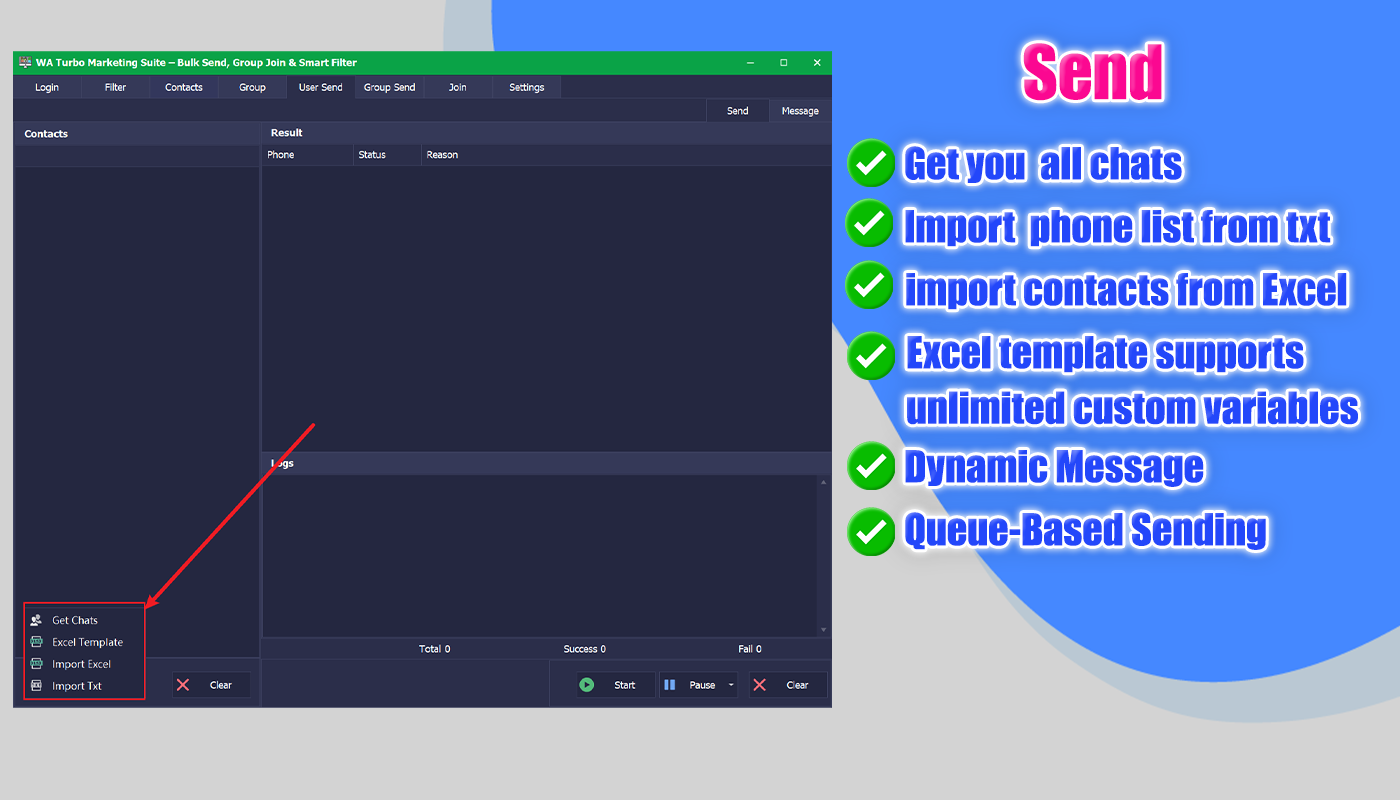
6) Bulk Message Sending (Excel Dynamic Templates)
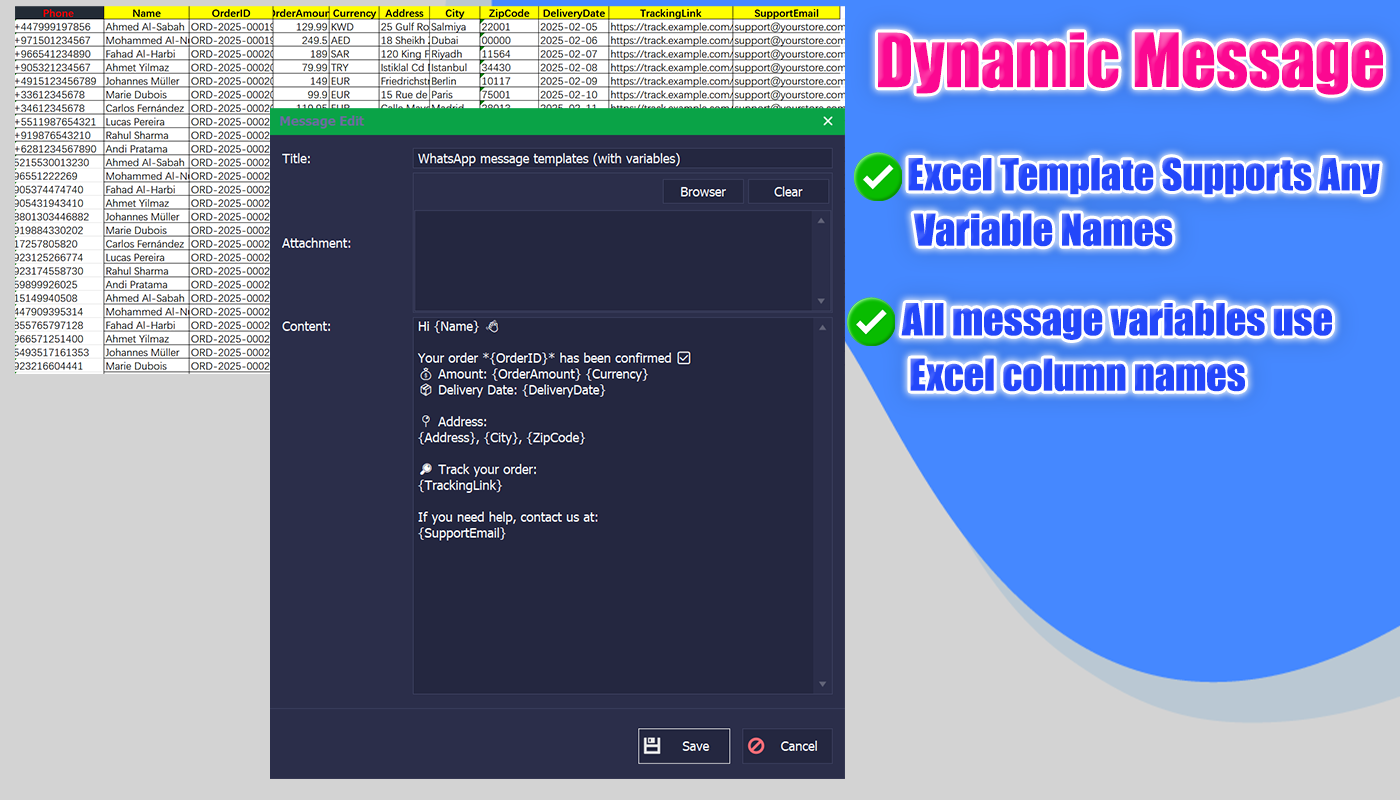
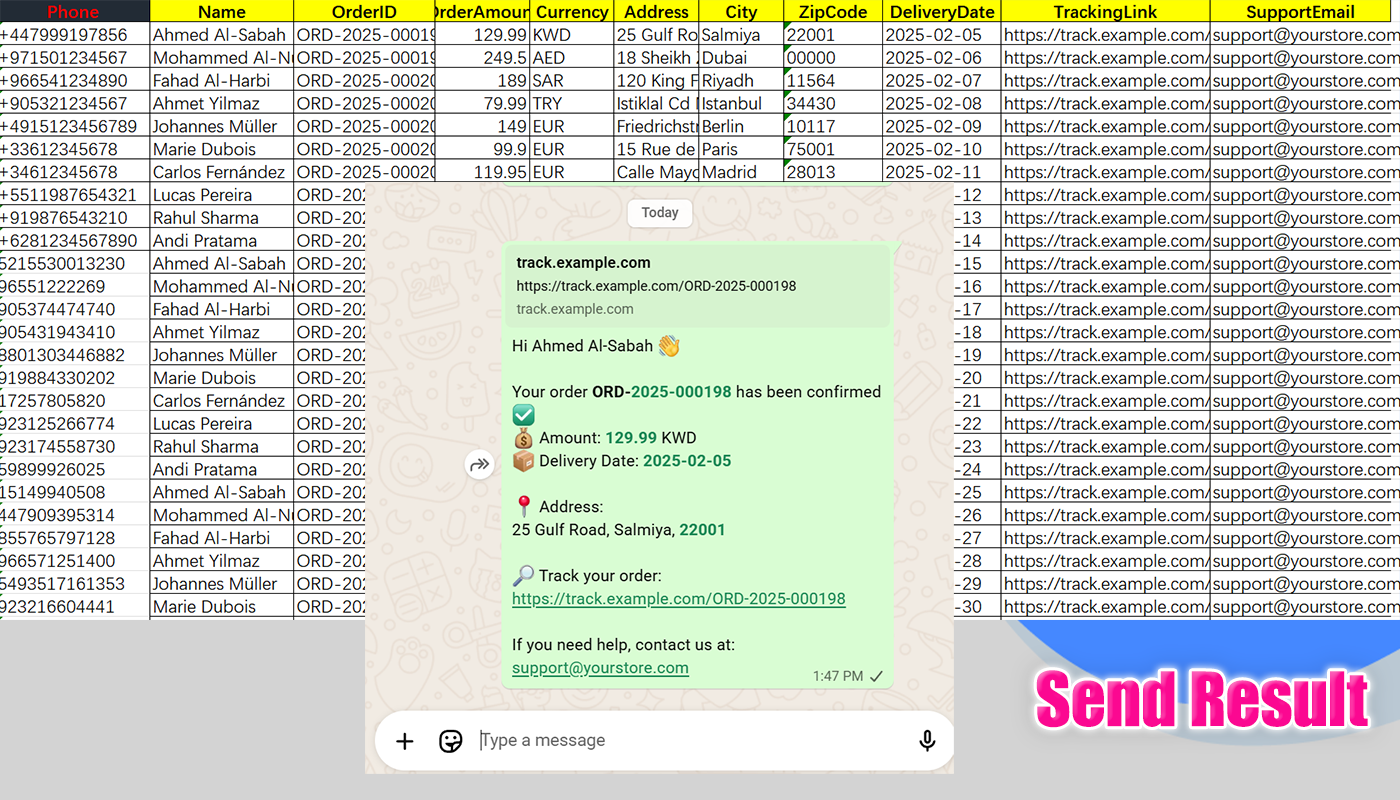
Sending personalized messages one by one doesn’t scale. This feature lets you send bulk WhatsApp messages using Excel-based dynamic templates — simple, flexible, and fully controlled.
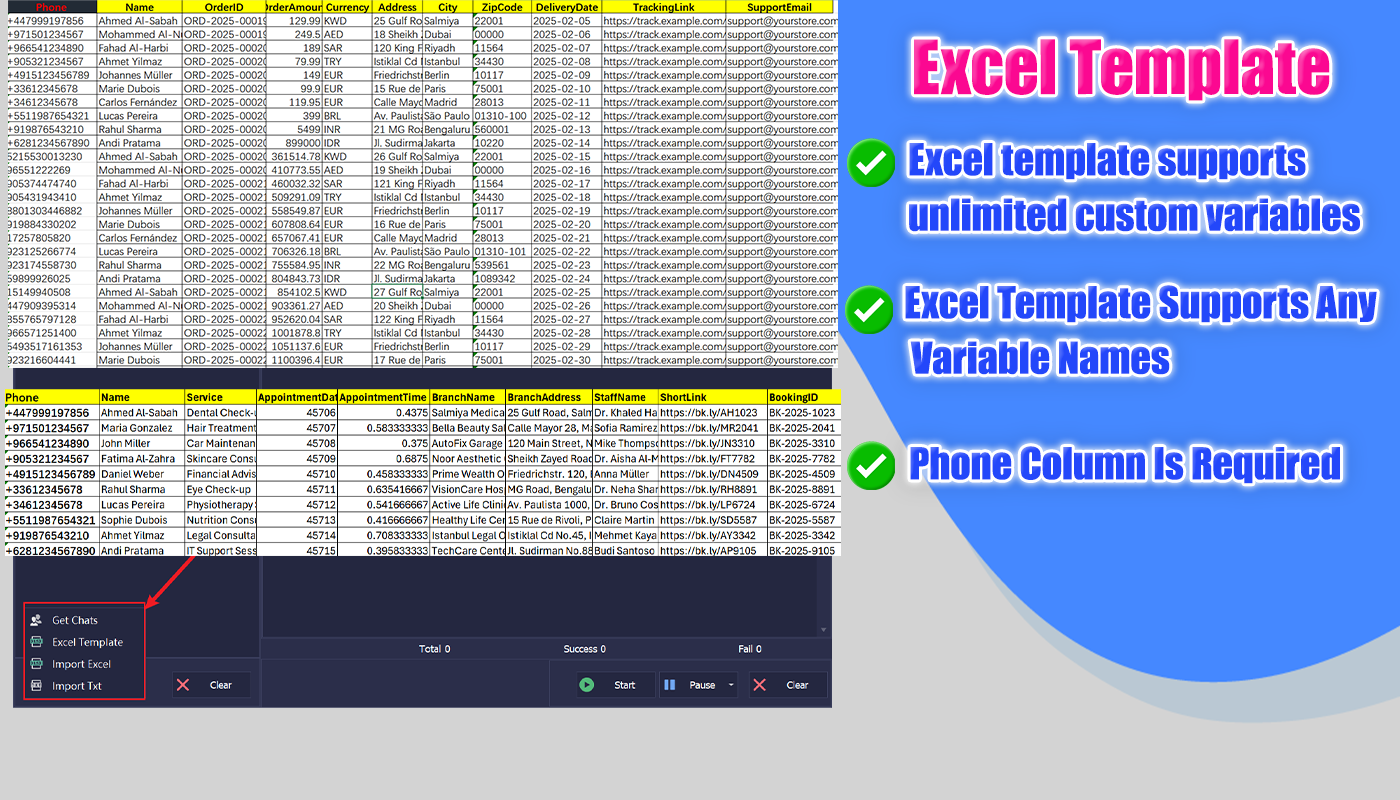
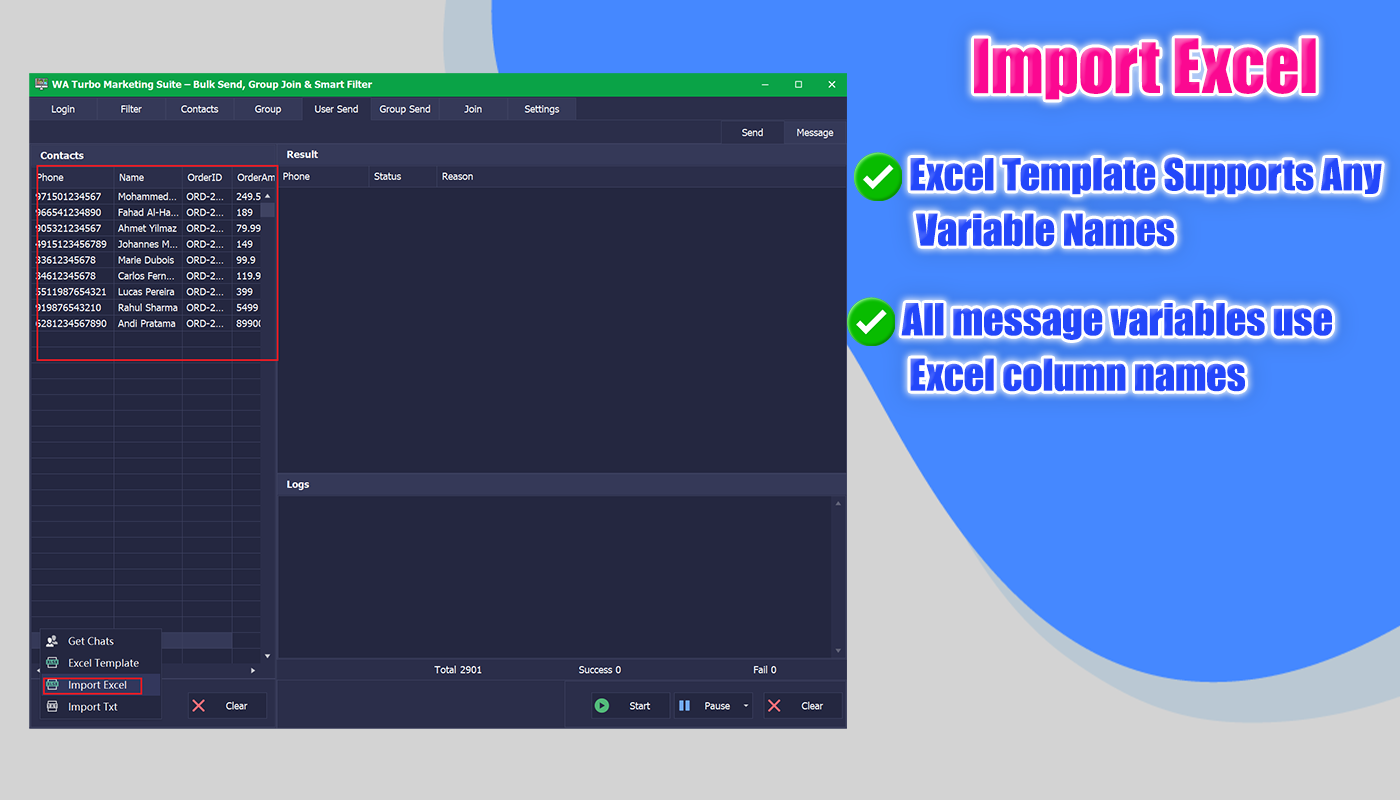
- Import recipients and variables directly from Excel
- Each row = one recipient
- Each column = one variable
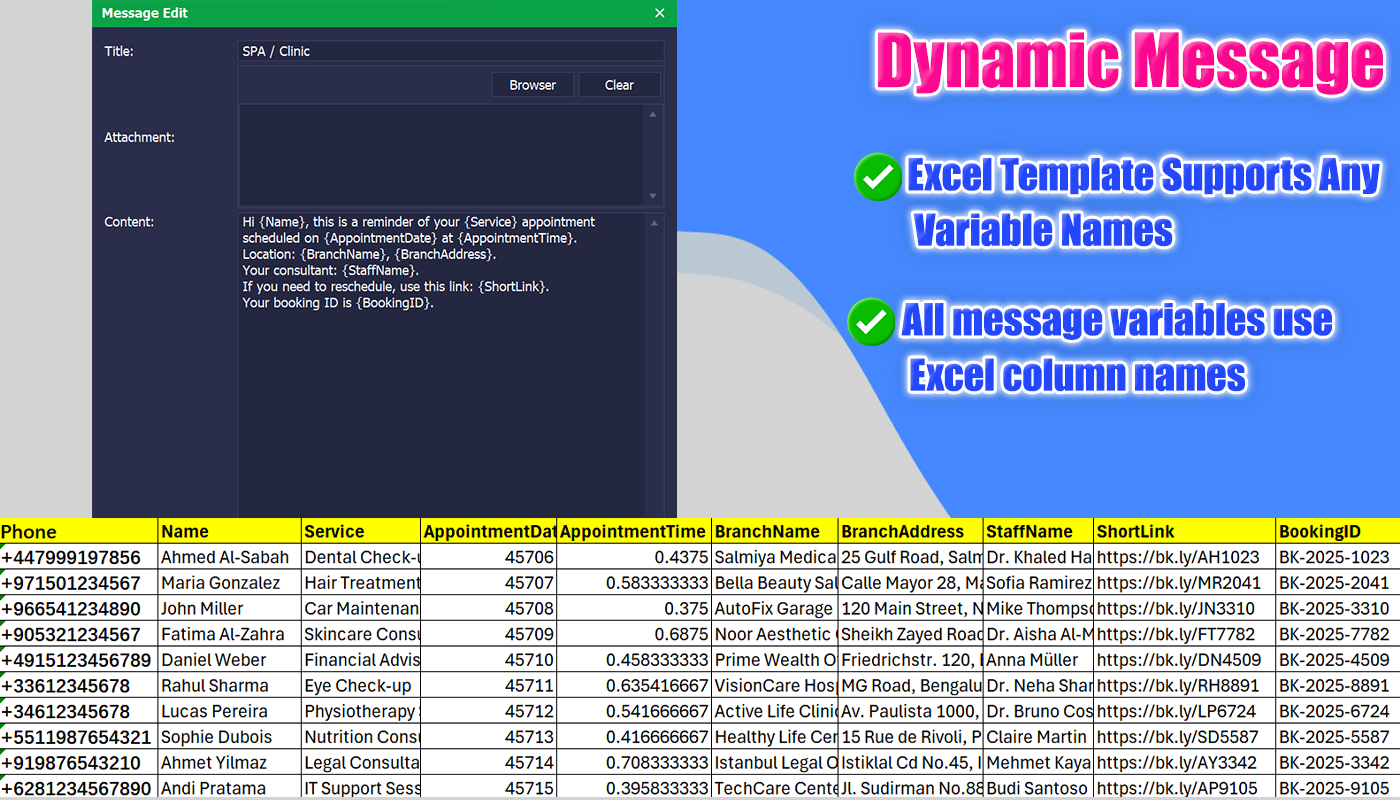
- Supports both dynamic messages and static messages
- Unlimited variables — use any Excel column name
- Only required column:
phone - Messages are generated automatically per row, based on the selected template
- Every recipient receives the correct message — no mismatches, no confusion
- Support sending attachments (images, documents, files)
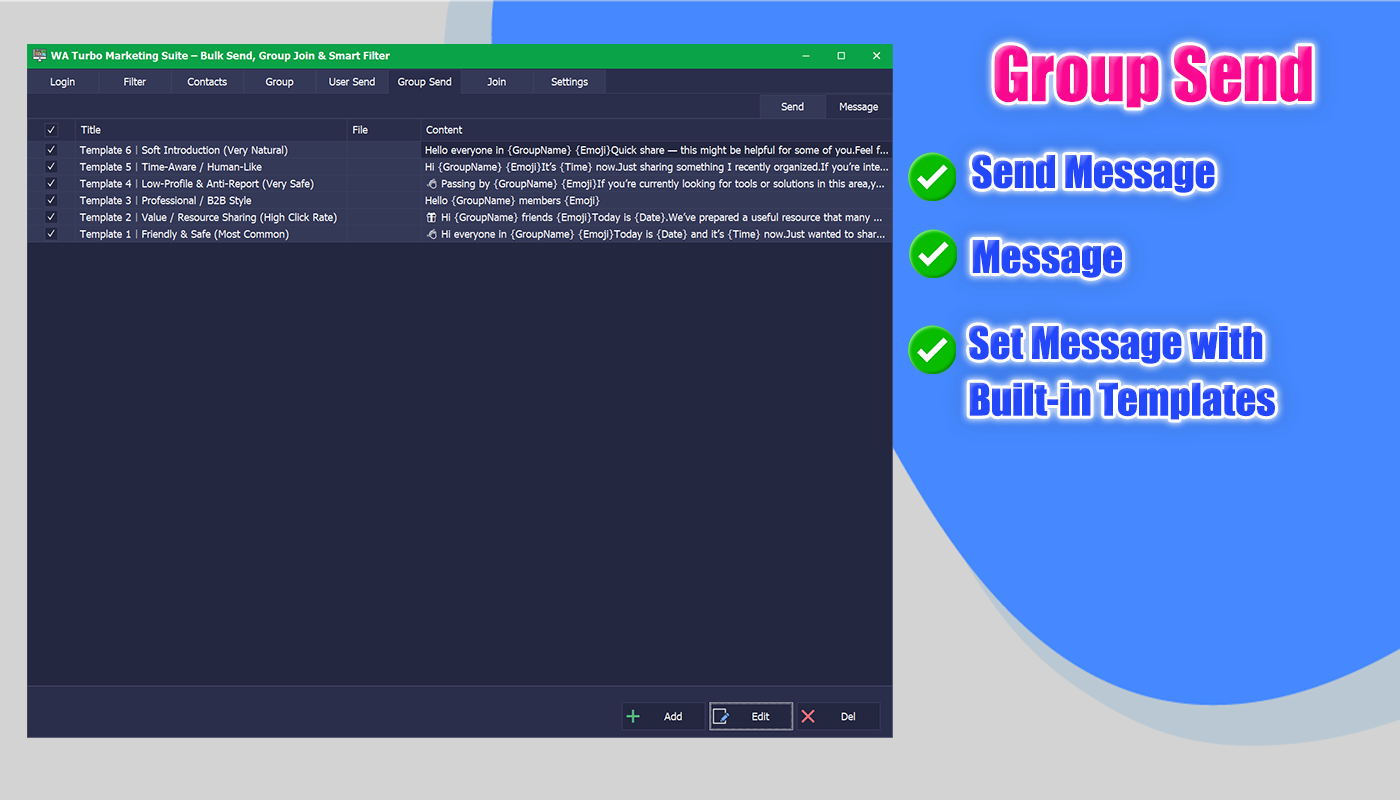
- Built-in ready-to-use templates for fast campaign setup
- Queue-based sending with real-time logs and delivery status
- Sending queue can be paused or canceled at any time
7) Group Bulk Messaging
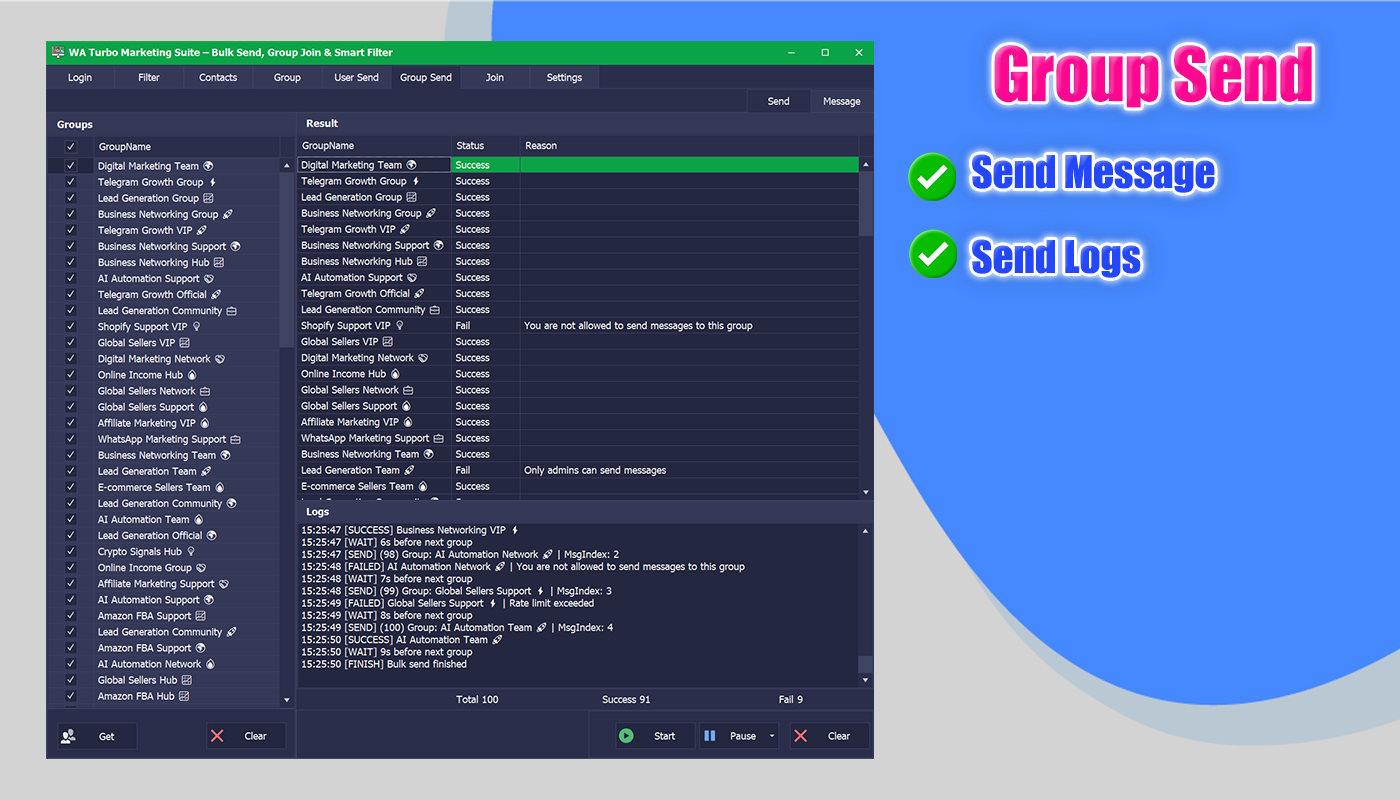
- Automatically retrieve and list all available WhatsApp groups
- Send messages to multiple WhatsApp groups in bulk
- Fully editable and customizable group message templates
- Supports both dynamic (variable-based) and static messages
- Queue-based sending with pause & cancel support
- Real-time sending logs and execution status
- Support sending attachments (images or files)
- Note: Write permission is required in target groups
 Join WhatsApp Groups by Invite Links
 Join WhatsApp Groups by Invite Links
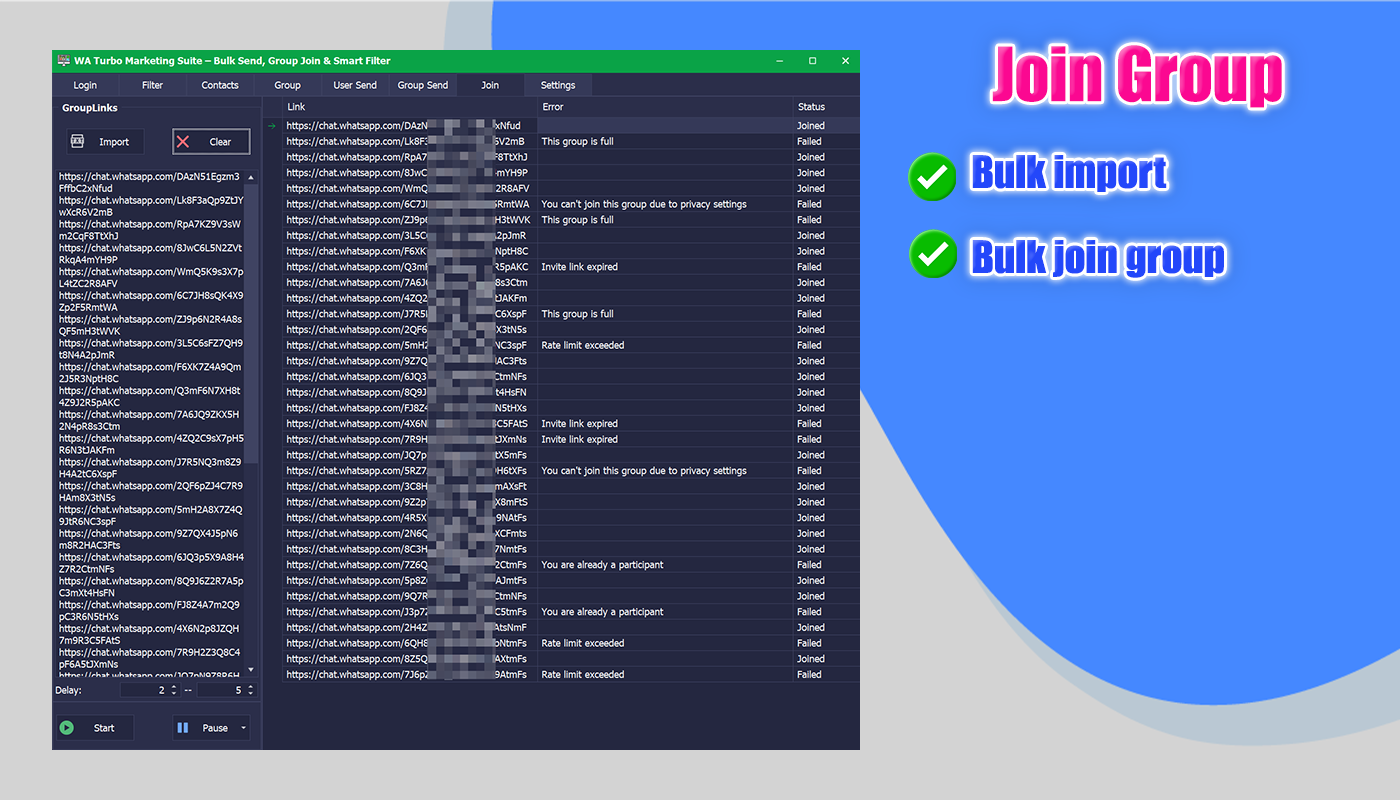
- Bulk join WhatsApp groups using invite links
- Import invite links from a text file
- Queue-based joining for safe and controlled execution
- Supports pause and cancel at any time
- Reduces manual work and saves significant time
9) ⚙️ System Settings & Stability
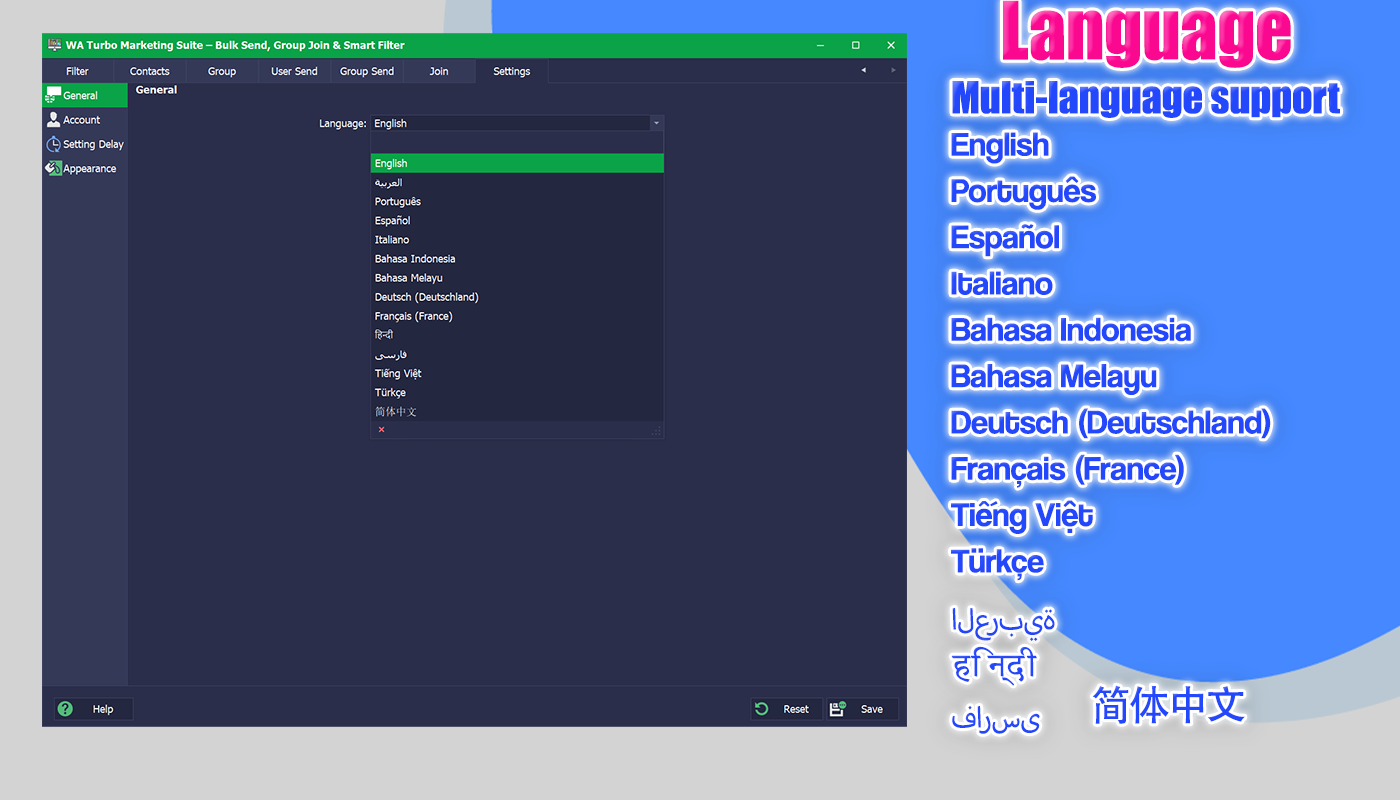
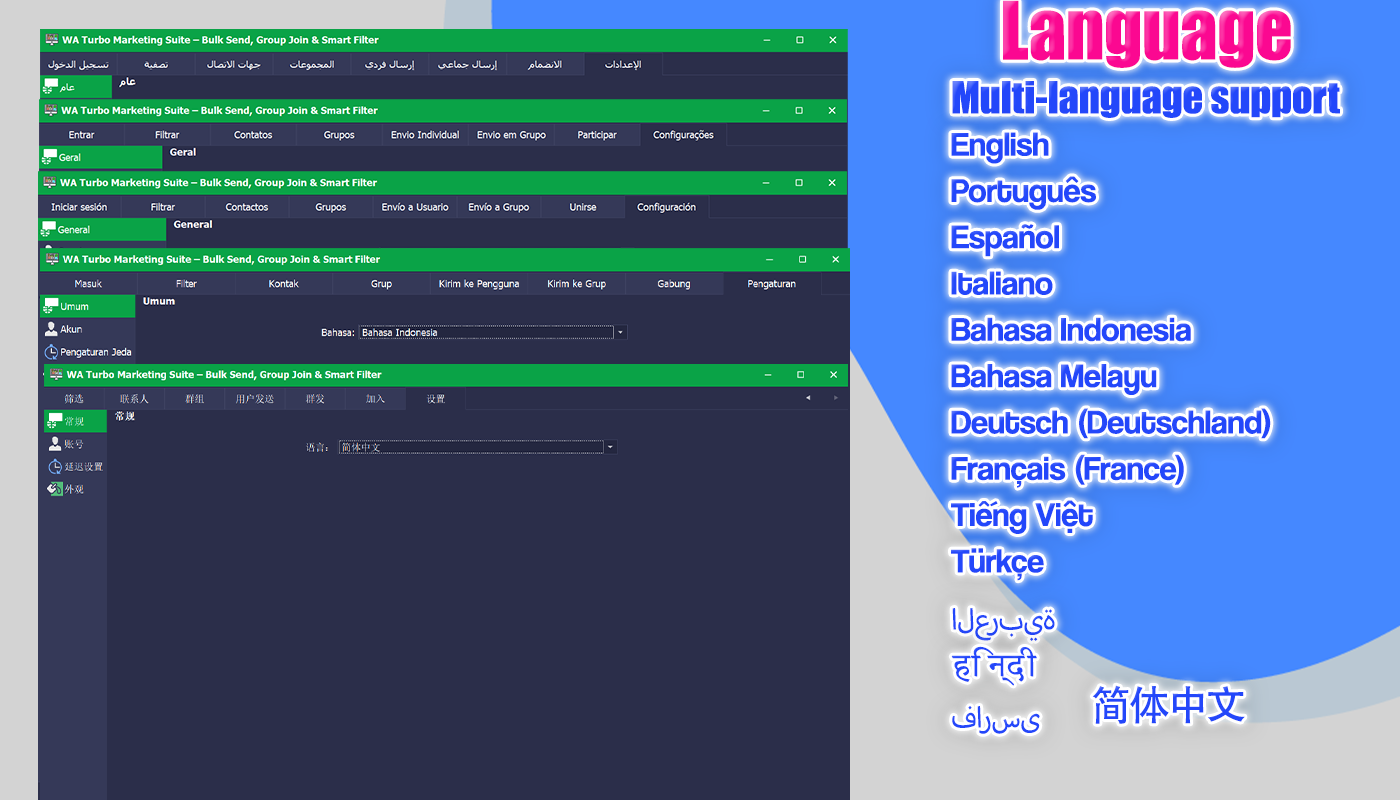
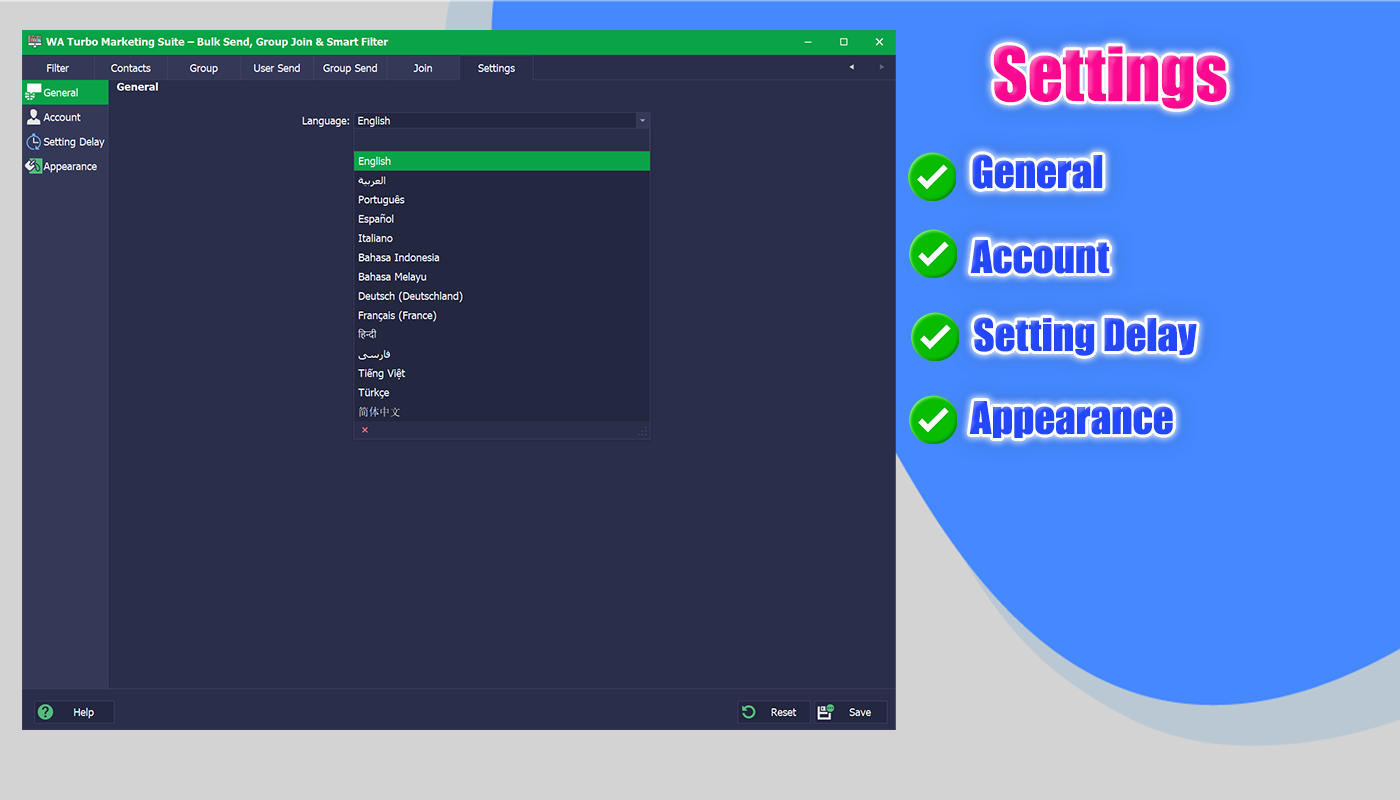
- Multi-language interface: English · العربية · Português · Español · Italiano · Bahasa Indonesia · Bahasa Melayu · Deutsch (Deutschland) · Français (France) · हिन्दी · فارسی · Tiếng Việt · Türkçe · 简体中文
- Configurable sending delays for safer message pacing
- Manually clear saved sessions after abnormal logout
- Quick re-login after session cleanup
Screenshots
Dynamic Message Examples
Example 1 (10 Parameters) — Real Order & Follow-up Message
Hi {firstName} Thank you for your recent purchase on {orderDate}. Here are your order details: Order ID: {orderId} Product: {productName} Plan: {planType} Amount Paid: {amount} {currency} Payment Method: {paymentMethod} City: {city} If you have any questions, feel free to contact us. Support Ref: {supportId} Excel Columns (10): phone | firstName | orderDate | orderId | productName | planType | amount | currency | paymentMethod | city | supportId
Example 2 (6 Parameters) — Real Service Update Notification
Hello {customerName}, Your service request has been updated ✅ Ticket ID: {ticketId} Service: {serviceName} Status: {status} Assigned Agent: {agentName} Last Update: {updateDate} Thank you for your patience! Excel Columns (6): phone | customerName | ticketId | serviceName | status | agentName | updateDate
Why Choose WATurbo?
- All-in-one workflow: extract → filter → send → export
- Flexible Excel templating with unlimited variables
- Queue-based sending for better stability
- Multi-account proxy support for scalable operations
- Real-time logs for transparency and troubleshooting
❓ FAQ Important Notes (Please Read Before Purchase)
Q1: Does this software work with WhatsApp Web?
Yes. This software operates through WhatsApp Web and requires a valid WhatsApp account to log in.
Q2: Does it guarantee delivery or prevent bans?
No. No tool can guarantee delivery or prevent account restrictions. Please use reasonable delays, avoid spam, and test with secondary accounts first.
Q3: How does bulk messaging work?
Bulk messaging uses a queue-based system with delays. Messages can be personalized using Excel-based dynamic templates.
Q4: Does Excel require fixed column names?
Only phone is required. All other columns can be named freely and used as message variables.
Q5: Does it support group messaging and group member export?
Yes. You can send messages to groups in bulk and extract/export group member lists.
Q6: What proxies are supported?
HTTP proxies are supported. Username/password proxies are not supported.
Rebranding / Renaming Policy (Optional)
- Software renaming: USD $59 per change
- If a WhatsApp update causes the renamed version to require adjustments, the next change is USD $59 again
⚠️ Notes to Avoid Misunderstanding
- This is a desktop software (not a cloud service)
- Use responsibly and comply with local laws and WhatsApp policies
- Performance depends on account quality, network stability, and WhatsApp Web changes
- Recommended: configure reasonable sending delays and avoid unsolicited spam messaging
System Requirements
- Supports Windows 7 / 8 / 10 / 11 / Windows Server
- .NET Framework 4.8
✅ Ready to Scale Your WhatsApp Workflow?
Choose WATurbo Marketing Suite to automate outreach, extract leads, and manage multi-account operations with control and transparency.

Online Support
 |  |  |
 |
Update Logs
V7.2.12 (08 May 2026)
- Fixed: Fixed message sending issue - Update: Updated to the latest WhatsApp version
V7.2.11 (22 April 2026)
- Fixed: Fixed message sending issue - Update: Updated compatibility with the latest WhatsApp version
V7.2.10 (07 April 2026)
- Fixed: Resolved issues with group message sending - Update: Updated compatibility with the latest WhatsApp version
V7.2.8 (28 Feb 2026)
- Update: Enhanced and optimized message sending system - Update: Updated compatibility with the latest WhatsApp version - Improved: Improved overall performance, stability, and reliability
V7.2.7 (30 Jan 2026)
- Update: Updated sending feature
V7.2.6 (21 Jan 2026)
- Fixed: Fixed group list loading failure
V7.2.5 (17 Jan 2026)
- Update: Updated WhatsApp Web - Fixed: Fixed message sending failure
V7.2.3 (02 Jan 2026)
- Update: Updated WhatsApp Web compatibility for the latest changes
V7.2.2 (19 Dec 2025)
- Improved: Enhanced message sending engine for better reliability and reduced occasional sending failures - Improved: Refined number filtering logic for higher accuracy and more consistent validation results - Update: Updated group member extraction to adapt to the latest WhatsApp Web interface changes - New: Added advanced dynamic message templates Message templates now support dynamic variables such as {username}, {email}, {orderId}, {city}, and more. Values are automatically populated from imported Excel/CSV data. - New: Added unlimited custom parameters Fully flexible parameter system with no limits. Any column name in your Excel file can be used directly as a message variable without additional configuration. V7.1.12 (10 Dec 2025)
- Fixed: Fixed message sending failure - Update: Updated filter logic for better accuracy - Update: Updated group member extraction for the latest changes - Added: Dynamic message template parameters You can now use placeholders inside your message templates (e.g. {username}, {email}, {orderId}, {city}, etc.). These placeholders will be automatically replaced with the corresponding values from your imported Excel/CSV data. - Added: Unlimited custom parameters The system now supports any number of parameters with any custom name. As long as the column exists in your DataTable (Excel), the message engine will automatically detect it and replace it in the message template. V7.1.11 (03 Dec 2025)
- Fixed: Fixed message sending failure - Update: Updated WhatsApp Web for the latest changes - Optimize: Improved stability
V7.1.10 (29 Nov 2025)
- Fixed: Fixed message sending failure - Update: Updated WhatsApp Web for the latest changes
V7.1.9 (19 Nov 2025)
- Fixed: Fixed message sending failure - Update: Updated WhatsApp Web compatibility for the latest changes
V7.1.8 (27 Oct 2025)
- Fixed: Resolved extraction issue - Optimize: Improved stability
V7.1.7 (21 Sep 2025)
- Fixed: Resolved extraction issue causing incomplete group member results - Optimize: Improved stability for long-running extraction sessions
V7.1.6 (06 Sep 2025)
- Fixed: Fixed message sending issue when multiple accounts were active - Update: Enhanced retry mechanism for failed messages
V7.1.5 (29 Aug 2025)
- Update: Updated number filter logic for improved accuracy - Optimize: Improved speed of large list validation
V7.1.3 (15 Jul 2025)
- Fixed: Improved filter stability and fixed minor parsing bugs - Update: Optimized message sending process for large batch campaigns
V7.1.2 (20 May 2025)
- Fixed: Fixed message sending failures caused by WhatsApp updates - Update: Improved form auto-scaling for high-DPI and multi-monitor support
V7.1.1 (05 May 2025)
- Update: Optimized message sending algorithms for faster and safer delivery - Optimize: Enhanced connection recovery and status detection
V7.0.1 (05 Apr 2025)
- Update: Enhanced bulk message queue for stable parallel sending - Optimize: Improved internal threading to reduce sending delay
V6.2.1 (25 Feb 2025)
- Update: Upgraded attachment handling for larger files (up to 2GB) - Update: Improved number validation with regional carrier detection - Optimize: Increased overall UI responsiveness
V6.1.3 (27 Oct 2024)
- Fixed: Resolved latency during real-time contact verification - Optimize: Improved multi-threaded validation performance
V6.1.2 (25 Aug 2024)
- Update: Updated WhatsApp Web compatibility for new DOM changes - Fixed: Resolved extraction timeout issue for group members
V6.0.1 (21 Jul 2024)
- Update: Improved spam-pattern detection in number filters - Optimize: Enhanced UI performance during bulk operations
V5.3.9 (19 Jul 2024)
- Update: Supported WhatsApp multi-device login compatibility - Fixed: Resolved message duplication in high-volume sends
V5.3.8 (08 Jul 2024)
- Update: Implemented dynamic message variables ({name}, {date}) for personalized messages - Add: Added placeholders preview inside the message composer V5.3.6 (07 Jun 2024)
- Update: Added send-rate limiter customization for anti-ban protection - Update: Enhanced DND (Do Not Disturb) detection accuracy
V5.3.5 (26 Apr 2024)
- Fixed: Corrected false positives in landline detection - Fixed: Resolved crashes when importing malformed CSV contact lists
V5.3.4 (21 Apr 2024)
- Update: Improved extraction reliability under unstable network conditions - Fixed: Resolved session cache corruption during WhatsApp reloads
V5.3.3 (01 Apr 2024)
- Fixed: Corrected country-code parsing in filters (+1, +44, etc.) - Update: Improved DOM adaptation for the latest WhatsApp version
V5.3.1 (23 Jan 2024)
- Fixed: Resolved database write issues during exports - Fixed: Corrected UI scaling on 4K / Retina displays - Optimize: Improved interface rendering speed
V5.3.0 (20 Jan 2024)
- Add: Added 40+ language packs including Arabic, Hindi, and Mandarin - Add: Added bulk media attachments (images, documents, audio) - Add: Introduced light/dark/high-contrast UI themes - Add: Added region-based message templates
V5.2.9 (29 Nov 2023)
- Fixed: Addressed performance degradation on Windows 7 systems - Add: Added cross-version support for Windows 10 / 11 - Optimize: Enhanced initialization speed for first startup
V5.2.8 (10 Sep 2023)
- Update: Automated .NET Framework dependency installer - Fixed: Reduced RAM usage during massive contact filtering
V5.2.7 (17 Jun 2023)
- Update: Enhanced WhatsApp message encryption handling - Fixed: Corrected number validation for EU/UK formats
V5.2.6 (18 Mar 2023)
- Fixed: Addressed crashes caused by version mismatch during updates
V5.2.5 (01 Mar 2023)
- Update: Updated WhatsApp Web adaptation and stability improvements
V5.2.4 (29 Feb 2023)
- Fixed: Corrected filter errors when handling international numbers
V5.2.3 (20 Feb 2023)
- Add: Added customizable send delays (1–60 seconds) to reduce bans - Fixed: Resolved message queuing errors under unstable connections
V5.2.2 (12 Feb 2023)
- Fixed: Fixed false negatives in DND (Do Not Disturb) detection
V5.2.1 (10 Feb 2023)
- Update: Improved session stability and automatic reconnect logic - Fixed: Prevented filter crashes caused by invalid input characters
V5.1.1 (09 Feb 2023)
- Add: Added error log export (CSV/JSON) for debugging - Fixed: Resolved startup failures on low-memory systems - Update: Improved validation speed by 30% with multi-threading
V5.0.1 (09 Jan 2023)
- Add: Added bulk message scheduler with timezone support - Add: Added real-time message status report (sent/pending/failed) - Update: Simplified phone number input and normalization
V4.0.1 (05 Jan 2023)
- Fixed: Fixed CSV import errors caused by special characters - Update: Reduced validation time by 40% using cache optimization
V3.0.1 (02 Jan 2023)
- Add: Added automatic phone number formatting and normalization - Add: Added regex-based filter to block non-numeric entries
V2.0.1 (12 Dec 2022)
- Add: Added two-factor authentication for safer sessions - Fixed: Reduced latency when validating large contact lists (10k+)
V1.0.1 (29 Nov 2022)
- Add: Initial version released with core modules: • Send Messages • Validate Numbers • Extract Contacts • Extract Group Members - Feature: Designed with WinForms UI and Baileys integration
4.5 average based on 31 ratings.

| Last Update | 2026-05-12 |
| Created | 2022-11-29 |
| Sales | 230 |
| Discussion | Comments |
| Application Runtime | Native |
| High Resolution | No |
| Compatible OS Versions | Windows 11 Windows 10 |
| Video Preview Resolution |


