VaultNotes | Secure iOS Notes App

VaultNotes | Secure iOS Notes App
iOS 18.5+ Ready | Secure SwiftUI Notes App | Reusable Security Engine | SwiftData | AES-256-GCM | Version 1.1
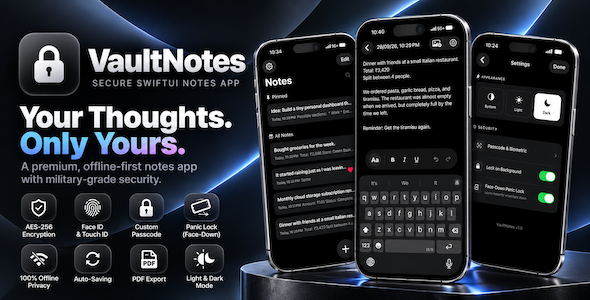
VaultNotes is a complete, production-ready Secure Notes App built 100% natively in SwiftUI. It is designed both as a ready-to-publish private notes application and as an extensible, modular architecture template. Whether you want to publish an offline encrypted notepad to the App Store or extract its battle-tested security framework into your own iOS projects, VaultNotes provides a clean, zero-dependency foundation.
Complete Secure Notes Experience Out of the Box
Unlike basic note templates, VaultNotes is engineered specifically for privacy-conscious users who want their thoughts, journals, and credentials protected with zero compromises:
- Rich Text Note Editor: Create formatted notes with Bold, Italics, Lists, and inline image attachments.
- Auto-Save Engine: Notes save continuously in the background as the user types—no accidental data loss.
- Local Encrypted Search: Fast, local search across encrypted note titles and contents without exposing plain text to disk.
- Built-in PDF Export: Generate, view, and share clean, print-ready PDF documents from secure notes with a single tap.
- Smart Organization: Pin important notes to the top and mark favorites for quick access.
Reusable Architecture for Developers
Save weeks of development and debugging time. VaultNotes was built using decoupled, modular Swift code so you can easily adapt the note-taking system or extract individual security modules into any iOS app:
- Turnkey Note App Template: Rebrand with your own colors and icons in minutes using the centralized
AppConfig.swiftandAppTheme.swiftfiles. - Drop-in Security Modules: Easily lift
SecureStorage.swift(AES-256 Crypto),KeychainHelper.swift(Keychain secure PIN storage), orAuthManager.swiftinto your own fintech, healthcare, or password-manager projects. - Floating UIWindow Security Shield: Learn and reuse the industry-standard dual-window architecture (
SecurityPassThroughWindow) to guarantee complete privacy in the App Switcher without navigation conflicts or screen-capture leaks. - Robust State Machine: Powered by an explicit
AppSecurityStateenum that completely eliminates impossible UI states, race conditions, and view-flashing glitches. - 100% Native & Dependency-Free: Zero CocoaPods, SPM packages, or third-party SDKs to audit, maintain, or update.
The “Zero-Knowledge” Standard
Built with Apple’s latest SwiftData framework and CryptoKit, VaultNotes features a client-side AES-256-GCM encryption engine. All note contents and rich-text attributes are sealed cryptographically before touching local storage, ensuring data remains encrypted at rest and is never stored in plaintext.
Key Features
- 100% Offline Privacy: No servers, no tracking, and no external data sync. Notes remain encrypted on-device.
- True Hardware Panic Lock (v1.1 CoreMotion): Uses hardware gravity sensors to detect when the phone is flipped face-down on a desk, instantly locking the notes app and enforcing strict passcode-only entry.
- Floating Window Privacy Curtain: Deploys a dedicated background shield to block sensitive note content from ever being captured in iOS multitasking snapshots.
- In-Memory Performance Caching: Employs
@Transientcaching to decrypt rich text only when needed, maintaining smooth 120Hz ProMotion scrolling over encrypted records. - Configurable Auto-Lock: Instant session invalidation when the app is backgrounded or minimized.
- Cryptographic Erasure (Data Wipe): Instant one-tap batch deletion with Keychain master key destruction, rendering old vault data mathematically unrecoverable.
- Dual Authentication: Granular settings for Face ID, Touch ID, and a custom 4-digit PIN fallback stored in the iOS Keychain.
- Brute-Force Lockout Engine: Automated progressive delay timers preventing dictionary and brute-force passcode guessing.
- iPadOS Multi-Window Safe: Dynamically binds floating security windows to active
UIWindowScenetargets, fully supporting Split View and Stage Manager.
Easy to Reskin & Customize
Designed for rapid re-branding and adaptation:
- Centralized AppConfig: Every single string, alert message, button label, icon, and timeout value lives inside
AppConfig.swiftfor one-step localization and renaming. - Adaptive Theme Engine: Seamlessly adjust monochrome gradients, card backgrounds, and accent colors inside
AppTheme.swift. - Customizable UI Components: Includes pre-styled tactile theme cards, custom keypads, and grouping platter sections ready for your brand.
Demo Instructions
VaultNotes operates entirely offline with a local credential system. There are no web-based email or password accounts required to test this app:
- Launch the application in Xcode Simulator or on a physical device.
- Upon the very first launch, you will be prompted to create and confirm a 4-digit PIN.
- This local PIN acts as your master gateway for all subsequent sessions.
What’s Included
- Full Xcode Project (Clean, production-ready Swift source code).
- Complete, interactive HTML Documentation guide with architecture breakdowns.
- Full Unit Test suite covering core view model logic and state updates.
- Pre-configured TipKit onboarding and sample data seeds.
Requirements
- Mac running macOS Sonoma 14.0 or later.
- Xcode 16.0 or later.
- Target: iOS 18.5+. (Required due to the utilization of the latest SwiftData
ModelContainerAPIs and SwiftUIWindowSceneReaderenvironments).
Changelog
Version 1.1.0 – Major Architecture & Security Overhaul
- True Panic Lock Upgrade: Replaced legacy proximity sensor with a precise
CoreMotionaccelerometer engine (Z-axis gravity) to eliminate false locks. Acts as a true security circuit-breaker by disabling biometrics and forcing PIN entry. - Floating UIWindow Layer: Introduced
SecurityPassThroughWindowrunning above the main application window (at.alert + 1) to eliminate all view-flashing and guarantee privacy curtain integrity in the App Switcher. - State Machine Refactor: Consolidated authentication state into an explicit, thread-safe
AppSecurityStateenum to eliminate race conditions and UI freezes. - Data Management & Cryptographic Wipe: Added bulk deletion logic using SwiftData’s high-speed batch delete and
fetchCountto instantly wipe database tables without RAM spikes. - iPadOS Split View Support: Integrated
WindowSceneReaderto dynamically attach overlays to active window scenes, preventing multi-window crashes. - Refined Monochrome UI: Upgraded design language to premium adaptive monochrome light/dark gradients.
Version 1.0.0 – Initial Release
- Initial launch of VaultNotes.
- Integrated SwiftData & AES-256 Encryption engine.
- Added biometric authentication (FaceID/TouchID) and 4-digit PIN system.
AI Disclosure
Please note: AI tools were utilized to assist with generating boilerplate code structure and formatting the documentation for this template.
$64 |
Download |
0 average based on 0 ratings.

| Last Update | 2026-10-27 |
| Created | 2026-01-08 |
| Sales | 3 |
| Discussion | Comments |
| Software Version | Other |
| Compatible With | Swift |
| Files Included | Layered PSD |
| Video Preview Resolution |


