Trash Bin for Perfex CRM with One-Click Restore

Note: This is a module designed for Perfex CRM . It is not a standalone script.
Description
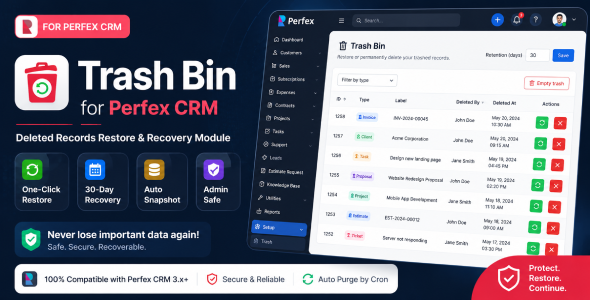
Trash Bin for Perfex CRM adds a powerful recycle-bin system to Perfex CRM, allowing administrators to safely recover accidentally deleted records with a single click.
Whenever a supported record is deleted, the module automatically captures a complete snapshot of the data before removal, including related child records such as items, taxes, contacts, comments, tags, and custom fields. Deleted records are securely stored in a dedicated trash system where they can be restored or permanently removed at any time.
Perfect for businesses, agencies, and teams that want additional protection against accidental deletions and data loss inside Perfex CRM.
Key Features:
-
Automatically capture deleted records before removal using Perfex CRM hooks.
-
One-click restore functionality for deleted records and related child data.
-
Supports multiple Perfex CRM entities including: Invoices, Estimates, Proposals, Credit Notes, Projects, Tasks, Clients, Contracts, Expenses, Leads, and Tickets.
-
Restores related data such as: line items, taxes, tags, contacts, comments, checklist items, assignees, followers, and custom fields.
-
Smart ID recovery system — restores records with original IDs whenever available.
-
Advanced filtering system to quickly browse trash records by entity type.
-
Configurable automatic trash cleanup with cron-based retention management.
-
Secure admin-only access with transaction-safe restore operations.
-
Bulk empty trash functionality for permanent cleanup.
-
Multilingual support included (English & French).
Supported Entity Types:
- Invoices
- Estimates
- Proposals
- Credit Notes
- Projects
- Tasks
- Clients
- Contracts
- Expenses
- Leads
- Tickets
Requirements:
- Perfex CRM v3.x or higher
- PHP 8.x recommended
- Working Perfex CRM cron job
Demo URL and Credentials:
Explore the module using our live demo:
- Demo URL: Demo
- Login:
- Email: admin@example.com
- Password: 123456
Installation Guide:
- Log in to Perfex CRM as an administrator.
- Navigate to Setup > Modules.
- Upload the module ZIP file and click Install.
- Activate the Trash Bin module.
- Ensure your Perfex CRM cron job is running for automatic trash cleanup.
- You’re all set!
Customer Support
Your satisfaction is our priority! Reach out to us for support requests, questions, or custom development services.
- Support Hours: Monday – Saturday
- Response Time: Within 1–2 business days
- Connect with us via our Support Portal
Change Log
Version 1.0.0
- Initial release
.png)


