Tile Measurement Price Calculator for WooCommerce


Tile Measurement Price Calculator for WooCommerce
Tile Measurement Price Calculator for WooCommerce helps tile and flooring stores sell more efficiently by letting customers calculate the exact quantity and price themselves. Customers simply enter the required area, and the plugin automatically determines how many tile boxes are needed and the total cost.
This reduces customer questions, prevents ordering mistakes, and avoids material shortages by allowing you to add waste allowances such as 5%, 10%, or 15%. You can also increase order value with minimum purchase quantities and automatic bulk discounts (for example: buy 10–20 boxes get 5% off, 20+ boxes get 10% off).
To clearly present product information, you can add unlimited custom product features with icons, labels, and values. These features help customers compare products easily and can be displayed on the product page, with optional visibility on shop and category pages.
For stores managing many products, all settings can be quickly imported or exported via CSV, saving time and reducing manual work.
⚠ Note: All calculations are performed based on the number of boxes (packages), ensuring accurate pricing and reliable stock management.
Live Demo
Online Documentation
Contact Us
Key Features
- Sell tiles by area while pricing by box/package
- Supports area input or length × width calculation
- Automatic calculation of required quantity and total price
- Supports multiple units: mm, cm, m, inch, feet, yard
- Set area coverage per product (area per box)
- Add multiple waste percentages (e.g. 5%, 10%, 15%, 20%)
- Tiered pricing based on quantity purchased
- Minimum quantity purchase enforcement
- Fully compatible with WooCommerce stock management
- Works with Simple Products and Variable Products
- Shortcodes for flexible layout placement
- Multi-language ready
- Create custom product templates with Elementor
Real Use Case Example
A customer wants to tile a 23.5 m² room.
Each tile box covers 1.44 m².
Waste allowance selected: 10%.
The plugin automatically calculates:
- Required number of boxes
- Correct product quantity
- Final total price
Supported Product Types
✔ Simple Product
✔ Variable Product
Elementor
Create custom product templates with Elementor

Demo: Link Page
Shortcodes
Display Tiered Price Table
[elptie_display_table_range_price]
Example:
[elptie_display_table_range_price product_id=”20”]
Display Measurement Calculator Form
[elptie_display_form]
Example:
[elptie_display_form product_id=”20”]
Price Display Options
Choose how prices are displayed on the frontend:
- Per Package – Show price per box/package
- Per Area – Show price per square meter (display only)
Note: All calculations are still based on package quantity to ensure accurate pricing.
Minimum Quantity & Validation
Set a minimum purchase quantity globally or per product. Display a custom validation message when customers order less than the required amount.
Use {min} as a placeholder for the minimum quantity.
Shop & Product Page Controls
- Enable or disable calculator features on shop/category pages
- Display or hide tiered pricing table
- Show or hide discount column
- Customize labels, titles, descriptions, and tooltips
- Use shortcodes to fully control layout placement
Import / Export Settings
Easily export plugin settings to CSV, edit them in bulk, and re-import when needed. Perfect for stores with many tile products.
How It Works
Step 1: Customer opens the tile calculator on the product page.
Step 2: Enters width and height of the area.
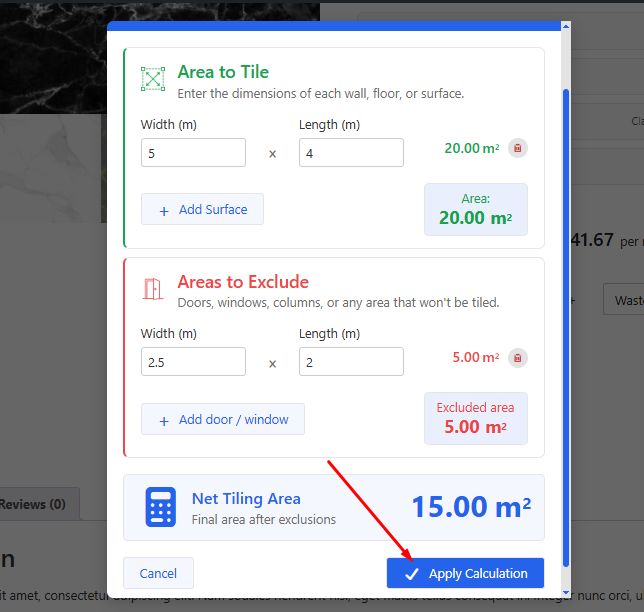
Step 3: Plugin calculates total area automatically.

Step 4:Required tile quantity is calculated based on tile size.
Step 5:Optional extra percentage is added to avoid shortage.
Step 6:Final price is updated instantly before adding to cart.

Perfect For
- Tile & flooring online stores
- Building material websites
- Ceramic, wall tile, and floor, ... tile sellers
- WooCommerce stores selling products by area
Why Choose This Plugin
- Easy to use for both store owners and customers
- Reduces calculation errors and order cancellations
- Saves time for sellers and support teams
- Creates a professional buying experience
Compatibility
- WordPress 5.x, 6.x, 7.x
- PHP 7.4+, 8.x
- Elementor (optional)
Customers talk about us


Change Log
v2.1.2 - 2026/06/15 - Enhanced the area calculation popup for a better user experience. - Added a Booking Form Elementor widget for seamless page builder integration.
v2.1.1 - 2025/12/30 - update calculate Width x lenght floor - update feature in shop page, product page - Reorganized settings - Compatible WooCommerce 10.4.3, WordPress 6.9
v2.1.0 - 2025/12/19 - update import/export product with setting - update feature in shop page, product page - Reorganized settings - Compatible WooCommerce 10.4.2, WordPress 6.9
v2.0.9 - Fix translate label package - Update code singleton
v2.0.8 - 2025/07/07 - Fix change quantity product on cart page - Compatible WooCommerce 9.9.5, WordPress 6.8.1
v2.0.7 - 2025/05/26 - Fixed the issue preventing purchases of variable products (Compatible WooCommerce 9.8.5)
v2.0.6 - 2025/04/24 - Fix label unit undefined - Fix icon arrow in input area
v2.0.5 - 2025/02/27 - Fix label unit in cart page - Fix product normal no display label unit - Fix shortcode form display html label unit - Add label package when change number unit
v2.0.4 - 2024/11/26 - Fix display double price when only price regular - Fix class body elptie_variable_product alway display in all product - Fix margin -left unit per m2 small - Fix shortcode display wrong place (compatible Avada theme) - Add setting unit m2 or sqr met
v2.0.3 - 2024/08/19 - Compatible WordPress 6.6.1, WooCommerce 9.1.4 - Fix compatible Avada theme (Double form) - Fix no display price in normal product - Add settings to display area price, package price in shop page - Fix include tax - Fix style tooltip (arrow);
v2.0.2 - 2024/05/27 - fix no display price product normal - fix error white sapce header
v2.0.1 - 2024/02/26 - fix display price by area (only display) - fix the issue of calculating product variable does not use the function of the plugin - set default value on the product = no
v2.0.0 - 2023/09/16 - Big update template single product - Change template single product use tile measurement - Delete label setting => use plugin to translte label - Add multiple waste percentage - Add description tooltip
v1.0.7 - 2022/08/02 - add suffix price on shop page (price per package) - fix css m2 in detail product page
v1.0.6 - 2022/05/21 - Fix some issues
v1.0.5 - 2022/04/22 - Update extra pecent - Change symbol m2 -> html
v1.0.4 - 2022/09/03 - Update support variation product - Update use shortcode to display table ranger price, form booking tile measurement calculator - Update quantity real purchase - Update minimum quantity customer purchase
v1.0.1 - 2022/02/21 - Fix some issue
v1.0.0 - 2022/01/01 - Initial release
$29 |
Download |
5 average based on 7 ratings.

| Last Update | 2026-06-15 |
| Created | 2022-03-03 |
| Sales | 132 |
| Discussion | Comments |
| Compatible Browsers | IE11 Firefox Safari Opera Chrome Edge |
| Software Version | WordPress 7.0.x WordPress 6.9.x WordPress 6.8.x WordPress 6.7.x WordPress 6.6.x WordPress 6.5.x WordPress 6.4.x WordPress 6.3.x WordPress 6.2.x WordPress 6.1.x |
| Compatible With | Elementor Elementor Pro WooCommerce 10.x.x WooCommerce 9.x.x WooCommerce 8.x.x WooCommerce 7.x.x WooCommerce 6.x.x WooCommerce 5.x.x |
| Gutenberg Optimized | |
| High Resolution | Yes |
| Files Included | JavaScript JS HTML CSS LESS Sass PHP |
| Video Preview Resolution |


