Tic Tac Toe Neon - Flutter Game Template
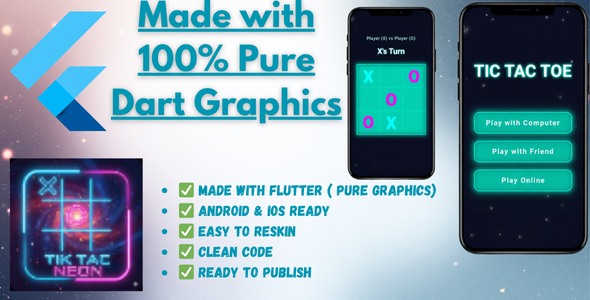

Tic Tac Toe Neon – Flutter Game Template (Pure Dart Graphics)
Overview
A complete, ready-to-publish Tic Tac Toe game app built entirely with Flutter. This template features a stunning neon glow theme and multiple game modes.
The most unique feature of this project is that all graphics are drawn using pure Dart code (CustomPaint). This means there are zero image assets, resulting in a tiny app size and a perfectly crisp look on any screen.
This is a perfect template for anyone looking to launch their own game on the Play Store or for students who want to learn how to create custom graphics and UI in Flutter.
Key Features
- 100% Pure Dart Graphics: No images! All UI elements, including the board, X’s, and O’s, are drawn with code, providing a perfectly sharp and scalable UI.
- Stunning Neon Glow Theme: A beautiful and modern glow effect applied to the entire UI.
- Multiple Game Modes:
- Player vs. Player
- Player vs. Computer (AI)
- AI Difficulty Levels: Includes “Easy,” “Medium,” and “Hard” modes for the AI.
- Ready-to-Use Screens:
- Home Screen (Mode Selection)
- Game Screen
- In-App Privacy Policy Screen (Template included)
- Additional UI Elements:
- “About” dialog to show your developer/studio name.
- “Play Online” button with a “Coming Soon” dialog (a perfect placeholder for your next update).
- Clean & Commented Code: Professionally written, well-commented code that is easy to understand and modify.
- Null Safety: The entire project is 100% null-safe.
- Ready for Publishing: Comes with all the necessary setup to be published on the Google Play Store.
What You Get
- Full Flutter Source Code
- This complete documentation file
Quick Setup Guide
1. Prerequisites
- Flutter SDK (v3.0.0 or higher)
- Dart SDK
- An IDE (VS Code, Android Studio)
2. How to Run the App
- Unzip the project file.
- Open the project in your IDE.
- Run
flutter pub getin your terminal to install all the required packages. - Run
flutter runto launch the app on your emulator or device.
3. How to Customize the App
- Change Colors: All colors are centrally managed. Go to
lib/utils/colors.dartand modify the values in theAppColorsclass to change the theme easily. - Change App Name:
- Android: Go to
android/app/src/main/AndroidManifest.xmland change theandroid:label. - iOS: Go to
ios/Runner/Info.plistand change theCFBundleNamestring.
- Android: Go to
- Change Package Name (Application ID): We highly recommend using the
change_app_package_namepackage. Run this command in your terminal:
flutter pub run change_app_package_name:main com.yourcompany.yournewname
4. How to Update Privacy Policy
- Go to
lib/screens/privacy_policy_screen.dart. - Find all the
[TODO]comments. - Replace the placeholder text like
[YOUR APP NAME],[YOUR COMPANY/DEVELOPER NAME], and[YOUR SUPPORT EMAIL]with your own information.
How to Sign and Publish for Release
This project is set to use the default debug signing config so you can run it immediately. To publish the app, you MUST create your own signing key.
For a complete, step-by-step guide, please follow the official Flutter documentation:
https://docs.flutter.dev/deployment/android#signing-the-app
Thank you for purchasing this template. If you have any questions or need support, please contact me through my author profile on CodeCanyon.
0 average based on 0 ratings.

| Last Update | 2025-11-01 |
| Created | 2025-11-01 |
| Sales | 0 |
| Discussion | Comments |
| Software Version | Flutter 3.x |
| Files Included | Dart YAML JavaScript JSON .java .kotlin |
| Video Preview Resolution |


