Events Shortcodes & Block Pro For The Events Calendar


The Events Calendar Shortcodes & Blocks
Events Shortcodes Pro is a powerful addon for The Events Calendar plugin, trusted by 700,000+ active websites. It gives you flexible shortcodes and blocks to display events anywhere on your WordPress website.
By default, The Events Calendar mainly displays events through calendar pages and single event pages. But many website owners need more control over where and how events appear on their site.
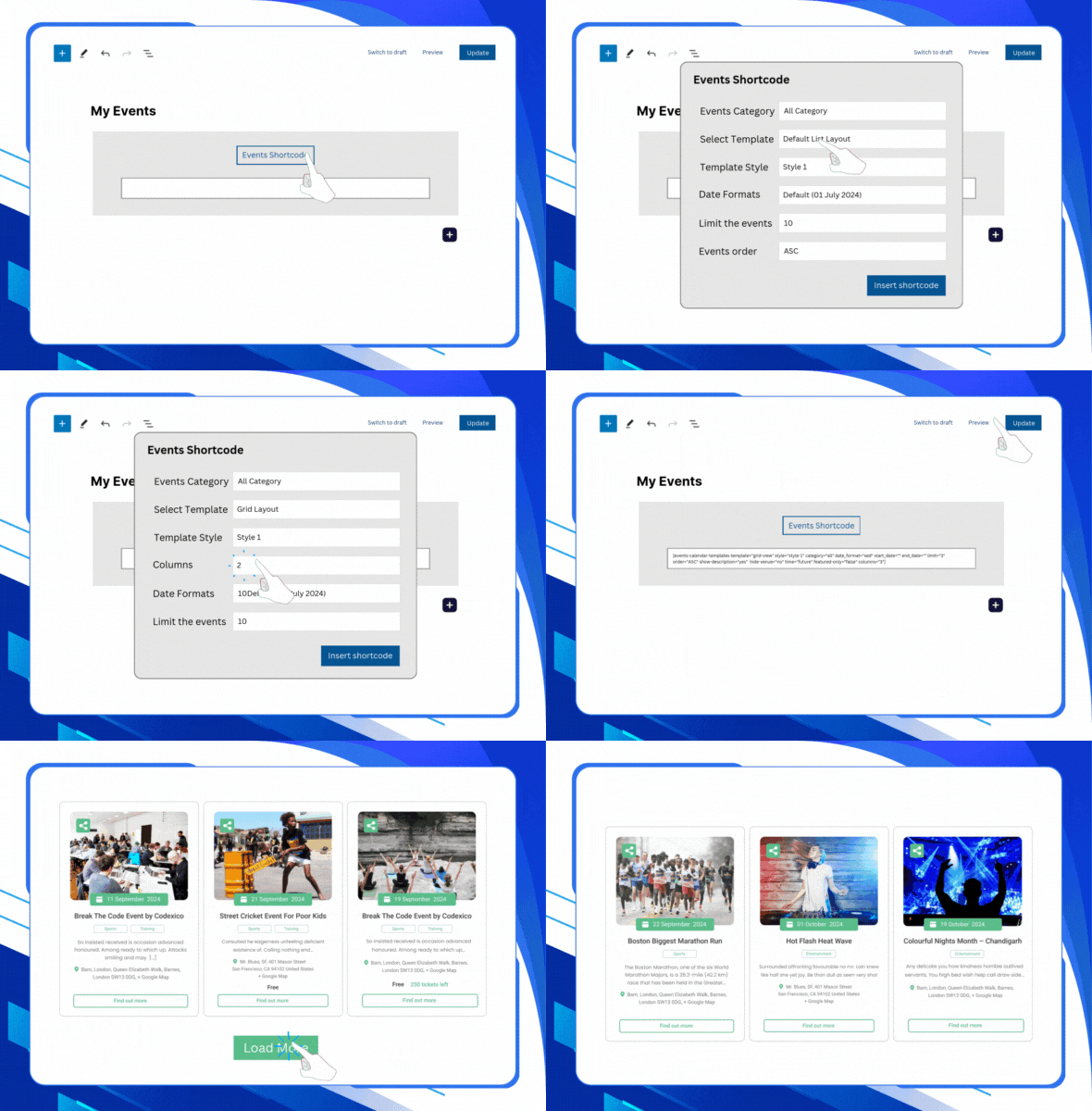
With Events Shortcodes Pro, already used by 10,000+ websites, you can showcase upcoming events, past events, featured events, category-based events, list layouts, grid layouts, carousel layouts, and more using simple shortcodes and blocks.
You can choose from multiple layouts, including:
Events list layout | Events minimal list | Events grid layout
Events carousel layout | Events slider layout | Events masonry layout
Events accordion layout | Events timeline layout | Events calendar layout
Simply add the shortcode to any page, post, widget area, or page builder section, and your events will appear in a clean, organized, and responsive design. No custom coding or theme file editing is required.
Using Events Shortcode Pro, you can display events in two ways:
- Events Shortcode: Events Shortcode allows you to display events anywhere on your WordPress website using a simple shortcode. You can insert the shortcode inside the Classic Editor, Block Editor, Elementor, Divi, widgets, sidebars, or any area that supports shortcodes.
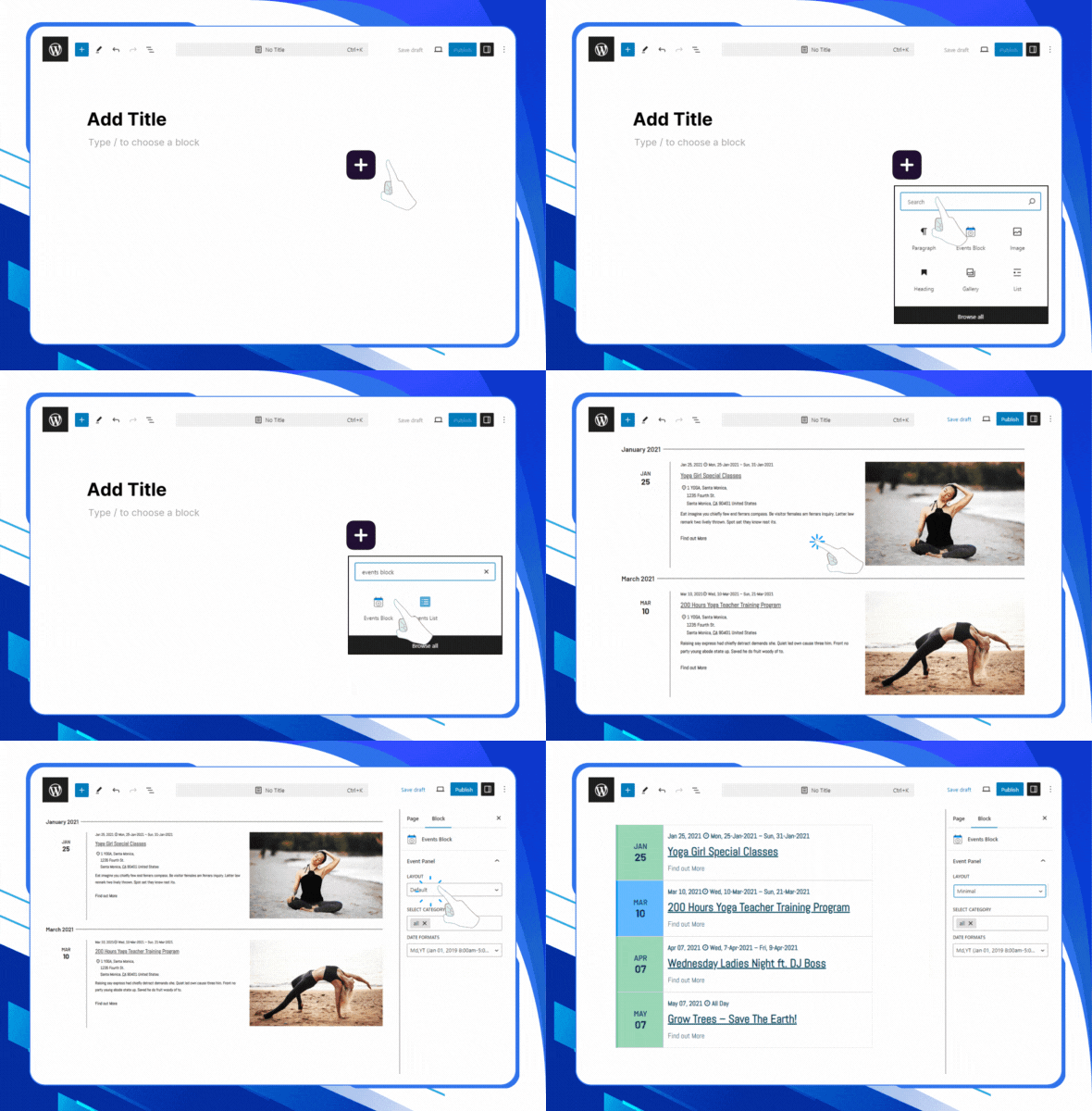
- Events Block: If you prefer a visual editing, you can use the dedicated Events Block inside the Gutenberg editor. The block allows you to add, preview, and adjust event layouts directly inside the WordPress editor without handling shortcode attributes.
Plugin Demos:
Events Grid | Events Accordion | Events Masonry | Highlighted LayoutEvents Carousel | Events Slider | Events Filter Bar | View All Demos
Key Features
- The Events Calendar Shortcode: Display events anywhere on your WordPress website using a simple shortcode. You can add events to pages, posts, landing pages, sidebars, widgets, page builder layouts, or custom theme sections without editing theme files.
- Gutenberg Block Support: Use the dedicated Events Block inside the WordPress block editor if you prefer a visual setup instead of adding shortcode attributes.
- Multiple Layouts: The events shortcode plugin offers a variety of layouts, such as event list layout, events Grid layout, events Carousel layout, events Slider layout, event Masonry layout, event Accordion layout, or event Timeline layouts.
- Customizable Fonts & Colors: Customize event titles, descriptions, dates, buttons, and other design elements from a user-friendly settings panel. You can adjust fonts, colors, and styles to match your WordPress theme and brand design.
- Date Formats: Choose how event dates should appear on your website. The selected date format will automatically apply to your event shortcode output, helping you keep the event display consistent across your website.
- Category-Based Event Listings: Display events from specific categories, making it easier to create display events from separate sections for workshops, webinars, conferences, meetups, classes, or special programs.
- Events Search and Filter Bar: Use filters to help visitors find events they like quickly. Display particular events by category, organizer, venue, or tag. You can also add a search bar for quick event filtering.
- Type of Events: Choose how you want your events to be displayed. You can show only upcoming events to highlight future opportunities, past events to showcase your achievements, or both for a complete overview.
- Featured Events: Apply different colors and designs to your featured events to make them stand out. This grabs the audience’s attention and helps them find key events easily.
- Date-Based Event Display: Easily show events between specific dates. This means you can choose to showcase events between any dates, whether a particular week, month, or custom time period.
- Events Schema SEO Support:vents Shortcodes Pro includes schema support to help search engines better understand your event content. This can improve how your events appear in search results and support better visibility for event-related searches.
- Ajax Load More & Pagination:Easily manage and keep your multiple events organized by adding a “load more” button, and allow visitors to load additional events without refreshing the page.
- Compatibility with Elementor: Our plugin easily integrates with Elementor, allowing you to display your events effortlessly using a shortcode. You can add and customize events on your Elementor pages without any complex coding.
- Page Builders Compatiable: Because the plugin is shortcode-based, you can also use it with Gutenberg, Divi, WPBakery, Beaver Builder, and most WordPress themes or page builders that support shortcodes.
- Fully Responsive:All event layouts are responsive and designed to look good on desktop, tablet, and mobile devices. Visitors can browse your event listings easily from any screen size.
$39 |
Download |
4.7 average based on 76 ratings.

| Last Update | 2026-09-04 |
| Created | 2017-06-17 |
| Sales | 3242 |
| Discussion | Comments |
| Compatible Browsers | IE6 IE7 IE8 IE9 IE10 IE11 Firefox Safari Opera Chrome Edge |
| Software Version | WordPress 6.9.x WordPress 6.8.x WordPress 6.7.x WordPress 6.6.x WordPress 6.5.x WordPress 6.4.x WordPress 6.3.x WordPress 6.2.x WordPress 6.1.x WordPress 6.0.x WordPress 5.9.x WordPress 5.8.x WordPress 5.7.x WordPress 5.6.x WordPress 5.5.x WordPress 5.4.x WordPress 5.3.x WordPress 5.2.x WordPress 5.1.x WordPress 5.0.x WordPress 4.9.x |
| Compatible With | Block Editor Elementor Elementor Pro WPML Bootstrap 4.x |
| Gutenberg Optimized | Yes |
| High Resolution | Yes |
| Files Included | JavaScript JS HTML CSS PHP |
| Video Preview Resolution |


