TBank - Payment Gateway Plugin for Acelle


T-Bank Payment Gateway for Acelle Mail
Accept Russian-issued card payments in your Acelle SaaS through T-Bank’s hosted checkout — no PCI scope on your side, no card data ever touches your server. Drop-in plugin for Acelle Mail SaaS billing. T-Bank handles the card form, 3DS authentication, and fraud screening. You collect the payout in your T-Bank merchant account.
Why T-Bank?
T-Bank (formerly Tinkoff Bank, rebranded in 2024) is the largest digital bank in Russia and runs the most widely-deployed e-acquiring service for Russian online businesses. If your Acelle SaaS targets the Russian or CIS market, T-Bank is what your customers expect to see at checkout — alongside Sberbank and YooMoney, T-Bank is one of the three “must-support” Russian payment options.
What you get out of the box:
- Hosted checkout (PaymentURL) — T-Bank renders the card-entry page on
securepay.tinkoff.ru. Your Acelle install never touches a card number. - 3DS / SCA — T-Bank handles the authentication step in-flow.
- Fraud screening — T-Bank’s antifraud engine screens transactions before settlement.
- Mobile-friendly checkout — works on mobile browsers and supports Apple Pay / Google Pay where the customer’s card is provisioned.
- Webhook-based status delivery — T-Bank POSTs verified status updates back to Acelle; the plugin verifies the HMAC token and updates the
PaymentIntent.
What this plugin does
Adds T-Bank as a payment-gateway type inside Acelle’s admin. Once installed, your Plans → Payment Gateways screen lets you add one or more T-Bank Terminals (e.g. one DEMO sandbox for testing, one production for live customers). Customers checking out can pick T-Bank alongside Stripe, Offline, or any other gateway you’ve enabled. Registers alongside Acelle’s existing gateways without modifying core code. Requires Acelle 4.0.24+ and PHP 8.1+.
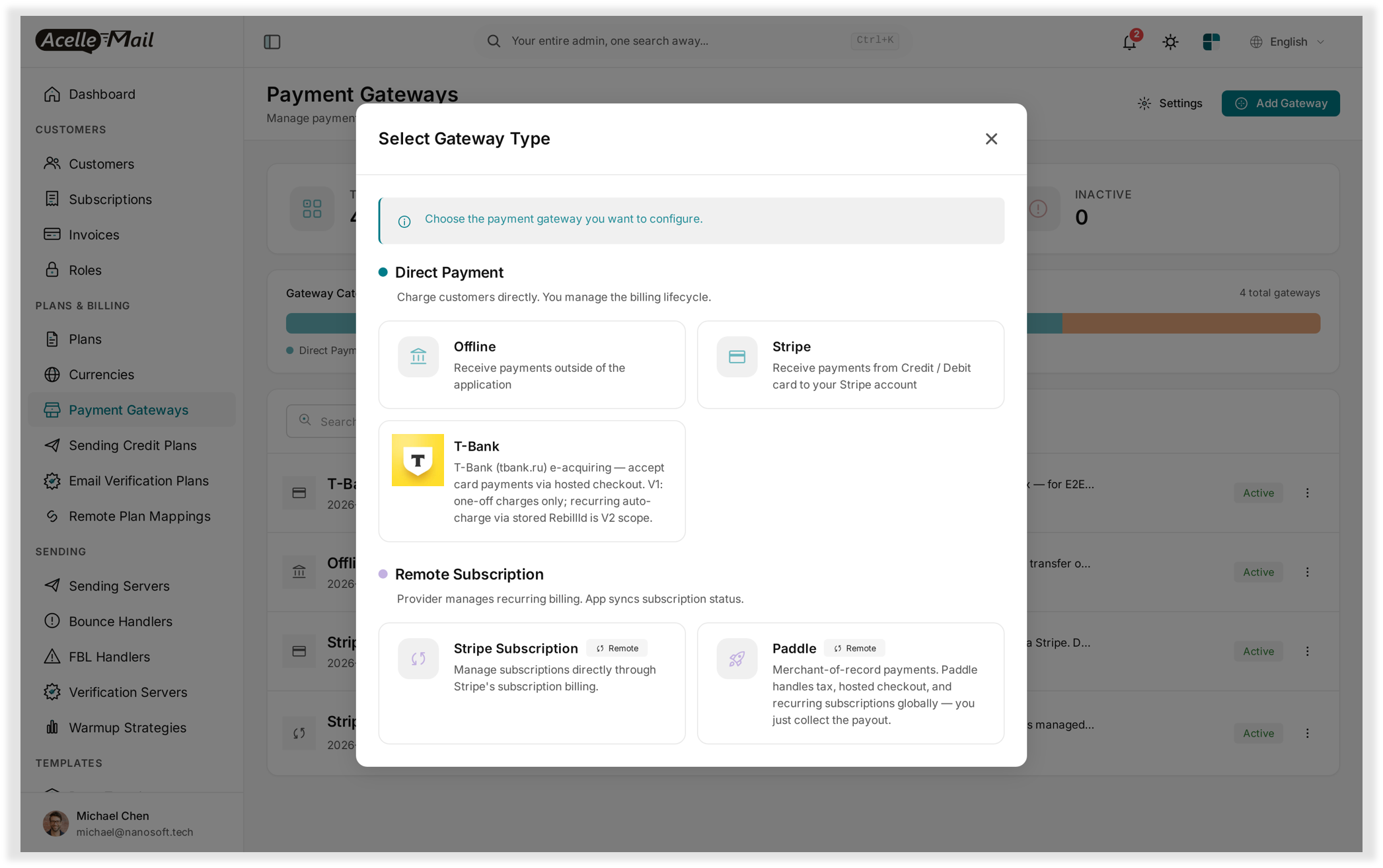
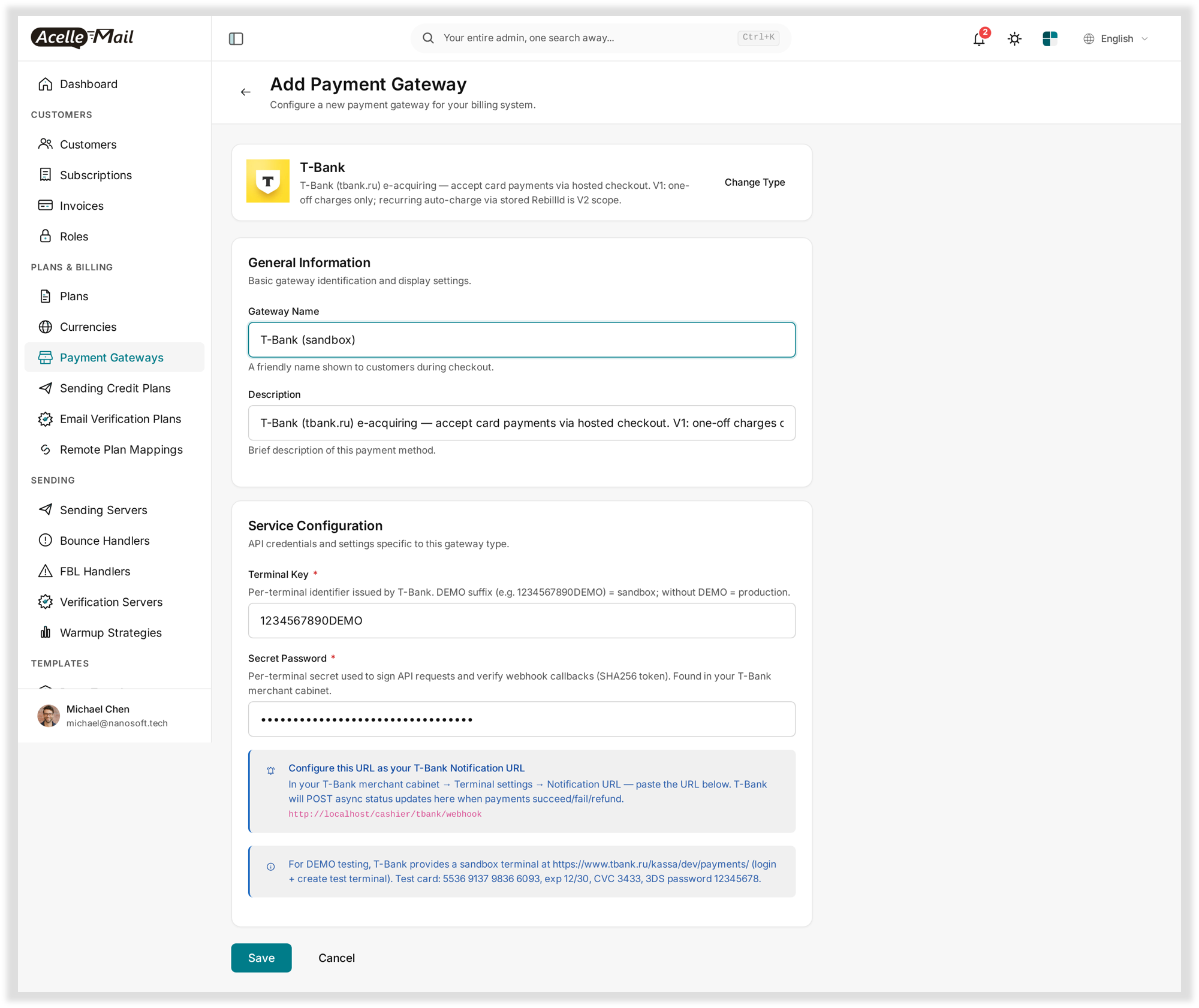
V1 scope — important
V1 supports one-off card charges only. Each customer click → one T-Bank transaction. This is well-suited to:
- Plan purchases (one-off subscription start)
- Top-up / pay-as-you-go credits
- One-time fees
It is NOT suited to:
- Auto-renewing subscriptions where the card is charged silently each month — that uses T-Bank’s
RebillIdflow and is planned for V2.
If you need recurring auto-charge today, use Stripe (Acelle ships with Stripe support) for those plans and T-Bank for one-off purchases. Both can run side-by-side in the same Acelle install.
Feature highlights
- ✅ Drop-in installation — upload the ZIP through Acelle’s standard plugin installer; activate with one click
- ✅ DEMO sandbox + Production terminals — pick by Terminal Key suffix (
…DEMO= sandbox) - ✅ Webhook-verified payments — async status updates with HMAC SHA-256 token verification
- ✅ Multiple terminals — register one DEMO and one production gateway side by side
- ✅ Connection test on save — wrong Terminal Key or Password fails immediately at configuration, not later at customer checkout
- ✅ Multi-tenant friendly — each Acelle tenant configures its own T-Bank merchant account
- ✅ Disable without uninstall — flip the plugin to inactive and T-Bank disappears from the gateway picker; existing rows are preserved
- ✅ Translated — English included; ships with translation hooks so your installed Acelle language packs (RU, etc.) auto-cover the new strings
- ✅ Unobfuscated source — plain
.phpfiles, no ionCube, no encoder. Audit and customise freely under the Envato license
What’s included
- Plugin ZIP —
acelle-tbank-v1.0.x.zip— ready to install - PHP source — Full source (no obfuscation):
ServiceProvider,TBankGatewayservice, 3 controllers (Checkout,Return,Webhook),TBankApiHTTP client - Documentation — HTML user guide (install / enable / configure / webhook setup / DEMO testing / troubleshoot), this listing description
- Screenshots — 8 high-resolution screenshots showing every step of the flow
- Tests — Unit tests for
TBankApi(PHPUnit / Pest compatible) - License — Envato Regular License (single end-product) — Extended License also available
Compatibility
- Acelle Mail — 4.0.24 and newer
- PHP — 8.1+ (matches Acelle’s own minimum)
- T-Bank account — Merchant cabinet at tbank.ru/kassa with at least one Terminal (DEMO or production)
- Server — Outbound HTTPS to
securepay.tinkoff.ruon port 443. Plus inbound HTTPS so T-Bank can POST async webhook callbacks to your Acelle install. - Database — Uses Acelle’s existing
payment_gatewaystable — no new migrations in v1
Frequently asked questions
Do I need a Russian legal entity to use T-Bank? For a production Terminal, yes — T-Bank requires Russian KYC / business verification. For the DEMO sandbox, no — anyone can sign up at tbank.ru/kassa/dev/payments/ and create a test terminal.
Will this plugin work alongside my existing Stripe / Paddle / Offline setup? Yes. Acelle supports multiple active gateways concurrently. This plugin only registers tbank as a new option; it does not interfere with existing gateways.
Does it support recurring subscriptions? Not in V1. V1 is one-off charges only. T-Bank’s RebillId (stored-card auto-charge) is planned for V2. For V1, run T-Bank as a one-off-charge gateway and use Stripe / Paddle for recurring plans.
Why does T-Bank require a webhook when other plugins (e.g. Paddle) don’t? T-Bank’s API is push-based — they POST status updates to your server. Most other gateways either expose a read API (so the app can pull state) or both. T-Bank’s webhook is the only authoritative signal that a payment succeeded; the browser return URL is informational and never trusted by the plugin. Setting the Notification URL in the T-Bank merchant cabinet is a one-time step (see §6 of the user guide).
My T-Bank account predates the rebrand — is it still “Tinkoff” in my dashboard? The API host (securepay.tinkoff.ru) and most legacy URLs still carry the Tinkoff name even though the brand is now T-Bank. The plugin works with both. If your merchant cabinet URL is business.tinkoff.ru, that’s the same product — just an older URL.
Is the source open / unobfuscated? Yes. All PHP source is delivered as plain .php files — no ionCube, no obfuscator. You can audit, fork, and customize it under the Envato license terms.
Changelog
v1.0.1 — Current
- Initial public release on CodeCanyon
(Future releases will be appended here. CodeCanyon emails buyers when a new version is uploaded.)
Planned for v1.1+
RebillIdflow for stored-card auto-charge (recurring subscription support)- Refund button in admin payment-intent view
- Migrating to T-Bank’s “Tokenize → Charge” two-step API for saved-card UX
Support
- Documentation: full HTML user guide bundled with the ZIP (also linked from the CodeCanyon item page)
- Item comments: ask publicly under the item’s Comments tab
- Direct contact: see the Author column on the CodeCanyon item page
Reasonable scope: install help, configuration help, bug reports against an unmodified install. Out of scope: T-Bank account / merchant cabinet / payout issues (those go to T-Bank support), Russian-language localisation work, custom development against the plugin source, Acelle core modifications.
License
Envato Regular License — use in a single end-product (one Acelle install / one Acelle SaaS instance). For SaaS providers reselling Acelle to multiple end customers under their own brand, the Extended License applies. Full terms: https://codecanyon.net/licenses/standard
0 average based on 0 ratings.

| Last Update | 2026-05-09 |
| Created | 2026-05-09 |
| Sales | 0 |
| Discussion | Comments |
| Compatible Browsers | |
| Software Version | PHP 8.x |
| High Resolution | |
| Software Framework | |
| Files Included | JavaScript JS HTML PHP |
| Video Preview Resolution |


