SwiftPasswords | Offline Security Vault App for Windows
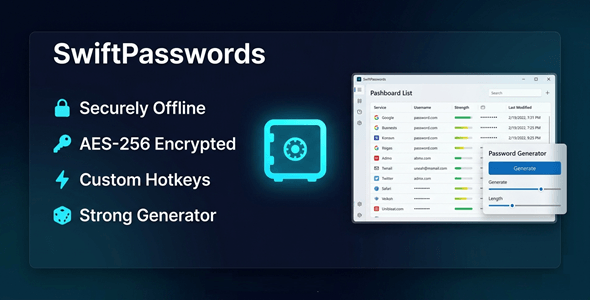

Your Passwords. Your Device. Nobody Else’s Business.
SwiftPasswords is the offline password vault that keeps your credentials 100% local.
No cloud. No subscriptions. No risk of a data breach.
Everything is encrypted and stored on your machine — right where it belongs.
You stay in full control, always.



Perfect For
✔ Freelancers managing dozens of client logins
✔ Small business owners protecting sensitive accounts
✔ Privacy-conscious professionals
✔ Remote workers handling confidential credentials
✔ Anyone who refuses to trust the cloud with their passwords
Features
 | Local Encrypted Vault All data is stored on your device with strong encryption. Nothing ever leaves your machine. |
| Built-in Password Generator Create strong, unique credentials instantly. Set length, complexity, and character rules. |
| Smart Search with Typo Tolerance Find any entry in seconds — even with spelling mistakes. No more scrolling through long lists. |
| Clipboard Protection Copied passwords auto-clear after a set time. Prevents accidental exposure in clipboard history. |
| Bulk Entry Management Select, edit, or delete multiple entries at once. Save hours when reorganizing your vault. |
| CSV & JSON Import Migrate from any other password manager easily. Bring all your existing data in with one click. |
| Activity Tracking See when each entry was last accessed or modified. Stay on top of your vault’s history. |
| Fast & Responsive UI Launches instantly. No lag. No loading screens. Designed for everyday use without friction. |
| No Internet Required Works 100% offline — even without a Wi-Fi connection. Your vault is always available, no matter what. |
| No Subscription. Ever. Pay once. Use forever. No monthly fees. No hidden charges. |
Why You Need This
❌ Cloud password managers get hacked — and your data is at risk
❌ Monthly subscriptions eat into your budget every single year
❌ Big tech apps track your usage and store your data on their servers
❌ Browser-saved passwords are easy targets for malware and phishing
SwiftPasswords fixes all of this.
Your data lives on your hard drive — encrypted and fully private.
No third party has access.
No breach can expose what was never online.
That’s real security.
How You Can Profit
✔ Offer it to clients as a premium security tool in your freelance packages
✔ Resell licenses to small businesses who need offline password management
✔ Bundle it with IT support or consulting services for added value
✔ Use it yourself and eliminate costly password manager subscriptions
Stop paying monthly fees for something you can own outright.
This is not just a tool — it’s a smarter, safer way to manage your digital life.
⚡ Fast Results
Install in under 2 minutes.
Import your existing passwords from CSV or JSON instantly.
Start using your vault the same day.
No configuration headaches. No tech skills required.
Example:
Import 500 passwords from LastPass in under 60 seconds — fully encrypted and ready to use.
Simple 3-Step Setup
 | Step 1 — Download & Install Run the installer on your Windows 10 or 11 machine. Takes less than 2 minutes. |
 | Step 2 — Create Your Vault Set your master password and create your encrypted local vault. |
 | Step 3 — Add or Import Entries Type in credentials manually or import from CSV / JSON. You’re ready to go. |
- Version 1.0.0 – Initial release with full offline vault, password generator, smart search, clipboard protection, bulk management, and CSV/JSON import
Turn this into your own software business.
✔ Sell licenses and keep 100% of the profit
✔ No coding required
✔ High-demand privacy & security niche
✔ One-time setup — then passive income
To activate reseller features, you must enable your reseller panel first.
All details are here
 | Does SwiftPasswords store anything online? No. Everything is stored locally on your device. No data is ever sent to any server. |
| Is there a monthly subscription? No. This is a one-time purchase. Pay once and use it forever with no recurring fees. |
| What Windows versions are supported? SwiftPasswords supports Windows 10 and Windows 11. Both 32-bit and 64-bit systems. |
| Can I import passwords from another manager? Yes. SwiftPasswords supports CSV and JSON import. Works with most major password managers. |
| What happens if I forget my master password? For maximum security, there is no cloud recovery. Keep your master password safe — it’s the only key to your vault. |
| Does it require an internet connection to work? No. SwiftPasswords works 100% offline. Use it anywhere, even without Wi-Fi. |
0 average based on 0 ratings.

| Last Update | 2026-05-07 |
| Created | 2026-05-07 |
| Sales | 0 |
| Discussion | Comments |
| Application Runtime | Native |
| High Resolution | |
| Compatible OS Versions | Windows 11 Windows 10 |
| Video Preview Resolution |


