SupportPilot - AI Chatbot Trainer & Helpdesk SaaS
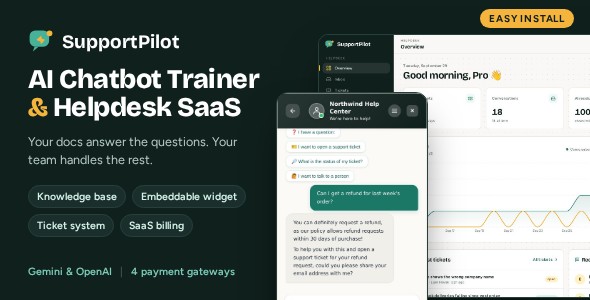

SupportPilot – AI Chatbot Trainer & Embeddable Helpdesk SaaS
Your docs answer the questions. Your team handles the rest.
SupportPilot is a self-hosted SaaS platform for AI customer support. Train a chatbot on your own content, embed it on any website with one script tag, and let it open a support ticket whenever it cannot solve a problem. Run it for your own business, or sell it to your customers as a subscription service.

Live Demo
- Dashboard and admin panel: https://demo.lendasys.com/supportpilot/login. Click Demo user or Admin on the sign-in page; no password needed.
- Chat widget on a sample website: https://demo.lendasys.com/supportpilot/demo-chat.html
The demo runs in demo mode, so settings, billing and account changes are disabled.
Key Features
- AI trainer: teach the chatbot with PDF, Word, Markdown and text files, web pages, sitemaps and Q&A pairs
- Embeddable chat widget: one script tag or a WordPress plugin; the AI replies in the visitor’s own language
- Bot-to-ticket handoff: unsolved chats become tickets with a transcript and an AI summary
- Helpdesk: shared inbox, live chat takeover, SLA tracking, internal notes, saved replies
- Form builder: drag-and-drop pre-chat forms, ticket forms and surveys
- Public help center built from your knowledge base
- Leads, automations and analytics
- SaaS billing: plans with usage limits, free trials with reminder emails and 4 payment gateways (Stripe, PayPal, Razorpay, cryptocurrency)
- Security: two-factor authentication, Google reCAPTCHA, Google Sign-In, account lock and suspension
- Complete admin panel and a one-command installer
AI Trainer (Knowledge Base)

- Upload PDF, Word (.docx), Markdown and text files, or import a web page or a whole sitemap
- Add question and answer pairs, or write articles directly
- View, edit and switch every source on or off; passages are rebuilt automatically when you save
- Semantic search with vector embeddings (PostgreSQL pgvector), with keyword search as a fallback
- Unanswered questions queue: AI drafts the answer, you add it to the knowledge base in one click
- Test playground to check answers before going live
Embeddable Chat Widget

- Tabbed messenger: home screen, chat, help articles and “My tickets”
- Works on any website: HTML snippet, included WordPress plugin or Shopify theme code
- Pre-chat forms, quick-reply buttons and satisfaction surveys
- File and image uploads (with image analysis on vision models), voice input and emoji picker
- Multilingual answers: the AI detects the visitor’s language and replies in it; you set each chatbot’s default reply language. The widget’s buttons and labels are in English.
- Widget Studio with live preview: colors, header, message bubbles, input area, font, position and button style
- Runs in Shadow DOM, so the host site’s styles never break the widget
Helpdesk & Ticket System

- The AI opens a ticket with the conversation transcript and a summary when it cannot help
- Three-panel Inbox: conversation list, thread and customer details
- Take over a live chat from the bot at any time
- Statuses, priorities, tags, departments and agent assignment
- SLA tracking for first reply time, with overdue indicators
- Internal notes and saved replies
- AI helpers: ticket summary, automatic category and priority, reply drafts from the knowledge base
- Customer ticket portal with secure tracking links, replies and file uploads
- Email notifications for new tickets and replies

Form Builder

- Drag-and-drop editor with 11 field types: short text, long text, email, phone, number, date, dropdown, single choice, multiple choice, rating and consent checkbox
- Multi-step forms with section headings and page breaks
- Required fields, validation and conditional fields
- Use forms before a chat, when opening a ticket (a different form per topic) and as after-chat surveys
Public Help Center

- Publish chosen knowledge base sources as a searchable help center
- Visitors can search the same articles inside the widget
- Nothing is public until you publish it
Leads, Automations & Analytics

- Leads: contact details captured from chats and forms, with statuses and AI lead analysis
- Automations: visual workflow builder. Triggers: conversation started, message received, lead created. Actions: send message, send email, wait, call webhook, create lead, send notification
- Analytics: messages, response time, satisfaction, lead conversion and peak hours
- In-app notifications for new leads, conversations and human-agent requests
SaaS Billing & Payment Gateways
- Subscription plans with limits on chatbots, conversations, messages, AI responses and leads
- Stripe: recurring card subscriptions with an optional free trial
- Trial reminder emails: sent automatically a set number of days before a trial ends
- PayPal: one payment per 30 days
- Razorpay: cards, UPI, netbanking and wallets; can charge in your own currency (for example INR) with an exchange rate you set
- Cryptocurrency through NOWPayments: the customer picks a coin on the payment page
- A gateway appears on the plan pages only after you add its keys
- Usage and limits page for your customers
Security & Accounts
- Two-factor authentication (2FA) with any authenticator app, QR code setup and single-use backup codes, for users and administrators
- Google reCAPTCHA on the sign-in, sign-up and password reset forms
- Google Sign-In, email verification and password reset
- Account lock after repeated failed sign-in attempts
- Users can change their password and delete their own account
- Administrators can suspend and restore accounts
Admin Panel

- Operations Center: users, chatbots, conversations, revenue and active subscriptions at a glance
- Users and subscriptions: change roles and plans, suspend accounts, reset two-factor authentication
- Integrations: enter AI, payment, Google Sign-In and reCAPTCHA keys from the browser; saved keys take effect immediately, without a restart
- AI Usage: daily AI responses and estimated token use per chatbot
- System Health: database, runtime and integration checks
- SMTP settings and editable email templates
- Notifications to users, with reusable templates
- Site Content editor for the landing page, contact page and legal pages
- General settings: site name, logo, SEO, contact details, social links, plans and trial settings
AI Providers
- Google Gemini (default) and OpenAI; one global model setting applies to every chatbot
- OpenRouter supported for knowledge base embeddings
- Three response styles per chatbot: strict (knowledge base only), balanced or creative, plus custom instructions
Third-Party Services: Your Own Accounts Required
SupportPilot connects to external services. None of these services or accounts are included with this item, and their fees are not part of the purchase price.
- AI services require your own account. To use OpenAI, Google Gemini or OpenRouter, you must create your own account with that provider and enter your own API key.
- AI services may cost extra. OpenAI, Google Gemini and OpenRouter charge for API usage (AI answers and knowledge base embeddings) under their own pricing. These fees are billed by the provider and can create additional costs.
- Payment providers require your own account. To accept payments with Stripe, PayPal, Razorpay or NOWPayments, you must open your own merchant account with each provider you want to use and enter your own keys. Your customers then pay through your account.
- Payment providers may cost extra. Stripe, PayPal, Razorpay and NOWPayments charge their own transaction fees and may have other costs, such as currency conversion or payout fees.
- Other optional services (Google Sign-In, Google reCAPTCHA and an SMTP email provider) also need your own accounts, and some may charge fees.
At least one AI provider (Google Gemini or OpenAI) is needed for chatbot answers. All other services are optional.
Easy Installation

On a fresh Ubuntu 22.04 / 24.04 or Debian 12 server, upload the files and run one command:
sudo bash install.shThe installer sets up Node.js, PostgreSQL with pgvector, the database, the environment file, your admin account, a background service with its scheduled jobs, nginx and a free HTTPS certificate. Run the same command again later to update. Manual installation steps for other systems are in the documentation.
Requirements
- A VPS or dedicated server with at least 2 GB RAM (4 GB recommended for building)
- Node.js 22 or 24 LTS
- PostgreSQL 14+ with the pgvector extension (managed services such as Supabase and Neon include it)
- Your own Google Gemini or OpenAI account and API key
- Optional: your own OpenRouter, SMTP, Stripe, PayPal, Razorpay, NOWPayments, Google Sign-In and reCAPTCHA accounts and keys
Tech Stack
- Next.js (App Router), React and TypeScript
- Tailwind CSS
- PostgreSQL with Prisma ORM and pgvector
- Plain JavaScript widget (no framework needed on the host site)
What You Get
- Full, unminified source code
- One-command installer (
install.sh) - WordPress plugin for the chat widget
- HTML documentation for installation and setup
- Sample data script that fills an account with conversations, tickets, leads and knowledge articles, plus a short guided tour in the documentation
Please Note Before Buying
- This is a Node.js (Next.js) application. It does not run on shared PHP hosting; you need a VPS or a dedicated server.
- AI services: OpenAI, Google Gemini and OpenRouter require your own account and API key, and their API usage may create additional costs.
- Payment providers: Stripe, PayPal, Razorpay and NOWPayments require your own merchant account, and their transaction fees or other charges may create additional costs. See Third-Party Services above.
- Stripe renews subscriptions automatically. PayPal, Razorpay and cryptocurrency take one payment per 30 days.
- The dashboard, admin panel and the widget’s interface are in English. The AI answers visitors in their own language.
Support
Email LendaLabs@gmail.com with your purchase code and a short description of the issue. We usually reply within 24–48 hours.
Changelog
v1.0.0 – Initial release


