Super Store Finder - Multi Categories Add-on
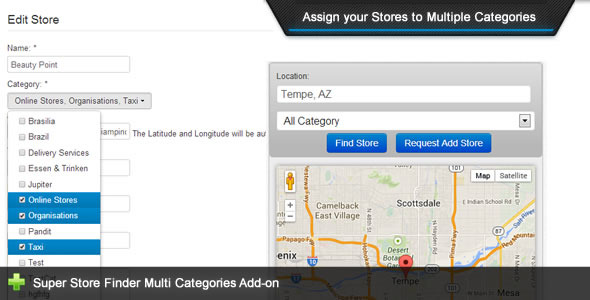

This add-on is an extension for and requires Super Store Finder
Super Store Finder – Multi Categories Add-on
This is an add-on for Super Store Finder application that allows administrator to choose and assign multiple categories for each store. Super Store Finder is a multi-language fully featured PHP/Javascript/MySQL Application integrated with the latest Google Maps API that allows customers to locate your stores easily. Packed with Geo Location, Google Street View and Google Maps Direction your customers will never be lost again getting to your locations.Main Features
- Allow administrators to choose and assign multiple categories for each store in Super Store Finder
- User friendly bootstrap multi-select feature
- No page refresh upon selecting multiple categories
- Easy to understand user guide included
Installation Instructions
- Notice for Super Store Finder Multi Categories Add-on:
a. You need to purchase Super Store Finder prior to using this Add-on
b. Be sure to backup your existing files and database before performing the steps below
1. Alter cat_id column in stores table to varchar(255) in your database, run below SQL command:
ALTER TABLE stores CHANGE cat_id cat_id varchar(255);
2. If you’re using the standard version (non-responsive), extract and replace content within superstorefinder.zip to your installation folder
3. If you’re using responsive version, extract and replace content within superstorefinder_responsive.zip to your installation folder.
4. You’re done!
Multi Categories Demo Instructions
- Login to administrator
- Edit a store from the store list or Add a new store
- Select multiple categories for a particular store
- Save the store details
- Search the store via frontend to view the results
Support and Inquiries: http://codecanyon.net/user/highwarden
Changelog / Updates
2.2 (Last Update 16 May 2022)
- Added compatibility with Super Store Finder 3.5
2.1 (Last Update 30 Jul 2019)
- Added compatibility with Super Store Finder 3.1
2.0 (Last Update 25 Jan 2019)
- Fixed category multi-selectbox issue on mobile
1.9 (Last Update 29 Mar 2018)
- Added compatibility with Mega Locator theme
1.8 (Last Update 11 Jan 2016)
- Updated all codes to mysqli
- Added compatibility to super store finder version 2.8 core
1.7 (Last Update 21st June 2015)
- Added code to allow integration with custom map code settings (refer to Super Store Finder item patch 2.6)
1.6 (Last updated: 5 May 2014)
- Added Multi Select Option for frontend. (Important Notice: stores table format cat_id column is revamped in the database)
- Fix text encoding issues
4.3 average based on 15 ratings.

| Last Update | 2022-05-16 |
| Created | 2013-09-26 |
| Sales | 391 |
| Discussion | Comments |
| Compatible Browsers | IE6 IE7 IE8 IE9 IE10 IE11 Firefox Safari Opera Chrome Edge |
| Software Version | PHP 8.x PHP 7.x MySQL 8.x MySQL 5.x |
| High Resolution | No |
| Software Framework | |
| Files Included | JavaScript JS CSS PHP SQL |
| Video Preview Resolution |


