SUMO WooCommerce Currency Switcher


SUMO WooCommerce Currency Switcher is a comprehensive WooCommerce Currency Switcher Plugin using which you can receive payments on your WooCommerce shop with multiple currencies.
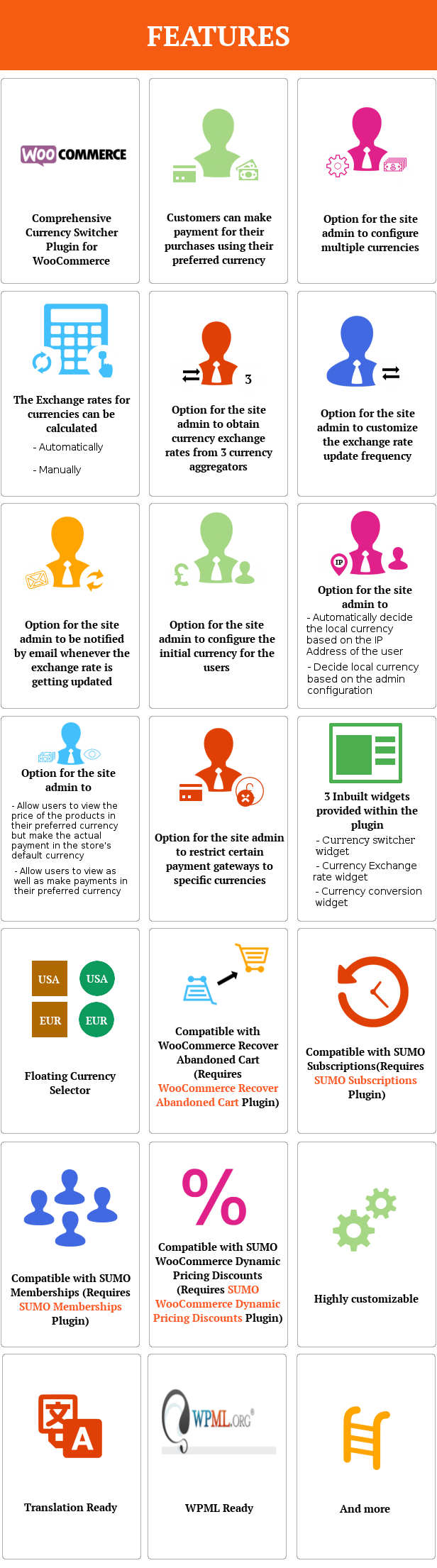
Features
How to Install SUMO WooCommerce Currency Switcher?
1. Login to your Codecanyon account 2. Go to Downloads Tab 3. You will find SUMO WooCommerce Currency Switcher 4. Download sumowoocommercecurrencyswitcher.zip (Please note this will always be the latest version) 5. Unzip sumowoocommercecurrencyswitcher.zip inside which you will find the Plugin files i.e. swcs.zip 6. Install SUMO WooCommerce Currency Switcher i.e. swcs.zip using WordPress Dashboard 7. Activate the PluginHow to Upgrade to a newer version of SUMO WooCommerce Currency Switcher?
If you are using an older version and want to upgrade to the latest version of SUMO WooCommerce Currency Switcher then please do the following steps.1. Deactivate and Delete the existing version of SUMO WooCommerce Currency Switcher in your site.
2. Download the latest version file (sumowoocommercecurrencyswitcher.zip) of SUMO WooCommerce Currency Switcher from Codecanyon.
3. Unzip sumowoocommercecurrencyswitcher.zip inside which you will find the Plugins files i.e. swcs.zip.
4. Install the latest version of SUMO WooCommerce Currency Switcher i.e. swcs.zip using WordPress Dashboard.
5. Activate the Plugin.
Please note you will not lose any settings values, data etc by following the above steps.
Support
Please check the documentation as we have lots of information there. The documentation file can be found inside the documentation folder which you will find when you unzip the downloaded zip file.For support, feature request or any help, please register and open a support ticket on our site.

Updates
Version 1.4.0 on 11 November 2025 Tweak: Prefix added for WooCommerce JS Libraries based on WooCommerce 10.3.0 Tweak: Provided compatibility with High-Performance Order Storage[HPOS] Tweak: Tested with WordPress v6.8.3 Tweak: Tested with WooCommerce v10.3.4 Fix: Fixed deprecated errors, fatal errors Fix: Changing the cart item quantity causes the block cart to revert to the default currency instead of the selected one Fix: The floating currency selector is not displayed for the customer's selection Version 1.3 on 26 July 2020 Fix: Conflict when using SUMO Donation Version 1.2 on 15 November 2018 New: Added option to Display Approximate Price in Default Currency on Cart & Checkout New: Added Price Info Icon option New: Added option to Show/Hide Cents Version 1.1 on 18 September 2018 New: Floating Currency Selector added Version 1.0 on 12 September 2018 - Initial Release
0 average based on 0 ratings.

| Last Update | 2025-11-11 |
| Created | 2018-09-12 |
| Sales | 11 |
| Discussion | Comments |
| Compatible Browsers | IE9 IE10 IE11 Firefox Safari Opera Chrome Edge |
| Software Version | WordPress 6.8.x WordPress 6.7.x WordPress 6.6.x WordPress 6.5.x WordPress 6.4.x WordPress 6.3.x WordPress 6.2.x WordPress 6.1.x |
| Compatible With | WPML |
| Gutenberg Optimized | No |
| High Resolution | No |
| Files Included | JavaScript JS HTML CSS PHP |
| Video Preview Resolution |
Search plugins
Browse Categories


