Street Clash | HTML5 Fighting Game
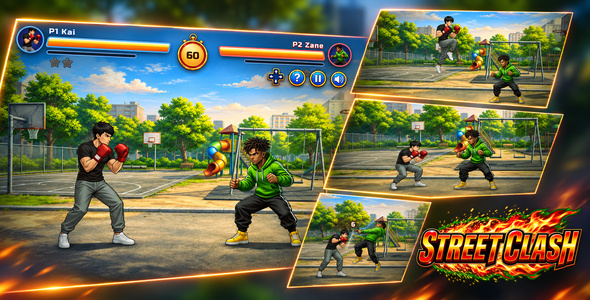

Street Clash is a self-contained HTML5 street-fighting game built with HTML5, CSS3, and vanilla JavaScript. It needs no engine, build step, installation, or server-side service. Open main_file/index.html directly, or upload the complete main_file folder to a static host.
Players pick one of six fighters and fight through a 120-level campaign, punching, kicking, blocking, and unleashing signature specials and ultimates in best-of-three bouts. With six chapters, five level types, a shop of upgrades, fighters to unlock with coins, a loud neon-street look, and a full soundtrack with an announcer, Street Clash turns a single alley fight into a long climb that ends with the CHAMPION! screen.
How to Play
Move with A / D (or the arrow keys against the computer), jump with W, block by holding S or the direction away from your opponent, punch with F, and kick with G. When the blue special meter under your health bar reaches 60%, press H for your first special or S + H for your second, and at 100% press T for your ultimate. A second player uses the arrow keys and Num1–Num4. On touch devices, an on-screen directional pad and Special, Special 2, Kick, Punch, and Ult buttons appear. Empty your opponent’s health bar before the 60-second timer ends and win two rounds to win the match; pause any time with Esc or P. If you lose a campaign fight, tap Try Again to restart the same level.
Core Gameplay
- 120 progressive levels — six chapters of 20 levels each, from Rookie Yard to Champion’s Row, with opponents that grow gradually stronger so late levels feel harder without a sharp difficulty cliff.
- Six fighters — Kai (Boxer), Brutus (Wrestler), Zane (Street Fighter), Viktor (Muay Thai), Shade (Ninja), and Rico (Capoeira), each with their own speed, power, moves, and look. Kai, Brutus, and Zane are free; Viktor, Shade, and Rico unlock with coins.
- Specials, ultimates, and passives — every fighter has two signature specials, a full-meter ultimate, and a built-in passive ability, such as Kai’s Perfect Block or Rico’s Rhythm damage bonus.
- Five level types — normal fights, rule fights (giant, rush, glass, heavy hitter, second wind, or armor opponents), time attacks, survival runs against several opponents in a row, and boss fights.
- Bonus objectives — every level has an optional goal, such as landing a combo, landing specials, winning a round without being hit, finishing fast, or finishing with high health, that pays extra coins.
- Punchy combat feel — fast punches, longer-reach kicks, high and low blocking, jump drift, combo counters with damage falloff, hit-stop, screen shake, sparks, and damage numbers.
- Smarter computer opponents — five fighting styles (aggressive, defensive, counter, zoner, and tricky) and three AI levels (Low, Medium, and Hard) selectable on the lobby and in Settings.
- Quick Fight and Friend mode — pick any two fighters and fight the computer, or switch the opponent to Friend for two players on one keyboard.
- Soundtrack, effects, and announcer — a looping soundtrack, 19 sound-effect cues, and announcer lines for each round, the fight start, and the K.O., with Music and Sound FX sliders and an announcer switch.
- Pause, resume, and loading screen — pause at any time to resume, open How to Play, or quit to the menu; a loading screen with the logo, a progress bar, and a percentage appears on every visit while the artwork, fonts, and sounds load.
Progression & Replayability
- Stage-by-stage unlock — each level unlocks only after the previous one is cleared, with Level 1 always available, and each chapter opens when the last level of the previous chapter is cleared.
- 1–3 star rating and best-star tracking — win for 1 star, add a star for shutting the opponent out (2–0) and another for finishing with at least 50% health. Replaying a level with a lower rating never overwrites your saved best, and the campaign holds up to 360 stars.
- Persistent progress — coins, owned fighters, shop upgrades, level stars, bonus claims, and sound and difficulty settings are saved via
localStorage. - Gradual difficulty — opponent health, power, and speed rise across the campaign, time attacks get shorter in later chapters, survival runs grow from two to three fights, and bonus goals get tougher.
- Coins and unlocks — levels pay coins on the first clear (less on replays), bonus objectives and chapter star bonuses add more, and a daily gift gives 60 free coins. Spend them on the Health, Power, and Meter shop upgrades (three levels each) or on Viktor (2000), Shade (4500), and Rico (8000).
Visual Presentation
- Neon street theme — three painted stages (a playground, a rainy street, and a gym) with a color tint that changes level by level, and gold, orange, and blue interface accents throughout.
- Painted artwork — stages, the logo, fighter sprites, buttons, panels, ribbons, coins, stars, and icons are included as WebP images in
main_file/script/images. - Animated fighters — twelve poses per fighter, including walking, jumping, crouching, punching, kicking, specials, blocking, getting hit, a knockout, and a victory pose, with after-images on fast moves.
- Clear HUD — player names, health bars, special meters, round stars, the round timer, a combo counter, ROUND, FIGHT!, and K.O. banners, plus pause, help, pad, and sound buttons.
- Responsive layout — the interface fills the viewport, and the CSS adapts button sizes, HUD positions, level tiles, and fighter cards for desktop, tablet, and phone (larger lobby, HUD, controls, and dialogs in portrait). Dialogs shrink to fit short windows, and a rotate prompt asks phones to switch to landscape.
- Bungee, Russo One, and Nunito typefaces — bundled locally as WOFF2 files in
main_file/script/fonts, so nothing is loaded from a CDN.
Technical Specifications
- Built with: Pure HTML5, CSS3, and vanilla JavaScript (Canvas 2D rendering)
- Runtime libraries: None. The three interface fonts are bundled locally and loaded from the project folder.
- Responsive: Designed for phones, tablets, and desktop; landscape is the playing orientation, and portrait on a touch device shows a rotate prompt; test your target devices
- Browser support: Minimum supported version floors: Chrome 87+ (desktop & Android), Edge 87+, Firefox 79+ (desktop & Android), and Safari 14.1+ (macOS & iOS 14.5+), set by the logical assignment operator
||=,replaceChildren(), and the CSSinsetproperty the game uses. Verified in Google Chrome 157 on Windows. - Touch & mouse support: Keyboard, mouse, and touch all work — on-screen buttons use pointer events with pointer capture on touch devices, and every action also has a keyboard key.
- Internet requirement: Not needed. All code, artwork, fonts, and sound are part of the project folder, so the game runs fully offline once the files are in place.
- Storage:
localStorage(a few hundred bytes for a new player, a few kilobytes at most with all 120 levels completed) under the keyssc_savefor progress andsc_setfor settings. Inspect or clear via browser DevTools (Application > Local Storage). - Audio: 26 MP3 files in
main_file/script/audio(soundtrack, effects, and announcer lines), plus a punch-hit sound generated with the Web Audio API. - Performance: Stage backgrounds and scaled fighter sprites are cached between frames, the canvas resolution follows the screen and pixel ratio, and the fight runs on a fixed 60-step-per-second timer, so movement stays consistent on mid-range phones and fast desktops alike.
Setup & Customization
- Keep
index.htmlbeside itsscriptfolder (with thecss,js,images,audio, andfontssubfolders). - Open the HTML file in a browser, or upload the entire
main_filefolder to a static web host. If local-file restrictions cause missing styles or images, run it from a local web server. - For basic branding, edit the title in
index.html, replacescript/images/logo.webpand the favicons, or change the fighter names and colors inCFG.fighters(script/js/assets-and-config.js) and the fighter prices in thePRICEobject (script/js/campaign-and-abilities.js). Game content, functionality, and visual styling can be customized through the project files. JavaScript customization requires development knowledge — the fighter data, combat values, AI levels, campaign levels, and audio cues all live in the JavaScript files.
Third-Party Services & Licensing
- Fonts: Bungee, Russo One, and Nunito are bundled as WOFF2 files in
main_file/script/fontsand are licensed under the SIL Open Font License 1.1. Commercial use and redistribution with the project are allowed; each font’s license file is included inmain_file/script/licences, so keep it with the fonts, and do not sell the fonts on their own. Nothing is downloaded from a CDN. - Artwork & Audio: The WebP, PNG, and ICO artwork ships inside
main_file/script/imagesand the MP3 files insidemain_file/script/audio; both are distributed with the project under the item’s license. - Other Dependencies: All code, artwork, fonts, and sound ship inside
main_file; the game makes no requests to external libraries, services, or APIs.
Buyer FAQ
- Can I embed it in an iframe? The game has no built-in iframe restriction. Embedding depends on the host’s frame/security headers and the parent page; test on your target host. Add
allow="fullscreen"to the iframe if you want the full-screen button to work. - Does it work on phones and tablets? The layout responds to screen size, and on-screen directional and action buttons appear on touch devices. The game is played in landscape, and a rotate prompt appears when a touch device is held in portrait. Two players on one device need a keyboard.
- Does it work offline? Yes. Every file the game uses is in the project folder, including the fonts and sound, so no connection is needed once the files are on the device or host.
- Can I disable a screen or feature? There is no built-in feature switch. To hide a lobby button, use a CSS rule such as
.l2 [data-a="shop"] { display: none !important; }instead of deleting its code, because the game scripts expect the screens to exist. Changing game rules means editing the files inscript/js/; development knowledge is recommended. - Can I replace the artwork? Yes. Replace the WebP files in
main_file/script/imageswith your own images using the same file names, such aslogo.webp(1400 × 656) or the 1440 × 810 stage backdrops. Each fighter folder holds 12 pose images, and the pose sizes and foot anchors are listed inCFG.fightersinscript/js/assets-and-config.js.
Changelog
- 1.0 Initial Release — Initial release of Street Clash.
No build tools, no installation, nothing to compile.
0 average based on 0 ratings.


