SophMate - AI Copilot for WordPress and WooCommerce


SophMate – AI Copilot, Workflow Automation and Insights for WordPress & WooCommerce
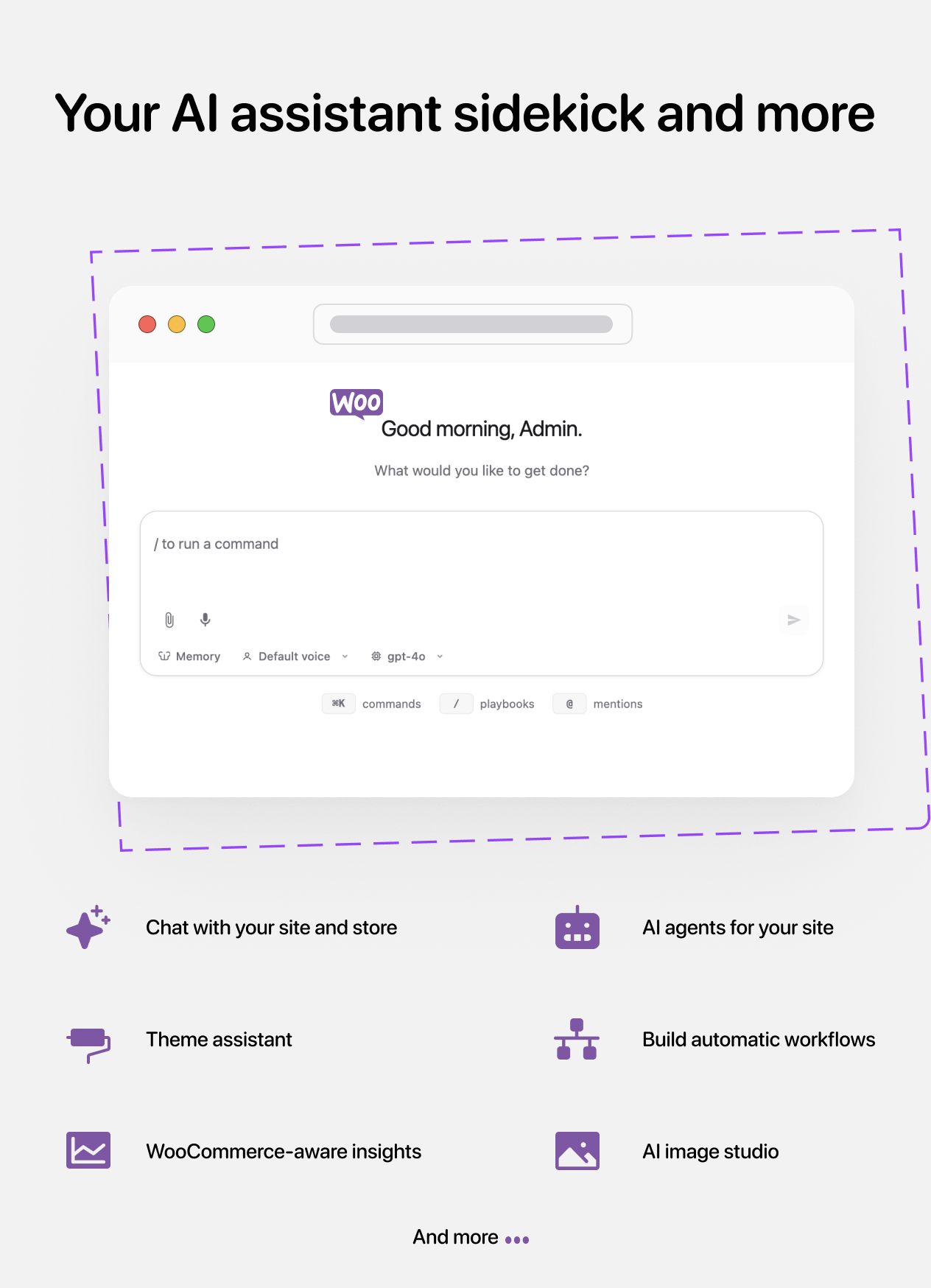
SophMate turns WordPress admin into an AI-powered operations workspace. Ask a Copilot to help with everyday site and store work, describe a process in plain English and let AI create the first workflow draft, or turn WordPress and WooCommerce data into clear insights you can act on.
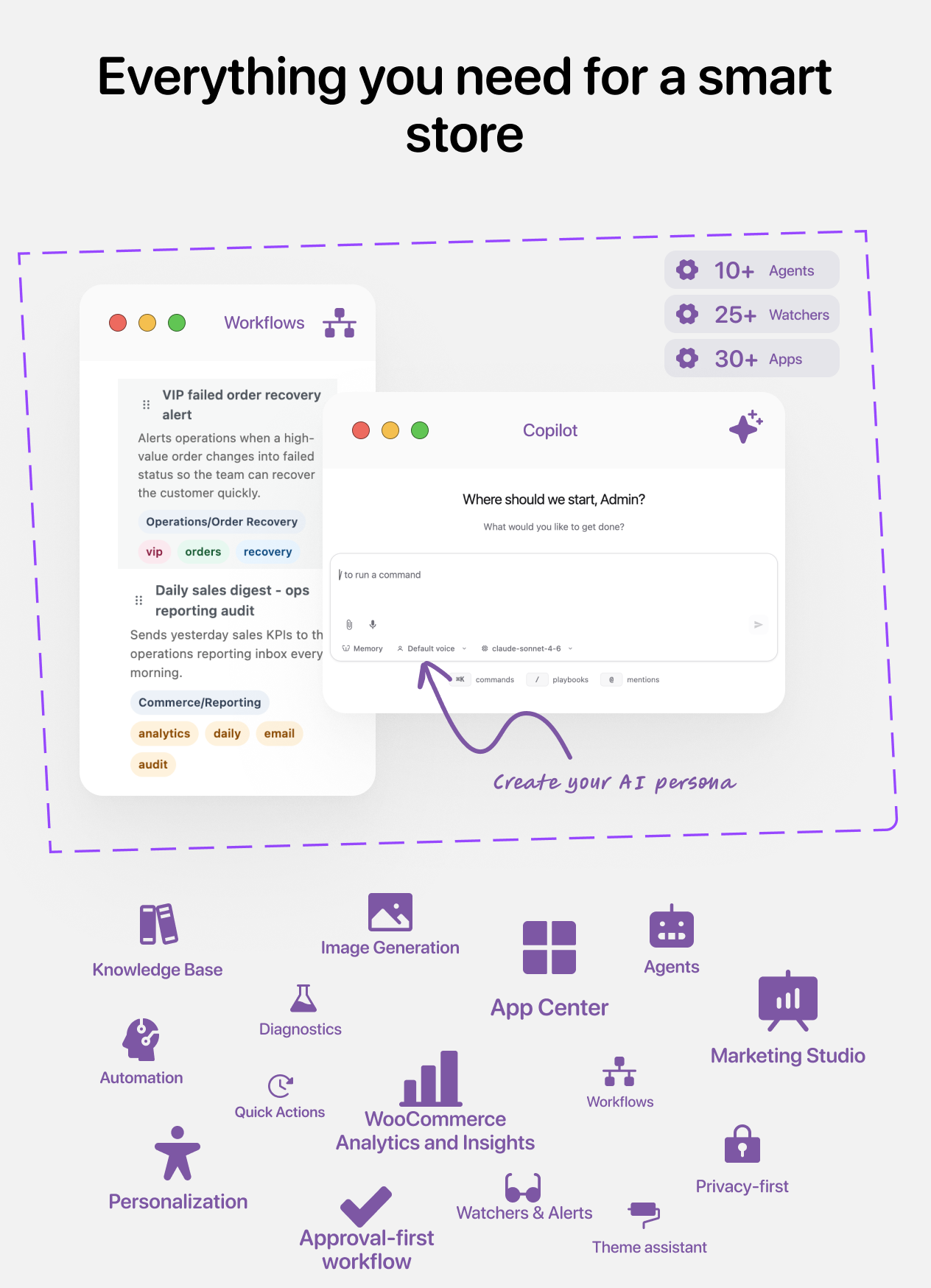
Use one workspace to research site activity, draft content and customer replies, build repeatable automations, monitor important changes, analyze performance, and prepare updates across WordPress and WooCommerce.
| Core capability | What you can do |
|---|---|
| AI Copilot | Ask questions in natural language, work with the current admin-page context, create content and files, research information, and turn requests into site or store actions. |
| AI Workflow Automation | Describe the automation you need and let AI generate a reviewable workflow draft with triggers, conditions, actions, and AI steps. Refine it visually, test it, then enable it when ready. |
| Social Workflow Automation | Connect Facebook Pages, Instagram professional accounts, X accounts, and YouTube channels to publish content, respond to engagement, and react to social events or metric thresholds through governed workflows. |
| Insights & Analytics | Explore site health, content, revenue, orders, products, customers, refunds, stock, workflow performance, and trends through dashboards, watchers, and conversational analysis. |
Move faster without giving up control. Site-changing actions can pass through permissions, budgets, risk checks, previews, human approvals, run history, and audit logs.
WooCommerce is optional. SophMate works as a WordPress AI workspace on its own and adds commerce-specific Copilot tools, automations, and analytics when WooCommerce is active.
One AI workspace for everyday WordPress operations
SophMate brings assistance, automation, and analysis together for WordPress site owners, WooCommerce stores, agencies, support teams, marketers, and technical operators.
| Business outcome | How SophMate helps |
|---|---|
| Ask your site or store | Use Copilot to answer operational questions, summarize what changed, inspect relevant context, and recommend useful next steps. |
| Create automations with AI | Explain a process in plain English and generate a disabled workflow draft that you can review, edit, simulate, and enable. |
| Automate repeatable work | Run workflows from schedules, WordPress, WooCommerce, or social events, webhooks, metric thresholds, or manual triggers with conditions, branches, delays, loops, AI steps, and integrations. |
| Coordinate social publishing | Connect multiple Facebook, Instagram, X, and YouTube accounts, prepare platform-specific content, route writes through approval, and continue workflows after durable publishing jobs finish. |
| Understand performance | Analyze site and store activity, revenue, orders, refunds, customers, products, stock, workflow results, trends, and operational risks. |
| Monitor what matters | Use watchers and alerts to spot low stock, sales drops, refund spikes, failed payments, site health issues, security signals, and custom conditions. |
| Create content and campaigns | Draft product content, customer replies, campaign ideas, channel copy, SEO suggestions, images, files, and provider campaign drafts. |
| Ground AI in your business | Teach SophMate your policies, FAQs, tone guides, procedures, and product facts so replies can include grounded context. |
| Review changes before they run | Turn site-changing requests into action plans with risk levels, affected records, previews, and approve/reject decisions. |
| Scale repeatable operations | Reuse playbooks, workflows, AI agents, app packages, tools, diagnostics, and support bundles across client sites. |
| Connect and extend | Use REST APIs, WP-CLI commands, custom tools, provider controls, app packages, webhooks, and external integrations. |
Work faster with a context-aware AI Copilot
Copilot works inside WordPress admin, so you can move from a question to useful output without jumping between disconnected AI tools and dashboards. It can use page context, your Knowledge Base, available site tools, files, and configured providers to help with real operational work.
- Ask questions about your WordPress site or WooCommerce store in natural language.
- Summarize recent activity, investigate an issue, compare options, and get suggested next steps.
- Draft posts, product copy, customer replies, internal notes, campaign assets, and structured files.
- Use @mentions, slash commands, conversation history, file attachments, Knowledge Base citations, and current-page context.
- Research public web information with supported search and fetch tools when configured.
- Turn a request into a reviewable action plan or a durable background task when the work needs more than one chat turn.
Describe a process and let AI build the workflow
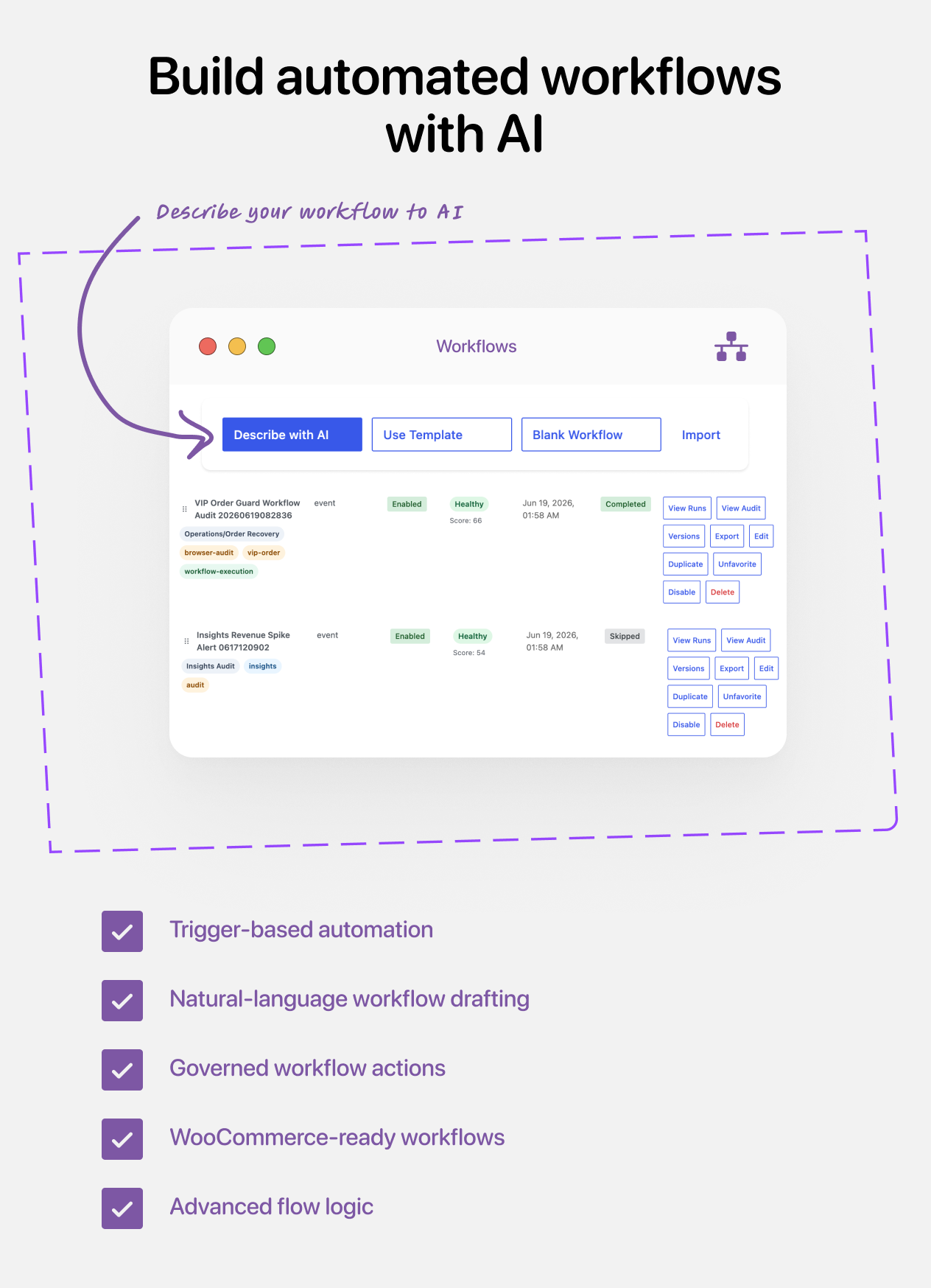
You do not have to start every automation from a blank canvas. Tell SophMate what should happen in plain English and it can generate a structured, disabled workflow draft for you to review. Fine-tune the trigger, logic, actions, and AI steps in the visual builder, simulate the workflow, then enable it when it is ready.
- Start with prompts such as “Alert me when stock is low,” “Prepare a weekly site report,” or “Draft a follow-up when an order reaches a specific status.”
- Trigger workflows manually, on a schedule, from webhooks, or from supported WordPress and WooCommerce events.
- Add conditions, branches, delays, approval waits, loops, parallel gates, reusable sub-workflows, variables, and rate limits.
- Use AI inside workflows to generate content, make bounded decisions, or launch an AI Worker for multi-step tasks with selected tool access.
- Connect WordPress, WooCommerce, SEO, marketing, media, messaging, HTTP, SQL, WP-CLI, and custom tools where configured and permitted.
- Test with simulation, inspect run history and outputs, track workflow health and analytics, and import or export reusable workflow packages.
AI-created workflows always begin as disabled drafts. You stay in control of what gets enabled, and approval steps can be added wherever human review is required.
Automate Facebook, Instagram, X, and YouTube workflows
Connect multiple site-scoped social accounts and build cross-network workflows without reducing every provider to a generic posting form. SophMate exposes provider-specific triggers, actions, validation, approval previews, job progress, and published resource links.
- Trigger workflows from supported Facebook Page activity, Instagram comments and mentions, X post and account activity, YouTube video changes, and reconciled comment or moderation events.
- Monitor supported Page, post, account, media, channel, or video metrics and run a workflow when a configured threshold is crossed.
- Publish Facebook Page text, links, photos, videos, Reels, and image Stories; publish Instagram images, videos, Reels, carousels, and eligible Stories.
- Publish text or media posts to X, create permitted replies, upload or update YouTube videos, set metadata and privacy, add thumbnails or playlists, and schedule supported content.
- Reply to comments and use supported moderation actions on Facebook, Instagram, and YouTube.
- Review the exact account, copy, media, audience, schedule, policy warnings, and estimated quota or X cost before an approval-controlled write runs.
- Track durable upload, processing, publishing, retry, and completion states. Successful jobs add the provider resource ID and canonical URL to downstream workflow steps.
- Protect OAuth handoffs, provider tokens, job payloads, webhook deliveries, and resumable upload data with encrypted storage, signed delivery checks, replay protection, deduplication, and retention controls.
Writes default to approval. Destructive moderation and every YouTube-generated write require exact approval. Other eligible low-risk writes can run automatically only when the account owner explicitly permits workflow writes and configures execution limits.
Supported account types: Facebook publishing is for Pages, not personal profiles. Instagram requires a Business or Creator account, with some capabilities limited by account type. YouTube Community Posts and guaranteed Shorts classification are not available through the API. X API access and activity delivery may incur provider charges.
Turn site and store data into useful decisions
SophMate combines dashboards, conversational analysis, workflow analytics, and proactive monitoring so you can understand what is happening before deciding what to do next.
- Review WordPress Site Insights, site-care signals, content activity, and operational health even when WooCommerce is not installed.
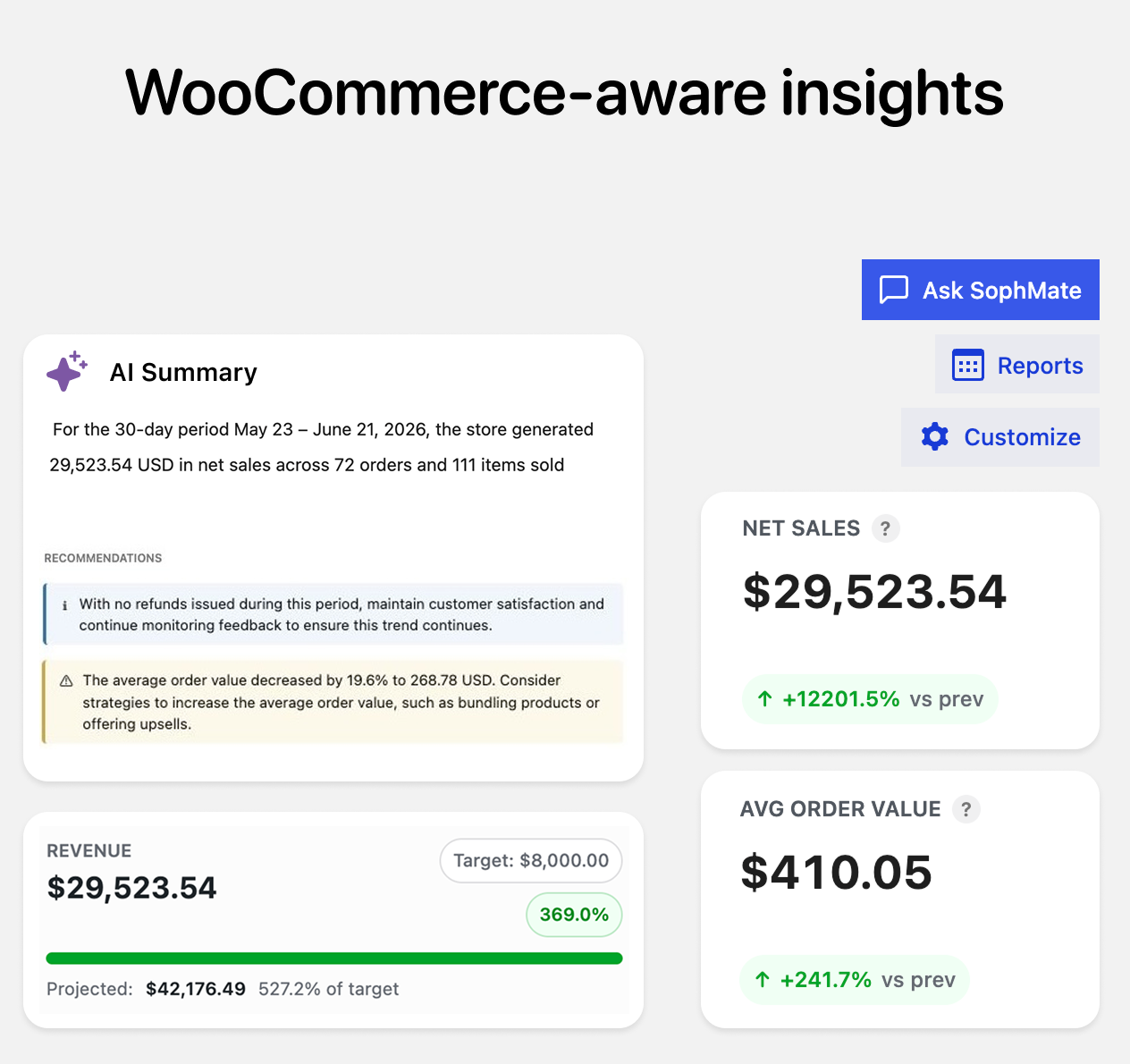
- Ask Copilot about revenue, orders, average order value, refunds, discounts, shipping, tax, top products, customers, and trends when WooCommerce is active.
- Explore timeseries data, conversion signals, category breakdowns, product performance, underperforming products, and goals.
- Inspect workflow success, failures, duration, health signals, and recent run history to improve automations over time.
- Monitor low stock, sales drops, refund spikes, failed payments, cart abandonment, performance, security, GDPR, disk space, SSL, and custom scenarios.
- Move from insight to action by opening the relevant record, starting a workflow, preparing content, or creating a reviewable change.
Draft WooCommerce customer replies faster
Support teams can use SophMate to prepare helpful WooCommerce responses without starting from a blank screen. It can use the current order context, Knowledge Base policies, tone guidance, and safe customer data settings to draft messages for review.
- Draft customer-facing replies for order status, refund, return, delay, and fulfillment questions.
- Create internal WooCommerce order notes that stay concise, factual, and action-oriented.
- Prepare refund or return review checklists before a human makes the final decision.
- Use Knowledge Base citations so replies can reference shipping, return, warranty, and support policies.
- Keep customer-facing notes and messages review-only until an authorized user approves the next step.
Improve product pages with AI
SophMate helps store teams refresh product pages, improve merchandising copy, and prepare SEO improvements while keeping factual product data intact.
- Generate product title alternatives, short descriptions, full descriptions, benefit bullets, and meta descriptions.
- Prepare SEO titles, focus keywords, Open Graph copy, and search-intent notes for WooCommerce products.
- Create image briefs, gallery shot ideas, lifestyle prompts, and alt-text guidance for product media.
- Score product readiness across content completeness, SEO readiness, image readiness, inventory risk, and merchandising clarity.
- Route product updates through action plans when the work would write changes to WooCommerce.
Create coupons safely with approval
Promotions can affect margin, customer expectations, and checkout behavior. SophMate can draft coupon ideas and WooCommerce coupon actions with guardrails before anything is published.
- Create reviewable coupon plans with discount type, amount, expiry, usage limits, and product or category targeting.
- Review coupon abuse and margin risk before approving a promotion.
- Draft customer-facing promo copy, campaign briefs, and channel ideas for approved offers.
- Audit existing coupons for expiry problems, overlapping discounts, weak usage limits, and risky stacking.
- Use approval flows so coupon writes are reviewed before they change the store.
Automate confidently with review and approval controls
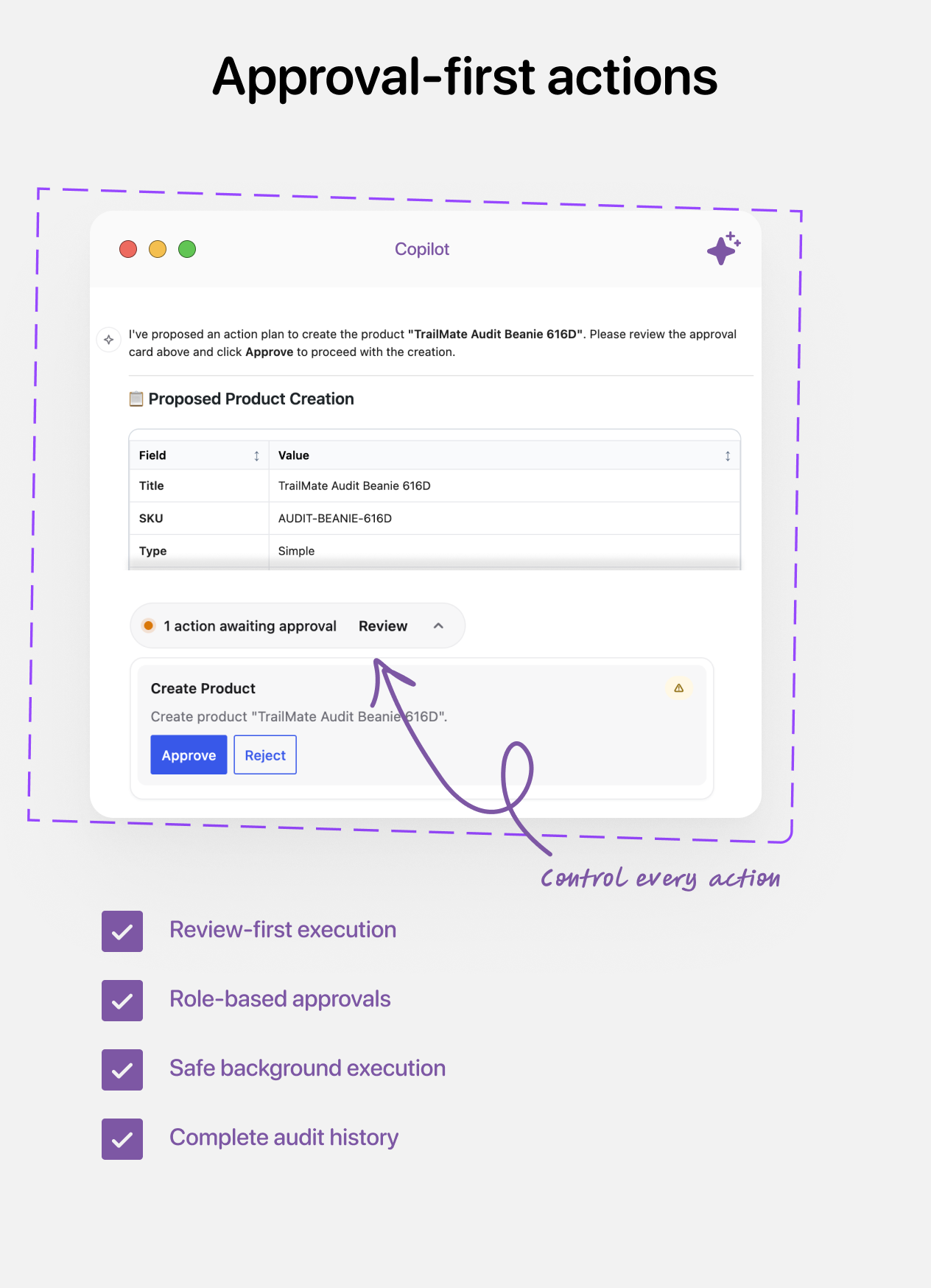
SophMate is built around action plans. When a request could modify WordPress or WooCommerce, SophMate can propose the work, explain the risk, and wait for a human decision.
- An operator asks Copilot, a workflow, an agent, an app, or a tool to perform work.
- SophMate validates permissions, provider configuration, budgets, input schemas, and risk level.
- For site-changing work, SophMate generates a reviewable action plan with context and a diff or dry-run preview where available.
- An authorized reviewer approves, rejects, or leaves the plan pending.
- Approved work executes through the relevant WordPress, WooCommerce, integration, or background-job adapter.
- The result is recorded in run history and audit logs.
- Risk levels for low, medium, high, and critical operations.
- Separate capabilities for proposing, approving, and executing actions.
- Approval queue for pending plans.
- Bulk execution support for long-running operations.
- Background progress tracking and failure records.
See what AI suggested, what ran, and what changed
Store owners and agencies need to know what AI suggested, who approved it, what ran, and what failed. SophMate makes that operational history visible through audit logs, safety controls, privacy defaults, and recovery tools.
- Audit proposal, approval, rejection, execution, workflow run, provider test, export, purge, alert, settings change, and failure events.
- Use WordPress capabilities for usage, insights, actions, approvals, settings, audit logs, workflows, personalization, knowledge, agents, and Image Studio.
- Encrypt provider keys at rest with AES-256-GCM and WordPress salt-derived keys.
- Redact API keys, passwords, tokens, credentials, bearer values, and common secret patterns from logs and support data.
- Use PII masking, retention settings, customer sharing controls, and WordPress personal-data export and erasure integration.
- Recover with Safe Mode, diagnostics, support bundles, connectivity checks, database table checks, cron health, and provider checks.
Turn store data into marketing ideas
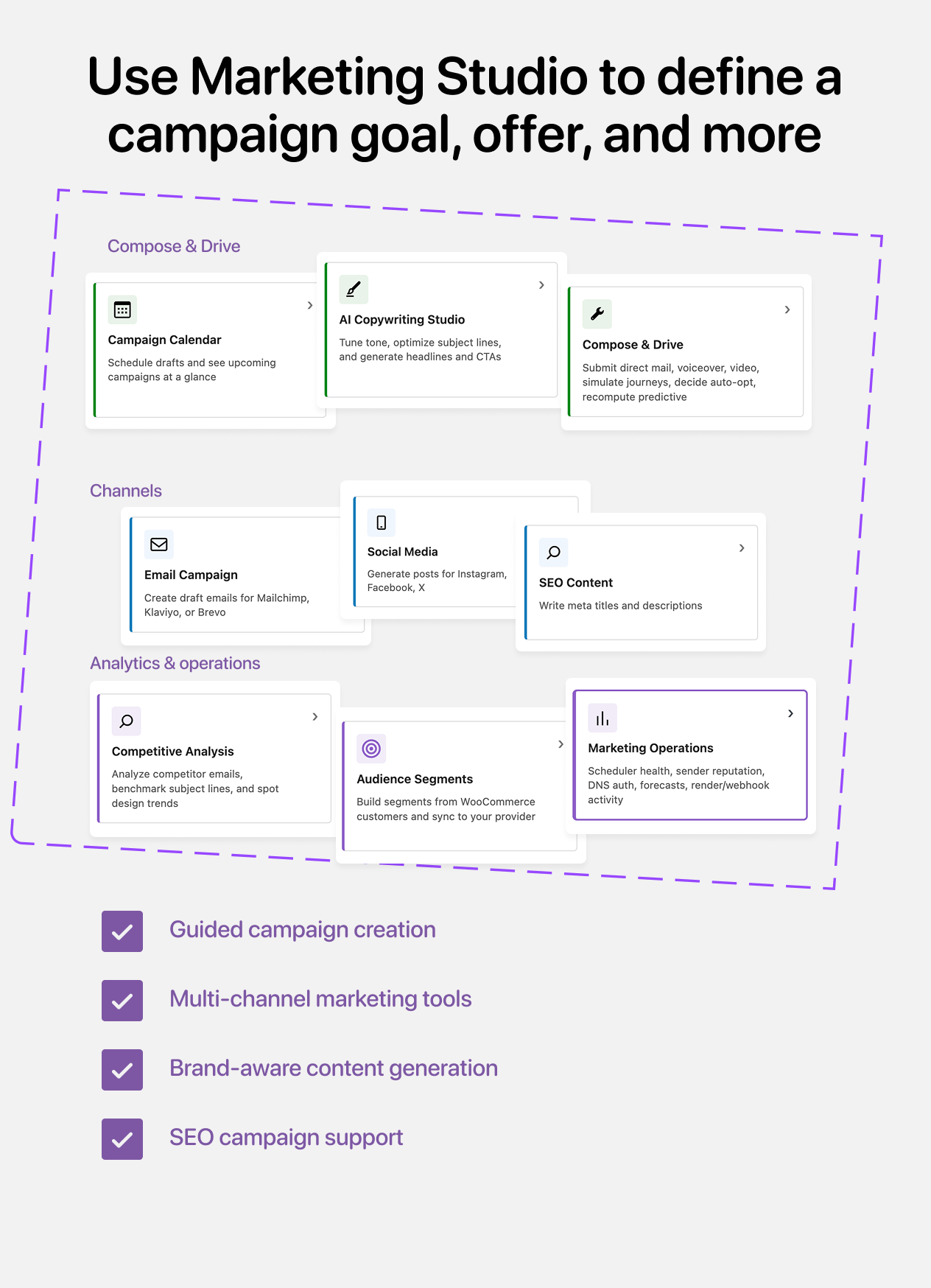
Marketing Studio helps teams turn products, store context, and goals into campaign ideas and assets. SophMate can draft marketing work, but email campaigns are created as drafts only and are not sent or scheduled from SophMate.
- Create campaign briefs with goals, offers, products, channels, and suggested assets.
- Generate email, social, SMS, SEO, landing page, testimonial, loyalty, referral, and multi-store marketing ideas.
- Create provider drafts for Mailchimp, Klaviyo, Brevo, ActiveCampaign, ConvertKit, Drip, Omnisend, HubSpot, and Constant Contact where configured.
- Use SEO suggestions for Yoast SEO and Rank Math with approval-based writes.
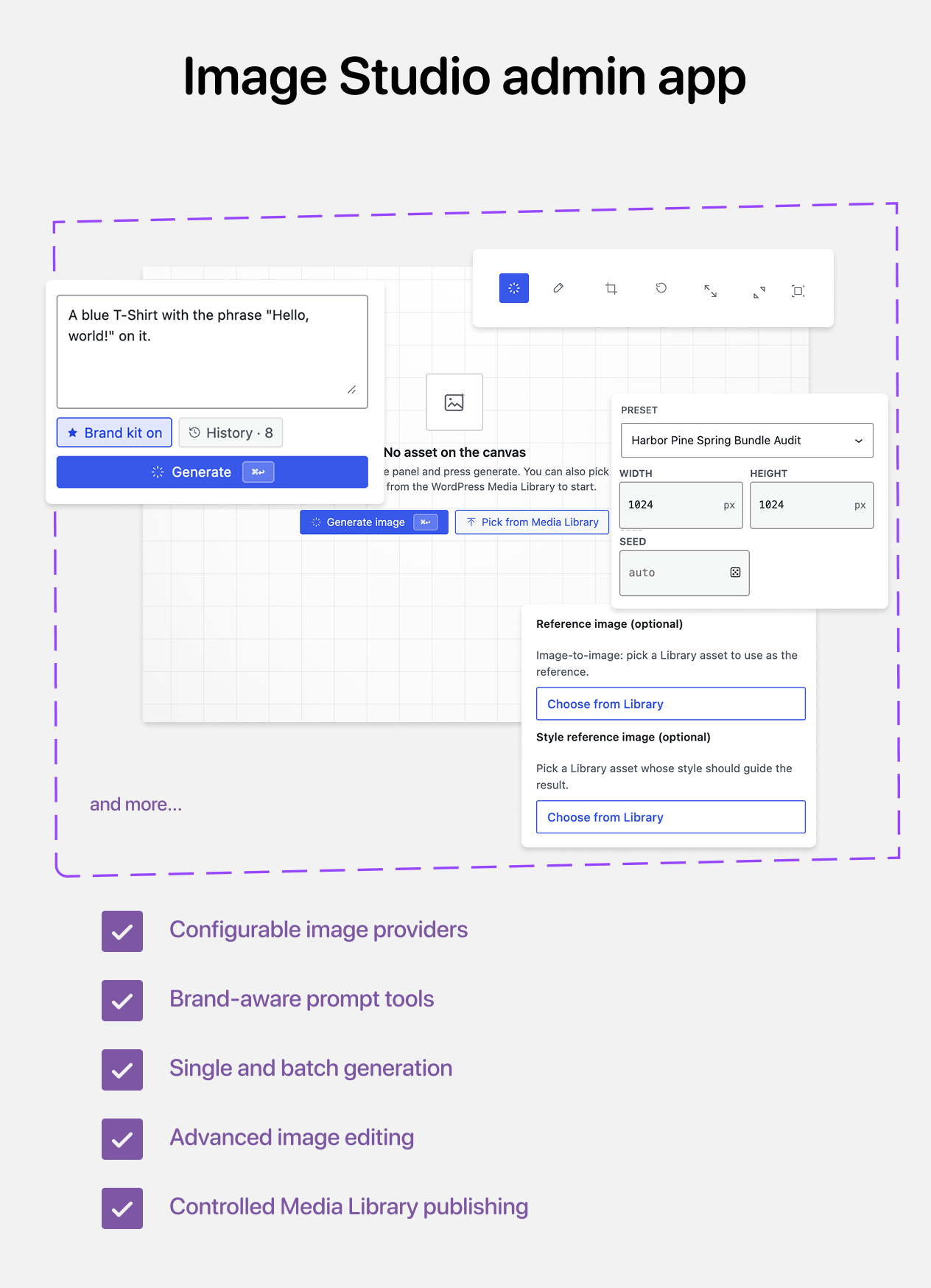
- Generate and organize campaign visuals with Image Studio using configured image providers, stock search, asset collections, alt text, and Media Library publishing controls.
- Use consent-aware personalization for audiences, slots, variants, experiments, product recommenders, and lifecycle programs with safe fallbacks.
Email safety invariant: SophMate creates email campaigns as drafts only. Operators review, schedule, and send from the email provider interface.
Give SophMate better answers with your Knowledge Base
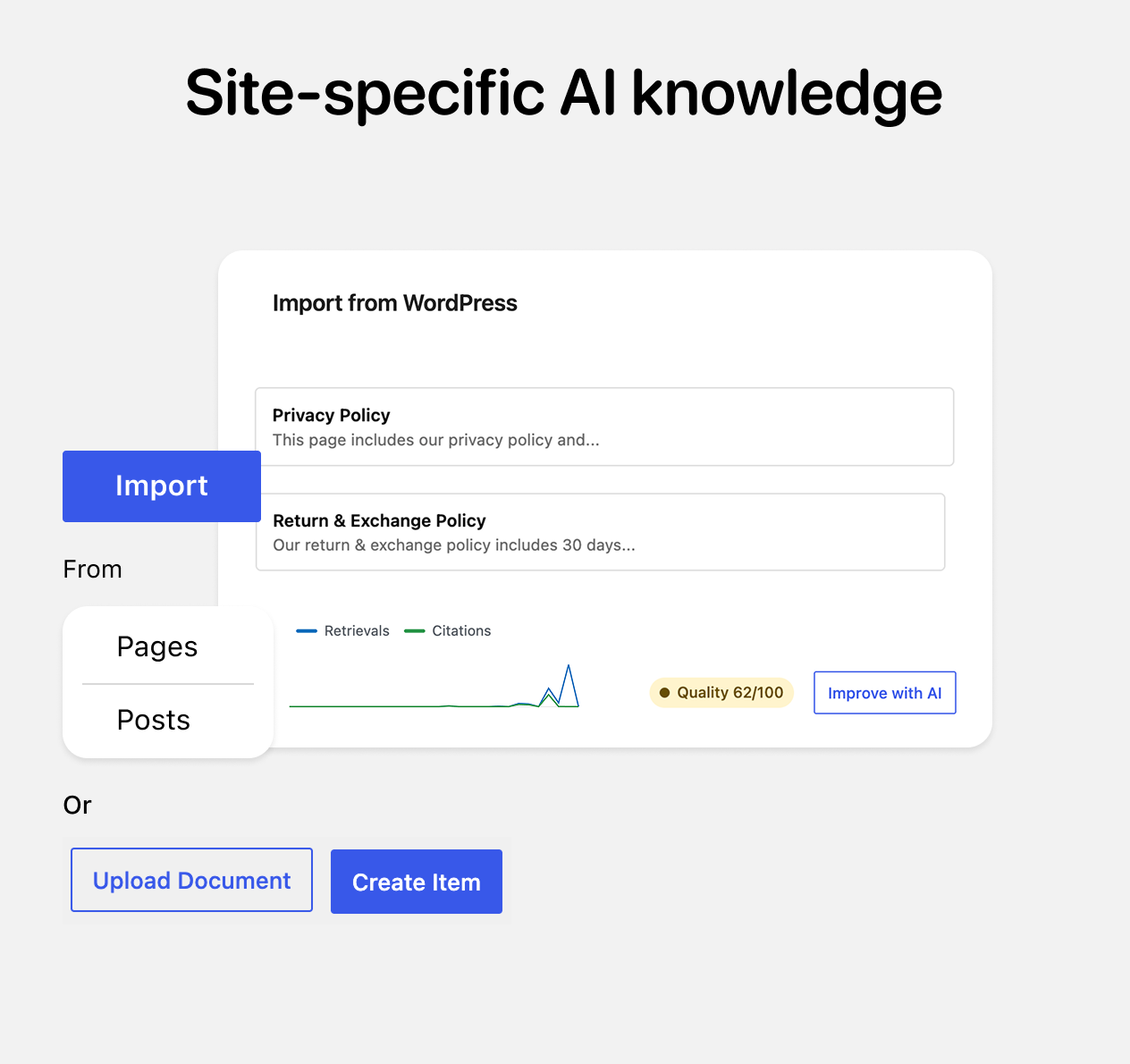
The Knowledge Base lets operators teach SophMate about store policies, FAQs, tone guides, procedures, product information, and internal reference material.
- Create Knowledge Base items directly in WordPress.
- Import content from WordPress posts, pages, and WooCommerce policy pages.
- Use item kinds such as Policy, FAQ, Tone Guide, Procedure, and Product Info.
- Choose sync modes: none, manual, or auto.
- Track revisions and roll back items.
- Use semantic search and citations in Copilot responses.
- Block secrets such as API keys, bearer tokens, passwords, and credentials.
- Use Knowledge Base analytics, collections, uploads, imports, revisions, and AI improvement features.
Scale repeatable AI operations across client sites
Agencies can turn successful Copilot prompts, workflows, playbooks, agents, and apps into repeatable ways of working across client sites while keeping each site’s settings, providers, budgets, approvals, and history separate.
- Create reusable playbooks, workflow packages, agent bundles, App Center packages, and custom tools.
- Import and export workflows, agents, app packages, custom tools, and redacted support bundles.
- Configure client-specific provider keys, budgets, capabilities, privacy defaults, retention windows, and approval policies.
- Use diagnostics, support bundles, Safe Mode, migration commands, run history, and audit logs when investigating issues.
- Install bundled App Center packages for support, lead capture, order status, returns, SEO, knowledge gaps, revenue leaks, feedback, and media workflows.
Connect, extend, and control your AI workspace
SophMate includes advanced capabilities for teams that need more than a simple chat plugin. Technical operators can connect providers, expose selected tools, build AI-assisted automations, control usage, and inspect runtime behavior.
| Advanced area | What it enables |
|---|---|
| AI Copilot | Admin chat, page context, @mentions, slash commands, conversation history, files, web research tools, Knowledge Base citations, and provider checks. |
| Workflows | Natural-language draft generation, visual editing, schedules, WordPress, WooCommerce, social and metric events, webhooks, manual triggers, conditions, AI actions, approval waits, durable external jobs, delays, loops, parallel gates, run history, simulation, import/export, and analytics. |
| Agents | Reusable AI workers with triggers, selected tools, knowledge, guardrails, memory controls, run traces, evals, and import/export bundles. |
| Tools and integrations | Read-only store context, WooCommerce actions, SEO actions, marketing draft actions, media actions, WordPress actions, custom HTTP tools, custom SQL tools, and WP-CLI-backed tools where permitted. |
| App Center | Bundled first-party app packages, review-and-install controls, capability review, budget review, visitor-facing app panels, package import/export, and App Studio drafts. |
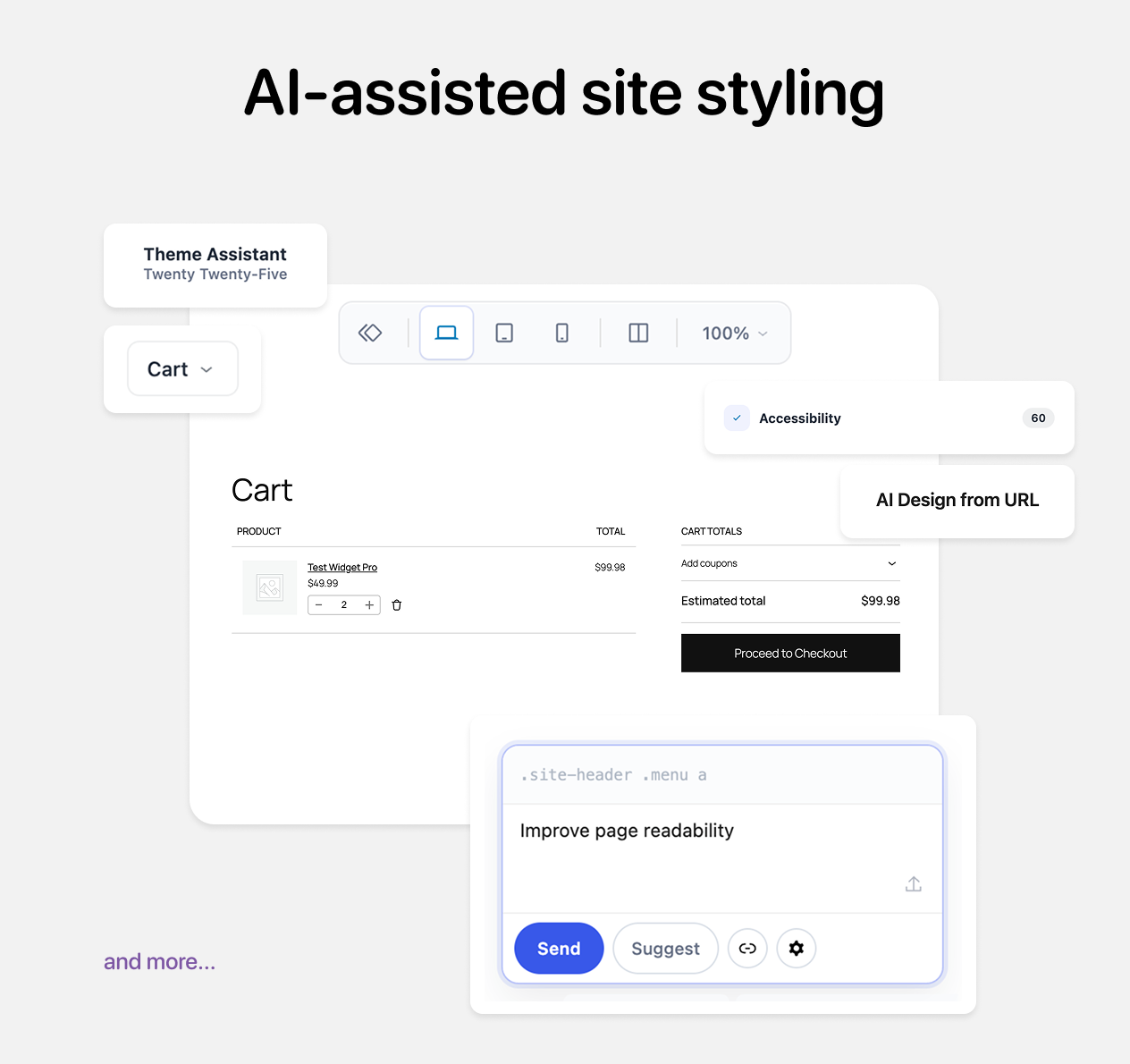
| Theme Assistant | AI-assisted CSS snippets, design chat, previews, design tokens, WooCommerce email style tools, template drafts, rollback markers, and approval-based applies. |
| REST and WP-CLI | Authenticated REST APIs under /wp-json/sophmate/v1 plus WP-CLI commands for diagnostics, database migrations, demo data, personalization, and advanced operations. |
| Developer architecture | Clean Architecture layers, WordPress adapters, dependency injection, generated REST path manifests, React/TypeScript admin apps, custom migrations, and automated quality tooling. |
Supported Integrations
| Area | Integrations / Adapters |
|---|---|
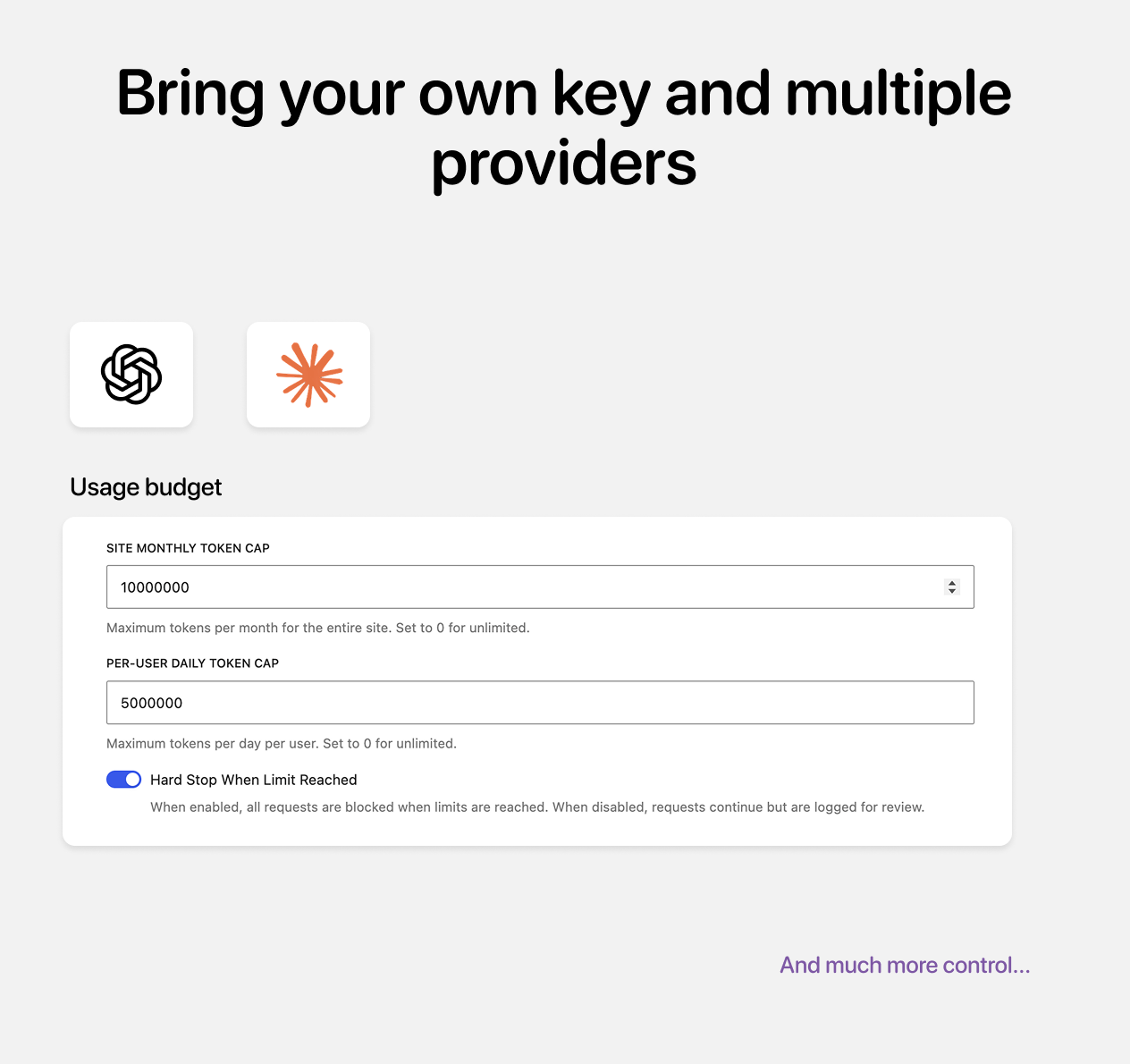
| Core AI Chat | OpenAI, Anthropic, and Google Gemini via bring-your-own API key or a matching WordPress AI Connector. |
| Agent Gateways | Bedrock, Vertex, Ollama, Azure OpenAI, OpenAI-compatible APIs, and managed provider configs when configured. |
| Image Providers | OpenAI, Stability, Replicate, and Openverse stock search depending on your provider configuration. |
| WooCommerce | Products, orders, coupons, analytics, HPOS-compatible order data, order statuses, stock, subscriptions, carts, and store context where WooCommerce is active. |
| Email Marketing | Mailchimp, Klaviyo, Brevo, ActiveCampaign, ConvertKit, Drip, Omnisend, HubSpot, and Constant Contact draft creation documented and supported. SophMate creates drafts only and does not send or schedule provider campaigns. |
| Social Workflows | Facebook Pages, Instagram professional accounts, X accounts, and YouTube channels with multi-account connections, supported engagement and metric triggers, provider-specific publishing, comment replies, moderation, approvals, scheduling, durable uploads, and quota or spend controls. |
| SEO | Yoast SEO and Rank Math metadata read/write support with approval-based writes. |
| Channels | Slack, Telegram, Discord, SMS, web push, mobile push, WhatsApp, direct mail, and email-related channel adapters across workflows, marketing, and apps where configured. |
| External Tools | Model Context Protocol server bindings, OAuth providers, inbound email delivery, analytics sinks, attachment policies, webhooks, and App Center package components. |
Provider note: Third-party services require their own accounts, credentials or OAuth grants, scopes, quotas, approvals, and billing. SophMate stores configured credentials encrypted and uses your provider account according to your settings.
Example Operator Scenarios
Store Owner Morning Check
- Open SophMate Copilot and ask, “What changed in my store overnight?”
- Review revenue, orders, top products, low-stock alerts, and open workflow runs.
- Review open approvals, recent workflow runs, and alert status.
- Approve low-risk action plans, reject irrelevant proposals, and snooze alerts already being handled.
Campaign Launch
- Use Marketing Studio to define a campaign goal, offer, products, and channels.
- Generate email, social, SMS, and SEO drafts.
- Create connected email provider campaign drafts without sending from SophMate.
- Use Image Studio for campaign visuals and alt text.
- Route SEO writes and live-site changes through action plan approval.
Support Workflow
- Import return policy, shipping policy, and tone guide into the Knowledge Base.
- Install support-focused App Center apps.
- Use Copilot or Agents to draft customer replies with citations.
- Approve customer-facing notes or messages before they are sent or added.
- Audit support actions later from the Audit Log.
Personalized Commerce Experience
- Install starter personalization slots, audiences, recommenders, experiments, and lifecycle programs.
- Define experiences for homepage hero, cart banner, recommendations, or Copilot greeting.
- Use consent-gated decision APIs and safe fallbacks.
- Review insights and experiment activity.
- Connect lifecycle actions to workflows and marketing drafts.
Agency Client Automation
- Configure provider keys, budgets, privacy defaults, and capabilities.
- Describe a recurring client process and use AI to generate the first workflow draft.
- Refine and test the automation, then reuse it through playbooks, workflow packages, and app packages.
- Use App Center and Agents for client-specific operational workers.
- Export redacted support bundles and diagnostics when investigating issues.
- Keep audit logs, approvals, and retention settings aligned with client policy.
Requirements
| Requirement | Details |
|---|---|
| WordPress | WordPress 6.0 or higher. |
| PHP | PHP 8.1 or higher. |
| PHP Extensions | OpenSSL required. DOM and iconv required for bundled reporting/PDF dependencies. The fileinfo extension is required for social media publishing. mbstring is recommended; a polyfill fallback is included. |
| WordPress Security Keys | Configured WordPress salts are required for reliable provider key encryption. |
| AI Provider | Bring your own OpenAI, Anthropic, or Google Gemini key for core Copilot/LLM features, or use a matching WordPress AI Connector. Image providers require their own keys when used. |
| WooCommerce | Required for commerce-specific tools, store analytics, order/product/coupon actions, and WooCommerce workflows. |
| Social Providers | Social workflows require a supported Facebook Page, Instagram professional account, X account, or YouTube channel plus the provider scopes, account eligibility, quota, and billing applicable to each action. Connection uses SophMate’s managed OAuth and webhook broker and requires an active license activation. |
| WP-Cron / Background Jobs | Needed for scheduled workflows, social polling and reconciliation, durable social publishing jobs, watchers, retention, snapshots, agent scheduling, and image jobs. |
Data Stored by SophMate
SophMate creates custom database tables for operational data such as conversations, messages, action plans, approvals, audit logs, playbooks, analytics snapshots, watchers, alerts, workflows, workflow runs, social connections, normalized social events, polling cursors, social publishing jobs and quota records, agents, agent runs, agent memory, Knowledge Base items, campaign kits, channel assets, Image Studio assets and jobs, personalization records, App Center records, and related runtime state.
Data Controls
- Conversation retention setting.
- Audit log retention setting.
- Image Studio staged asset retention setting.
- Data retention preview and purge tools.
- Plugin data export tools.
- Administrator-only danger zone for full plugin data deletion.
- WordPress personal-data export and erasure integrations.
- Disconnect, revocation, export, erasure, retention, and encrypted-payload controls for social connections and jobs.
- Audit trails anonymized where deletion would weaken audit evidence.
Important Notes Before Purchase
- SophMate is a WordPress plugin, not a hosted SaaS account.
- You must provide your own AI provider API keys.
- WooCommerce is required for WooCommerce-specific features.
- Social workflow availability depends on each provider’s supported account types, granted permissions, application review or verification, quotas, pricing, API changes, and runtime capability checks. X API usage may be paid.
- Generated AI content should be reviewed by a human before publication or customer delivery.
- High-risk and site-changing operations are intentionally routed through approval and capability checks.
FAQ
Does SophMate include an AI API key?
No. SophMate is a bring-your-own-key plugin. Configure OpenAI, Anthropic, or Google Gemini for core AI features, and configure image or marketing providers separately if you use those features.
Can AI create workflow automations for me?
Yes. Describe the process in plain English and SophMate can generate a disabled workflow draft with supported triggers, conditions, actions, and AI steps. Review and edit the draft, simulate it, then enable it when you are satisfied.
Which social networks can SophMate automate?
SophMate supports workflow connections for Facebook Pages, Instagram Business and Creator accounts, X accounts, and YouTube channels. Depending on the provider and connected account, workflows can react to engagement or metric thresholds, publish and schedule content, reply to comments, moderate supported comments, and manage YouTube video uploads or updates. Multiple accounts per provider are supported.
Does social content publish automatically?
Social writes default to an exact approval preview. Destructive moderation and YouTube-generated writes always require approval. Eligible lower-risk actions can run automatically only when the connection explicitly permits workflow writes, the workflow is configured for auto execution, the operator has permission, and daily execution limits are set.
Can SophMate change my WooCommerce store without approval?
SophMate is designed around approval workflows. It can propose changes, show diffs or dry-run output where supported, and execute approved actions according to capabilities and policy. High-impact changes are not meant to happen silently.
Does SophMate send marketing emails?
No. Email marketing integrations create drafts only. You review, schedule, and send inside your email marketing provider.
Can I use SophMate without WooCommerce?
Yes. Many WordPress features still work, including Copilot, Site Insights, workflows, watchers, Knowledge Base, Theme Assistant, Image Studio, Agents, App Center, personalization, and diagnostics. WooCommerce-specific analytics, tools, and workflows require WooCommerce.
Does SophMate support GDPR workflows?
SophMate integrates with WordPress personal-data export and erasure tools, includes retention controls, masks PII by default, redacts secrets, and anonymizes audit records where operational history must be preserved.
Where are API keys stored?
Provider keys are encrypted in WordPress options using AES-256-GCM and WordPress-derived keys. Keys are not shown again after saving and are not included in logs, support bundles, or privacy exports.
Can agencies reuse workflows and apps?
Yes. SophMate includes playbook import/export, workflow import/export, App Center package import/export, Agent import/export, and custom tool import/export.
Does SophMate include frontend visitor features?
Yes. App Center and Personalization include visitor-facing panels, forms, signed visitor sessions, consent-gated decisions, event APIs, and safe fallbacks.
Can I extend SophMate?
Yes. SophMate includes REST APIs, WP-CLI commands, a tool registry, custom tools, workflow extension points, app packages, and a layered architecture designed for extension.
Version 1.3.0 Highlights — 2026-08-16
Added
- Social media workflow integrations — Facebook Pages, Instagram, X, and YouTube connections with multi-account OAuth, webhook and polling triggers, metric thresholds, and twelve publishing, reply, moderation, and video-management actions. Social writes use exact approval previews, encrypted credentials, scheduled jobs, and quota controls.
- Workflow AI V3 — Contract-guided workflow generation and execution using typed capability contracts, deterministic compilation, requirement-level proofs, and durable resumable generation jobs. Uncontracted capabilities are excluded instead of guessed.
- Editor Copilot — Editor-native AI copilot for Gutenberg posts and pages: briefs, outlines, drafting, block rewriting, title/excerpt/slug alternatives, SEO, editorial and accessibility reviews, and Image Studio handoff. Edits arrive as reviewable proposals with before/after previews; nothing is autosaved or published.
- Production-grade Copilot reasoning — Provider-neutral reasoning kernel with capability discovery, evidence-backed research, validation, simulation, and completion verification. Depth is selectable per conversation with an Auto default, and external integrations fail closed.
- AI Worker workflow action — Durable, high-risk action for complex multi-step AI work, with token and step budgets, approvals, Knowledge Base retrieval, and structured results. Inline execution is the fast default, and every mutation passes through action-plan governance.
- Telegram polling and webhook workflows — Dedicated Polling, Webhook, and Send Message capabilities with durable cursors, verified inbound headers, retry handling, reply chunking, and Plain Text, MarkdownV2, or HTML formatting.
- Verified Telegram account access — Private, single-use account linking for customers and administrators, revalidated against live WordPress users and capabilities, with
/whoami,/unlink, active-link management, and privacy export/erasure. - Durable Telegram conversation supervisor — Encrypted per-chat sessions, ordered turns, duplicate coalescing, queued delivery, and typed outcomes. Historical requests can no longer authorize new writes.
- Added a verified Telegram Operator Site Manager workflow template that starts disabled, requires administrator linking, and blocks customer and anonymous access.
- Added
sophmate.web.capturefor bounded visual inspection of public HTTPS pages, plus a Save capture action that promotes screenshots into private encrypted Copilot files. - Added an opt-in, Pro-only SophMate MCP Server for connecting Claude Code and other remote MCP clients to site-scoped tools, with OAuth 2.1, tool allowlists, rate limits, and governed write operations.
- Added governed long-tail integration contracts with operator-reviewed evidence, SSRF-safe connection probes, and versioned conformance checks. Activation binds tools, playbooks, collections, and provider capabilities to live catalogs.
- Added workflow-reasoning rollout controls (
enabled,canary,shadow,off) and phase-level telemetry limited to identifiers, decisions, counts, token usage, and latency. - Added provider-state parity for governed reasoning across OpenAI Responses streaming, Anthropic signed thinking continuation, and Gemini native Google Search with verifiable citations.
Fixed
- Fixed unscheduled social publishing failing with
validation_erroron a nullscheduled_at, and connected Facebook, Instagram, X, and YouTube workflows staying disabled because reviewed integration contracts were missing. - Fixed inline AI Worker runs failing after successful tool execution when a provider returned plain text or fenced JSON instead of the expected envelope, and OpenAI runs failing on tools that accept dynamic object keys.
- Fixed Telegram follow-ups losing prior conversation context or the governed proposal behind an assistant reply, so a request such as “show me its content” resolves the exact pending draft without repeating the write.
- Audited workflow runs end to end: bounded capability windows cut a representative Telegram turn from 20,878 to 1,897 input tokens, execution counts and action-plan provenance are persisted, failed output never reaches downstream ports, replay requires side-effect confirmation, and credentials in legacy runtime URLs are redacted.
- Completed the Workflow AI V3 production audit across generation, readiness, activation, and runtime, including stable asynchronous draft envelopes, live credential-slot resolution, and activation fingerprints that ignore cosmetic metadata.
- Fixed governed drafts being rejected as “changed after validation” and recurring
AI_WORKER_TOOL_IDENTITY_SCOPE_MISMATCHfailures in AI-generated Telegram workflows. - Made AI workflow generation converge instead of cycling through opaque retries, with field-level compiler diagnostics, schema-aware bounded repair, canonicalized requirement bookkeeping, and actionable guidance when repairs are exhausted.
- Made drafting distinguish provider credential, quota, rate-limit, and network failures from workflow-validation failures, with recovery-appropriate statuses and a direct AI Settings recovery action.
- Closed governed-draft replay and activation-time authorization gaps. Generic webhook secrets are now edited only as credential references, and unsigned endpoints require a restrictive IP allowlist.
- Made workflow approval mode and the Auto-mode policy bypass apply consistently to every inline and background AI Worker mutation, including custom tools without a tool-level approval requirement.
- Corrected linked-customer Telegram order requests to use the customer-scoped order tool without asking for an email address or order number, and let public bots reply with verified text when configured tools are not authorized.
- Fixed MCP OAuth discovery on Apache sites with plain permalinks, rebuilt the consent screen as an accessible WordPress-native authorization card, and made read-only OAuth connections easy to widen with the same access presets as manual connections.
Version 1.2.0 Highlights — 2026-07-14
Added
- Copilot Files — Added a Pro-only, first-class file workspace for private AI-created and uploaded files, with encrypted storage, immutable revisions, provenance, scoped access grants, metadata and tag management, search and filtering, archive/trash lifecycle controls, authenticated previews and downloads, responsive desktop/mobile layouts, and accessible Markdown, CSV, JSON, TXT, PDF, and image rendering.
- Added Copilot file tools for listing, searching, inspecting, and reading accessible files; privately creating Markdown, TXT, JSON, CSV, and PDF artifacts; and approval-governed metadata, sharing, status, and revision-restore operations. File contents are treated as untrusted input, reads are bounded, and encrypted keyword indexing avoids plaintext search indexes.
- Added end-to-end chat integration for Copilot Files, including a searchable composer picker, combined five-file attachment limits, persisted attachment references, streamed and reload-safe artifact cards, authenticated preview/download actions, and cross-conversation file discovery instead of relying on conversation memory.
- Added an opt-in, Pro-only SophMate MCP Server for securely connecting Claude Code and other remote MCP clients to site-scoped SophMate tools, with Streamable HTTP, OAuth 2.1 and expiring personal tokens, connection-specific tool allowlists and permissions, read-only and all-tools snapshot presets, rate limits, audit/privacy controls, action-plan-governed write operations, and a separately confirmed administrator-only mode for always executing while bypassing human approval policy.
- Added current OpenAI GPT-5.6 variants and Claude Sonnet 5 to the Copilot model catalog; the current Gemini 3.5 Flash, 3.1 Pro, and 3.1 Flash-Lite family remains available.
- Added a read-only
sophmate.web.fetchAI tool for direct access to public HTTPS pages and textual APIs, with readable extraction, long-content chunking, link discovery, SSRF protection, bounded responses, and explicit untrusted-content labeling. - Added a provider-neutral
sophmate.web.searchAI tool backed by native OpenAI Responses or Anthropic server search, with ranked citations, domain/locale/recency controls, active encrypted-credential reuse, cache and rate controls, budget accounting, and a search-then-fetch workflow. - Added Google Gemini as a first-class LLM provider, with end-to-end support for provider setup, native streaming chat, structured output, tool calling, multimodal input, managed Agents, model selection, connection tests, and WordPress 7.0 Google connector credentials.
- Added a WordPress-first Site mode for installations without an active, supported WooCommerce version, including a shared capability profile, dependency-aware tools and automations, goal-based onboarding, WordPress-native Quick Actions, Site Insights, Site Brief onboarding, site-care watchers, and compatibility metadata for App Center apps.
Changed
- Made the
sophmate.web.fetchAI-facing description explicitly instruct models to call it when users ask to fetch, open, read, inspect, or summarize a supplied website URL instead of searching for that URL. - Adapted Home, Status, Copilot, Insights, Quick Actions, Playbooks, Agents, Workflows, Watchers, App Center, Theme Assistant, Marketing, Personalization, and Settings to present WordPress features first and expose commerce only when WooCommerce is ready or the user intentionally looks for it.
- Replaced missing optional-commerce error states with neutral, accessible dependency guidance and native WordPress plugin-management actions, while preserving blocked commerce configurations for automatic recovery after WooCommerce is reactivated.
- Made WP-Cron a supported Site-mode background backend and reserved Action Scheduler requirements for workloads that genuinely need it.
Fixed
- Added provider-specific compatibility for the newest models: GPT-5.6 uses
max_completion_tokenswhile legacy-compatible and local models retainmax_tokens, Claude 5 models omit unsupported sampling parameters and expose classifier refusals as content filtering, Gemini 3.5 omits legacy sampling parameters, and shut-down Gemini model IDs migrate to supported successors. Filtered responses now discard partial text and tool calls across stored, cached, and live-streamed output. - Hardened web fetch and search against recognizable credentials (including recursively encoded, nested, and parser-ambiguous query parameters), unsafe or looping redirects, multiplied request timeouts, known or heuristic binary payloads behind misleading content types, pathological HTML DOM breadth, cross-user/provider cache reuse and provider-configuration races, oversized structured or single-field responses and paused-turn replay state, omitted or failed-request usage accounting, mixed-answer refusals, incomplete provider responses, and Anthropic server-tool or paused-continuation failures returned with HTTP 200.
- Corrected Gemini thinking-token accounting, safety-block handling, malformed function-call rejection, thought-signature preservation, Google API-key error classification, JSON Schema compatibility, and resolved-endpoint connection testing.
- Prevented Site-mode pages, Copilot tool catalogs, slash commands, schedulers, hooks, direct deep links, and app runtimes from advertising or calling unavailable WooCommerce functionality.
- Corrected Site-mode readiness and attention counts so an absent optional WooCommerce integration does not make an otherwise healthy SophMate installation appear broken.
Version 1.1.0 Highlights — 2026-07-08
- Added WordPress 7.0 AI Connector credential detection for OpenAI and Anthropic, with automatic connector-key usage during setup/runtime and a SophMate key override option.
- Added an auto-mode workflow option to bypass the site’s approval policy for workflow tool actions, allowing trusted workflows to execute eligible tools without waiting for policy-based approval matches.
- Long-Running Background Tasks — Copilot can now propose durable background tasks for work that exceeds a chat turn, such as translating all products, auditing every order, or bulk-creating posts. Tasks run on a tick-based runner built on Action Scheduler with WP-Cron fallback, watchdog checks, budgets, approvals, scoped pre-authorization grants, final reports, audit events, GDPR handling, retention purge support, scheduler awareness, and
wp sophmate taskWP-CLI commands. Feature-flagged and premium-gated. - Reduced 128M memory-limit pressure by deferring admin REST route and scheduler bootstrap work, lazily resolving screen assets, adding opt-in runtime memory profiling, bounding list/export/support-bundle materialization, and checkpointing background batches before memory reserve exhaustion.
Version 1.0.0 Highlights — 2026-07-01
- AI Copilot for WordPress admin.
- Bring-your-own OpenAI, Anthropic, or Google Gemini provider setup, with WordPress AI Connector support.
- Action plans, approvals, risk levels, and audit logs.
- WooCommerce quick actions, analytics, tools, and HPOS compatibility.
- Workflows with triggers, conditions, actions, simulation, run history, import/export, and analytics.
- Agent builder, triggers, runs, templates, memory, provider gateway, governance, and evals.
- App Center with bundled apps, imports, App Studio drafts, package governance, frontend panels, forms, vector search, jobs, media, and approval chains.
- Consent-aware Personalization with audiences, slots, variants, experiments, recommenders, lifecycle programs, insights, and policy graphs.
- Marketing Studio with campaign generation, provider drafts, SEO integrations, segments, compliance, budgets, and campaign workspaces.
- Image Studio with providers, jobs, assets, brand kits, collections, presets, editing, Media Library publishing, and retention support.
- Knowledge Base with imports, revisions, sync modes, citations, collections, uploads, analytics, and secret detection.
- Theme Assistant with CSS generation, approval-based applies, rollback markers, previews, and block template drafts.
- Watchers & Alerts for scheduled monitoring and operator notifications.
- Diagnostics & Support with environment checks, connectivity checks, recovery mode, and support bundle tools.
- Custom tools, REST APIs, WP-CLI commands, database migrations, and developer-oriented architecture.
Docs & Learning
Live Demo: View Demo (demo/demo)
$39 |
Download |
0 average based on 1 ratings.
.png)
| Last Update | 2026-08-16 |
| Created | 2026-06-30 |
| Sales | 1 |
| Discussion | Comments |
| Compatible Browsers | |
| Software Version | WordPress 7.0.x WordPress 6.9.x WordPress 6.8.x WordPress 6.7.x WordPress 6.6.x WordPress 6.5.x WordPress 6.4.x WordPress 6.3.x WordPress 6.2.x WordPress 6.1.x WordPress 6.0.x |
| Compatible With | WooCommerce 10.x.x |
| Gutenberg Optimized | |
| High Resolution | |
| Files Included | JavaScript JS JavaScript JSON HTML CSS PHP |
| Video Preview Resolution |


