Solvio AI - AI helpdesk, Autonomous support system, RAG, live chat, and support ticket
.png)

Turn Customer Support Into an AI-Powered Workflow
Solvio is a self-hosted autonomous AI support agent with RAG chatbot, AI helpdesk, live chat, support ticket system, knowledge base, OpenAI integration, and customer support automation for modern businesses.
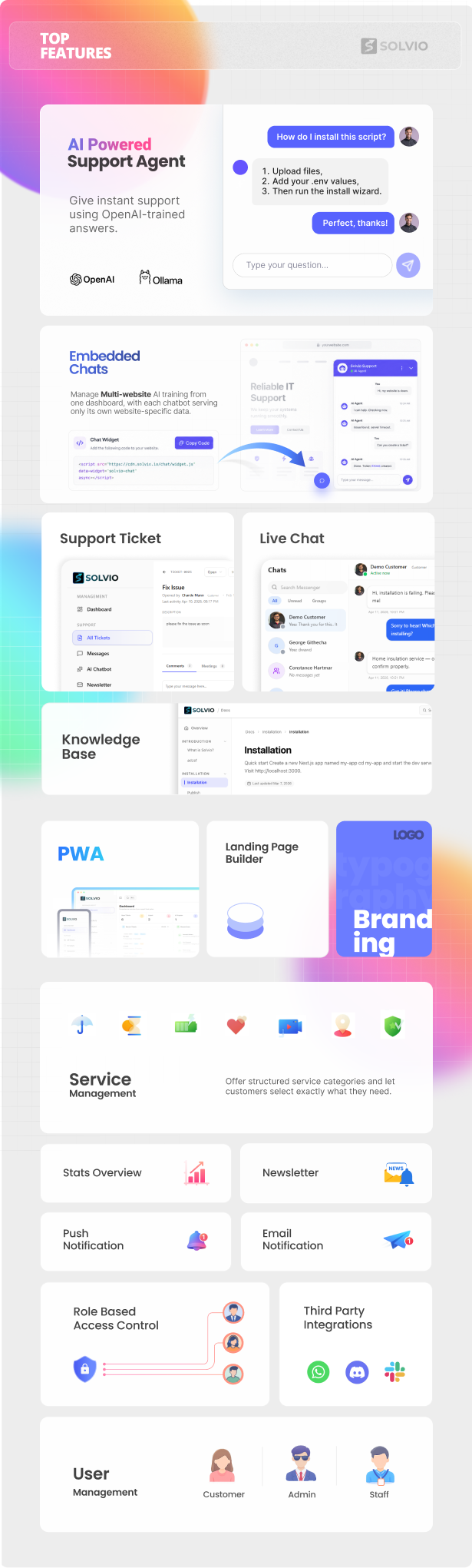
Main Features: Autonomous AI Support Agent, RAG AI Chatbot, Live Chat, Ticket System, Knowledge Base, Human Handoff, Envato Purchase Code Validation, PWA, and Push Notifications.
Key AI-Powered Features
- Autonomous AI Support Agent for automated customer support
- RAG-Powered AI Chatbot trained with your knowledge base
- Real-Time Live Chat with human handoff
- Support Ticket System with AI-assisted ticket automation
- Knowledge Base for self-service support and AI training
- WhatsApp, Slack & Discord Notifications
- Envato Purchase Code Validation for software authors
- PWA & Push Notifications for modern support teams
- Landing Page Builder and Role-Based Access Control
.gif)



Solvio — AI Chatbot Helpdesk, Live Chat, Customer Support Ticket Software & Knowledge Base
Stop paying $50+/month for Zendesk or Freshdesk. Solvio is a complete, self-hosted customer support platform with AI chatbot powered by OpenAI, real-time live chat, ticketing, knowledge base, and 6+ built-in integrations — all for a one-time payment. Built with Next.js 16, MongoDB, Socket.IO, and Tailwind CSS for blazing-fast performance.
Live Demo: https://solvio-demo.neurolightstudio.com
Documentation: https://solvio-demo.neurolightstudio.com/docs
Changelog: https://solvio-demo.neurolightstudio.com/changelog
Demo Login Credentials:
Admin: admin@demo.com / demo123
Support Agent: support@demo.com / support123
Customer: customer@demo.com / customer123
Why Businesses Choose Solvio Over Monthly SaaS Tools
Most helpdesk software charges $15–$115 per agent per month. That adds up to $180–$1,380 per agent per year — and the price only goes up as your team grows. Solvio costs a one-time payment with no recurring fees, no per-agent pricing, and no feature gates. You get full source code, deploy on your own server, and keep complete control of your customer data.
Built with a modern tech stack (Next.js 16, React, MongoDB, Socket.IO, TypeScript, Tailwind CSS), Solvio delivers faster performance, better developer experience, and easier customization compared to legacy PHP-based helpdesk alternatives.
AI Chatbot Powered by OpenAI
Solvio includes a built-in AI chatbot integration powered by OpenAI — shipped in version 3.1. Automate your customer support and let AI handle common questions while your team focuses on complex issues.
How it works: Train your AI assistant with your own custom Q&A pairs through the admin panel. When a customer asks a question, the AI matches it against your training data using semantic understanding — not just keyword matching. “How do I change my password” will correctly match your answer about “password reset” because the AI understands meaning.
Key AI capabilities:
- AI chatbot powered by OpenAI for instant customer responses
- Custom Q&A training — add your own questions and answers, no coding needed
- Bulk import training data via CSV
- AI suggested replies for support agents
- AI ticket classification — auto-tag priority, category, and sentiment
- Confidence threshold control — set when AI responds vs. escalates to human
- Works 24/7 — customers get instant answers even outside business hours
Complete Support Ticket System
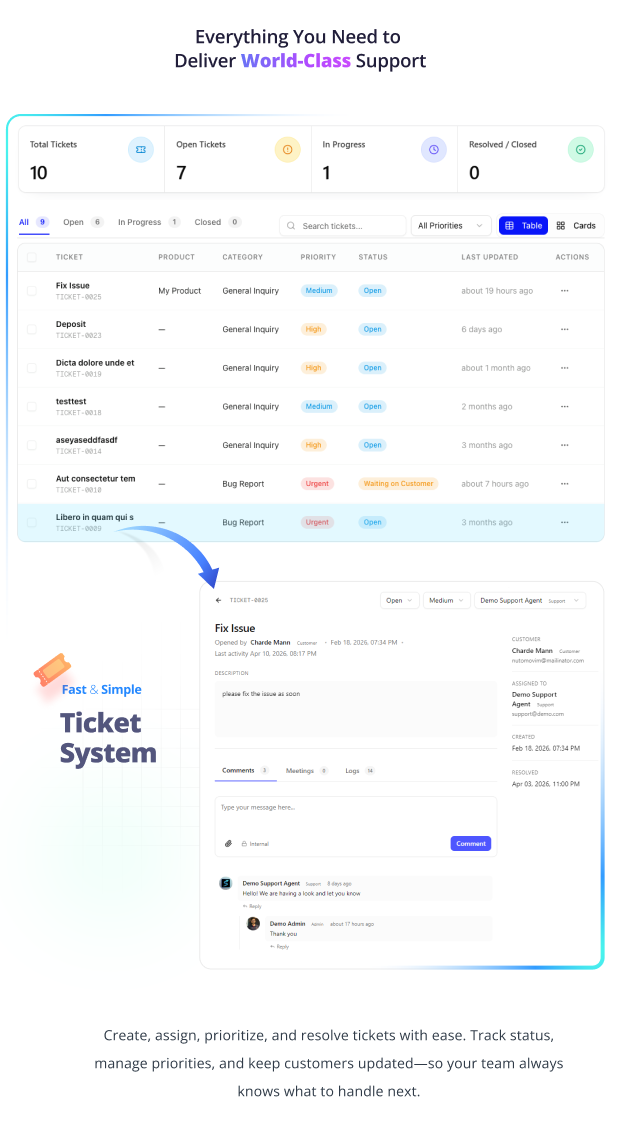
Create, assign, prioritize, track, and resolve customer support tickets with a professional workflow designed for teams of any size.
- Ticket statuses: Open, In Progress, Waiting on Customer, Resolved, Closed
- Priority levels: Low, Medium, High, Urgent
- Department-wise ticket management
- Agent assignment with workload visibility
- Ticket categories management
- Internal notes and comments for team collaboration
- File attachments (images, documents, ZIP, any file type)
- Complete ticket history, meetings, and activity logs
- Table and card view options
- Advanced search, filtering, and pagination
- Direct contact form communication
Real-Time Live Chat
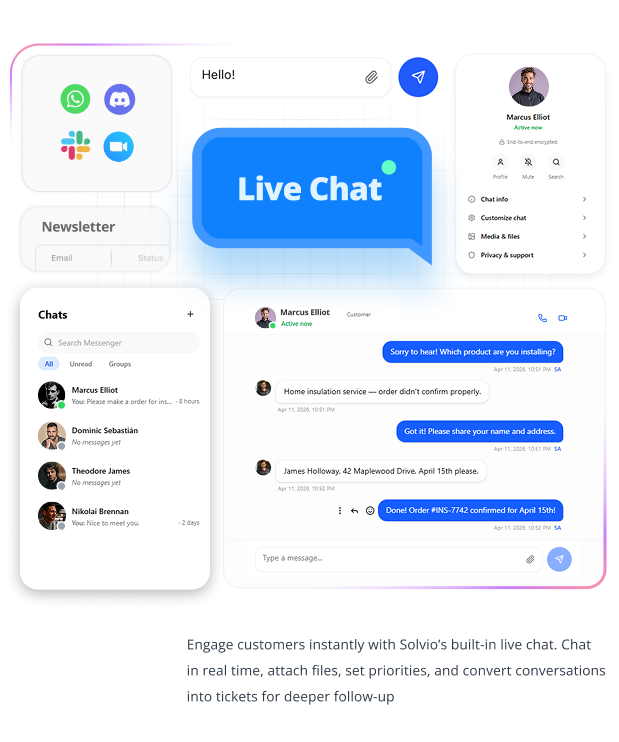
Engage with customers instantly through built-in real-time chat powered by Socket.IO. Migrated from Supabase to Socket.IO in v3.0 for faster, more reliable performance.
- Instant messaging with zero delay
- File and media sharing within conversations
- Customer online/offline status
- Full chat conversation history
- Convert any chat into a support ticket for follow-up
- Redesigned chat interface for world-class UX
- Works across admin, customer, and staff panels
Knowledge Base & Documentation Portal
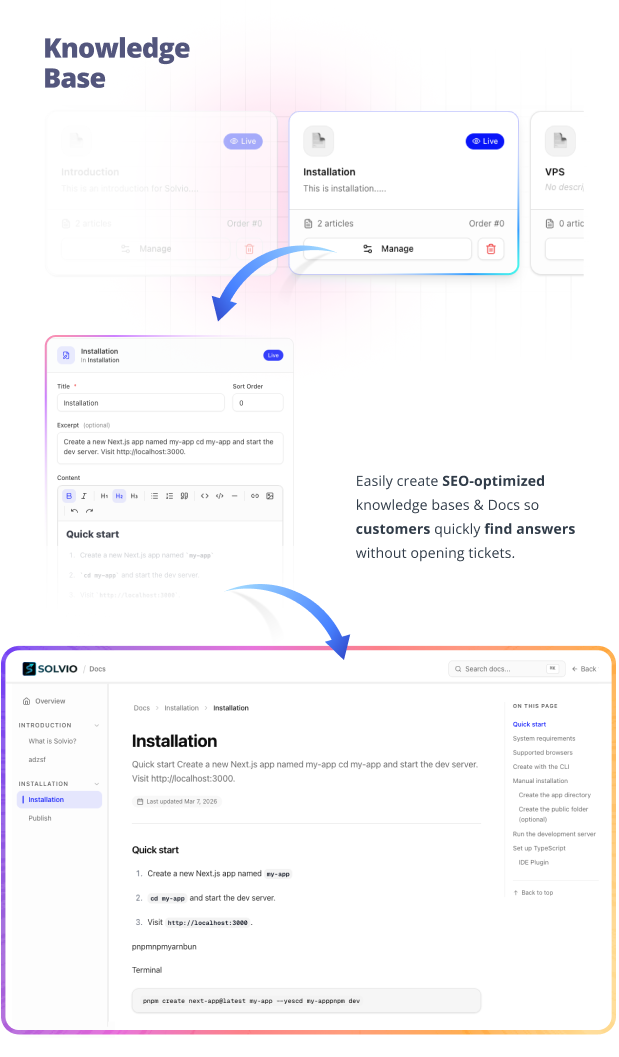
Reduce ticket volume by 30–50% by helping customers find answers on their own with a fully searchable, SEO-optimized documentation portal.
- Dynamic documentation generation
- Organize articles into categories with sidebar navigation
- SEO-optimized article pages with meta tags
- Full-text search system
- Rich text editor for content creation
- “On This Page” navigation for long articles
- Breadcrumb navigation
- Public-facing documentation portal
6+ Built-In Integrations (All Included — No Paid Add-ons)
Unlike competitors that charge extra for each integration, Solvio includes them all out of the box.
OpenAI / AI Chatbot — Connect your OpenAI API key and power your customer support with AI. Train the chatbot with your own data directly from the admin panel.
WhatsApp Chat — Add a WhatsApp button so customers can reach you on the messaging platform they already use. Configure custom default messages and phone number from admin settings.
Slack Integration — Get instant Slack notifications when new tickets are created. Connect via webhook URL in under 60 seconds. Includes test message feature.
Discord Integration — Receive ticket alerts directly in your Discord server. Perfect for gaming companies, developer communities, and startups. Includes test message feature.
Envato / CodeCanyon Integration — Validate purchase codes when customers create tickets. Supports Envato API token and username configuration. Perfect for CodeCanyon authors, ThemeForest sellers, and Envato marketplace businesses.
Crisp Chat — Connect your existing Crisp account for an embedded live chat widget. Supports both anonymous visitors and logged-in users with floating menu access.
Email & Push Notifications — Automated email alerts for new tickets, replies, and status changes. Browser push notifications keep your team responsive without checking the dashboard constantly.
Landing Page Builder
Create your public support homepage without writing a single line of code.
- Landing page header generation and management
- Customizable hero sections with CTA buttons
- Feature blocks and content sections
- Branding controls (logo, colors, text)
- Redesigned to support international standards
- SEO-friendly output
Service Request Management
Perfect for digital product sellers, web agencies, freelancers, and hosting companies.
- Modular services management — create custom service categories
- Installation request handling
- Customization and installation details pages in support panel
- Bug report tracking
- Technical support workflows
- Maintenance request system
Customer Self-Service Portal
Give your customers a clean, professional support experience.
- Create and track tickets with real-time status updates
- Reply to tickets with file attachments
- Access the full knowledge base and documentation
- Submit service requests
- Real-time live chat with support agents
- View complete ticket history
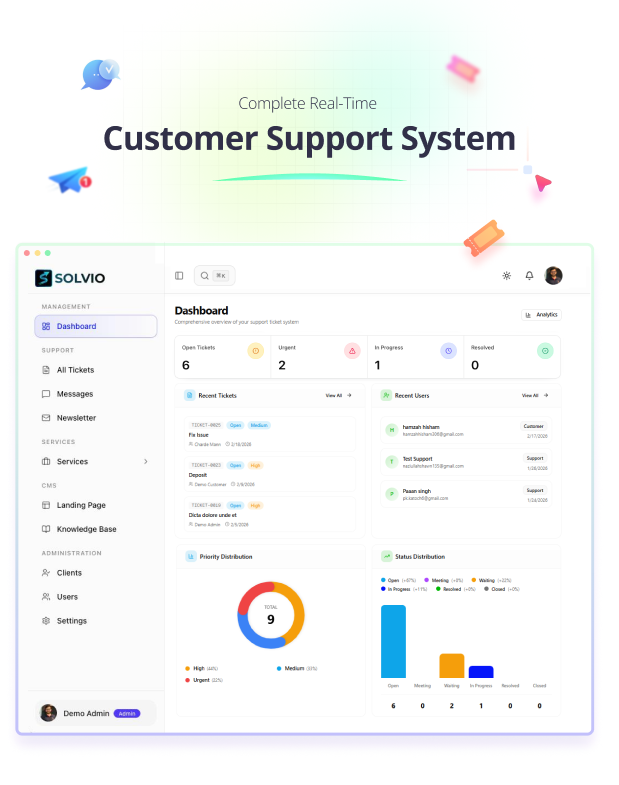
Admin Dashboard & Analytics
Everything your support team needs in one place.
- Ticket volume overview (open, urgent, in progress, resolved)
- Priority and status distribution charts
- Redesigned stats card design for quick insights
- Recent tickets and recent users at a glance
- User management with role-based access control
- Vendor dashboard with management tools
- Activity tracking and performance overview
- Newsletter management
- Announcements management
- Maintenance mode management
Progressive Web App (PWA)
Install Solvio on any device like a native mobile app.
- Installable on iOS, Android, and desktop
- Fast loading and responsive
- Mobile-friendly design across all panels
- App-like user experience
Role-Based Access Control
- Admin — Full access to all settings, users, analytics, and features
- Support Staff — Manage tickets, chat with customers, handle service requests
- Vendor — Dedicated vendor dashboard with management tools
- Customer — Create tickets, view knowledge base, chat with support, submit service requests
- Custom Roles — Create custom roles with specific permissions tailored to your workflow
Dark & Light Theme
Full dark mode and light mode support across the entire application. Agents and customers can work in whichever mode they prefer.
Modern Technology Stack
- Next.js 16 — Server-side rendering, API routes, optimal performance
- React — Component-based UI with modern hooks and React Compiler
- MongoDB — Flexible document database, Atlas Vector Search compatible
- Socket.IO — Real-time bidirectional communication for live chat
- Tailwind CSS — Utility-first styling for rapid customization
- ShadCN UI — Professional, accessible UI components
- TypeScript — Type-safe codebase for reliability
- Node.js — Fast server-side JavaScript runtime
Security & Performance
- Secure authentication with session management
- Protected API routes with input validation
- CSRF protection
- API key encryption for AI and integration credentials
- Optimized performance with React Compiler
- Clean, documented, developer-friendly source code
- Modern scalable architecture
Who Is Solvio For?
- SaaS Companies — Support your subscribers without per-agent SaaS costs
- CodeCanyon & Envato Authors — Built-in purchase code validation
- Web Agencies — Manage client support with service request workflows
- E-commerce Businesses — Live chat and ticket support for shoppers
- Software Companies — Knowledge base + AI chatbot + ticketing for product support
- Hosting Companies — Ticket, live chat, and maintenance request support
- IT Support Teams — Internal helpdesk with AI-powered classification
- Startups — Professional support system without enterprise pricing
- Freelancers — Manage client requests and project support
What You Get
- Full source code (non-encrypted, non-obfuscated)
- Admin, staff, vendor, and customer panels
- AI chatbot with OpenAI integration
- All 6+ integrations included (no paid add-ons)
- 9 languages included
- Dark and light theme
- Detailed documentation
- Free installation support
- 6 months of support (extendable to 12)
- Lifetime updates
Changelog
v3.1 — April 14, 2026 (Latest) — OpenAI ChatBot Integration & Design Refinements
- ChatBot implementation powered by OpenAI
- Crisp Chat integration
- Improved responsive design
- Made design consistent across the application
- Improved spacing and border styling
- Fixed dynamic header issue
v3.0.0 — April 12, 2026 — PWA, Real-Time Chat Migration & UX Overhaul
- PWA support and push notifications
- Direct contact form communication
- Department-wise ticket management
- Third-party integrations: WhatsApp, Slack, and Discord
- Upgraded Next.js from 16.1.4 to 16.2.3
- Migrated Supabase to Socket.IO for real-time chat
- Implemented React Compiler for better performance
- Redesigned sidebar, stats cards, ticket pages, chat interface across all panels
- Implemented pagination in all data tables
- Improved responsiveness across the entire application
- Resolved dark mode issues
v2.0.0 — March 8, 2026 — Knowledge Base & Landing Page Management
- Dynamic documentation generation (Knowledge Base)
- Landing page header generation and management
- CTA buttons in landing page
- Enhanced UI/UX across the application
- Fixed user creation and user details page issues
v1.2.0 — January 30, 2026 — Announcements, Maintenance & Access Control
- Announcements management
- Maintenance management
- Custom role creation and permissions management
- Modular services management
- Ticket categories management
- Upgraded Next.js (16.0 to 16.1)
- Fixed Windows .zip file upload, long filename image upload, and role display issues
v1.1.0 — January 21, 2026 — Support Panel Enhancements
- Customization and installation details page in support panel
- Landing page setup design updates
- Fixed URL mismatch, agent assignment, notification routing, and ticket visibility issues
v1.0.0 — January 20, 2026 — Initial Release
- Multi-vendor support with role-based access control
- Ticket management with priority and status tracking
- Real-time notifications
- Admin dashboard with analytics
- Customer portal for ticket submission
- Knowledge base with documentation
- Multi-language support (9 languages)
- Dark and light theme
- Maintenance request system
- File attachments support
- Email notification system
- User management with permissions
- Secure authentication, protected API routes, CSRF protection
- Optimized performance with Next.js 15 and TypeScript
Support & Updates
We actively maintain and improve Solvio — 6 major updates shipped in under 3 months since launch. Got a question or need help? Leave a comment or open a support ticket. We typically respond within 24 hours.


