SmartGrocery SaaS - AI-Powered Premium Grocery Solution (Laravel + Next.js + Flutter)
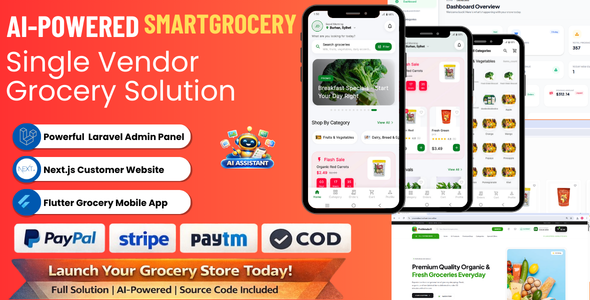

SmartGrocery SaaS – AI-Powered Premium Grocery Solution (Laravel + Next.js + Flutter)
Live Demos
Next.js Website Demo | Flutter App Demo | Admin Panel Demo
Admin Panel Login Details
- Admin URL:
https://adminprovendorx.burhanstore.online/admin/dashboard - Email:
admin@gmail.com - Password:
12345678

SmartGrocery SaaS is a complete premium grocery and supermarket solution built with a modern tech stack: Laravel 12 (admin + REST API), Next.js 16 grocery web storefront, and a production-ready Flutter 3 mobile app for Android / iOS. It includes a powerful admin panel, AI-powered product assistant, secure online payments, wallet system, order management, notifications, and full eCommerce features from product listing to delivery.
What You Get
- Laravel 12 Admin Panel + API (folder:
laravel_code) - Next.js Grocery Web Frontend (folder:
grocery-web) - Flutter Grocery Mobile App (folder:
flutter_code) - Well-structured REST API layer to connect web and apps
- AI Assistant for product content, SEO and category suggestions
- PayPal, Stripe, Paytm & Wallet System (with COD support)


Tech Stack
- Backend: PHP 8.2+, Laravel 12, Laravel Sanctum
- Database: MySQL / MariaDB
- Web Frontend: Next.js 16 (App Router), React 19, TypeScript, Tailwind
- Mobile: Flutter 3 with GetX state management
- Payments: Stripe, PayPal, Paytm, Wallet System, COD
- AI: External AI API (configurable from admin settings)
Admin Panel (Laravel) – Key Features
Admin Screens & Pages
- Admin Login (secure login screen for store owner / staff)
- Dashboard (overall summary of orders, revenue, customers, products, recent activity)
- Categories
- Categories list
- Create category
- Edit category
- Subcategories
- Subcategories list
- Create subcategory
- Edit subcategory
- Products
- Products list
- Create product (with AI assistant)
- Edit product (with AI assistant)
- Flash sale products management (select / list)
- Special offers products management (select / list)
- Premium products management (select / list)
- Orders
- Orders list (filter by status)
- Order details page
- Customers
- Customers list
- Customer details page (orders, contact info, addresses)
- Reviews
- Reviews selection and moderation screen
- Support Tickets
- Support tickets list
- Support ticket detail view with reply thread
- Staff Management
- Staff list
- Create staff
- Edit staff
- Banners
- Main banners list
- Create banner
- Edit banner
- Special offers banners list
- Create special offers banner
- Edit special offers banner
- Pages (CMS)
- Static pages list (e.g. About, Terms, Privacy)
- Create page
- Edit page
- Coupons
- Coupons list
- Create coupon
- Edit coupon
- Delivery Types
- Delivery methods list
- Create delivery method
- Edit delivery method
- Payment Methods
- Payment methods list
- Create payment method
- Edit payment method
- Notifications
- Notifications list
- Create notification (push / in-app feed item)
- Newsletter Subscriptions
- Subscribers list
- AI Settings
- Configure AI API key, base URL and model
- Select AI language (e.g. English / Bangla)
- Select AI tone (friendly / formal / neutral)
- Adjust AI temperature and behavior
- General Settings
- Store name, logo, contact details
- Currency symbol and format
- Tax percentage
- Mail / SMTP configuration
- Payment gateway keys and settings
- Visits & Analytics
- Storefront visits statistics via visits API
Store Management (Summary)
- Dashboard with key metrics and quick links
- Manage categories and sub-categories with active / inactive status
- Manage products with images, price, discount price, stock, featured flags
- Support for special offers, premium products and flash sale
- Configurable delivery types with cost (e.g. home delivery, pickup)
- Configurable payment methods (COD, Stripe, PayPal, Paytm etc.)
AI Assistant for Products
SmartGrocery SaaS includes a built-in AI assistant inside the admin product create/edit screen to save hours of manual work.
- AI Prepare Product (button:
AI prepare) - AI Generate Description (button:
AI generate) - AI SEO Generator (button:
AI SEO) - AI Remove Background for product images (via
/api/ai/remove-background)
AI Prepare Product
When you enter a product name and click the AI Prepare button, the system calls /api/ai/prepare-product and:
- Analyzes the product title and your existing category tree
- Suggests the best category and subcategory
- Generates a professional short description
- Can optionally trigger AI SEO generation for title, meta description and keywords
AI Generate Description
The /api/ai/generate-description endpoint is used to:
- Generate high-converting, SEO-friendly product descriptions
- Support multiple languages (e.g. English, Bangla) based on admin AI settings
- Configure tone (friendly, formal, neutral) from settings
- Write copy optimized for grocery and supermarket products
AI Product SEO
Using /api/ai/generate-product-seo from the admin product page, the AI assistant can:
- Generate meta title, meta description and SEO keywords
- Use product name, category, description, price and unit as context
- Output language and tone controlled from AI settings
- Auto-fill SEO fields in the admin form with one click
AI Image Background Removal
- Upload raw product image with messy background
- Call
/api/ai/remove-backgroundfrom admin - AI removes background and returns a clean PNG for your store
Order & Customer Management
- View all customer orders with status (pending, processing, shipped, delivered, cancelled)
- Filter and search orders by customer, status, or order number
- Detailed order view with items, quantities, prices, totals, payment and delivery details
- Update order status and payment status
- View and manage customer shipping addresses
- Support ticket system for customer support
- Review management (approve, edit, delete customer reviews)
Coupons, Tax & Settings
- Create and manage coupon codes (fixed or percentage)
- Configure minimum purchase amount and usage count
- Global tax percentage from settings (auto-applied during checkout)
- Store-wide settings for currency symbol, app name, logo, contact info
- AI configuration (API Key, base URL, model, language, tone, temperature)
Payments Integration
- Central PaymentController with modular services:
- Stripe payment intent creation (client secret, publishable key)
- PayPal order creation with approval link for web and app
- Paytm transaction initiation with callback endpoint
- Cash on Delivery (COD) option with no external gateway required
Notifications & Marketing
- API endpoint for notifications feed (e.g. offers, announcements)
- Newsletter subscription API
- Visit tracking API to measure store visits and traffic
- Banner management for homepage and special offers page
REST API Highlights
The Laravel backend exposes clean JSON APIs consumed by both the web and Flutter app:
- Auth: Register, login, user profile, delete account, logout
- Catalog: Categories, products, popular products, product details
- Promotions: Flash sale, special offers, premium products, coupons
- Checkout: Delivery types, payment methods, apply coupon
- Orders: Create order, list orders, order details, track by number
- Reviews: Submit and manage product reviews
- Support: Support tickets and replies
- AI: Generate description, prepare product, SEO, remove background
Next.js Grocery Web (Customer Website)
The Customer Website folder contains a modern Next.js storefront that connects to the same Laravel API. It offers a smooth shopping experience on desktop and mobile browsers. Below is the full list of core pages included in the customer website. All pages are implemented as Next.js App Router routes inside src/app.
Customer Website Pages
- Home (
/)- Hero section with banners and main CTA
- Featured categories
- New arrivals products section
- Popular deals / best sellers
- Special offers and premium products highlights
- Customer reviews / testimonials section
- All Products (
/products)- List all products with pagination
- Filter and sort options
- Categories (
/categories)- Grid of all active categories
- Category Detail (
/category/[slug])- Products filtered by selected category
- Product Detail (
/product/[id])- Product gallery, price, discount and details
- Add to cart and wishlist actions
- Reviews and rating section
- SEO Product Page (
/p/[slug])- SEO-friendly product detail URL using slug
- Flash Sale (
/flash-sale)- Time-limited deals pulled from flash sale configuration
- Premium Shop (
/premium-shop)- Premium / high-value products collection
- Special Offers (
/special-offers)- Special promotional products and banners
- New Arrivals (
/new-arrivals)- Recently added products
- Cart (
/cart)- Cart items list with quantity controls
- Cart totals and coupon input
- Proceed to checkout button
- Checkout (
/checkout)- Shipping address form
- Delivery method selection
- Payment method selection
- Order summary and place order action
- Order Tracking (
/order-tracking)- Track order by number
- Orders (
/orders)- List of all orders for the logged-in customer
- Status filter (all, pending, processing, delivered, cancelled etc.)
- Order Details (
/orders/[id])- Detailed view of a single order with items, totals, payment and delivery info
- Wishlist (
/wishlist)- Customer wishlist products list
- Notifications (
/notifications)- Notifications feed from backend API
- Account / Profile (
/account)- Customer profile details
- Access to orders and settings
- Login (
/login)- Customer login using Laravel API
- Register (
/register)- New customer registration form
- Contact (
/contact)- Contact form and store contact information
- Support (
/support)- Support / help center page integrated with ticket system
- Not Found (
/not-foundcomponent)- Custom 404 page for invalid routes
Web Tech Stack
- Next.js 16 (App Router)
- React 19, TypeScript and functional components
- Context-based state management for Auth, Cart, Settings and Wishlist
- Reusable UI components (Header, Footer, product cards, skeleton loaders)
- OneSignal JS workers included for push notification support
API Integration on Web
- Central
src/lib/api.tshelper to call Laravel API - Automatic Authorization header using token from
localStoragewhen available - Graceful error handling (connection errors handled silently to avoid breaking UI)
- Server-friendly data fetching compatible with static export / SSR
Flutter Mobile App (Customer App)
The flutter_code folder contains a production-ready grocery mobile app built with Flutter 3 and GetX. It connects directly to the Laravel API and mirrors the core features of the web storefront. Below is the full list of main screens included in the app.
Mobile App Screens
- Splash Screen (
splash_screen.dart) - Intro / Onboarding (
intro_screen.dart) - Authentication
- Login screen (
login_screen.dart) - Register screen (
register_screen.dart)
- Login screen (
- Main Container
- Main bottom navigation screen (
main_screen.dart) - Home tab (
home_screen.dart) with banners, categories, flash sale, special offers, premium products
- Main bottom navigation screen (
- Category & Product Listing
- Category list screen (
category_screen.dart) - Generic product list screen (
product_list_screen.dart) - Special offers products (
special_offers_screen.dart) - Popular deals (
popular_deals_screen.dart) - Premium products (
premium_products_screen.dart) - New arrivals (
new_arrivals_screen.dart)
- Category list screen (
- Product Details
- Product detail screen (
product_detail_screen.dart) with gallery, price, discount and description
- Product detail screen (
- Search
- Search screen (
search_screen.dart) with search results
- Search screen (
- Cart & Checkout
- Cart screen (
cart_screen.dart) - Address list screen (
address_list_screen.dart) - Add address screen (
add_address_screen.dart) - Checkout flow handled via
checkout_controller.dart
- Cart screen (
- Payments
- Payment selection screen (
payment_screen.dart) - Payment webview screen (
payment_webview.dart) for gateways like Stripe / PayPal / Paytm
- Payment selection screen (
- Orders
- Orders list screen (
orders_screen.dart) - Order detail screen (
order_detail_screen.dart) - Order success screen (
order_success_screen.dart)
- Orders list screen (
- Notifications
- Notifications screen (
notifications_screen.dart)
- Notifications screen (
- Profile & Settings
- Profile main screen (
profile_screen.dart) - Profile details/edit screen (
profile_details_screen.dart) - About us screen (
about_us_screen.dart) - Support tickets screen (
support_tickets_screen.dart)
- Profile main screen (
Mobile App Architecture
- GetX controllers for home, cart, checkout, orders, settings and more
- Reusable models for products, categories, addresses, orders, payment methods
- Central ApiService using Dio with interceptors for auth token
- SharedPreferences for secure token persistence on device
- WebView integration for payment gateways
- Shimmer loading effects and animated widgets for smooth UX
Installation Overview
1. Laravel Backend (Admin + API)
- Upload the contents of
laravel_codeto your server - Run
composer install - Create a database and update the
.envfile (DB, APP_URL, etc.) - Run migrations:
php artisan migrate --force - Generate app key:
php artisan key:generate - Set up storage link:
php artisan storage:link - Configure AI settings and payment gateways in the admin panel
2. Next.js Web Frontend
- Open
grocery-webin your terminal - Run
npm install - Configure the API base URL to point to your Laravel API
- Run
npm run devfor development ornpm run build&npm startfor production
3. Flutter Mobile App
- Open
flutter_codein Android Studio or VS Code - Run
flutter pub get - Update the API base URL in
lib/config.dartto your Laravel API - Configure app name, icon and package ID as needed
- Build release APK or App Bundle using
flutter build
Why Choose SmartGrocery SaaS?
- Complete solution: admin panel, web storefront and mobile app in one package
- AI Assistant built-in for product content, SEO and images
- Modern tech stack suitable for long-term maintenance
- Clean code with separate layers for API, web and app
- Easy to customize branding, colors, texts and features


