AI Document Scanner & PDF Maker – ML Kit, OCR Text, Sign & Watermark (Java)
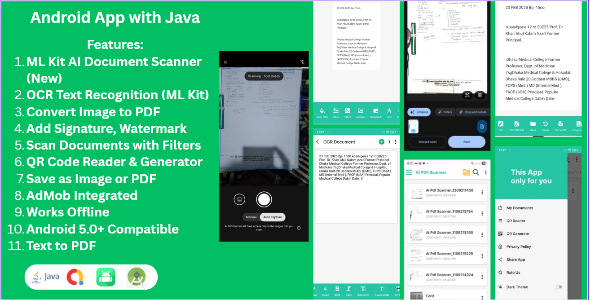

AI PDF Scanner & OCR Editor – Smart Document Scanner for Android (Java)
Try the app before you buy!
Click Here to Download Demo APKAI PDF Scanner & OCR Editor is a complete Android document scanning solution built with Java. Powered by Google ML Kit’s native document scanner UI, it enables users to seamlessly scan multi-page documents, extract text using on-device OCR technology, apply custom visual filters, edit content, and export high-quality PDF or image files — all without requiring any backend or server integration.
This project is fully optimized for Scoped Storage (Android 10+) and designed for developers who want to quickly launch a professional, feature-rich document scanner application with clean architecture, AdMob integration, and easy customization.
Core Features
- ML Kit AI Document Scanner: Native, fast, and interactive multi-page scanning flow powered by Google ML Kit
- On-Device OCR Text Extraction: Fast and reliable text recognition directly on the device
- Multi-Page PDF Creator: Easily scan, group, and arrange pages into high-quality A4 PDF files
- Document Grouping & Folder Management: Append new scans to existing folders without duplicate creation
- Digital Signature & Watermark: Add custom signatures with transparent backgrounds and watermark text overlays
- Smart Image Filters: Apply professional visual filters for enhanced document readability
- QR & Barcode Scanner: Built-in QR code reader and generator tools
- Export & Share Options: Export scanned items instantly as single/multi-page PDF or JPEG images
- AdMob Integrated: Monetize your app out-of-the-box with banner and interstitial ads
- 100% Offline Support: Works smoothly without any internet or backend dependencies
Technical Details
- Platform: Native Android
- Programming Language: Java
- Minimum SDK: Android 8.0+ (API 26+)
- Scoped Storage Compliant: Fully compatible with Android 10, 11, 12, 13, 14, and 15+
- OCR & Scanning Engine: Google ML Kit (On-device processing)
- Optimized Memory Management: Efficient Bitmap handling to prevent OutOfMemory (OOM) errors
- No Firebase or complex server required
Easy Setup & Customization
The project is simple to configure and run. Import the project into Android Studio, change the package name, place your AdMob app IDs, build, and you are ready to publish!
Ideal For
- Developers building mobile productivity and utility applications
- Business and office document management solutions
- Invoice, receipt, and business card scanning tools
- Startups launching commercial PDF scanner applications
Package Includes
- Full Android Source Code (Java)
- Android Studio Ready Project
- Clean & Well-Documented Codebase
- Step-by-step Setup Documentation
If you are looking for a reliable, offline-ready, and easy-to-customize PDF scanner solution for Android, this project provides a rock-solid foundation for your next app.
Please review the demo carefully before purchase to ensure it meets your requirements.
0 average based on 0 ratings.

| Last Update | 2026-09-18 |
| Created | 2026-02-14 |
| Sales | 3 |
| Discussion | Comments |
| Software Version | Android 15.0 Android 12.0 Android 11.0 Android 10.0 |
| Files Included | .apk .java .xml |
| Video Preview Resolution | 382x850 |


