Smart Invoice .Net core 7 + User Management + Arabic Support + Full Source Code
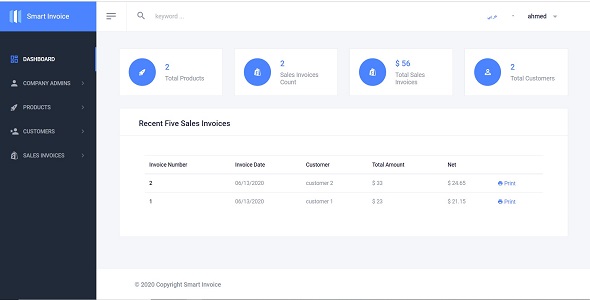

Smart Invoice .Net core 7.0+ User Management + Arabic Support + Full Source Code
Version v2.0
Introduction
Smart Invoice make admin able to add unlimited products and customers and create sales invoices with taxes and discounts and print invoices . also you can add unlimited companies .
This web based application is developed on .Net core 7.0 using ASP.Net Core, C#, Entity framework core, JavaScript, jQuery, JSON, Bootstrap, HTML, CSS and SQL Server.
Smart Invoice System has Two default roles [Admin , CompanyAdmin] , and you can add unlimited roles .
Framework: .Net Core 7.0
Features :
- Support English / Arabic
- Architecture : Clean Architecture
- Full User Management Module
- Users [Create –Edit – Delete – Search]
- Roles [Create –Edit – Delete – Search]
- Policies [Create –Edit – Delete – Search]
- Authentication Settings
- Bind Pages with Policies , using easy user interface
- Login
- Reset Password
- Error Log : using NLog
- Audit trail : log database actions [add – update -delete] and business actions Like:[CreateInvoice,UpdateInvoice , etc]
- Multitenant: unlimited companies
- Products [Create –Edit – Display – Delete – Search]
- Customers [Create –Edit – Display – Delete – Search]
- Sales Invoices [Create –Edit – Display – Delete – Search]
- Dashboard
Quick Start Guide
How to Generate Database Tables
- Open [Package manager console] and in the [Default project] list .. select [Common.Persistance] project
- Write the below commands
- add-migration CreateCommon -context CommonDbContext
- update-database -context CommonDbContext
- Open [Package manager console] and in the [Default project] list .. select [UserManagement.Persistance] project
- Write the below commands
- add-migration CreateIdentity -context ApplicationDbContext
- update-database -context ApplicationDbContext
- Open [Package manager console] and in the [Default project] list .. select [SmartInvoice.Persistance] project
- add-migration CreateSmartInvoice -context SmartInvoiceDbContext
- update-database -context SmartInvoiceDbContext
- Congratulations , just run the project .
Credentials
- User name : admin
- Password : P@ssw0rd
- Create Company Admin
- Company Admins à New Company Admin
0 average based on 0 ratings.

Search plugins
Browse Categories


