Side War - Trench Battle Game for Live Streams | Python Script
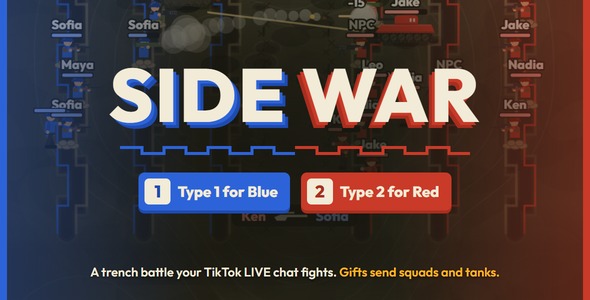

A two-sided trench battle your TikTok LIVE chat fights Side War turns your stream into a war between Blue on the left and Red on the right. Viewers pick a side in chat and get a soldier with their name on it, likes send reinforcements, and gifts send squads of riflemen, machine gunners, anti-tank soldiers and tanks. The first side to reach the kill target wins the round.
Self-hosted: it runs on your own PC. A Python server reads your LIVE and runs the battle, and the game screen is a web page you add to OBS, TikTok LIVE Studio or another app with a Browser Source at 1080×1920.
Key features How viewers play Type 1 to join Blue or 2 to join Red (the chat words are adjustable). A free pistol soldier runs into the trench with the viewer’s name above it and comes back 10 seconds after it falls (adjustable). Every 100 likes from a side sends that side another soldier. Kills count for the viewer who sent the soldier. The top killers show as avatar circles at the top of the screen, and each round names a top soldier. The battle Five soldier types, each with its own weapon, health, range and sound: pistol soldier, rifleman, machine gunner, anti-tank soldier and tank. Three trenches per side. Soldiers in a trench dodge part of the fire and take less damage. Soldiers fight from cover first. They push into the enemy’s trenches only when at most one enemy can fire at that spot, and fall back into a trench when it gets dangerous. Tanks hold behind their own trenches and shell the enemy lines. Only rockets and shells really hurt them, and up to 3 per side fight at once (adjustable). Damage varies from shot to shot, with grazing hits and the damage shown above every target. The first side to 50 kills wins the round (adjustable), or play an endless battle without rounds. Gifts and thank-yous Every gift sends a squad. Ten gifts come set up, five for each side, and any other gift sends a squad by its coin value: 1 pistol soldier at 1 coin, up to 3 tanks and 16 soldiers at 20,000 coins. Combos multiply the squad, up to 100 soldiers per gift. Small gifts get a notification, gifts from 10 coins a banner with fireworks, and gifts from 500 coins a full-screen spotlight with the sender’s photo and the soldier they sent. Both limits are adjustable, and big thank-yous wait their turn. Made for streaming The battle runs on the server, so OBS, preview windows and page refreshes always show the same fight. Everything sits in the upper part of the 9:16 screen. The bottom stays clear for TikTok’s chat and gift bar. NPC soldiers keep a quiet stream lively. They never reach the leaderboard and step aside for viewers’ soldiers. Cartoon hit effects for a general audience: small droplets that vanish at once, sparks only, or nothing. A light effects mode helps slower streaming PCs. When chat goes quiet, the battle waits for viewers and carries on with the same round when they come back. The server window shows the links and a new Admin Panel password at every start, then lists every round and gift. Admin Panel Six tabs: Live, TikTok, Settings, Soldiers, Gifts and Sounds. It also works on a phone on the same Wi-Fi.
A live scoreboard, pause, end the round, clear the field, and an activity log of rounds, gifts and big kills. Test everything without going live: join a side, chat, send likes and any gift as a test viewer. Add NPC soldiers to Blue, Red or random sides, or let the game keep a minimum number on the field. Edit each soldier type’s health, damage, range, fire rate and speed, and each gift’s side and squad. Change the title, side names, chat words, trenches, tanks and kill target, and replace any of the fifteen sound effects with your own MP3, WAV or OGG file. Before you buy: the TikTok connection and its costs The connection to your LIVE depends on external services that are not part of this item and that we do not control: TikTok’s unofficial live data, read through the open-source TikTokLive library, and Euler Stream, a third-party service that signs each connection. Future changes to TikTok’s API or to these services can stop the connection until TikTokLive and this item are updated. Possible ongoing cost: Euler Stream’s free plan has a daily request limit. The game runs on the free plan without a key, but if you stream often or keep reaching that limit, you may need a paid Euler Stream plan. Paid plans are monthly subscriptions billed by Euler Stream at their own prices, which can change, and they are not included in the price of this item. You are responsible for any costs and account requirements needed to go live and stay connected: a TikTok account that is allowed to go LIVE, any Euler Stream plan you choose, your internet connection and your streaming software. TikTok is a trademark of ByteDance Ltd. This item is not made, endorsed or supported by TikTok or Euler Stream. Requirements Windows 11 (tested). A start script for macOS and Linux is included. Python 3.10 or newer OBS Studio, TikTok LIVE Studio, Streamlabs Desktop or another app with a Browser Source A TikTok account that can go LIVE. The game never asks for your TikTok password. What’s included Full Python, HTML, CSS and JavaScript source code. The soldiers, tanks, trenches and effects are drawn in code. Documentation with screenshots: installation, OBS, the TikTok connection, connection status and debugging, every rule and Admin Panel setting, and how to change colors, fonts and the logo Fifteen original sound effects Start scripts: START_GAME.bat for Windows, start_game.sh for macOS and Linux No TikTok gift artwork. The gift legend and thank-yous show each gift’s picture straight from TikTok’s servers: the game loads TikTok’s public gift list when it starts, and TikTok sends the picture with every gift during a LIVE. Installation Install Python 3.10 or newer. On Windows, tick “Add Python to PATH”. Open the Source folder and double-click START_GAME.bat (start_game.sh on macOS and Linux). It installs the requirements and starts the server. Copy the Admin Panel password from the server window. In OBS, add a Browser Source with the address http://localhost:5000 at 1080×1920. Open http://localhost:5000/admin, log in and try a battle with “Test without going live”. Go live, type your TikTok username in the TikTok tab and click Connect. Support and updates Ask through the Support tab on this item’s page. Please include your operating system, your Python version and a screenshot of the server window. Updates are free for buyers: download the newest version from your Downloads page. The changelog lists what changed.
Changelog Version 1.0.0 (October 2026): first release.
0 average based on 0 ratings.

| Last Update | 2026-11-07 |
| Created | 2026-11-07 |
| Sales | 0 |
| Discussion | Comments |
| Application Runtime | Native |
| High Resolution | Yes |
| Compatible OS Versions | Windows 11 Windows 10 |
| Video Preview Resolution | 720x1280 |


