WooCommerce Show Price After Login Plugin


Show Price After Login Plugin for WooCommerce
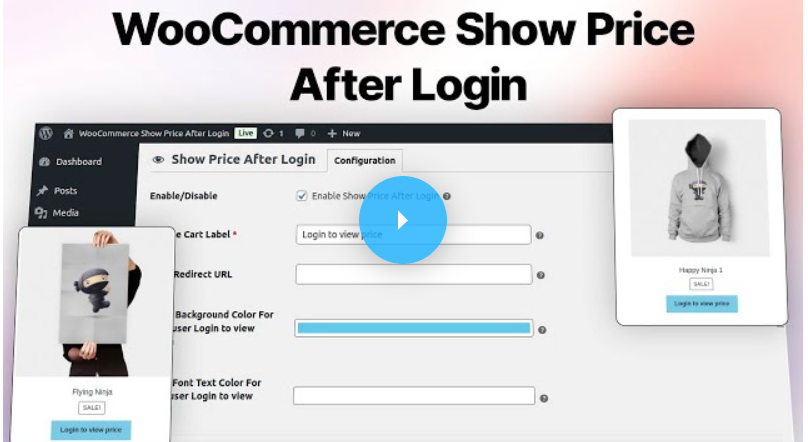
Show Price After Login Plugin for WooCommerce allows the store owner to display product price and the “Add to cart” button after login. The product price and “Add to cart” button will not display until the customer logs in to his account on the website.
WooCommerce Show Price After Login is now compatible with WooCommerce’s latest features Cart and Checkout Blocks. and High-Performance Order Storage (HPOS) feature.
Check how to activate your WooCommerce plugin through the purchase code. and How do you get updates on Webkul Modules directly on the Plugins page.


Why Show Price After Login Plugin for WooCommerce?


1 – Allows Admin To Provide Restriction
Allows the admin to provide certain restrictions for prices visible on the catalog page for the guest user.2 – Only Registered Users Can View All Product Prices
This module is applicable for all types of the product i.e. Simple, Variable, Group, and External.3 – Attract Guest User To Login
Attract guest users to log in to view the prices of all products.4 – Select Product Stock Type
The admin can select the In-stock or Out-of-stock status of the product to display the price.5 – Enable/Disable Product
The admin can enable/disable the virtual and downloadable products to show the price.
- The admin can Enable/Disable the module status in Show Price After Login menu page.
- The Admin can hide the prices of all products for guest user.
- The Guest user needs to login to see the prices of products.
- Allows the admin to provide certain restriction for price visibility to the catalogue page for the guest user.
- Price and add to cart button will not display until the customer logs in.
- Attract guest user to login to view the prices of all the products.
- This module is applicable for all types of products i.e. Simple, Variable, Grouped, External and Product Variation.
Business Use
There are many reasons why prices are now hidden on B2B e-commerce sites. Until users successfully log in, the product prices are not displayed. To view prices on the website, new visitors must register or log in.Therefore, unless the customer or website visitor is logged in, this plugin will let store owners hide the product prices and the add to cart buttons.
Video Preview
Support
Dear Customers, if you have a question/query, please raise a ticket at webkul.uvdesk.com. We will do our best to answer as quick as it is possible. Don’t give us a low rate without contacting support on the issue you’ve faced with. We are always happy to help you.

Change Log
"Initial release 1.0.0, current version 1.4.1"
v 1.4.0 (2026-06-24) Fixed: Coding standards according to the new WordPress -7.0 and WooCommerce 10.9 versions.
v 1.4.0 (2026-06-24) Added: "Request a Quote" / Price Inquiry Form Integration. Added: Custom administrative Quote Inquiries settings and list table. Added: Reusable WooCommerce branded email notification system for plugin notifications. Added: Dynamic admin branding customizer settings (primary, hover, text, and header gradient background configurations). Added: Advanced Rules feature allowing complex pricing and visibility rules with custom priority. Added: Visibility Conversions Analytics Dashboard with graphical view/click charts. Added: Scheduled Visibility controls to auto-hide prices during date ranges. Added: Price Blur & Teaser overlays for guest users. Added: AJAX-powered Login & Registration modal. Added: Allow list rules via CSV file uploads. Added: Geolocation country-based pricing and visibility restriction rules. Added: WordPress User Role-based pricing and visibility restriction rules. Added: WooCommerce Brands integration to set price visibility rules by brand. Added: Teaser masking overlay configurations for hidden price elements. Added: High-performance caching system for rule exclusion evaluations. Security: Added deep sanitization for rules settings update array and secure JSON textarea filtering. Optimized: UI/UX Modernization of the Advanced Rules Builder and list tables. Fixed: Pagination issues and product count inaccuracies when specific products are hidden. Fixed: Alphabetical sorting logic for Advanced Rules list table.
v 1.3.0 (2025-08-25) Update: Compatible with WooCommerce 10.1 version. Update: Compatible with WordPress 6.8 version. Update: Code according to WordPress and WooCommerce coding standards. Optimized: Scripts and styles for faster loading. Update: Compatible with WC cart and checkout blocks. Update: Fixed layout issues.
v 1.2.4 (2025-01-06) Added: Login redirect url in admin settings. Updated: Code according to WordPress and WooCommerce coding standards.
v 1.2.3 (2024-06-18) Added: Bulk product allow settings using csv import in admin. Fixed: Webkul WC Addons menu not registering when other webkul wc addons are active.
$71 |
Download |
0 average based on 1 ratings.

| Last Update | 2026-07-09 |
| Created | 2019-07-17 |
| Sales | 255 |
| Discussion | Comments |
| Compatible Browsers | IE11 Firefox Safari Chrome Edge |
| Software Version | WordPress 7.0.x WordPress 6.9.x WordPress 6.8.x WordPress 6.7.x |
| Compatible With | WooCommerce 10.x.x WooCommerce 9.x.x WooCommerce 8.x.x WooCommerce 7.x.x |
| Gutenberg Optimized | Yes |
| High Resolution | No |
| Files Included | JavaScript JS HTML CSS PHP |
| Video Preview Resolution |


