ShopKit | Flutter WooCommerce Mobile App With 10 Store Designs and Connector Plugin


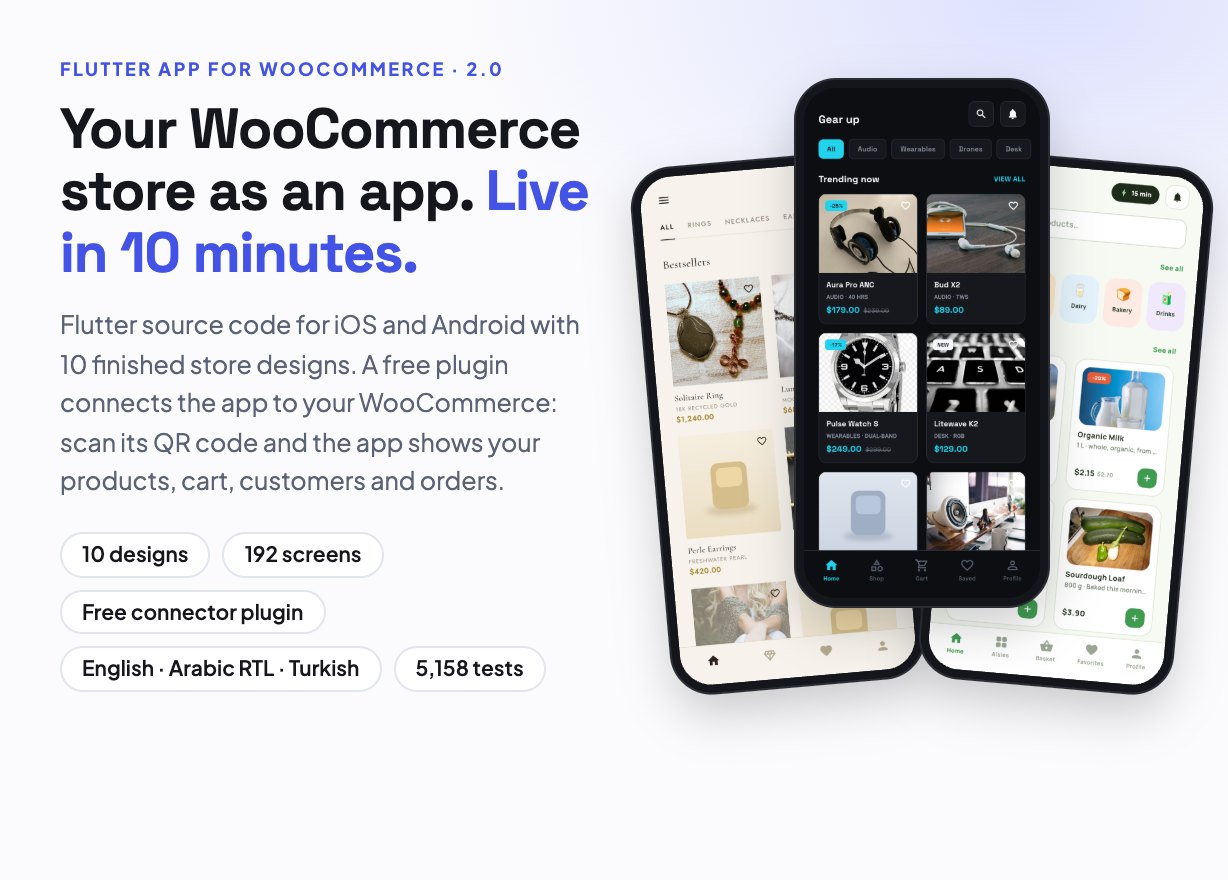
Your WooCommerce store as an iOS and Android app
ShopKit is the Flutter source code of a shopping app with 10 finished store designs (Core Kit plus 9 niche themes) and a free companion plugin, Webkoding ShopKit Connect for WooCommerce. Install the plugin, scan its QR code in the app, and the app shows your store’s products, variations, cart, coupons, shipping, customers and orders. There is no app builder to learn: you pick the design that fits your shop, brand it and publish it.
Every app also runs offline on a bundled sample store, so you can try all designs before you have a server. English, Arabic (right to left) and Turkish are included in every app and in the plugin.
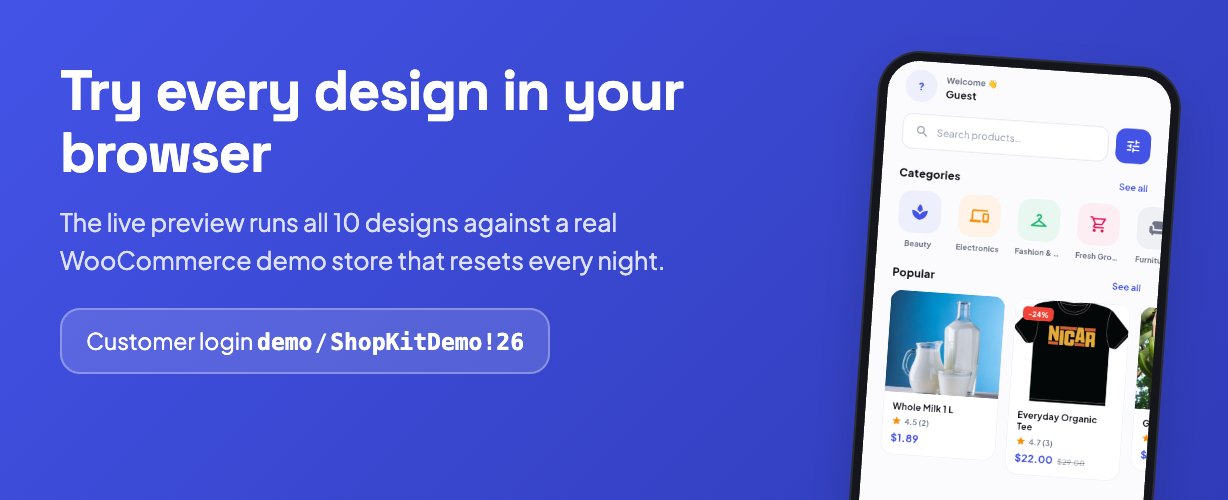
- Live preview (all 10 designs in your browser): shopkit-demo.webkodingtheme.com/app
- The WooCommerce demo store the apps talk to: shopkit-demo.webkodingtheme.com
- Customer login: demo / ShopKitDemo!26
- Documentation: read the full setup guide
- Product page: shopkit.webkodingtheme.com
The demo store resets every night and offers cash on delivery and cheque only, so no money moves. There is no public admin login: the plugin’s admin pages are shown in the screenshots below.
What is not included, and what third-party services cost
Please read this before buying. ShopKit and the ShopKit Connect plugin have no running cost of their own, but publishing a shop app uses services from other companies. They are not included in the price of this item, need your own account, and are billed to you directly by each provider at prices they set and can change:
- Web hosting — live mode needs your own WordPress + WooCommerce site on HTTPS. WordPress, WooCommerce and the plugin are free.
- App store accounts — Google Play Console (one-off registration fee, US$25 at the time of writing) and the Apple Developer Program (yearly fee, US$99 at the time of writing). iOS builds need a Mac with Xcode.
- Payment gateways — card payments go through the gateway you already use on your WooCommerce checkout (Stripe, PayPal, iyzico…), which charges its own per-transaction fees. Cash on delivery and bank transfer cost nothing extra.
- Firebase Cloud Messaging (Google) — optional, for push notifications. Free to send at the time of writing; other Firebase products are billed by usage. iOS push also needs the paid Apple Developer account.
- Not implemented: maps, live courier tracking, support chat and augmented reality. The screens that show them are sample layouts: they show sample content in demo mode and are hidden in live mode. Making any of them real needs a paid third-party service at your own extra cost. The Nest theme’s “view in your room” card is a static UI layout with no AR functionality, no camera access and no 3D rendering.
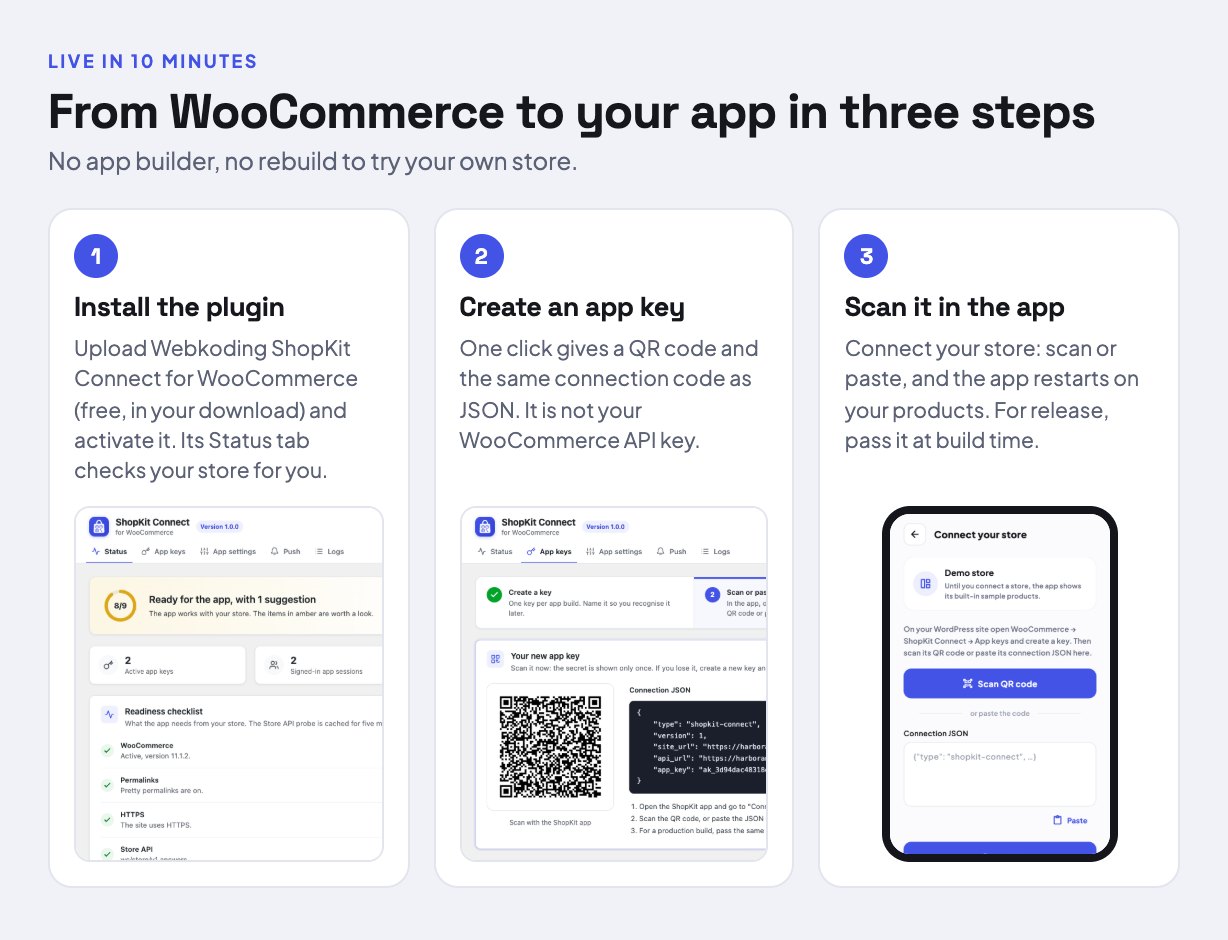
Live in 10 minutes
- Install ShopKit Connect. Upload the plugin zip from your download in WordPress (Plugins → Add New → Upload) and activate it. Its Status tab checks WooCommerce, permalinks, HTTPS, the checkout page, background jobs and the Store API, and tells you what to fix.
- Create an app key. On the App keys tab, name a key and click Create key. The page shows a QR code and the same connection code as JSON. It is not your WooCommerce consumer key and gives no access to your admin or the WooCommerce REST API.
- Give it to the app. In the app, open Connect your store and scan the QR code or paste the JSON: the app checks the key, keeps it in the phone’s secure storage and restarts on your store, with no rebuild. For the app you publish, pass the same code at build time with
--dart-define=SHOPKIT_CONNECTION; the store is then fixed and the Connect screen is hidden from your customers.
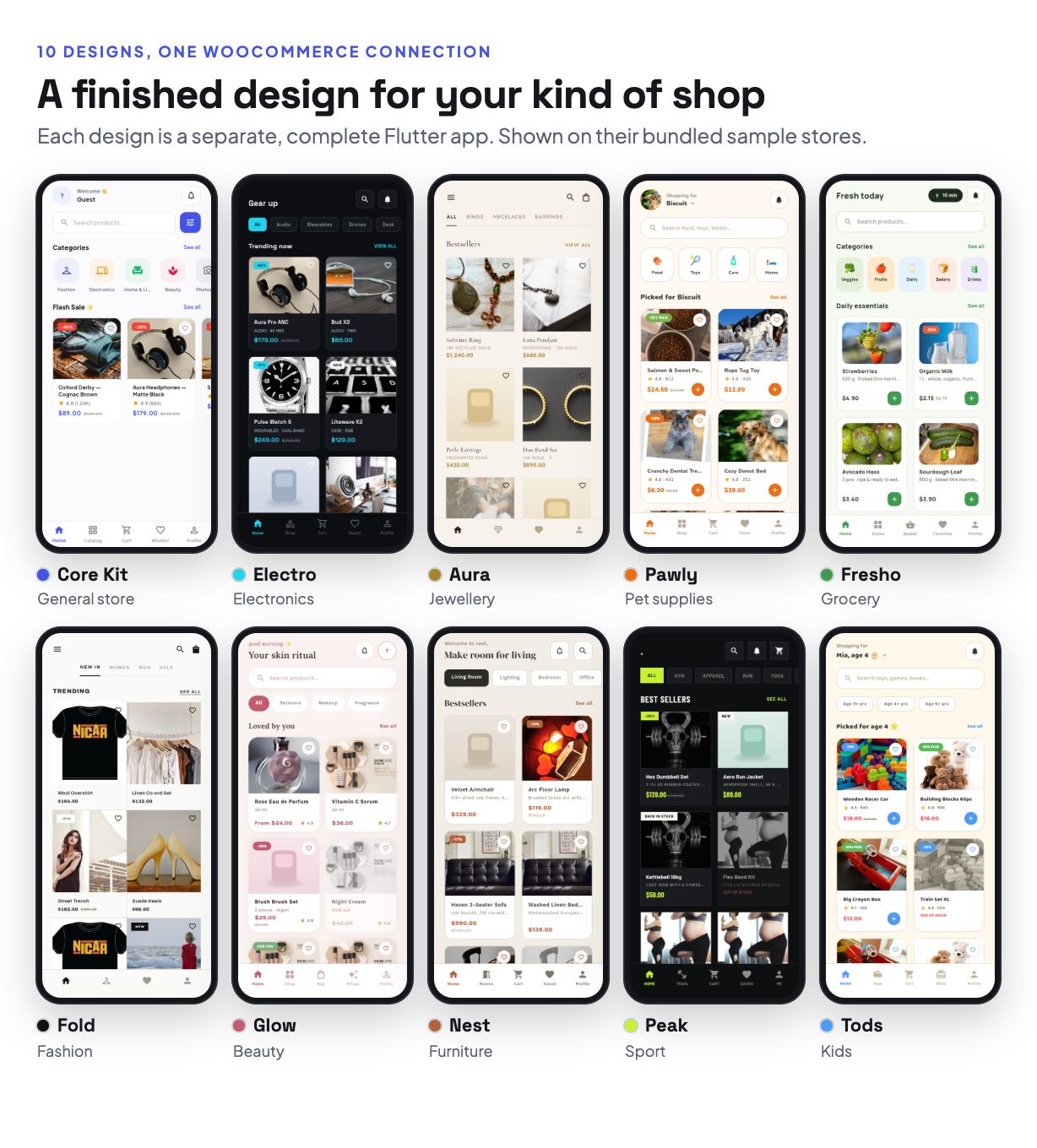
10 designs, each a complete app
Each design is a separate Flutter app with its own screens, colours and fonts, built on the same WooCommerce data layer. Use one on its own or keep several.
- Core Kit — general store, light and dark, 48 screens; the base every design builds on
- Electro — electronics and gadgets, dark neon look, 17 own screens
- Aura — jewellery and luxury, editorial serif style, 16 own screens
- Pawly — pet supplies, 16 own screens
- Fresho — grocery delivery, 15 own screens
- Fold — minimal monochrome fashion, 16 own screens
- Glow — beauty and skincare, 16 own screens
- Nest — furniture and home decor, 16 own screens
- Peak — outdoor, sport and fitness, 15 own screens
- Tods — kids’ toys, clothes and gifts, 17 own screens
192 screens in total. Each niche app also uses the shared Core Kit screens it needs (password reset, addresses, orders, settings, reviews, filters) drawn in its own style, so every app is a complete shop. A showcase app opens every screen of every design on its sample store.
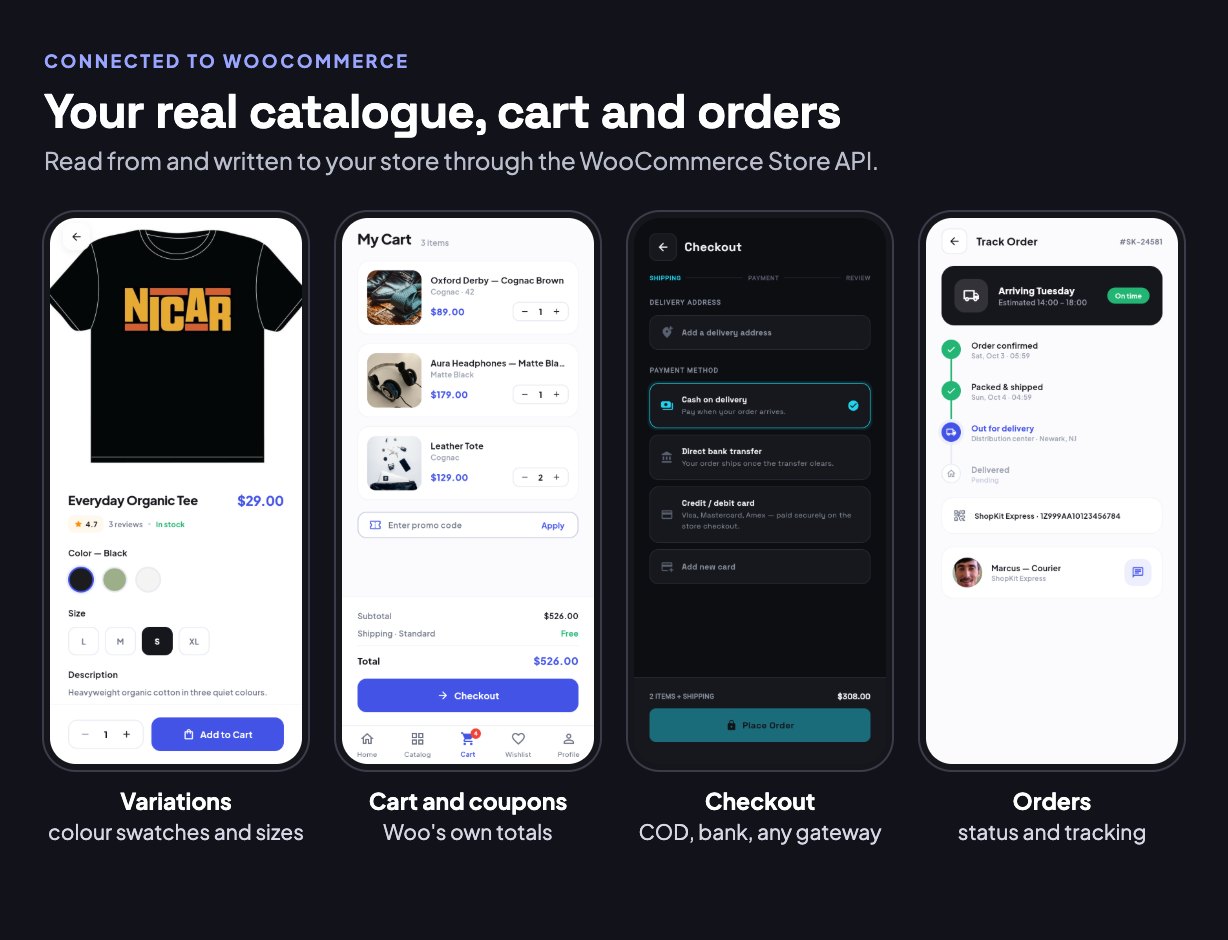
What works with your WooCommerce store
Everything below reads from and writes to your store through the WooCommerce Store API and the plugin. A feature your store has no data for is hidden in the app, never filled with sample content.
- Catalogue — categories and sub-categories, search, filters and sorting, sale prices, featured and best-selling products, stock status.
- Variable products — colour, size and other attributes, with colour swatches you set per attribute term in the plugin; price, stock and photo follow the chosen variation.
- Cart, coupons and shipping — WooCommerce’s own cart, with your coupons, shipping zones and methods, taxes and totals as your checkout calculates them.
- Payments — cash on delivery, bank transfer and cheque are placed inside the app. Every other gateway enabled on your checkout runs on your own checkout page in a secure in-app web view; the app hands over its cart with a one-time link and never sees card numbers.
- Customer accounts — sign in, register and password reset with your WooCommerce customers, address book, profile, account deletion. App tokens are hashed and revocable, and store staff accounts are refused in the app.
- Orders — order history, order detail with a status timeline, and the tracking number you add to the order.
- Wishlist and reviews — a per-customer wishlist kept on the store, product reviews, and writing reviews from the app (can be switched off).
- Notifications — an in-app notification feed for order updates that needs no push setup; optional push through Firebase Cloud Messaging when an order changes status.
- Branding from WordPress — store name and logo on every splash screen, home banners, contact details, terms and refund links, and feature switches, without a new app release.
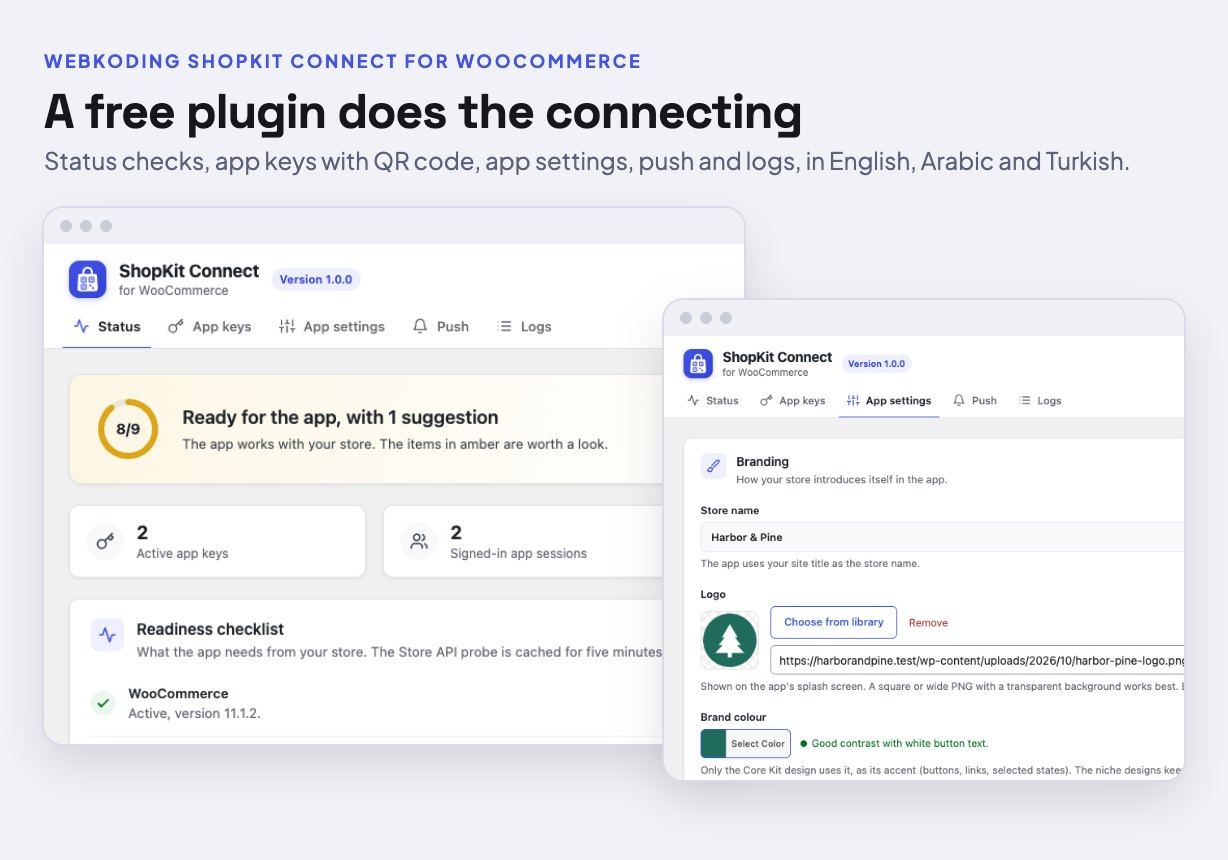
Webkoding ShopKit Connect for WooCommerce (free plugin, included)
The plugin adds only what the app needs and does not change your shop’s pages. Admin tabs: Status (nine checks), App keys (create and revoke keys, QR code and JSON), App settings (feature switches, logo, banners, contact details, free-shipping threshold), Push (Firebase setup, test and broadcast messages) and Logs. Its endpoints are rate limited per key and visitor. It is GPL licensed, translated into Arabic and Turkish, and tested with 152 PHPUnit tests on a real WordPress + WooCommerce. It is being submitted to the WordPress.org plugin directory; until then it ships in your download.
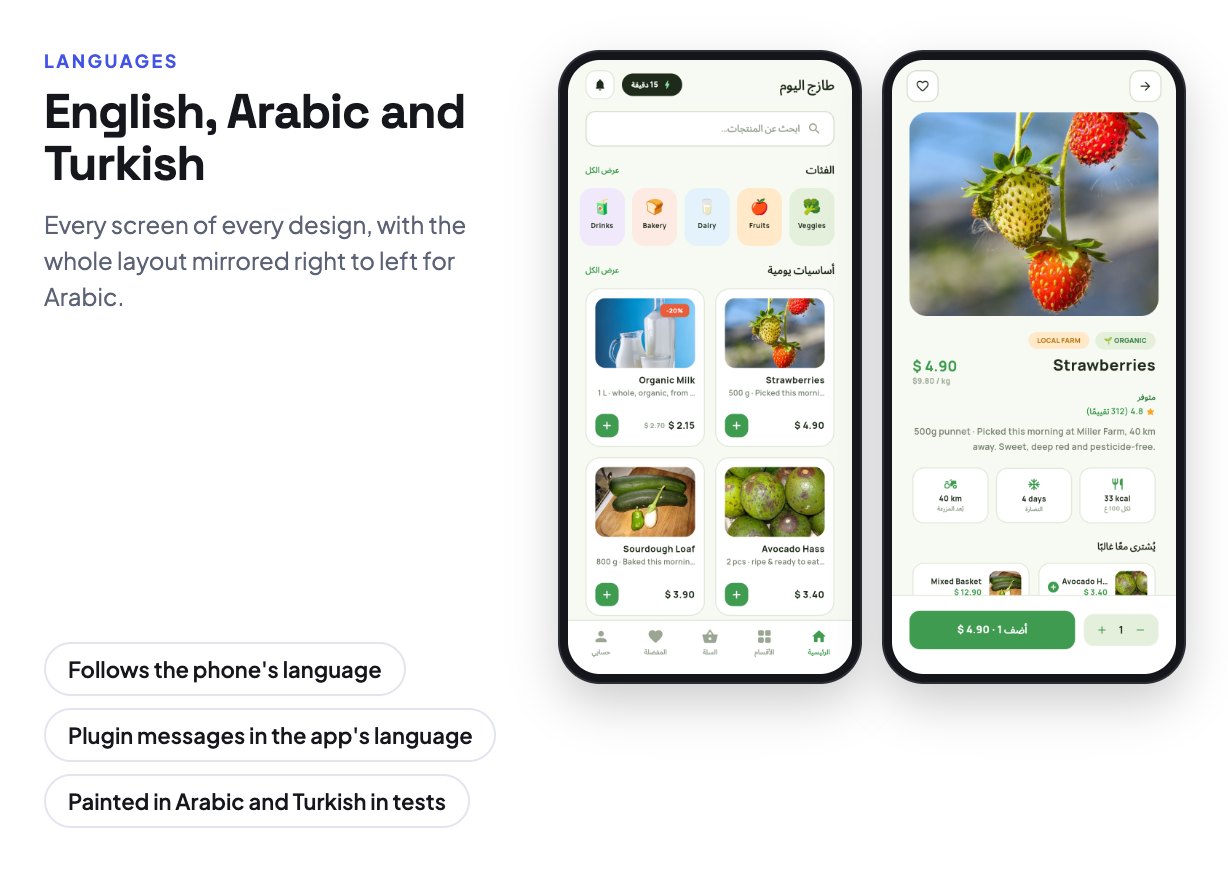
English, Arabic and Turkish
Every screen of every design is translated, and Arabic mirrors the whole layout right to left. The app follows the phone’s language and customers can change it in the app; the plugin answers the app in the same language. Prices use your store’s currency in the language’s number format. Every screen is painted in Arabic and Turkish on a small phone with large text in the automated tests. Adding a language is described step by step in the documentation.
Built to be handed over
- Flutter 3.x, null-safe Dart, clean layers: UI (
shopkit_core), models and interfaces (shopkit_domain), sample store (shopkit_data_mock) and WooCommerce (shopkit_data_woo). - 5,158 automated Flutter tests, all passing, including a test per app that paints every screen and fails on any layout error.
- Fonts and sample photos bundled; nothing is downloaded at run time.
- Real package names,
compileSdkandtargetSdk36, andandroid/andios/folders in every app. - Human-readable documentation: prerequisites for beginners, the store connection, a branding guide (package name, app name, icon, logo, colours, fonts, photos), languages, payments, push, release builds, updating, troubleshooting, costs, and a developer section. A 63-second setup video (documentation/video/setup-walkthrough.mp4, English captions) is included: it installs the plugin, creates an app key, connects the app to a real WooCommerce store and places a cash-on-delivery order that appears in WooCommerce.
- Original screen designs as plain web pages, openable without design software.
Requirements
- App: Flutter 3.24 or newer with Dart 3.3 or newer (built and tested with Flutter 3.44.7 / Dart 3.12)
- Android: Android 7.0 or newer on the phone (minSdk 24); the Android SDK with API 36 and Java 17 to build
- iOS: iOS 15.0 or newer on the phone; a Mac with Xcode to build
- Store (live mode): WordPress 6.5+, PHP 7.4+, WooCommerce 10.0+, HTTPS; tested up to WordPress 7.1 and WooCommerce 11.1
- Demo mode: nothing beyond Flutter; no server and no paid account
Support and updates
Item support is through the Support tab on CodeCanyon and covers installing and using the item and fixing bugs in it. Six months of support are included and can be extended. Please include your Flutter version and the exact error text. Customisation and third-party account setup are not part of item support.
Updates are free for buyers and are listed in the changelog. Full, unlocked source code: nothing is minified or obfuscated, and every feature works with both the Regular and the Extended licence.
Changelog
2.0.0 — October 2026
New: ShopKit becomes an app for a real WooCommerce store; every app still runs offline on its sample store
New: Webkoding ShopKit Connect for WooCommerce, a free companion plugin: app keys with QR code and connection JSON, customer sign-in with hashed, revocable tokens, address book, wishlist, order history with tracking numbers, notification feed, push, and a one-time hand-off of the app cart to your checkout page
New: WooCommerce data layer shared by all 11 apps; live mode with one build flag
New: Connect your store in every app: scan the plugin’s QR code or paste its JSON, no rebuild
New: payments: cash on delivery, bank transfer and cheque in the app; every other gateway on your checkout page in a secure web view
New: optional push through Firebase Cloud Messaging; tapping an order notification opens the order
New: store logo on every splash screen; Core Kit takes the store’s primary colour
New: English, Arabic (right to left) and Turkish in every app and in the plugin
New: 5,158 automated Flutter tests; the plugin has 152 PHPUnit tests
Changed: fonts are bundled, nothing is downloaded at run time
Changed: android/ and ios/ ship with every app; iOS 15.0 minimum
Changed: screens without WooCommerce data are hidden in live mode
Fixed: release Android builds were missing the INTERNET permission
1.0.0 — July 2026
Initial release: 10 designs, 192 screens on sample data
$39 |
Download |
0 average based on 0 ratings.

| Last Update | 2026-10-05 |
| Created | 2026-08-07 |
| Sales | 3 |
| Discussion | Comments |
| Software Version | Flutter 3.x |
| Files Included | Dart YAML JavaScript JSON .java .kotlin .h .storyboard .plist .swift HTML |
| Video Preview Resolution | 1920x1080 |


