Sharp Gallery

Description
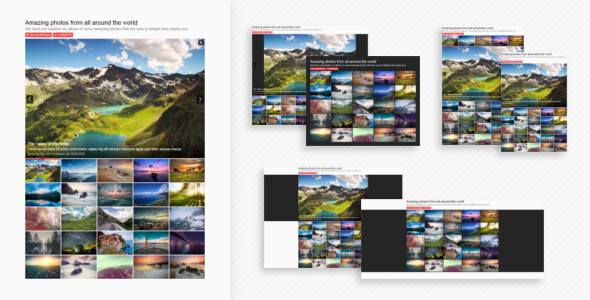
This is a beautiful, powerful and customizable grid based image gallery. What is characteristic is that the content is displayed and functions within this grid. The thumbs are bigger and contribute to the design. The big images are opened in place, within the grid, connected to the thumbs themselves. Coupled with other design elements and effects, this creates a beautiful look and a great functionality.
Here are some of the important features of this gallery:
- Comes with 12 templates
It comes with a number of 12 templates that showcase different ways of configuring the gallery and provide a starting point in customizing it.
These are available to see on the preview page. - Has over 40 settings
It has available over 40 different settings that are set in the JS build code in order to configure the gallery in different ways. These range from thumbs width to stage position, animation settings and keyboard navigation.
All of the available settings can be previewed right now in the guide. - Fully responsive
It is fully responsive, all of the content resizes based on the available space and it displays well on different screen sizes and devices.
- Cross browser support
It is supported on all popular browsers, both on computers and mobille devices as well on popular older browsers.
- Lightweight
Although it has many options, the gallery remains very lightweight. The minified JS plugin file is under 16KB. This makes it load very fast on all devices.
- Smooth and fast animations
It uses Velocity for the animations which makes them smooth and fast accross all devices and browsers.
- Easy to work with and implement
The gallery has been designed to be as simple as possible to install, customize and work with.
Installing it requires simply copying the HTML code and the assets folder. And the available settings makes it easy to customize it in different ways. - Detailed guide and instructions
The gallery comes with a detailed guide that containes all of the information that you need to know when working with it. It gives complete instructions about how to install and customize the gallery as well as how to contact me if you have any questions or any problems.
The guide is available to preview right now at this link. - Support provided
I am available for support in case you have any questions, problems or need any help implementing the gallery.
The guide gives instructions on how to contact me and I will do my best to respond as soon as possible. - Free updates
All future updates and developments to the gallery will be completely free once you have bought the project one time.
After an update is made, the changes are documented below.
This is the jQuery plugin version of the gallery. A WordPress plugin version is also available here: Sharp Gallery for WordPress.
Updates
2.1 (13 March 2018):- Fixed an issue that was causing the thumb columns not to display well in some remote cases.
- Added a query string parameter called “sgimage” to be able to specify an image to be opened by default through the URL (?sgimage=3).
- Added version numbering.
- Fixed an issue that was causing the stage not to resize properly in some cases.
- Improved the autoscrolling animation in Webkit browsers.
- Fixed an issue that was causing the autoscroll not to stop when manually scrolling.
- Added a new setting called “width” to specify the width of the gallery.
- Added a new setting called “margin” to specify the margins around the gallery.
- Added a new setting called “thumbLabelsEnabled” to be able to turn thumb labels on and off without needing to modify any HTML content.
- Added a new setting called “imageTextsEnabled” to be able to turn image texts on and off without needing to modify any HTML content.
- Removed the former CSS settings and added many of them as JS settings instead to make it easier to work with them. Added backward compatibility support for all of the previous CSS settings so that they are still working.
The new settings are:- thumbBorderCorners: The corners type of the thumb border, either “square” or “round”.
- thumbBorderWidth: The width of the thumb border, either “small” or “big”.
- thumbSpace: The space between the thumbs, either “small” or “big”.
- thumbLabelBackground: The background type of the thumb label, either “gradient” or “plain”.
- imageTextBackground: The background type of the image text, either “gradient” or “plain”.
- borders: If there should be and the type of borders around the thumbs and the stage. They can be “small” or “big”.
- textColor: The color of the gallery text that is displaying directly over the page background.
- Added a new setting, called “font”, to control if the gallery uses its own default font or the font from the page it is on.
- Changed the name of the “keyboardArrowsNav” setting to “keyboardArrows”. Added backward compatibility support for the former name.
- Added a new setting, called “wideBackgroundTarget”, to be able to set a target for the wide background, either the parent element or the browser window.
- Changed some of the default settings.
- Removed the default “max-width” from the CSS code of the main element. You can use the “width” setting instead.
- Removed the default “margin” from the CSS code of the main element. You can use the “margin” setting instead.
- Updated jQuery to the latest version.
- Removed Animate Enhanced and added Velocity instead.
- Updated the templates.
- Updated the guide.
- Updated the “Read Me” file.
- Made a series of other small modifications and improvements.
- Fixed a problem that was causing the images not to show properly in the Safari browser.
- Launched.
5 average based on 4 ratings.


