Website to Android App Converter — WebView + TWA, Push, Offline, Ads, JS Bridge


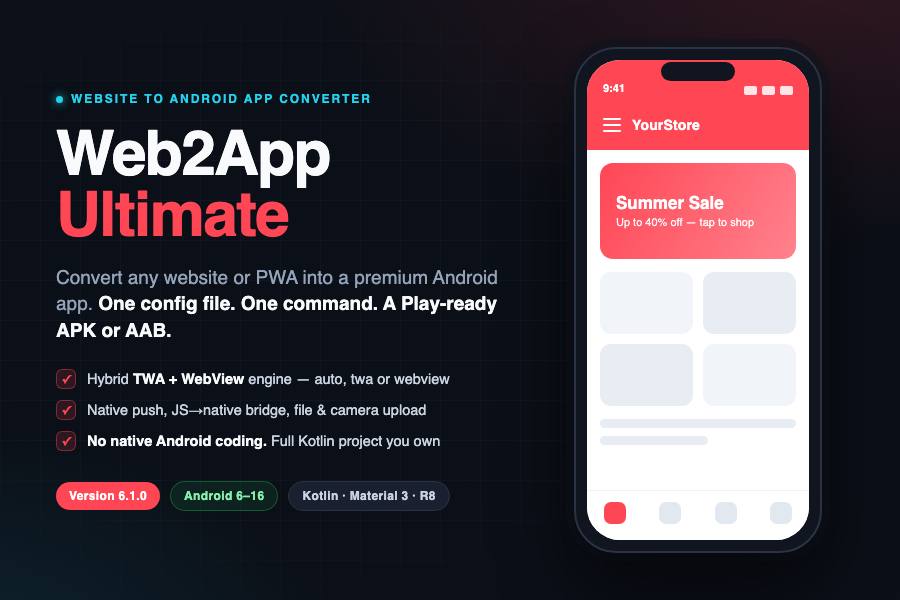
Web2App Ultimate – Convert any website or PWA into a premium Android app (WebView + TWA)
One config file. One command. A Play-ready APK or AAB. Web2App Ultimate is a website to Android app converter built on a TWA + WebView hybrid engine. Turn any website, web app or PWA into a native Android application with push notifications, offline mode, file uploads, system downloads, deep links and a JavaScript-to-native bridge – from a single Android Studio project you fully own.
Built with Kotlin and Material 3. Supports Android 6 to Android 16 (API 23 to 36). R8 hardened. No subscriptions, no monthly fees, no lock-in.
Edit one config file, run one Gradle command, publish to Google Play. No native Android coding required. Engineered to pass Google’s 2026 Play Store Minimum Functionality review.
Live Preview and demo: https://web2app.shop
How Web2App Ultimate compares
| Plain WebView wrapper | Monthly SaaS app builders | Web2App Ultimate | |
|---|---|---|---|
| One-time price, you own the source | Sometimes | No – you rent | Yes |
| TWA + WebView hybrid engine | No | Rare | Yes |
| Passes Google 2026 Minimum Functionality | Often rejected | Varies | Engineered for it |
| Native push, offline, downloads, uploads | Partial | Yes (locked behind plans) | Included |
| JavaScript-to-native bridge | No | Limited | Full API |
| Biometric lock, bottom nav, dark-mode sync | No | Rare | Built in (v6.1) |
| No subscription, no per-app fees | Varies | No | Yes |
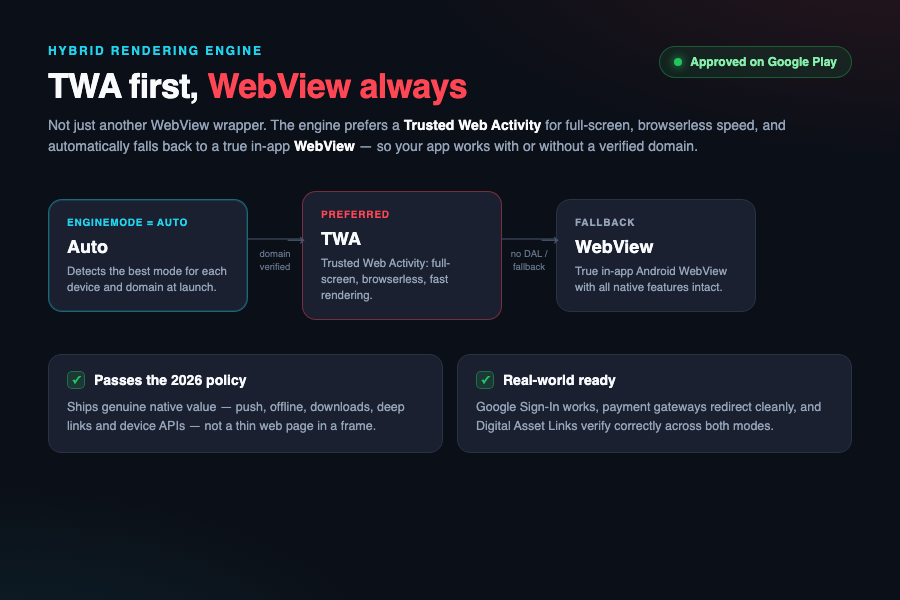
Not just another WebView wrapper – built to get approved on Google Play
Google’s Minimum Functionality policy now rejects thin WebView wrappers. Web2App Ultimate is approved because it ships genuine native functionality, not just a web page in a frame:
- Runs your website as a Trusted Web Activity (TWA) for full-screen, browserless, fast rendering.
- Automatically falls back to a true in-app Android WebView when a TWA is not available – your app works with or without a verified domain.
- Ships push notifications, offline support, downloads, deep links and native device APIs – the real value Google requires.
- Google Sign-In works, payment gateways redirect cleanly, and deep links verify correctly.
engineMode=auto defaultUrl=https://yoursite.com enablePush=true enableOfflineScreen=true$ ./gradlew assembleRelease BUILD SUCCESSFUL - app-release.apk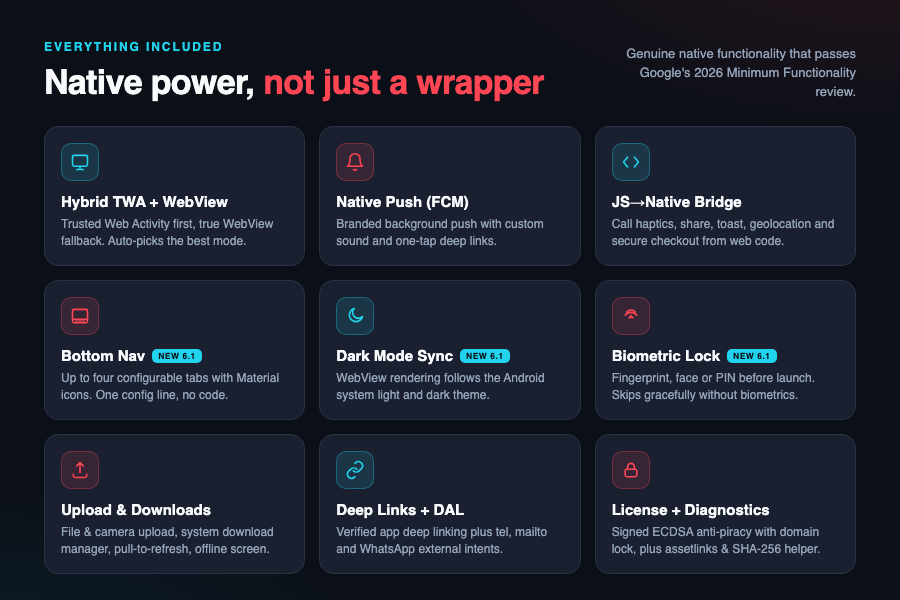
Features
- Hybrid WebView and TWA engine – Trusted Web Activity first, with a true Android WebView fallback. Auto-selects the best mode for each device.
- Native push notifications (Firebase Cloud Messaging) – reliable branded background push with custom sound and one-tap deep links. No third-party push service required.
- JavaScript to native bridge – call native Android features from your web code: haptics, share sheet, toast, vibrate, confetti, dynamic theme color, geolocation, native notifications, dynamic launcher shortcuts and secure checkout hand-off.
- Bottom navigation bar – up to four configurable tabs with Material icons, mapped to any URLs on your site. One config line, no code. New in version 6.1.
- Dark mode auto-sync – WebView rendering follows the Android system dark and light theme automatically. New in version 6.1.
- Biometric app lock – optional fingerprint, face or PIN authentication before the app opens. Skips gracefully on devices without biometrics. New in version 6.1.
- Native UX – file and camera upload, system download manager, geolocation, pull-to-refresh, loading progress bar and an offline screen with retry.
- Deep links and Digital Asset Links – verified app deep linking, plus external-intent handling for tel, mailto and WhatsApp.
- AdMob, in-app review and in-app update – flag-gated and ready to switch on.
- Server-backed license check – optional signed (ECDSA) anti-piracy layer with domain locking and one-click revoke, for apps you sell or build for clients.
- Diagnostics screen – one-tap assetlinks.json generator and SHA-256 fingerprint helper for painless TWA setup.
- One-file configuration – twa-config.properties holds URL, app name, colors and every feature flag in one place.
Who it is for
If your product runs in a browser, Web2App Ultimate can ship it to Google Play as an Android app:
- Online stores and e-commerce – wrap Shopify, WooCommerce or a custom store; send flash-sale push, deep-link to a product, accept return photos via the native camera and file pickers.
- News, blogs and magazines – push the moment you publish; the offline screen keeps readers on the last page when the signal drops.
- SaaS and web dashboards – full-screen TWA rendering with first-class native gestures through the JavaScript bridge.
- Online courses and LMS – native download manager for resources and push reminders for new lessons.
- Communities and memberships – re-engage members with branded push and deep links into a specific thread.
- Restaurants and local services – a tappable ordering or booking app; external links handle tel, mailto and WhatsApp.
- Web games and PWAs – package an HTML5 game or PWA with splash, adaptive icon, review prompts and AdMob.
- Agencies and resellers – build branded client apps at scale: one config file per app and a signed APK or AAB the same day.
- Real estate and listings – push alerts for new listings and price drops, plus tap-to-call and WhatsApp enquiries.
What is included
- Full Android Studio project in Kotlin – 100 percent source code, yours to own.
- TWA and WebView hybrid engine with three modes (auto, twa, webview).
- Push notifications (FCM), offline screen and smart caching.
- File and camera upload plus native system downloads.
- JavaScript bridge: haptics, share, toast, vibrate, confetti and more.
- Bottom navigation bar, dark mode auto-sync and biometric app lock.
- AdMob, in-app review and in-app update prompts.
- Server-backed license check and diagnostics screen.
- One-file configuration via twa-config.properties.
- Step-by-step setup documentation (offline HTML).
Buy once and own the full Android project. Source, engine and documentation included. Free updates, no subscriptions, no lock-in.
Want to feel the native features? The web preview shows the engine; download the demo APK to experience biometric lock, bottom navigation and dark-mode auto-sync on a real device: https://web2app.shop/demo-app
Try before you buy – this is a live engine, not a slideshow
The Live Preview at https://web2app.shop is the actual Web2App Ultimate engine running in your browser – tap anything and it really responds. Test it yourself: engine modes (auto, TWA, WebView), pull-to-refresh, file and camera upload, system downloads, external links (tel, mailto, WhatsApp), the offline screen with retry, push notification delivery, haptic feedback, the native share sheet and the dynamic theme-color bridge.
Then go one step further: install the demo APK on a real Android device to feel the native-only features – biometric app lock, the bottom navigation bar and dark-mode auto-sync – that a browser simply cannot show.
On the roadmap – iOS is coming
An iOS version of Web2App Ultimate is in active development. The same one-config-file, own-the-source philosophy is coming to iPhone and iPad with a WKWebView engine, push and the native bridge – so you will be able to ship the same website to both stores. Buy now on Android and you are early: existing buyers get the iOS engine as a free update when it lands, no second purchase.
Requirements
- Android Studio Ladybug (2024.2) or newer, supporting Android Gradle Plugin 8.12.
- JDK 17.
- Kotlin 2.1.0 and Android Gradle Plugin 8.12.2.
- compileSdk and targetSdk 36 (Android 16); minSdk 23 (Android 6.0).
- A Google Play Developer account to publish.
- An HTTPS website or PWA.
- A Firebase project, only if you enable push notifications.
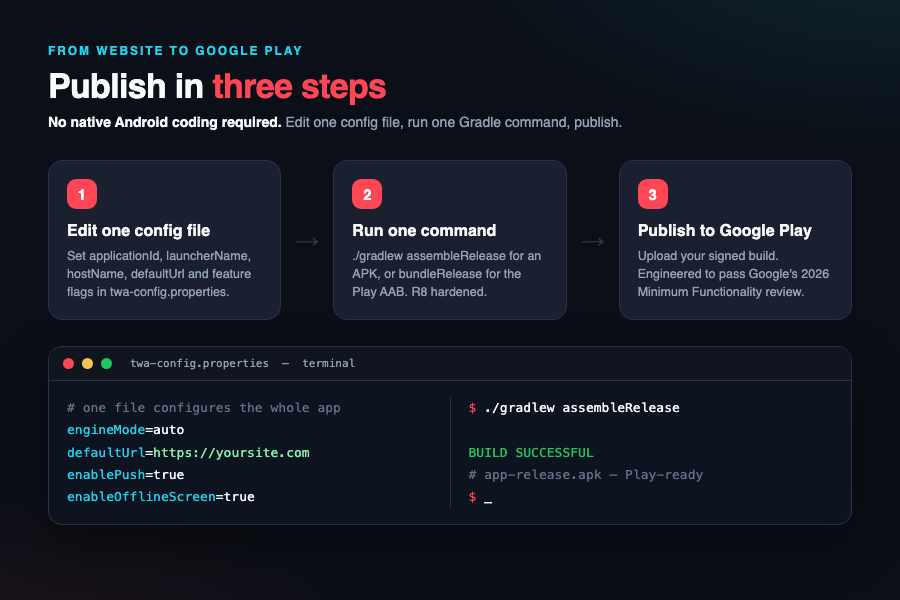
Publish in three steps
- Copy app/twa-config.example.properties to app/twa-config.properties.
- Set applicationId, launcherName, hostName and defaultUrl.
- Run ./gradlew assembleRelease, or bundleRelease for the Play AAB.
That is the whole loop. Everything else is optional configuration for the features you switch on. Full FCM push, Digital Asset Links, AdMob, branding and the complete JavaScript bridge API reference are in the included offline documentation.
Support and updates
Every purchase includes free updates and 6 months of support, extendable at checkout. For the fastest fix, include the package name, website URL, assetlinks.json response and Play App Signing SHA-256 – most setup issues resolve on the first reply.
Regular License – for a single app whose end users are not charged to use it.
Extended License – for a paid app, or apps you build and sell to clients.
Changelog
6.1.0 – 2026-06
- New: configurable bottom navigation bar (up to four tabs, Material icons).
- New: dark mode auto-sync with the Android system theme.
- New: biometric app lock (fingerprint, face or PIN) with graceful fallback.
- Hardening: API rate limiting on all SaaS endpoints (license, activation, push, config).
- Bundled default navigation icons so the sample config runs out of the box.
6.0.0 – 2026-06
- TWA and WebView hybrid engine with auto, twa and webview modes.
- Native FCM push, offline screen, pull-to-refresh, file and camera upload, system downloads.
- JavaScript to native bridge (window.Web2App): toast, vibrate, haptic, share, notify, location, download, setShortcuts, pay, setThemeColor, celebrate.
- AdMob, Play in-app review and update, Play Billing scaffold.
- Server-backed license check and diagnostics. Single-file configuration. Android 6 to 16, Kotlin 2.1.0, AGP 8.12.2.
Convert your website to an Android app and publish to Google Play this week. Learn more at https://web2app.shop
Copyright 2026 Vikas Chandra Guru, Available on CodeCanyon.
$15 |
Download |
0 average based on 0 ratings.

| Last Update | 2026-07-31 |
| Created | 2020-10-22 |
| Sales | 2 |
| Discussion | Comments |
| Software Version | Kotlin 1.x |
| Files Included | HTML |
| Video Preview Resolution |


