ServiceDesk - Repair & Work Order Manager for Perfex CRM
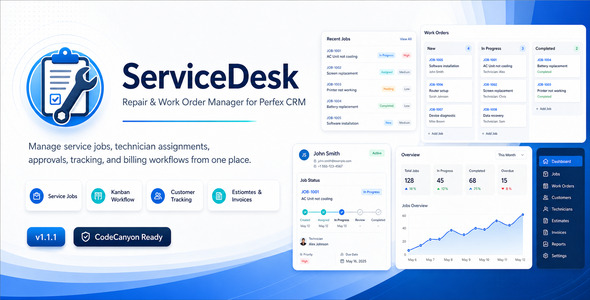

ServiceDesk – Repair & Work Order Manager for Perfex CRM
ServiceDesk is a flexible repair, service job, and work order management module for Perfex CRM. It helps businesses manage customer repair requests, service jobs, technician assignments, diagnosis, checklists, approvals, tracking, attachments, job sheets, and linked billing records from one central Perfex CRM workflow.
Live Demo & Documentation
Admin Demo:
https://perfex.rblxdrip.com/admin
Demo Login Details:
Username: test@gmail.com
Password: test
Online Documentation:
https://perfex.rblxdrip.com/event-documentation/servicedoc/
This module is designed for repair shops, service centers, workshops, field service teams, appliance repair businesses, electronics repair centers, HVAC service providers, vehicle workshops, maintenance companies, and any business that needs structured service job management inside Perfex CRM.
Key Features
- Service job and work order management
- Customer and contact linking with Perfex CRM
- Customer profile Service Jobs tab with job count badge
- Customer area support for linked service jobs
- Configurable job statuses and service categories
- Technician / staff assignment
- Item, asset, or equipment details
- Diagnosis summary, fault found, and suggested solution
- Internal notes and job-related attachments
- Checklist items and reusable checklist templates
- Industry templates for different repair and service businesses
- Kanban board for visual work order tracking
- Status workflow rules
- Public job tracking page
- Customer approval and rejection flow
- Customer digital signature during approval
- Printable job sheet with optional QR tracking
- Signature display on job detail and job sheet
- Optional ServiceDesk jobs on the main Perfex calendar
- Calendar status filtering and completed job hiding option
- Customer-facing field visibility settings
- Quick status change from the Service Jobs list
- Estimate and invoice reference linking
- Lead Source field using Perfex CRM lead sources when available
- Staff permissions for view, view own, create, edit, delete, and manage
Who Can Use This Module?
- Mobile and laptop repair shops
- Electronics repair centers
- Appliance repair companies
- Vehicle and bike workshops
- HVAC and field service teams
- Furniture repair businesses
- Watch and jewelry repair shops
- Industrial equipment service providers
- Maintenance and after-sales service teams
- Any business managing repair, service, or work order requests
Complete Service Job Workflow
ServiceDesk helps you manage the full service lifecycle:
- Create a customer-linked service job
- Record item, asset, or equipment details
- Assign a technician or staff member
- Add issue details, diagnosis, notes, files, and checklists
- Track job progress using statuses and Kanban view
- Change job status quickly from the jobs list
- Show active ServiceDesk jobs on the main Perfex calendar when enabled
- Request customer approval where required
- Capture customer digital signature during approval when enabled
- Print job sheets for workshop or customer handover
- Link estimates and invoices for billing reference
- Allow customers to track their job status
Perfex CRM Friendly
ServiceDesk is built to fit naturally inside Perfex CRM. It uses familiar admin layouts, customer relationships, contacts, staff permissions, customer profile tabs, customer area access, calendar integration options, and module-based installation structure.
Customer Tracking, Approval & Signature
Customers can track service jobs using the public tracking flow, while approval links allow businesses to collect customer decisions before continuing with work. Version 1.2.0 also adds optional customer digital signature support during the approval step. The captured signature can be stored with the approval record and displayed on the job detail page and printable job sheet.
Flexible for Many Industries
Unlike repair modules limited to one industry, ServiceDesk is designed as a general repair and work order management solution. You can configure statuses, categories, checklists, custom fields, customer-facing field visibility, templates, and workflow settings according to your business process.
Version
Version 1.3.0 Changelog Summary
- Added ability to link ServiceDesk jobs with multiple active/open Perfex CRM projects.
- Added Related Projects multi-select field on the service job create/edit form.
- Added customer-based project filtering where applicable.
- Added linked projects display on the service job detail page.
- Added clickable project links for quick access from the service job page.
- Added equipment/job label printing functionality.
- Added Print Label option on the service job detail page.
- Added Print Label action from the Service Jobs list.
- Added professional printable label layout for equipment and service jobs.
- Added company name, logo, address, phone, and VAT details from Perfex CRM company settings on labels.
- Added label visibility settings for company logo, company details, customer name, serial/reference number, due date, and tracking URL.
- Added configurable label sizes for different printing needs.
- Improved label layout spacing and readability for clearer serial number and asset information.
- Improved equipment label design for a more professional printed output.
- Improved ServiceDesk workflow for repair shops, service centers, and equipment-based service businesses.
- Updated fresh installation schema and upgrade migration compatibility for version 1.3.0.
Version 1.2.0 – Major workflow enhancement update.
Version 1.2.0 Changelog Summary
- Added quick status change directly from the Service Jobs list.
- Added optional ServiceDesk job visibility on the main Perfex CRM calendar.
- Added calendar mapping using job due date and estimated completion date range.
- Added option to hide completed/final jobs from the calendar.
- Added calendar status filter setting.
- Added customer-facing field visibility settings.
- Added customer digital signature support during approval.
- Added setting to enable or require customer signature before approval.
- Added signature pad on the public approval page.
- Added signature display on admin job detail page and printable job sheet.
- Improved customer approval workflow.
- Improved admin settings structure.
- Improved fresh installation schema and upgrade migration compatibility.
- Fixed missing language labels and dropdown label display issues.
Requirements
- Perfex CRM 3.0 or higher
- PHP version compatible with your Perfex CRM installation
- MySQL / MariaDB database
Support
For support, please provide your Perfex CRM version, PHP version, screenshot of the issue, exact error message, and steps to reproduce the problem.
.png)


