Screen Shake Wake Lock Gesture with AdMob Meta Ads Android



Is your power button failing, or are you looking for a smarter, faster way to access your device? Screen Shake Wake Lock Gesture is the most advanced utility, designed to replace your physical buttons with intuitive motion controls.
The Ultimate Smart Screen Control & Security Suite Whether your power button is broken or you simply want a “hands-free” experience, our app provides a seamless bridge between movement and security.
Key Features of Screen Shake Wake Lock Gesture:
Wave to Unlock: Wave your hand over the proximity sensor to wake your screen instantly. Perfect for messy hands while cooking or working.
Shake to Lock/Wake: No more clicking. Give your phone a gentle shake to toggle the screen.
Lift to Wake: Your phone is ready when you are. The screen wakes the moment you pick it up from any surface.
Flip to Sleep: Protect your privacy. Place your phone face-down to instantly lock the screen and save battery.
Double Tap Access: The classic shortcut. Tap anywhere on the screen to wake it up or put it to sleep.
Technical Specifications:
- Language: JAVA
- UI: XML with Material Components
- Minimum SDK: API 24 (Android 7)
- Target SDK: API 36 (Android 16)
Permission Required To Use App :
- Foreground_Service_Special_Use permission :- Required on Android 14 or newer devices to keep the Shake Tap service & Lock screen service running in the background, even if the app is cleared from the recent apps list.
- BIND_ACCESSIBILITY_SERVICE:- Permission is required to perform these actions, including actions through the floating bar.
IF THE APP IS NOT INSTALLED ON YOUR DEVICE, YOU CAN INSTALL THE APP USING THE TIPS GIVEN BELOW.
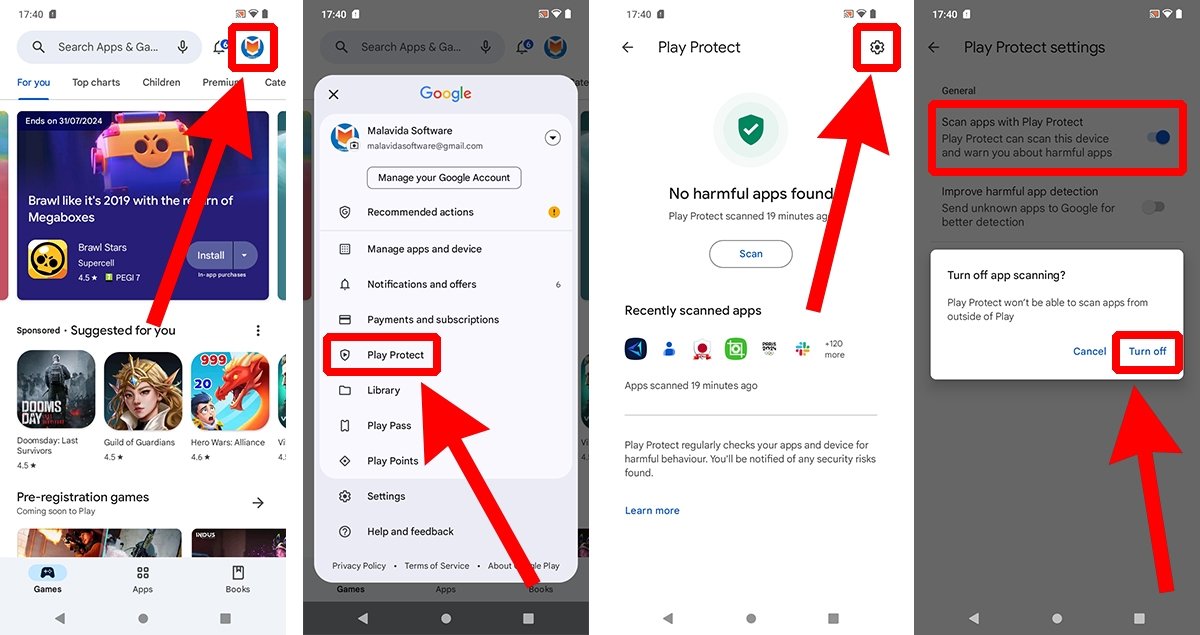
How to disable Google Play Protect to prevent it from scanning your apps:
- Open the Google Play Store app on your Android device.
- Tap your profile icon, located in the upper right corner.
- Tap on Play Protect.
- Now, tap the gear icon to open the settings menu (again, it is in the upper right corner).
- Tap the slider button corresponding to Scan apps with Play Protect.
- In the floating menu, select Disable.
- Confirm the action with your fingerprint or security PIN.
YOU NEED TO ENABLE APP “RESTRICTED SETTING” WHICH YOU CAN FIND IN APP INFO
AFTER INSTALLING THE APP YOU CAN ENABLE GOOGLE PLAY PROTECT.
0 average based on 0 ratings.
%20(2).png)
| Last Update | 2026-08-29 |
| Created | 2026-03-06 |
| Sales | 0 |
| Discussion | Comments |
| Software Version | Android 15.0 Android 12.0 Android 11.0 Android 10.0 Android 9.0 Other |
| Files Included | .apk .java .xml |
| Video Preview Resolution |


