Sales Quotas Module for Prefex CRM


Note: This is not a standalone application. This is a plugin for Perfex CRM. You have to install the Perfex – Powerful Open Source CRM to use this plugin.
Turn Perfex CRM Into a Sales Quota & Performance Dashboard
Sales Quotas for Perfex CRM helps you define revenue targets for your sales team and automatically measure progress against real invoice data — not spreadsheets, not guesswork.
Set quotas by month, quarter, or year. Then open the reports page and instantly see who is on track, who is at risk, and who needs attention — with paid amounts, forecast pipeline, and visual bar charts for every period.
Why do you need this module
Perfex CRM tracks invoices beautifully, but it does not give sales managers a simple way to answer:
- “Did Sarah hit her Q2 target?”
- “How much has James collected vs what’s still outstanding?”
- “Is the team on pace for the year?”
Sales Quotas closes that gap. Admins set targets once; the module does the math from your existing invoice records.
Key Features
Manage Quotas — Fast & Intuitive
- Add staff members individually to your quota plan
- Set amounts per period in a clean grid layout
- Enter a row total and let the module split it evenly across all periods
- Filter by year and period type (monthly / quarterly / yearly)
- Save all quotas in one click
Real Revenue Tracking (Not Manual Entry)
- Paid — Invoice payments
- Forecast — Remaining balance on unpaid and partially paid invoices
- Paid + Forecast — Combined progress toward quota
- Based on invoices created by each staff member within the selected period
Visual Team Reports
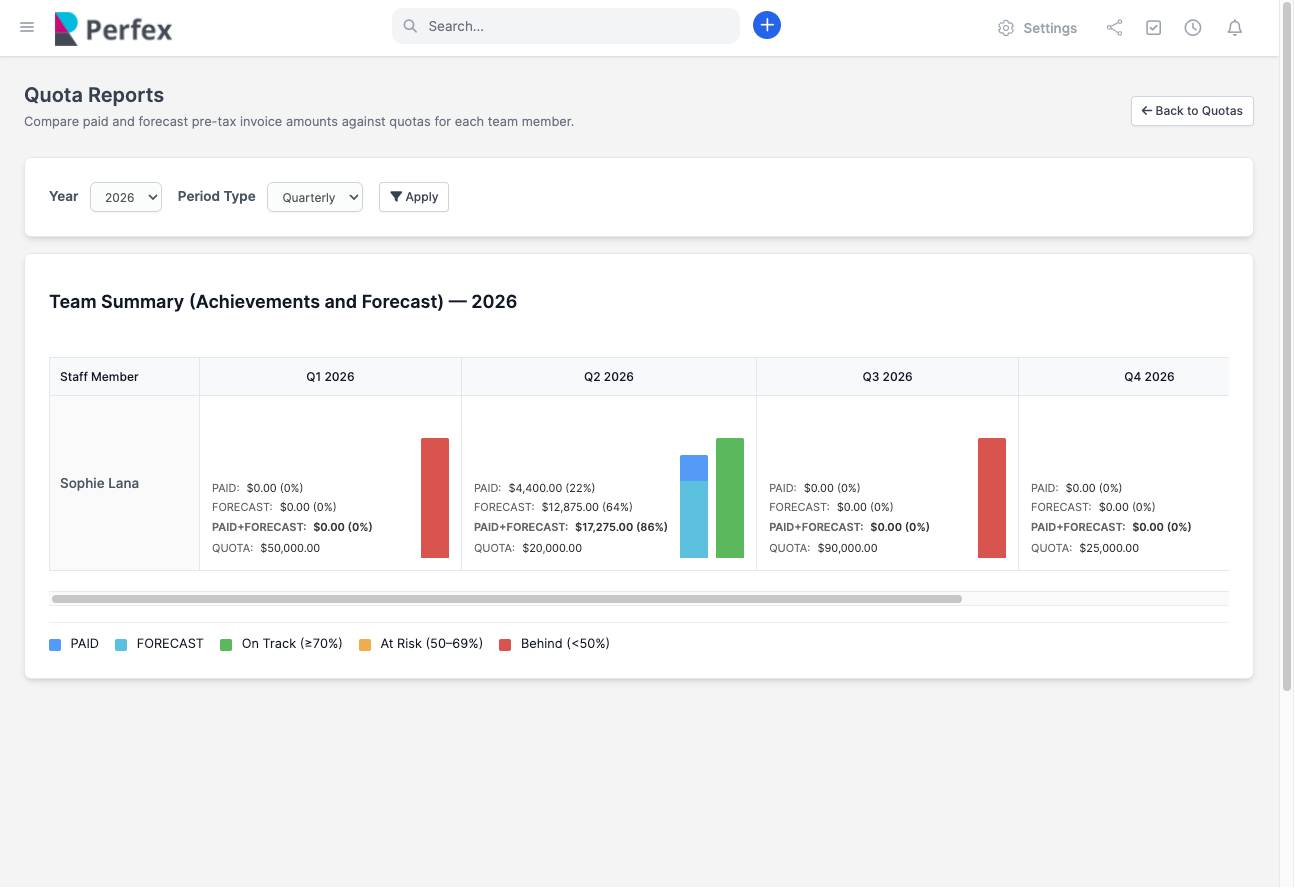
- Team summary table for all assigned staff
- Stacked bar charts: paid vs forecast vs quota
- Percentage completion for every metric
- Color-coded quota bars:
- On Track — meeting or exceeding target
- At Risk — below target but recoverable
- Behind — significantly under quota
- Year totals column for quick annual overview
Fully Configurable
- Default period type (monthly, quarterly, yearly)
- Custom colors for paid, forecast, and status bars
- Adjustable at-risk and on-track percentage thresholds
- Uses your Perfex base currency automatically
How It Works
- Activate the module from Perfex Setup → Modules
- Add staff and set their revenue quotas on the Manage Quotas page
- Open Quota Reports to see paid, forecast, and progress vs target
- Adjust settings to match your sales review process
Who is Needs this
- Sales managers tracking team revenue targets
- Agencies measuring account manager performance
- Service businesses with invoice-based sales
- CRM admins who want quota visibility without exporting to Excel
- Teams running monthly, quarterly, or annual sales reviews
DEMO
DEMOAdmin Username
testadmin@gmail.comPassword
password@1234Support
Please send an email from Support page for any issues, questions or suggestions. To save time and get quick feedback, please don’t ask for support in comments section.VERSION HISTORY
Version 1.0.0 – 9th June 2026Initial Release


