Rocket Rumble | HTML5 Jetpack Multiplayer Shooter Game
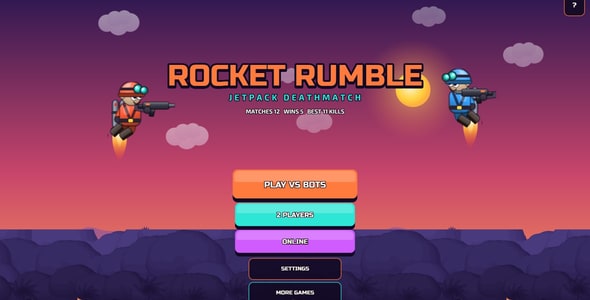

Rocket Rumble: fly, shoot, rule the arena
A 2D jetpack deathmatch shooter in the style of the classic mobile arena shooters. Run across floating islands, fly with a fuel-limited jetpack, aim in any direction and fight for the most kills before the clock runs out. Play against bots offline, with a friend on one keyboard, or online in rooms with a 4-letter code.
Gameplay
- Jetpack movement: run, then hold to fly. Fuel burns in the air and refills on the ground, so every flight is a decision.
- 360° aiming: mouse on desktop, a floating thumb stick on phones. Shoot in any direction while you fly.
- Four guns: pistol (endless ammo), SMG (fast), shotgun (six pellets, brutal up close) and sniper (one shot nearly kills). Guns and medkits lie in crates that refill after 14 seconds.
- Deathmatch rules: most kills when the clock runs out wins, or the first to the kill limit. Respawn after 3 seconds with a short shield. Kill feed, leader line, kill streaks.
- Bots that play like people: they chase the nearest enemy, grab guns, fly to high ground, retreat to medkits and miss more or less depending on the skill setting.
- Juice: muzzle flashes, glowing tracers, jet exhaust, respawn rings, screen shake, synthesized sound effects (no audio files to load).
Three ways to play
- Play vs bots: offline, 0 to 5 computer players, works without internet.
- 2 players on one keyboard: WASD + mouse against arrows + I J K L, with bots on top; the camera zooms to keep both players in view.
- Online rooms: create a room, share its code, the host adds bots and presses START. Up to 8 players per room, 60 Hz server simulation, 20 snapshots a second. The small Node.js room server ships in the package (see “Optional services” below).
For site owners and portals
- Fills the whole screen on phones (upright or sideways), tablets, 4:3, 16:9 and ultra-wide monitors, with no black bars. Twin floating thumb sticks on touch screens, keyboard and mouse on desktop.
- Branding without coding: title, subtitle, match rules, soldier stats and colours, links and ads in
config.js(a Settings Editor is included). Your own logo and menu background as picture files with fixed names. - In-game tutorial (4 pages) that opens by itself on the first visit and from the ? button at any time.
- All art is drawn by the game’s code: characters, guns, effects, the painted jungle arena with parallax islands. No image files to license, 1.4 MB in total, loads in a second.
- Runs from any static hosting or offline by double-click; no database, no server code needed for offline play.
- Full TypeScript source on the Phaser engine (MIT), with a headless simulation test and a browser test suite (desktop, two players, touch, online, six window shapes).
- Documentation with annotated screenshots, a step-by-step branding guide, a server set-up guide and an FAQ.
Ads and optional services
Ads are only possible between matches, never during play, and only when you add a portal SDK (GamePix or CrazyGames) to index.html; without one the game shows a short demo ad that you can switch off. GamePix, CrazyGames, AdSense and AdMob are separate services: they need your own accounts and have their own terms, possible costs and revenue sharing.
The online mode is optional. Its room server is a small Node.js app that runs on your own hosting (a VPS, a PaaS or any host that runs Node.js 22 with WebSockets), which may have its own costs. Offline play against bots and the two-player mode need no server at all.
Technical Requirements
- Browsers: current Chrome, Edge, Firefox, Safari and Opera on Windows, macOS, Android, iPhone and iPad (Internet Explorer is not supported)
- Engine: TypeScript on Phaser 4.2.1 (stable release, MIT licence), already bundled in
game/: nothing to install - Hosting: any static web hosting (HTML, JS and CSS files) for the game; it also runs offline by double-clicking
game/index.html - Online rooms (optional): Node.js 22 or newer on your own server, one open port (WebSocket),
wss://behind HTTPS sites - Rebuilding from source (optional): Node.js 20 or newer and npm; not needed to change texts, rules, colours or pictures
Support
Support is provided in English, by email and in the item comments.
0 average based on 0 ratings.


