Recall AI – Flutter Flashcard App with AI Generation, Spaced Repetition & In-App Subscriptions
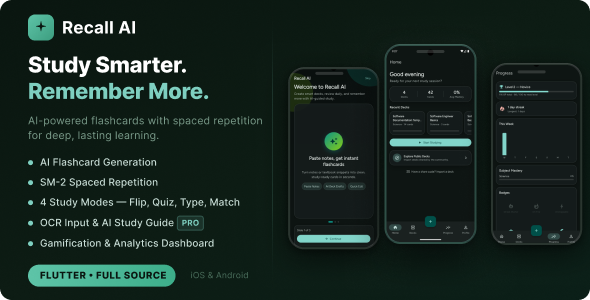

Recall AI — AI-Powered Flashcard & Spaced Repetition App
Recall AI is a complete, production-ready Flutter application that helps users learn anything faster using AI-generated flashcards and the proven SM-2 spaced repetition algorithm. Built with clean architecture, Riverpod state management, Firebase backend, OpenAI card generation, and RevenueCat subscriptions — everything you need to launch your own study app on Android and iOS.
✨ Key Features
- AI Flashcard Generation — Paste notes, type a topic, or upload a PDF/image. OpenAI (GPT-4o-mini) generates a full deck of flashcards in seconds.
- SM-2 Spaced Repetition — The same algorithm used by Anki. Cards are scheduled at the optimal interval for long-term retention (New → Learning → Review → Mastered).
- 4 Study Modes — Flashcard flip, Multiple Choice (MCQ) with explanations, True/False, and Typing mode (Pro).
- OCR Input (Pro) — Snap a photo or upload a PDF. Google ML Kit extracts the text, then AI turns it into a study deck.
- AI Study Guide — Per-deck AI-generated overview with key concepts, common mistakes, and memory tips.
- Gamification — XP, levels, daily streak tracking with 2× XP multiplier, badges, and mastery percentage per deck.
- Analytics Dashboard — Weekly study chart, subject mastery breakdown, level progress bar, and badge showcase.
- Deck Sharing & Explore — Share decks with a 6-character code. Browse and import from a public community feed.
- Push Reminders — Firebase Cloud Messaging sends daily study reminders to keep users on streak.
- In-App Subscriptions — Free, Monthly, Yearly, and Lifetime tiers managed via RevenueCat with a built-in paywall screen.
- Dark & Light Theme — Material 3 design with dynamic color scheme. Fully customizable brand color.
- 4 Auth Providers — Email/password, Google Sign-In, Sign in with Apple, and anonymous guest mode.
- Offline / Guest Mode — Guests study locally via SharedPreferences. Authenticated users sync via Firestore.
- Portrait-only, phone-first UI — Pixel-perfect Material 3 design with Figtree font.
Screens Included
- Splash Screen with brand animation
- Onboarding carousel (3 slides)
- Sign In / Sign Up (Email, Google, Apple, Guest)
- Home Overview — stats card, recent decks, quick start
- Deck List — search, sort, filter by subject & mastery
- Deck Method Selection — 4 creation modes
- Deck Creation — AI generation form with subject, difficulty, card count
- Deck Detail — 3 tabs: Flashcards, Stats, AI Study Guide
- Deck Edit — add, edit, reorder, delete cards
- Study Session — 4 modes with progress header
- Study Summary — results, XP earned, mastered cards
- Progress / Analytics — level, streak, weekly chart, badges
- Profile — account info, subscription status, quick stats
- Settings — theme toggle, notifications, sign out
- Explore — browse community-shared decks
- Import Deck — 6-character share code lookup
- Paywall — subscription plans with feature comparison
Tech Stack
- Framework: Flutter 3 / Dart 3
- State Management: flutter_riverpod
- Routing: go_router with route guards
- Backend: Firebase Auth, Cloud Firestore, Firebase Remote Config
- AI: OpenAI GPT-4o-mini (key stored in Remote Config — no hardcoding)
- Monetization: RevenueCat (purchases_flutter)
- OCR: Google ML Kit Text Recognition
- Design: Material 3 · Figtree font · Teal seed color (#0D9488)
- Architecture: Clean architecture per feature (presentation / application / domain / data)
- Testing: Unit tests + policy tests included
Subscription Tiers
Free
- Max decks: 5
- Cards per generation: 15
- Character input limit: 2,000
- PDF / Image upload (OCR): ✗
- Typing study mode: ✗
- Deck sharing: 1 deck
- Analytics history: 7 days
Monthly ($4.99)
- Max decks: Unlimited
- Cards per generation: 50
- Character input limit: 20,000
- PDF / Image upload (OCR): ✓
- Typing study mode: ✓
- Deck sharing: Unlimited
- Analytics history: All time
Lifetime ($49.99)
- Max decks: Unlimited
- Cards per generation: 50
- Character input limit: 20,000
- PDF / Image upload (OCR): ✓
- Typing study mode: ✓
- Deck sharing: Unlimited
- Analytics history: All time
⚙️ Requirements to Launch
- Flutter SDK 3.x
- Firebase project (free tier works fine)
- OpenAI API key (added to Firebase Remote Config — no code change needed)
- RevenueCat account (free up to $2,500 MRR)
- Google Play Console ($25 one-time) for Android
- Apple Developer account ($99/year) for iOS + Sign in with Apple
What’s Included
- Complete Flutter source code (Android + iOS)
- Full offline HTML documentation
- Quick Start Guide
- Unit tests + policy tests
- Clean architecture, well-commented and ready to customize
Changelog
Version 1.0.0 — Initial Release
- AI flashcard generation via OpenAI GPT-4o-mini (paste notes, topic, OCR)
- SM-2 spaced repetition engine with 4 card states
- 4 study modes: Flashcard, MCQ, True/False, Typing
- AI-generated per-deck Study Guide
- Gamification: XP, levels, streaks, badges
- Analytics dashboard with weekly chart and subject breakdown
- Deck sharing with 6-character codes and public Explore feed
- RevenueCat subscriptions: Monthly, Yearly, Lifetime
- 4 auth providers: Email, Google, Apple, Anonymous
- Firebase Cloud Messaging push reminders
- Dark / Light theme toggle
- Full offline guest mode
- iOS arm64 simulator support (MLKit 0.15.1 + platform 15.6)
- Google AdMob App ID support (iOS Info.plist + Android Manifest)
Support
We provide dedicated support for all CodeCanyon buyers. Please include your purchase code when reaching out.
- Email: devsnack26@gmail.com
- WhatsApp: +855 967 413 911
Response time: within 24–48 hours on business days.
0 average based on 0 ratings.

| Last Update | 2026-04-02 |
| Created | 2026-04-02 |
| Sales | 1 |
| Discussion | Comments |
| Software Version | Flutter 3.x Flutter 2.x Flutter 1.x Other |
| Files Included | Dart YAML .java .kotlin .h .storyboard .plist .swift |
| Video Preview Resolution |
Search plugins
Browse Categories


