QR Menu - QR Menu Maker for Multi/Single Restaurant & Contactless ordering & For Mobile and Web
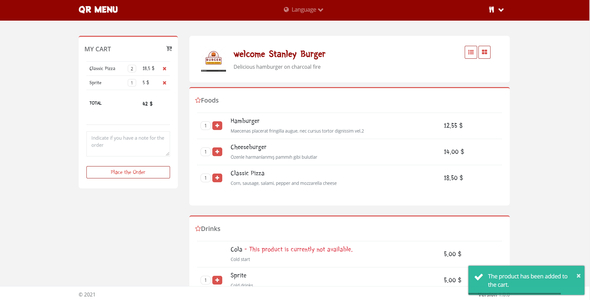

QR Menu allows the registered and approved restaurants to manage their menu and orders. Customers view the restaurant menu by scanning the qr code on their phones. Customers view the restaurant menu by scanning the qr code on their phones. Then they add the products they choose to the cart. They send the order by entering the order note. The order is instantly transmitted to restaurant officials. Restaurants can follow up and manage their orders through the application.
It can support a wide range of database providers such as Microsoft SQL Server and PostgreSQL.
Demo Link:
https://qr-menu.azurewebsites.net
Example Restaurant : Username : Test , Password : 123456
Example Waiter : Username : Waiter, Password : 123456
Note :Test database connected. So there may be slowness.
Scan the qr code below and order by viewing the menu : (If the qr-code image is not displayed, refresh the page)

Features:
- Postgresql and Mssql multi database support
- Compatible for all restaurants and hotels
- Support for 13 different languages
- Instant order transmission with sound and visual notification
- Order management on Kanban Board (dragable)
- Add options to menus and pricing. For example Extra, size…
- Simple, stylish and mobile friendly design. Quality components
- Powerful order management and reporting for restaurants
- Invoice for payment
- Source code and Documentation
- Easy setup
- Database is created automatically. Just run project
- High performance
- Separate authorizations for waiter, restaurant officer and admin users
Admin Features:
- Add restaurant
- Block or activate restaurant accounts
- Monitor instant order count for your application
- Monitor the amount of instant earnings for your application
- Export restaurant list in Excel, CSV and PDF format
- Search and sort in restaurant list
- Change password
Restaurant Features:
- Monitor and manage orders instantly
- Monitor and manage orders with Kanban Board, List or Table View
- Receive a payment document for the table whose orders are completed
- Add/update tables and create QR Code
- Add/update category for menu product
- Add/update item for menu
- Add/update options for menu (example : extra, size…)
- Choose qr code pdf style and update restaurant settings
- Add Staff, block/unblock staff
- Get reports for staff
- See your past orders
- Get stock reports
- Export for all list in Excel, CSV and PDF format
- Change password
- Manage Currency from settings page
- See instant waiter and payment call
Technologies Features:
- Asp.Net Core 6.0 MVC
- SignalR
- In-Tier architecture is developed with EntityFramework code first technique
- Fluent Validation (Powerfull validation for server side and client side)
- Role-based membership system with Identity Core
- MSSQL
- Postgresql
- Database Transaction
- jQuery
- Ajax
- Bootstrap 4
- Create PDF with Rotativa
V 2.0.0 - (02.12.2022) Application updated to .net 6 Added POSTGRESQL Database option Added call waiter and request account buttons Added kanban board for orders. (draggable) Currency management added to restaurant settings page Added option to add features to menu (Example; Extras: tomato, cheddar, onion..) Menu page grid areas have been expanded and updated Cart text font updated Fixed the error of adding a qr table with the same number Changed datepicker for reports, Bugs fixed Bugs fixed *********************************************************************** V 1.0.0 - (22.02.2021) Completing the project


