qBilling


qBilling — Multi-Tenant SaaS CRM, Billing & Business Management Platform
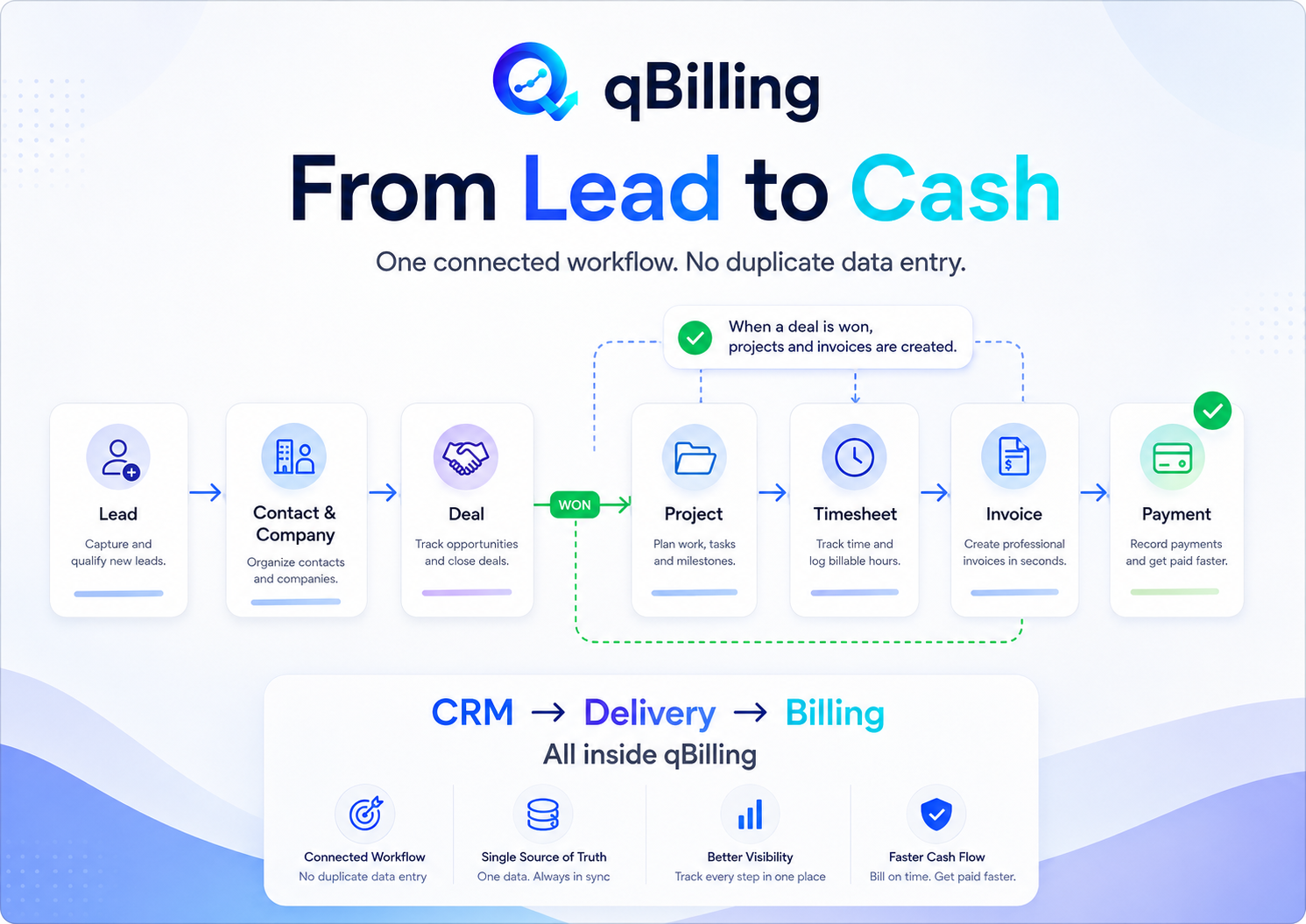
qBilling has grown far beyond an invoicing script. It is now a full CRM-centered business management platform: Lead → Contact/Company → Deal → Project → Timesheet → Invoice → Payment → Renewal, in one connected app. It ships in two commercial modes from the same codebase, with no code fork required:
- Mode A — Self-Hosted Core (CodeCanyon): one active business, installed on your own server via a guided web installer.
- Mode B — SaaS Platform: unlimited tenants on one install, with a dedicated Platform Admin console for packages, billing, and tenant lifecycle — launch your own “qBilling-as-a-Service” business.
Built on Laravel 13 + PHP 8.4, with the entire UI rebuilt on Inertia.js v3 + React 19 and the Tabler design system.
Live Demo: https://qbilling.quantiklab.com/login
Documentation: https://documentation.quantiklab.com/qbilling/
Four Isolated Application Surfaces
qBilling separates concerns into four distinct, independently-authenticated surfaces so a leak in one can never reach another:
- Public / Marketing Site — built entirely with the drag-and-drop Page Builder.
- Tenant Staff App — CRM, sales, projects, billing, HR/payroll, support, reports, settings.
- Customer Portal — a branded, white-labelable login for your tenants’ own customers.
- Platform Admin — the operator console for whoever runs the whole SaaS.
What Business Owners / Tenant Admins Get
CRM Core
- Contacts & Companies, decoupled from billing so one person can belong to many deals
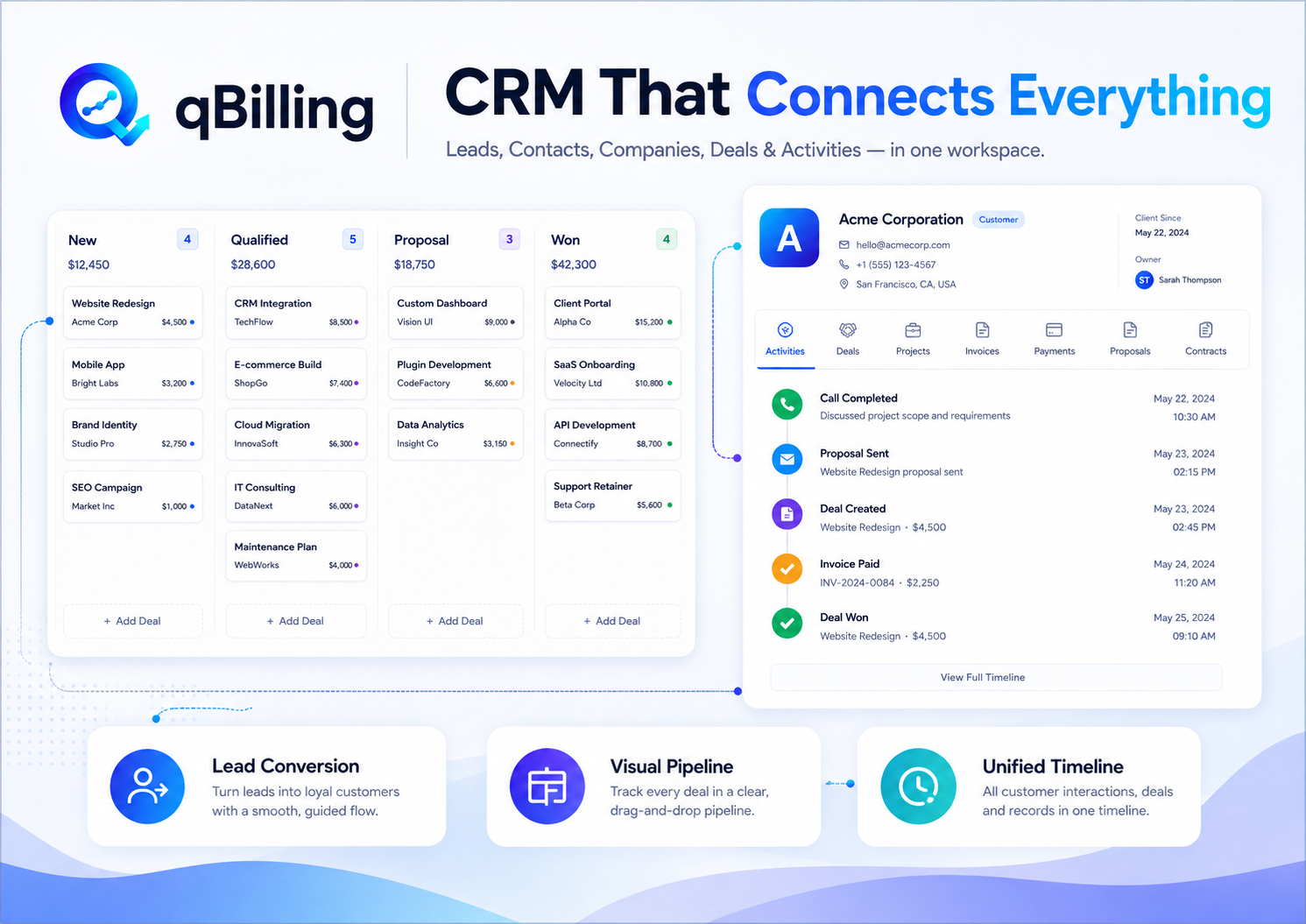
- Lead capture with a Kanban board and a daily, automatically-recalculated lead score
- Deal/Pipeline Kanban board with per-stage totals
- Deal → Project → Invoice automation — moving a Deal to “Won” auto-creates the Project and Sales Invoice
- Customer 360 view — one page merging invoices, payments, projects, proposals, contracts and a live activity timeline per Company
- Goals & KPI tracking against real, live-computed data (never a cached snapshot)
Sales & Billing
- Sales Invoices with custom per-product tax and discount rates, PDF generation, and inline paid/unpaid status
- Quotes, one-click convertible into Invoices
- Proposals — narrative sales documents with public no-login links and Draft/Sent/Viewed/Accepted/Declined tracking
- Contracts with types, value, auto-renew, and a proactive “Expiring Soon” panel
- Recurring Customer Subscriptions — automatic scheduled billing with MRR reporting
- Purchase Orders integrated straight into Inventory
- Multi-currency support, custom Payment Terms, and one-click “Pay Now” links
Inventory
- Live stock levels, cost/retail pricing, categories and multi-warehouse tracking
- Stock-value reporting with top-product breakdowns
Accounting
- Bank/cash Accounts with running balances, full Transaction ledger, Balance Sheet and Account Statement reports
- Sales, Purchases and Expenses post straight into the ledger
Projects, Tasks & Timesheets
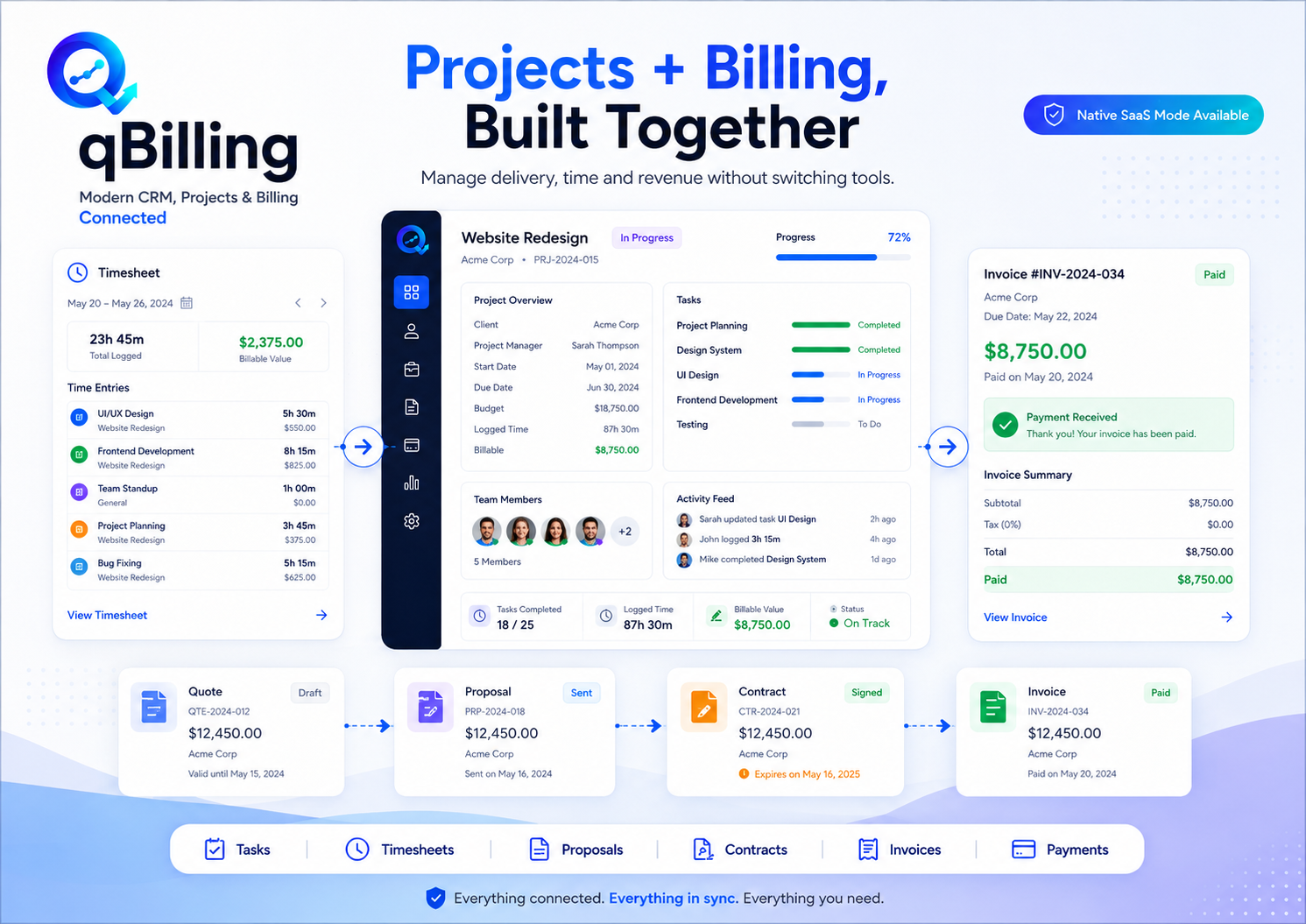
- Projects with milestones, templates and multiple views
- Tasks with dependencies across every project
- A persistent start/stop Timer visible from the top bar, plus manual time entry and a billable flag
- “Generate invoice from unbilled time” — turns tracked hours straight into a Sales Invoice
Support Desk
- Ticketing with Departments, Services and SLA Policies
- Canned Replies and inbound Email Piping
- Live SLA-breach tracking in the Support report
HR & Payroll (Professional/Enterprise entitlement)
- Full salary structure management: salary components, prorated components, and tenant-configurable tax rules/slabs
- Payroll processing engine with a mandatory approval workflow and separation-of-duties enforcement
- Attendance capture, Leave management, Overtime, Bonuses/Incentives
- Employee Loans and Salary Advances with installment schedules
- Auto-generated Payslips and automatic General Ledger posting on each payroll run
- Dedicated Payroll dashboard and reports
AI Assistant (Bring Your Own Key)
- Connect your own OpenAI, Anthropic, Google Gemini, or any OpenAI-compatible key — qBilling never meters or bills your AI usage
- A persistent chat drawer that answers questions against your live data (“which invoices are overdue?”) using real tool calls, not guesses
- Draft-only write actions — the assistant proposes an invoice, task, expense, lead or deal-stage move as a reviewable card; nothing is created until you click Apply
- Dashboard Insights — a daily, auto-refreshing “what needs attention” digest
Automation Engine
- Trigger → Condition → Action rule builder (deal won, ticket created, SLA breach, and more)
- Run-count and active/inactive tracking per rule
Page Builder
- Drag-and-drop section/component builder used to construct the entire public marketing site — home page, pricing, and any number of custom pages/menus
- Publish/unpublish per page, fully manageable from the tenant’s or platform’s own admin — no code deploy needed to change the public site
Communication & Knowledge
- Communication Hub — a shared inbox for email-piped conversations with internal notes and “create Lead from this conversation”
- Company Newsfeed — pinnable, role-restrictable internal announcements
- Knowledge Base with public/internal visibility per article (public articles surface directly in the Customer Portal)
- WhatsApp & SMS automated overdue-invoice reminders (Twilio + Meta WhatsApp Cloud API)
Platform & Extensibility
- Public REST API (
/api/v1) with personal access tokens - Outbound Webhooks — HMAC-signed, retried on failure, for CRM events like deal-stage changes, tickets and SLA breaches
- Custom Fields on Leads, Deals, Contacts and Sales Invoices — no code required
- Fine-grained, per-permission Role matrix plus named Custom Roles
- Full Activity Log audit trail on every create/update/delete
- Delegated Company Portal Admin — a customer-side admin who can invite and manage their own company’s portal members
Reports
12 report pages, every one paired with a real Recharts chart: Income, Expense, Income vs Expense, Sales, Purchase, Inventory Stock, Balance Sheet, Account Statement, CRM Pipeline, Support, Subscriptions (MRR trend) and Goals.
What Customers Get — the Customer Portal
A completely separate, brandable login (/portal/login) — no route ever bridges a staff session into it or back:
- Dashboard — outstanding balance, lifetime paid, open invoice count
- Read-only Invoices, Projects, Proposals and Contracts scoped to their own company
- Raise and track their own Support Tickets
- Help Center — public Knowledge Base articles only; internal articles 404 with no ID leak
- White-label branding — logo, color and display name, when the tenant’s package includes it
Running It as a SaaS — the Platform Admin Console
This is qBilling’s biggest evolution: run your own multi-tenant billing SaaS out of the box.
- Tenant lifecycle — create, suspend, archive tenants; cross-tenant status counts, MRR/ARR, failed payments and churn on a live dashboard
- Packages & Entitlements — pricing tiers, trial lengths, and feature/limit grants, all editable without a deploy — Payroll, AI, WhatsApp/SMS, White-Label Portal, API access, and every module gate lives here as data, not code
- Impersonation — securely log in as any tenant user for support, with a required reason, 1-hour auto-expiry, and a full impersonation history log; correctly routes staff users into the staff app and customers into their own Portal account
- Platform Reports — 12-month MRR trend, tenant growth, churn trend and package distribution
- AI Assistant Governance — platform-wide kill switches for AI action types and individual tools, plus a per-tenant adoption table
- Site Settings, Pages & Menus — the same Page Builder drives your platform’s own public marketing site and pricing page
- Independent Stripe/SMTP credentials for platform billing, entirely separate from any tenant’s own gateway configuration
Requirements
- PHP >= 8.4
- MySQL, OpenSSL, PDO, Mbstring, Tokenizer, XML, Ctype, JSON, BCMath extensions
- A guided, web-based Installer handles requirements checking, purchase-code verification, database setup, admin account creation and optional demo data
Full setup and module documentation: https://documentation.quantiklab.com/qbilling/
Version History
--- Version 3.1 — SaaS Platform, HR/Payroll & Page Builder --- - Native multi-tenancy: tenant-scoped data isolation enforced at the framework level, with a dedicated tenant cache and file storage layer. - Tenant-scoped RBAC on spatie/laravel-permission "teams", plus tenant-level Custom Roles. - New Platform Admin console: tenant lifecycle, Packages & Entitlements (feature/limit gates editable without a deploy), secure Impersonation with audit history, platform-wide MRR/ARR/churn dashboard and reports. - Drag-and-drop Page Builder for the public marketing site — sections, components, and per-page publish control, used by both self-hosted tenants and the Platform's own marketing site. - Customer Self-Service Portal: a fully separate authentication realm for tenant customers, with white-label branding and a delegated Company Portal Admin role. - Full Automation Engine: trigger -> condition -> action rule builder covering deal, ticket and SLA events. - Recurring Customer Subscriptions with automatic scheduled billing and an MRR-normalized Subscriptions report. - Full HR & Payroll module: salary structures, a proration-aware payroll engine, mandatory approval workflow with separation of duties, attendance/leave/overtime, bonuses, employee loans and salary advances, auto-generated payslips, and automatic GL posting. - AI Assistant (bring-your-own-key): live-data chat with tool calls, draft-only record creation (invoices, tasks, expenses, leads, deal moves), a daily Dashboard Insights digest, and platform-wide governance controls over which AI tools are enabled. - Public REST API (/api/v1) with personal access tokens, plus HMAC-signed, retry-on-failure outbound Webhooks for CRM events. - Universal Custom Fields on Leads, Deals, Contacts and Sales Invoices. - Knowledge Base with public/internal visibility, surfaced directly in the Customer Portal Help Center. - Communication Hub shared inbox, Company Newsfeed announcements, WhatsApp/SMS automated overdue-invoice reminders. - Full Activity Log audit trail across every module. - Every report page rebuilt with real charts (Recharts) alongside its data table; 4 brand-new reports added: CRM Pipeline, Support, Subscriptions and Goals. --- Version 3.0 — CRM & Delivery Integration --- - Full CRM layer on top of the existing billing engine: Contacts, Companies, Lead capture/conversion, Pipeline/Deal Kanban board, and a shared Activity timeline. - Deal -> Project -> Invoice automation: a Won deal auto-creates its Project and Sales Invoice. - Timesheets: persistent start/stop timer, manual time entry, billable flag, and "generate invoice from unbilled time." - Proposals: narrative sales documents with public view-tracking links. - Contracts: types, value, auto-renew, and an "Expiring Soon" widget. - Customer 360: a merged, reverse-chronological timeline of invoices, payments, projects, proposals and contracts per Contact/Company. - In-app Notification bell with real triggers (deal won, contract expiring, lead assigned, proposal accepted). - Guided, web-based Installer wizard with purchase-code verification. - Fixed a password-reset security issue and several silent SQL-error-swallowing catch blocks. --- Version 2.0 — Laravel 13 Modernization --- - Upgraded from Laravel 5.7 to Laravel 13. - Converted the entire admin UI from server-rendered Blade to Inertia.js v3 + React 19. - Rebuilt the visual design system on Tabler. - Restored the standard Laravel document-root structure and fixed the cPanel .htaccess redirect for shared-hosting deployments. --- Version 1.0.5 --- - Fixed a couple of issues in reporting. - Fixed an issue in date format. - Fixed an issue in invoice tax calculation when changing tax in the invoice line item. --- Version 1.0.3 --- - Fixed date issue in invoice creation. - Fixed an issue where settings was not saving properly. --- Version 1.0.2 --- - Fixed an issue in .env file which caused 404 error on some servers. --- Version 1.0.1 --- - Fixed an issue that caused SMTP mail error when creating new customer and supplier. - Small bug fixes. --- Version 1.0 --- - Initial Release: Sales Invoices, Quotes, Purchase Invoices, Payments, Products/Categories/Warehouses, Accounts & Transactions, Projects & Tasks, Tickets, Employees, Reports.


