Pulsea | Flutter Fitness Workout UI Kit


Pulsea is a complete fitness and workout tracker app UI kit built with Flutter, GetX and Material 3 — 16 polished screens, light and dark themes, and a full training flow on bundled mock data. No backend needed to run the demo.

You can have a credible fitness app on screen this afternoon. Unzip, flutter pub get, flutter run — the demo boots on bundled mock data with no server, no API keys and no signup, so the first thing you see is a finished app rather than a build error. Every color, font, radius and spacing value lives in one tokens file, so re-skinning it to a gym’s or a client’s brand is an afternoon, not a rewrite.
What’s in the package
- Full Flutter source code (16 screens, 76 Dart files, null-safe, zero analyzer issues)
- Light and dark themes — the near-black dark theme is the hero — both palettes in a single
app_colors.dart - Mock data layer: workout programs, exercises, weekly activity and workout history
- Reusable, theme-aware components throughout
- Offline HTML documentation — a screenshot wall of the app, a feature walkthrough, a logo and brand-color guide, environment setup and a troubleshooting section
- Widget tests included
- Only three dependencies:
get,google_fontsandcupertino_icons
Who is this for
- Freelancers and agencies with a fitness or gym app due for a client and no time to design one from zero
- Founders validating a coaching or workout subscription who need a credible front end before building a backend
- Flutter developers who already have a fitness API, HealthKit or Google Fit data and need a production-grade UI layer to drop it into
- Gyms and studios that ship a branded member app and need a base that re-skins from one file
- Developers learning custom painting — the rings, charts and timer are all drawn on canvas, so this is a real-world reference for doing it without a charting package
The screens that make this kit
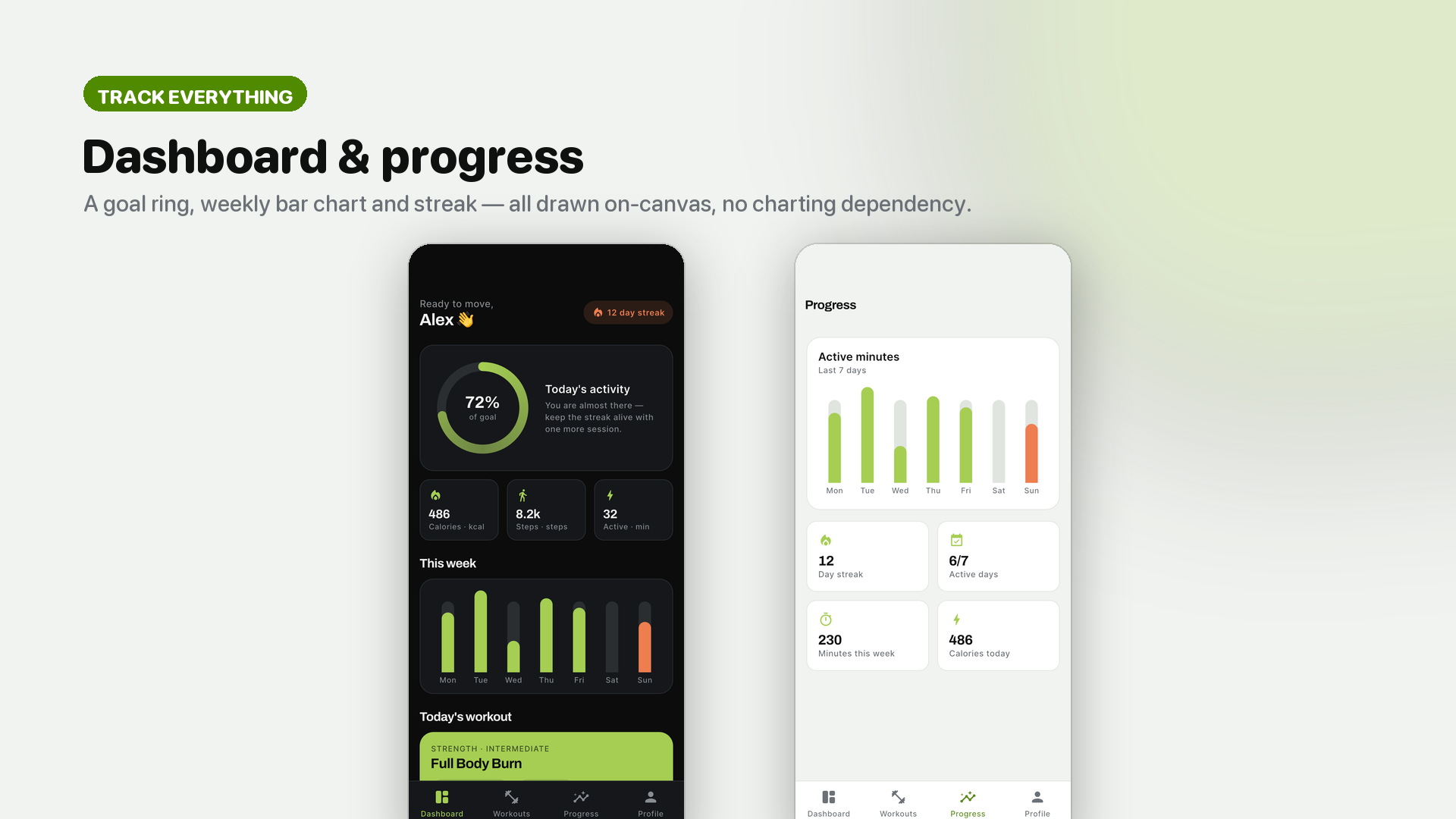
Dashboard & progress — a daily goal progress ring, a weekly activity bar chart, streak and headline metrics (calories, steps, active minutes), plus a progress screen with weekly minutes and active days. All drawn on canvas, with no charting dependency.
Programs & interval timer — a program detail screen with the full exercise list, and a full-screen work / rest interval timer with a countdown ring, set progress and play / pause / skip controls.

Workouts & saved — a two-column workout grid with focus filters, plus a saved-workouts library.

Onboarding, auth & dark mode — a guided onboarding, a clean auth flow, and settings in dark mode. The supporting screens are finished too, not placeholders.

History, profile & settings — completed-workout history, profile, and theme-aware settings.

A high-energy design system
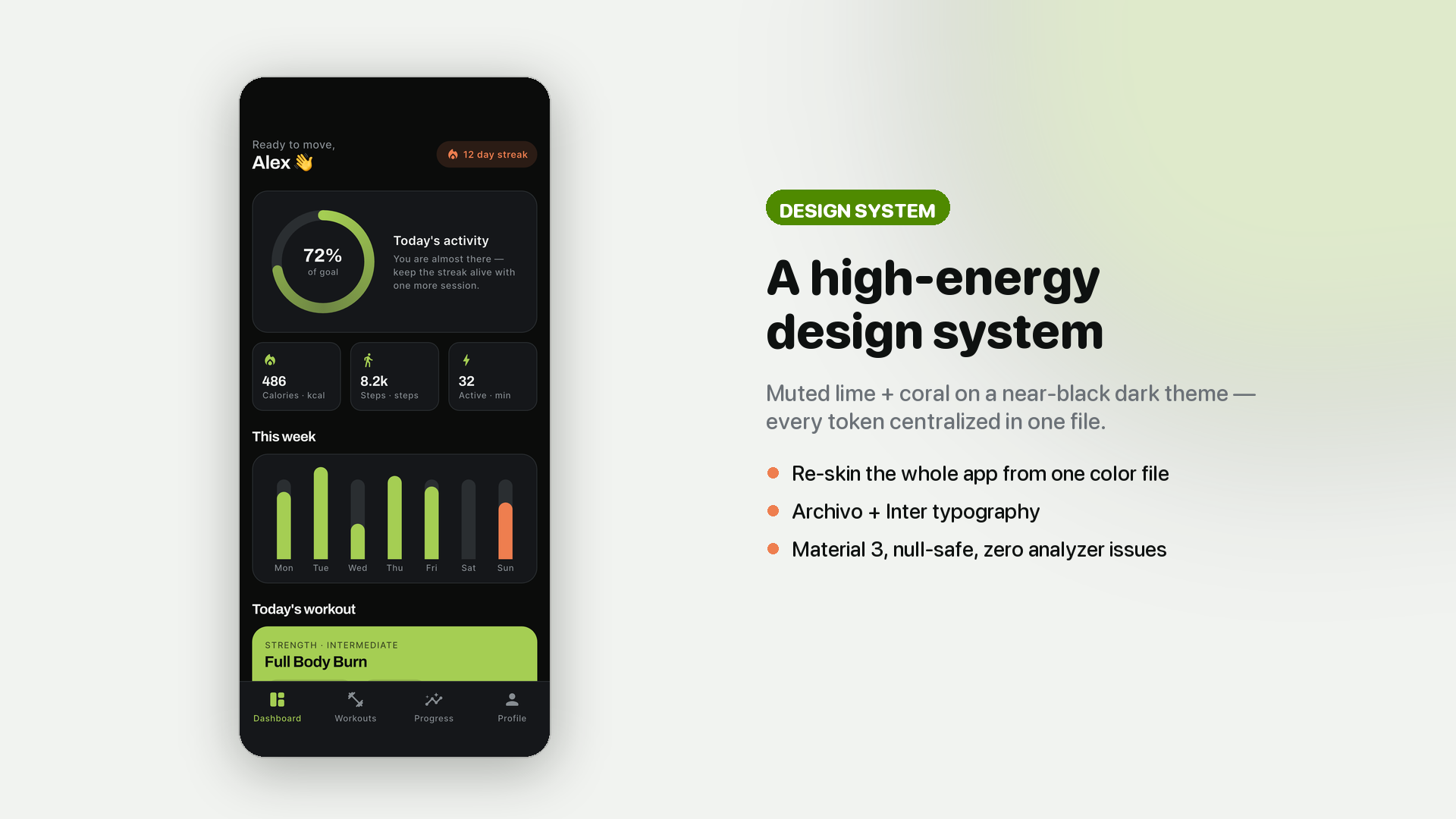
Pulsea ships a distinctive high-energy design system — a muted lime-green primary, a warm coral accent, a near-black dark theme, Archivo and Inter typography and a compact, data-first layout. Every token is centralized, so one file changes the whole app.
Light & dark, built in
Both themes are complete, not an afterthought — a runtime toggle, both palettes living in a single app_colors.dart file, and every component is theme-aware. The dark theme was designed first, which is what most fitness apps actually ship.

The complete training loop
Dashboard with today’s goal > browse workouts > filter by focus > program detail with exercise list > active workout interval timer > workout complete > history > progress charts, plus saved workouts, profile, addresses and settings.
Features
Screens and flows
- 16 screens covering the complete tracking and training journey
- Onboarding, dashboard, browse, program detail, active workout, workout complete, history and progress
- Saved workouts, profile, addresses and settings
- Skeleton loaders and empty states already wired on every list
Tracking and progress
- Daily goal progress ring, drawn on canvas
- Weekly activity bar chart
- Streak counter and headline metrics: calories, steps, active minutes
- Progress screen with weekly minutes, active days and streak
- Workout history
Training
- Full-screen interval timer with work and rest countdown per exercise
- Set progress with play, pause and skip controls
- Two-column workout grid with focus filters
- Program detail with the full exercise list
- Workout complete summary
Theming and design
- Light and dark themes with a runtime toggle, both palettes in one file
- Centralized design tokens — colors, fonts, spacing, radii
- Google Fonts: Archivo and Inter
- Compact, data-first layout built for numbers on small screens
Code and architecture
- Clean GetX architecture: View > Controller > Service > Model, with lazy bindings per route
- All demo data in ONE file; mock services with
Futuresignatures — replace the bodies with your HTTP calls and you are live - Charts, rings and the workout timer are custom-painted — no charting package, so there is nothing to break when a chart library ships a major version
- Android and iOS from a single codebase, Material 3, null-safe, zero analyzer issues, widget tests included
- Tiny dependency footprint:
get,google_fonts,cupertino_icons
Sixteen polished screens — the complete training journey: splash, auth, dashboard, workouts, timer, progress and account.

Get it running in 5 minutes
1. Unzip the package 2. cd fitness_ui_kit 3. flutter pub get 4. flutter run 5. Open documentation/index.html for the re-theming and API integration guides
No backend to install, no API key to register, no account to create. If flutter doctor is green, the demo runs. The included documentation covers re-theming from one file, the logo and brand-color guide, replacing the mock services with your own REST or Firebase calls, and a troubleshooting section for the usual environment issues.
Try it before you buy
Use the Live Preview button on this page to open the app in your browser and click through the real screens — the activity dashboard, the interval timer and the progress charts are all live, running the same code that ships in the package.
Requirements
To run and build the source code you need the Flutter SDK (version 3.29 or newer) and Dart 3.7 or newer, together with a Flutter-ready IDE — Android Studio or Visual Studio Code with the Flutter and Dart plugins.
Platforms
Runs on both Android and iOS from a single Flutter codebase (Material 3, null-safe).
What’s not included
Being straight with you up front, so there are no surprises after purchase:
- No backend or API. This is a UI kit with a mock data layer. The mock services expose
Futuresignatures so you can swap in your own calls, but the server side is yours to build. - No health-data integration. Steps, calories and active minutes come from mock data. Wiring up HealthKit, Google Fit or a wearable SDK is yours to add — the metrics are already laid out and formatted, so it is a data-source swap rather than a UI build.
- No Figma source in this version.
- No stock photography — by design. All imagery is emoji and on-canvas drawing, which is why the package is small, has no image licensing to inherit, and re-skins cleanly to any brand.
Support and updates
- Questions go through the Comments tab on this page or my Envato profile contact form.
- I aim to reply within 1 to 2 business days on working days.
- Support covers setup problems, bugs and questions about how the included code works.
- Support does not cover custom feature development, backend implementation or third-party integration work — those are separate projects.
- Bug fixes and Flutter compatibility updates are free for existing buyers.
Changelog
Version 1.0 — Initial release: 16 screens, light and dark themes, activity dashboard with on-canvas progress ring and weekly chart, active workout interval timer, progress charts, workout history, offline HTML documentation.
Important note on third-party services and external costs: Pulsea is a front-end UI kit that runs on bundled mock data. Connecting it to a live back end — such as Firebase, AWS, REST APIs or health/fitness data providers — will involve those third-party services, which will incur their own separate costs and are not included in this item.
0 average based on 0 ratings.

| Last Update | 2026-07-02 |
| Created | 2026-07-02 |
| Sales | 2 |
| Discussion | Comments |
| Software Version | Flutter 3.x |
| Files Included | Dart YAML JavaScript JSON .kotlin .swift |
| Video Preview Resolution |


