PromptVault | AI Prompt Manager for Windows and Mac
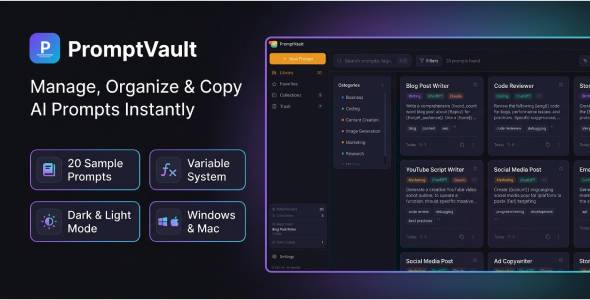

PromptVault — AI Prompt Manager & Library
A professional desktop application for managing, organizing, and instantly copying AI prompts. Built with React + Electron, PromptVault runs natively on Windows and macOS — fully offline, no account required, no internet needed. Perfect for power users of ChatGPT, Claude, Gemini, Midjourney, DALL-E, and any other AI tool.
⚡ Why PromptVault?
If you use AI tools daily, you already know the problem — great prompts get lost in browser bookmarks, text files, and Notion pages scattered everywhere. PromptVault gives you one beautiful, fast, dedicated home for all your prompts with instant search, smart organization, and a powerful variable system that turns your prompts into reusable templates.
Core Features
- Prompt Library — Store unlimited prompts in a beautiful grid or list view. Each prompt shows category, AI model tags, variable highlights, use count, and quick copy button.
- Smart Prompt Editor — Full-featured editor with real-time line/character/word count, variable syntax highlighting, multi-model tagging, tag autocomplete, notes field, and preview mode.
- Variable System — Write prompts with
{{variable_name}}placeholders. When you copy a prompt, a Fill Variables modal appears automatically — fill in your values and the final assembled prompt is copied to clipboard instantly. Turn any prompt into a reusable template. - Collections — Organize prompts into folders with custom colors and icons. 5 default collections included: Writing, Coding, Marketing, Image Generation, Research.
- Advanced Search — Global search across titles, content, tags, and notes. Press
Cmd/Ctrl + Kto focus instantly. Filter by category, AI model, tags, favorites, and date range. - Favorites — Star your most-used prompts for instant access from the sidebar.
- Trash with Auto-Empty — Deleted prompts go to trash, not permanently deleted. Configure auto-empty: 7, 30, or 90 days.
- Import / Export — Backup and restore your entire prompt library in JSON or CSV format. Individual prompts exportable as .txt files.
- Usage Statistics — Track total prompts, collections, most-used prompt, and lifetime copy count in the sidebar dashboard.
✨ Design & UX
- Dark / Light / System theme — Switch instantly, preference saved automatically
- 6 accent colors — Violet, Blue, Green, Orange, Pink, Red
- Grid and List views — Toggle between visual grid and compact list
- Custom frameless titlebar — Native-feeling window controls on both platforms
- Smooth 60fps animations — Polished transitions throughout
- Toast notifications — Animated slide-in/out with progress bar auto-dismiss
- Empty states — Helpful illustrated states when sections are empty
- Keyboard shortcuts — Full keyboard navigation support
⌨️ Keyboard Shortcuts
Ctrl/Cmd + N— New promptCtrl/Cmd + K— Focus searchCtrl/Cmd + S— Save promptCtrl/Cmd + D— Duplicate promptCtrl/Cmd + F— Toggle favorites filterCtrl/Cmd + ,— Open settingsEscape— Close modal / go backCtrl/Cmd + Shift + E— Export all prompts
First Launch Experience
On first launch PromptVault greets you with a 3-step welcome tour and 20 professionally written sample prompts across 7 categories — Writing, Coding, Marketing, Image Generation, Research, Content Creation, and Business. All sample prompts use the {{variable}} system so you can start using them immediately.
How to Install
- Download the package and unzip
- Windows: Run
PromptVault-Setup-1.0.0.exeand follow the installer - macOS: Open
PromptVault-1.0.0.dmgand drag to Applications folder - Launch PromptVault — no setup, no account, works instantly
System Requirements
- Windows: Windows 10 or later (64-bit)
- macOS: macOS 11 Big Sur or later (Intel and Apple Silicon)
- Storage: ~200MB installation size
- Internet: Not required — fully offline
Privacy
All your prompts are stored locally on your device only. No data is ever sent to any server. No analytics, no tracking, no cloud sync. Your prompts stay completely private.
What’s Included
- Windows installer (.exe)
- macOS installer (.dmg)
- Documentation (HTML)
- README (HTML)
- Changelog
- License
Built With
- React 18 + Vite
- Electron 28
- Tailwind CSS
- electron-store (local JSON storage)
- Lucide React icons
- Inter font (Google Fonts)
Support
Full documentation is included in the package. For questions, bug reports, or feature requests please use the CodeCanyon comments section — we respond within 24–48 hours.
$19 |
Download |
0 average based on 0 ratings.
.png)
| Last Update | 2026-05-12 |
| Created | 2026-05-12 |
| Sales | 1 |
| Discussion | Comments |
| Application Runtime | Native |
| High Resolution | Yes |
| Compatible OS Versions | Windows 11 Windows 10 macOS 15 macOS 14 macOS 13 macOS 12 macOS 11 |
| Video Preview Resolution |


