Pipely | Multi-Tenant CRM, HRM and Business Operations Platform (Next.js + Flutter)
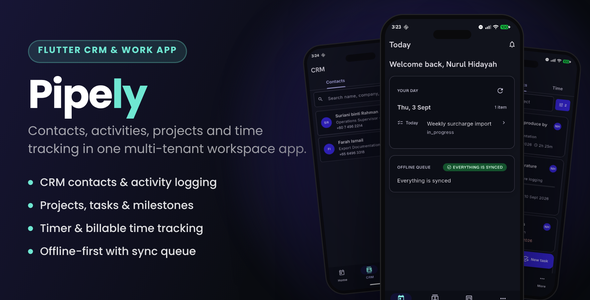

Pipely — one backend, three surfaces, a real Flutter app
Every comparable item on this marketplace is PHP. Most are CodeIgniter, and the volume leader has not been maintained since 2023. Pipely is TypeScript end to end — Next.js App Router and PostgreSQL on the web, Flutter on mobile, one backend behind both.
Run it for your own company, or install it once and give each of your client companies an isolated workspace of their own. Tenant isolation is enforced three ways — a query wrapper, PostgreSQL row-level security, and a session that never trusts an id from a URL — and there are 2,018 tests whose only job is to try to break it.
Seven modules — CRM, projects, invoicing, HRM, support tickets, inventory and accounting — are all built, and all operable from the phone as well as the browser.
Try the demo
Every workspace is its own subdomain — that is the product, not a URL scheme.
- Staff app — Northwind Studio (Scale plan, all seven modules) — northwind.pipely.devsnack.dev
Sign in aseleanor@northwindstudio.co.uk· Owner · password123456 - Marketing site and signup — pipely.devsnack.dev
- Android APK — Download the demo build — same workspace, same login
The app is built for one workspace, and that is the design. The tenant is the hostname: the server reads it from the Host header and there is no workspace field on the sign-in screen, because a tenant field would hand an attacker one endpoint from which to spray credentials at every workspace on the deployment. So this build signs in Northwind staff and nobody else — which is exactly what you want from a tenant boundary.
✨ What’s inside
CRM
- Contacts, companies and contact channels with a unified activity timeline
- Leads, deals, pipelines and a drag-and-drop kanban board
- Lead conversion that carries the whole history into a contact, company and deal
- A public web-to-lead form, rate-limited, for your marketing site
- SMTP and IMAP email, automation rules, and six reports
Projects
- Projects, tasks, milestones and threaded comments
- A gantt chart drawn in SVG — no charting dependency, no licence to check
- Time tracking that turns logged hours directly into invoice lines
Invoicing
- Estimates with client accept and decline
- Invoices, line items, tax rates and recurring schedules
- Server-rendered PDFs — no headless browser at runtime, so nothing to install and nothing to time out
- Stripe payments with signed webhooks, refunds, credit notes and receipts
HRM
- Employees, departments, designations, employment details and documents
- An org chart built from the reporting line
- Attendance with optional geolocation capture, and leave with an approval flow
- A payroll engine, payslips and HR reports
Support desk
- Ticket queues with manual, least-busy and round-robin assignment rules
- Threaded replies with internal notes your customer never sees
- SLA targets computed on read, so a timer is never stale
- Canned responses and email-to-ticket ingestion
- Customer submission from the client portal
Inventory
- Products with SKUs, categories, cost and sale price, tax class and images
- Multiple warehouses
- An immutable stock ledger — a level is a
SUM, never a counter that can drift - Suppliers and purchase orders with a receive flow
- Stock that moves when an invoice is paid
Accounting
- A chart of accounts and a double-entry journal where a posted entry is reversed, never edited
- Expenses with receipts and client rebilling, and vendor bills
- Automatic posting from invoices, payments, expenses, payroll runs and credit notes
- Five reports: profit and loss, balance sheet, cash flow, expense by category and an account ledger
The client portal
- Your customer signs in, sees their projects and files, accepts an estimate, pays the invoice, downloads the receipt and raises a support ticket — with no member of staff involved
- White-labelled with each tenant’s own colour and logo, with an optional “powered by” credit
- A fourth isolation layer, because two customers of one tenant also need isolating from each other
The Flutter app
- Every module above, on Android and iOS, against the same
/api/v1your own integrations would use - Biometric lock and secure token storage — refresh tokens never touch shared preferences
- An offline cache for contacts, deals, tasks and today’s schedule
- A sync queue for attendance clock-in, task status, time entries and activity logging
- Invoices, stock and the ledger are online-only on purpose — a figure cached on a phone is a wrong number waiting to be read, and the app says so instead of showing something stale
Multi-tenancy you can audit
Every tenant-owned table carries a non-nullable tenant_id — there are 106 of them — and three independent mechanisms keep one tenant’s data away from another’s:
- The query wrapper. Every tenant read and write goes through one function that adds the tenant predicate, applies the caller’s permission scope and writes the audit row. Importing the raw database client outside a short declared allowlist fails the linter.
- Row-level security. Every tenant table has a PostgreSQL policy keyed to a session variable set per transaction. If a query somehow bypasses layer one, the database still returns nothing.
- The session. Tenant and role come from the authenticated session, never from a URL segment or request body. Changing an id in a URL cannot reach another tenant, because the id in the URL is never trusted.
The isolation suite is 2,018 tests, and part of it runs against a raw database connection with the application’s own wrapper bypassed entirely — so a security claim cannot pass because of the layer above it.
Tech stack
- Web — Next.js 16 App Router with React Server Components, React 19, TypeScript 5.9 in strict mode with zero errors at build
- Styling — Tailwind CSS 4 with Radix primitives, on a documented design-token system
- Database — PostgreSQL 15+ with Drizzle ORM, 51 migrations including every row-level security policy
- Auth — Auth.js v5, credentials with Argon2id, optional Google and Microsoft Entra sign-in
- API —
/api/v1with bearer plus refresh-token rotation, andIdempotency-Keyhonoured on every mutation - Background jobs — Inngest, with four configurable cron cadences
- Files — Cloudflare R2, presigned direct upload, magic-byte validation, signed expiring downloads
- Email — nodemailer over any SMTP provider, configurable per tenant
- Payments — Stripe, behind a gateway abstraction, with per-tenant credentials
- Mobile — Flutter with Riverpod 2, GoRouter, freezed, Dio and Drift
- Validation — Zod on every mutation, server-side, shared between the web and API paths
What you get
- Full source for the Next.js application and the Flutter app, in one workspace
- The complete schema — 106 tenant tables, 51 migrations, every RLS policy
- A demo seed that builds two complete workspaces with hand-written realistic data across all seven modules. No lorem ipsum, no repeated rows
- The design system as tokens, consumed by both clients
- A branding pipeline — one master SVG mark and a script that derives every launcher icon and favicon from it
- Full documentation, plus a quick-start guide
- Docker Compose and a production Dockerfile for one-command self-hosting
- Unit tests plus the 2,018-test isolation suite
- 6 months of item support
Setup in about ten minutes
pnpm install- Copy
.env.exampleto.env, then set two variables: your database URL and an auth secret pnpm db:migrate— schema and RLS policiespnpm db:seed— two demo workspaces with realistic datapnpm dev
Deploy to Vercel by importing the repository and pointing a wildcard domain at it, or run docker compose up -d on your own box. There is no cPanel step, no FTP upload and no guided web installer to fight with.
✅ Requirements
- Node.js 22.14 or newer, and pnpm 10 or newer
- PostgreSQL 15 or newer — Neon’s free tier is enough to start
- Flutter stable, only if you are building the mobile app
- Docker, optional
Read this twice: the scheduler runs on Inngest, which calls the app on a cron. Without a connected Inngest app nothing scheduled fires — no recurring invoices, no overdue chasing, no inbound mail polled. Nothing breaks and no figure is wrong: every affected screen has a manual button and every report states when it was last built. But an unattended install without it is one where nobody chases an invoice. It needs no account and no keys in development.
Third-party services and their costs — please read
Pipely is source code, not a hosted service. Your purchase buys the code and six months of item support. It does not include hosting, a database, any third-party account, or any credit with the providers below.
Every service Pipely can talk to is operated by a third party and billed to you by that third party, under their pricing and their terms. None of it is paid to us, none of these prices are ours to set, and all of them can change at any time — check each provider’s current pricing and terms yourself before you rely on it. Figures below are indicative only, correct at the time of writing.
- A PostgreSQL database (Neon, Supabase, Amazon RDS, or your own server) — the one thing the application genuinely requires. Neon’s free tier is enough to start with; anything beyond it is billed by that provider.
- Application hosting (Vercel, a VPS, your own Docker host) — likewise required, and billed by whoever you host with.
- Stripe — card payments. No monthly fee, but Stripe takes a per-transaction fee on every payment your customers make, set by Stripe and varying by country and card type. A Stripe account and their identity checks are yours to complete.
- Cloudflare R2 — file attachments, employee documents, expense receipts, product images. Charged per GB stored (around $0.015/GB/month, with no egress fee and a free monthly allowance). Billed by Cloudflare.
- An SMTP provider — outbound email. Any provider that speaks SMTP works, including one you already pay for. Most price by volume above a free tier.
- Inngest — the scheduler behind recurring invoices, overdue chasing, inbound mail polling and SLA breach notices. Free up to a monthly step allowance, billed by Inngest beyond it.
- Google and Microsoft sign-in — optional OAuth buttons. Free to configure for ordinary use, but each requires a developer account with that provider, and some Microsoft Entra directory features are only available on paid Microsoft plans.
- Firebase Cloud Messaging — mobile push transport. Requires a Google Cloud project; free at the volumes this application produces.
- Apple and Google developer accounts — only if you publish the Flutter app to the App Store or Google Play. Apple charges an annual fee, Google a one-off registration fee. Neither is needed to build or side-load the app.
None of the optional ones are required to run Pipely. Every integration is unset by default and the feature it powers switches itself off with a message rather than erroring, so you can install, migrate, seed and use the whole application with a database and nothing else configured. There is no forced signup anywhere in the stack.
⚠️ What’s NOT included
Read this before buying. These are deliberate scope decisions and honest gaps, not a roadmap with dates.
- No SaaS billing layer. Plans exist and control which modules a tenant sees, and signup provisions a real tenant — but there is no subscription lifecycle: no trial expiry, no dunning, no seat or storage enforcement. If you intend to resell subscriptions, you are building that part.
- The super-admin console is one page. The route group, the schema and the host routing are in place; the screens are not.
- No staff or role management screens. The permission system is complete and enforced server-side —
module.actiongrants, three scopes, seven seeded roles — but there is no UI to add a colleague, change somebody’s role or edit a role’s grants. A workspace gets the owner account created at signup; anyone else is a database insert today. If you run this for a team, that is the first screen you will build, and the model underneath it is already there. - One payment gateway. Stripe, behind an abstraction. PayPal, Paddle, Razorpay and Mollie are not implemented.
- Two-factor authentication is not built. The database columns exist and the audit log already redacts the secret, but there is no enrolment and no verification. Do not advertise 2FA to your own users until you build it.
- Server-side push is not built. The app registers device tokens and handles an incoming message, but nothing dispatches one yet. In-app notifications work fully on both clients.
- The mobile app is one build per workspace. The tenant is the hostname — deliberately, because a tenant field on the sign-in endpoint would hand an attacker one place to spray credentials at every workspace on the deployment. The backend URL is compile-time, so a company running Pipely for itself builds once, while a reseller serving many client companies needs a build per customer until a runtime workspace step exists. Their staff can use the web app on any workspace in the meantime.
- No statutory payroll tax for any jurisdiction. This is a payroll engine: you define the earnings and deduction components. It will not file your returns or calculate your PAYE.
- No accounting compliance. The accounting module exists to make the other six add up, not to replace an accounting package. No period lock, no closing run, no multi-currency journal.
- English only. Every string already lives in a translation catalogue, so adding a language is a file rather than a rewrite — but only English ships, and right-to-left layouts have not been exercised.
- Offline editing on mobile is limited to the four queued write types named above.
- No guided web installer. Install is a documented command sequence, or Docker.
Licensing
Every third-party dependency is permissively licensed — MIT, MIT-0, Apache-2.0, BSD or ISC — and redistributable as part of this source. Fonts are under the SIL Open Font License. Nothing in the stack restricts commercial redistribution.
A Regular License covers a single end product that is free to its end users. An Extended License is required if your end users are charged — which includes reselling workspaces as a subscription, so if multi-tenancy is why you are here, Extended is the one you want.
Support
Six months of item support is included: bug fixes, questions about the code as shipped, and help with the documented setup path. Email devsnack26@gmail.com with your purchase code, your version and the exact error text.
Not included: installing or hosting it for you, customisation, building the gaps named above, or writing your jurisdiction’s payroll tax rules. You supply your own database, domain and third-party accounts — we provide the setup walkthroughs, not the accounts.
Changelog
Version 1.0.0 — 3 September 2026
- Initial release.
- Seven modules on both the web app and the Flutter app.
- Three surfaces on one Next.js application: marketing and signup, the tenant staff app, and the client portal.
- Multi-tenancy in three layers, with a fourth inside the client portal. 106 tenant tables, 51 migrations.
- Stripe payments, R2 uploads, SMTP and IMAP email, the Inngest scheduler.
- Docker and Vercel deployment paths, and a demo seed with two complete workspaces.
0 average based on 0 ratings.

| Last Update | 2026-09-10 |
| Created | 2026-09-10 |
| Sales | 0 |
| Discussion | Comments |
| Software Version | Flutter 3.x Flutter 2.x Flutter 1.x Other |
| Files Included | Dart YAML JavaScript JSON .java .kotlin .h .storyboard .plist .swift JavaScript JS CSS HTML |
| Video Preview Resolution |


