Perfex CRM Chat


Perfex CRM Chat Module
Real-Time Messaging, AI Chatbot, Video Calls & Live Support for your CRM
The most complete communication add-on for Perfex CRM. Real-time staff chat, client messaging, group conversations, AI-powered chatbot with lead capture, WebRTC voice and video calls, live support panel, CSAT analytics, all in one module. Built on Pusher WebSockets for instant delivery with zero server polling.
Requires Perfex CRM 3.0.0 or higher.

▶ Live Demo
Staff / Admin Login: https://perfex-chat-module.idevalex.com/admin
Client Login: https://perfex-chat-module.idevalex.com/authentication/login
★ What’s New in Version 2.0.0
Version 2.0.0 is a major release that transforms Perfex Chat from a team messaging tool into a full communication platform:
- ◆ AI Chatbot System — Embed a trained AI assistant on any website. RAG-powered answers from your own content, automatic lead capture, and one-click escalation to live agents.
- ◆ Voice & Video Calls — WebRTC peer-to-peer calls between staff and clients. Draggable picture-in-picture video, floating voice bar, camera-denied fallback.
- ◆ CSAT Analytics Dashboard — Customer satisfaction ratings, staff performance rankings, trend charts, and filterable reports.
- ◆ Conversation Tags & Notes — Color-coded tags and internal staff notes for organized support.
- ◆ Canned Responses — Quick-reply templates with shortcut codes for faster agent replies.
- ◆ Message Reactions — React to any message with emoji reactions (8 quick reactions).
- ◆ Domain Whitelisting — Restrict your chatbot widget to specific domains with allowed domain restrictions and CORS protection.
- ◆ Lead Capture & CRM Conversion — Automatically turn chatbot visitors into Perfex CRM leads or clients.
- ◆ GDPR Consent — Built-in consent collection with customizable privacy policy links.
- ◆ Image Paste — Paste images directly from clipboard into any conversation.
◈ Real-Time Staff & Client Chat
Everything your team needs for fast, reliable internal and client communication — no page refresh, no server polling, no delays.
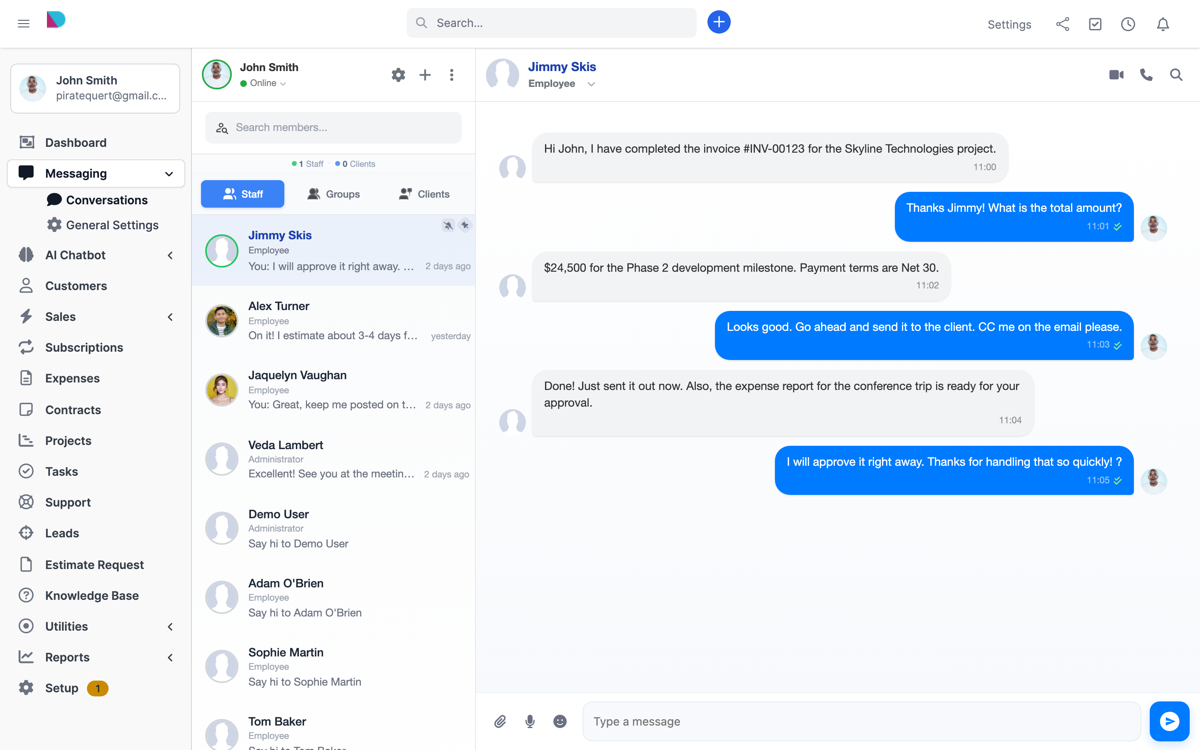
- Staff-to-Staff Messaging — privately message any colleague in real time
- Staff-to-Client Messaging — engage directly with CRM clients and contacts
- Group Chat — create unlimited group conversations, add/remove members, rename on the fly
- Global Announcements — broadcast messages to all staff or all clients
- Typing Indicators — see who is composing a message with their name displayed
- Read Receipts — message Sent, Delivered, and Seen statuses with timestamps
- Online Presence — Online, Away, Busy, and Offline status indicators
- Message Reactions — react to messages with quick emoji reactions
- Desktop Notifications — HTML5 browser push notifications for new messages
- Sound Alerts — configurable per-user sound notification preferences
- User @Mentions — tag teammates in group conversations
- Emoji Picker — full emoji picker with 100+ emojis
- Quick Mentions — instantly reference Projects, Invoices, Estimates, Contracts, and more
- Message Forwarding — forward any message to another user or group
- Edit Messages — edit sent messages inline directly in the bubble
- Copy & Delete Messages — full message management with admin controls
- Audio Messages — record and send voice clips from staff and client sides
- Image Paste — paste images directly from clipboard into chat
- File & Image Sharing — drag-and-drop uploads with shared files and photos gallery
- Media Preview — in-chat lightbox for videos, images, MP3, YouTube, and Vimeo links
- Message Search — live search through message history
- Contact Search — instant search and filter staff and client contacts
◆ AI Chatbot — Website Visitor Support Widget
Embed an intelligent, trainable AI chatbot on any website. Visitors get instant answers powered by your own content. When they need a human, the conversation seamlessly escalates to your live support staff — all inside Perfex CRM.
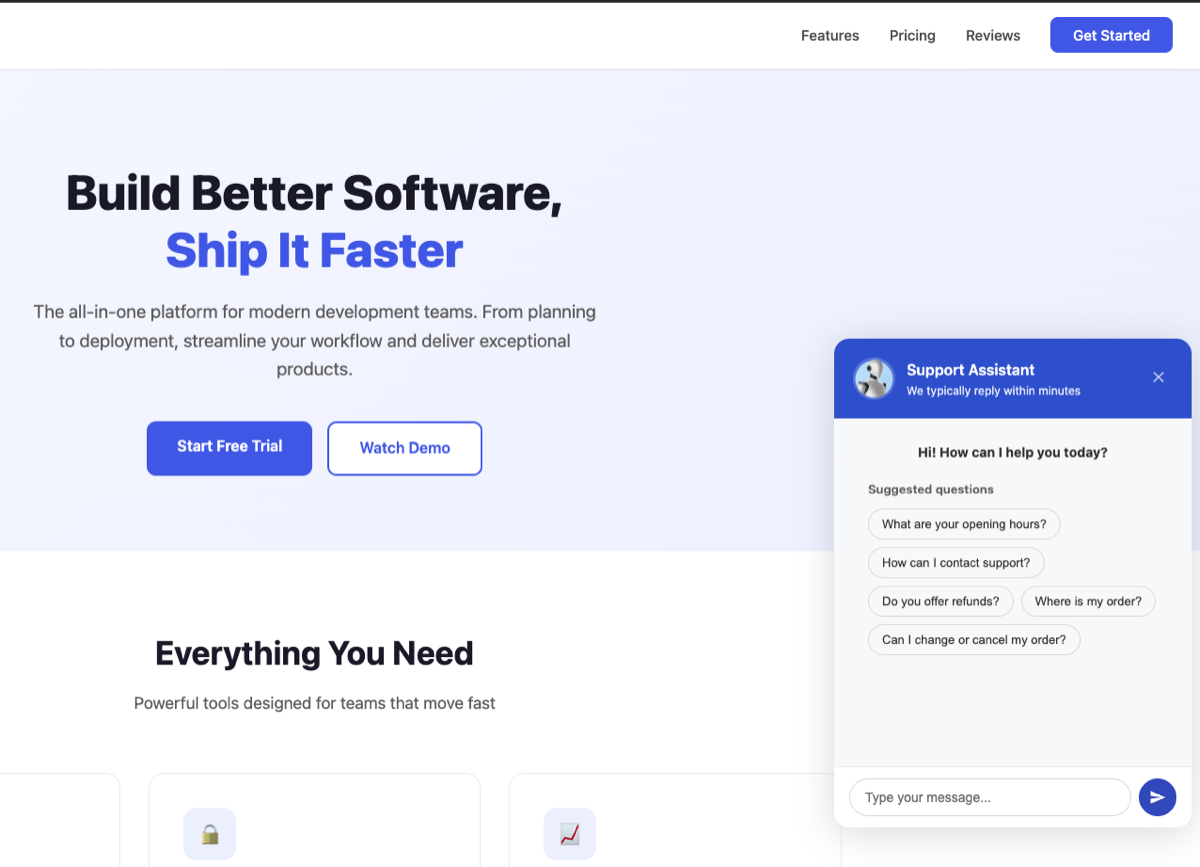
- Embeddable Widget — single script tag to add the chatbot to any website
- Multi-Model AI — choose from GPT-4o, GPT-4.1, GPT-5, and more OpenAI models
- RAG Training — train the AI with website URLs, Q&A pairs, free-form text, or document uploads (PDF, TXT, DOCX)
- Website Crawler — automatically crawl and index your site content up to 3 levels deep
- Custom Appearance — match your brand with colors, position, icons, avatars, and welcome messages
- Smart Escalation — visitors request human help, AI captures their info, staff gets notified instantly via Pusher
- Lead Capture Form — collect name, email, and phone during escalation or pre-chat
- CRM Conversion — convert chatbot visitors to Perfex CRM leads or clients in one click
- Canned Responses — quick-reply templates with shortcut codes for fast agent responses
- CSAT Ratings — visitors rate their experience after conversation closes (1-5 stars with comments)
- Rate Limiting — built-in protection against message spam (20 messages/minute per visitor)
- Auto-Close — automatically close idle conversations after configurable timeout via cron
- GDPR Consent — consent collection with customizable privacy policy link
- Domain Security — whitelist allowed domains, CORS protection, XSS prevention
- 9 Widget Languages — English, Dutch, French, German, Italian, Spanish, Portuguese BR, Turkish, Ukrainian
◆ Live Support Panel
A dedicated staff dashboard for managing all chatbot conversations. Filter, search, assign, tag, and respond — all in real time.
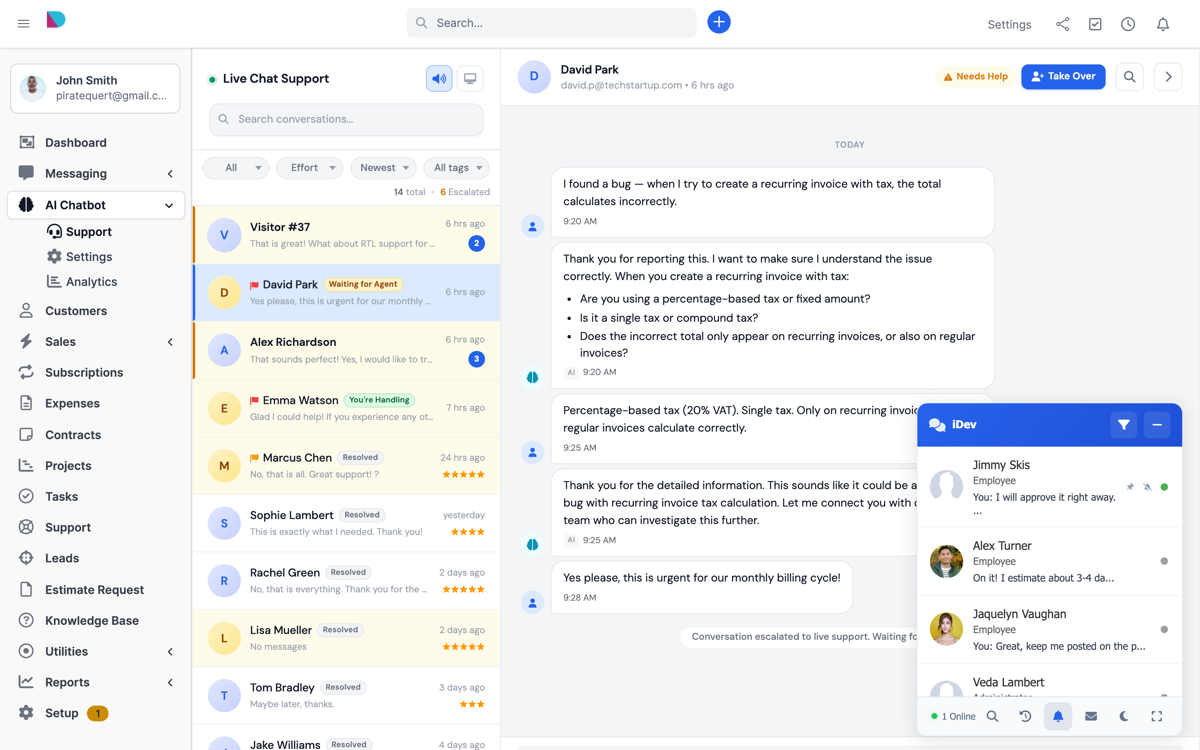
- Conversation Sidebar — real-time list of all conversations with status, unread badges, and last message preview
- Status Filters — filter by active, escalated, human-handling, or closed conversations
- Staff Assignment — assign or transfer conversations between staff members
- Priority Levels — mark conversations as high, medium, or low priority
- Color-Coded Tags — create custom tags with hex colors to organize conversations
- Internal Notes — add private staff notes not visible to visitors
- Take Over / Return to AI — staff takes control from AI, or returns the conversation back
- Lead & Client Conversion — convert visitor to CRM lead or client from the info panel
- Close & Delete — end conversations or remove them entirely
- Export — download conversations as CSV or HTML
◆ Voice & Video Calls (WebRTC)
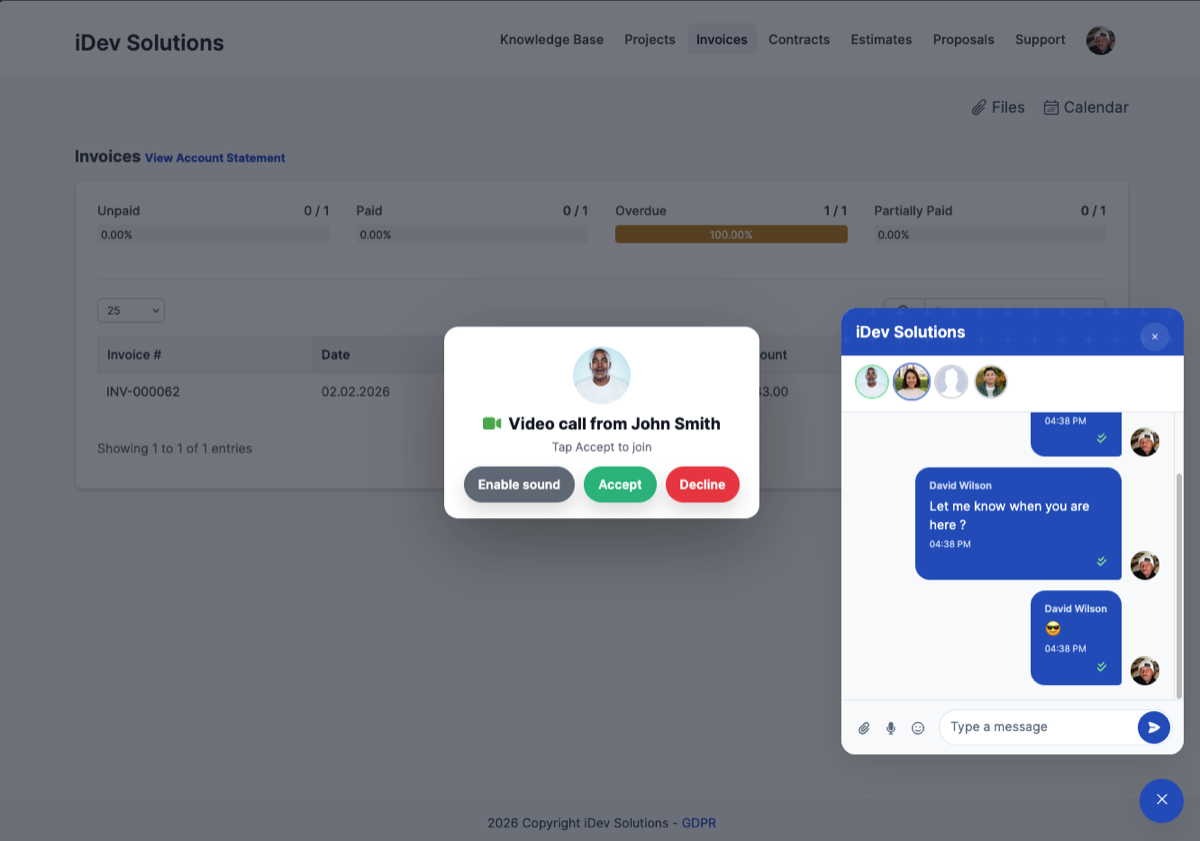
Crystal-clear voice and video calls directly inside Perfex CRM. No external apps needed — just click and talk. Powered by WebRTC with Pusher signaling.
- Staff-to-Staff Calls — voice and video calls between team members
- Staff-to-Client Calls — call clients directly from the chat interface
- Peer-to-Peer WebRTC — secure, low-latency direct connections
- Picture-in-Picture Video — draggable floating video window
- Floating Voice Bar — minimal UI for voice calls, keeps your workspace clear
- Camera Fallback — “Continue with Audio Only” when camera is denied or unavailable
- Mute/Unmute Controls — toggle audio and video during call
- Call History — call events logged in conversation thread (missed, answered, duration)
- Incoming Call Screen — ringing UI with caller avatar, accept and decline buttons
- Pusher Signaling — call setup uses your existing Pusher connection, no extra infrastructure
◆ CSAT Analytics & Staff Performance
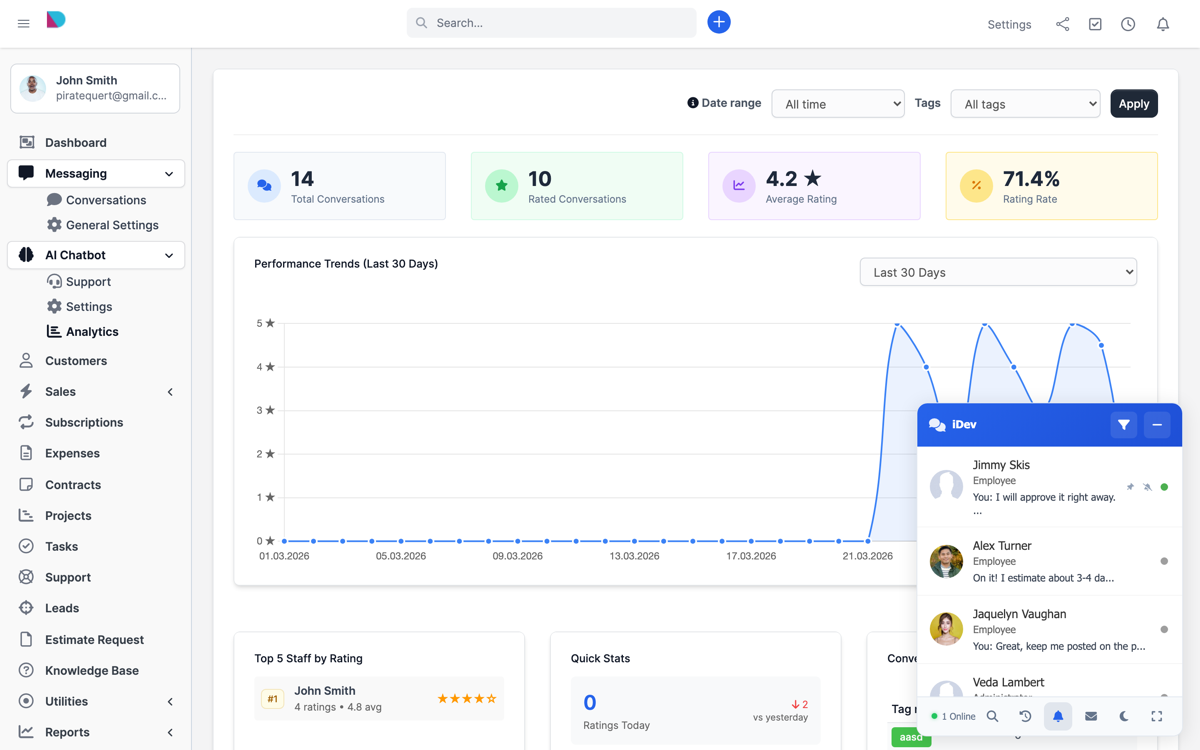
- CSAT Overview — total conversations, average rating, response percentage
- Rating Breakdown — 1-5 star distribution with percentages
- Staff Performance — per-agent conversation count, rating count, and average rating
- Trend Charts — rating trends over time with visual charts
- Quick Stats — today, yesterday, this week, last week comparisons
- Advanced Filters — filter by date range, tags, conversation status, staff, and priority
- Export — download conversation data as CSV or HTML
◆ Three Chat Views
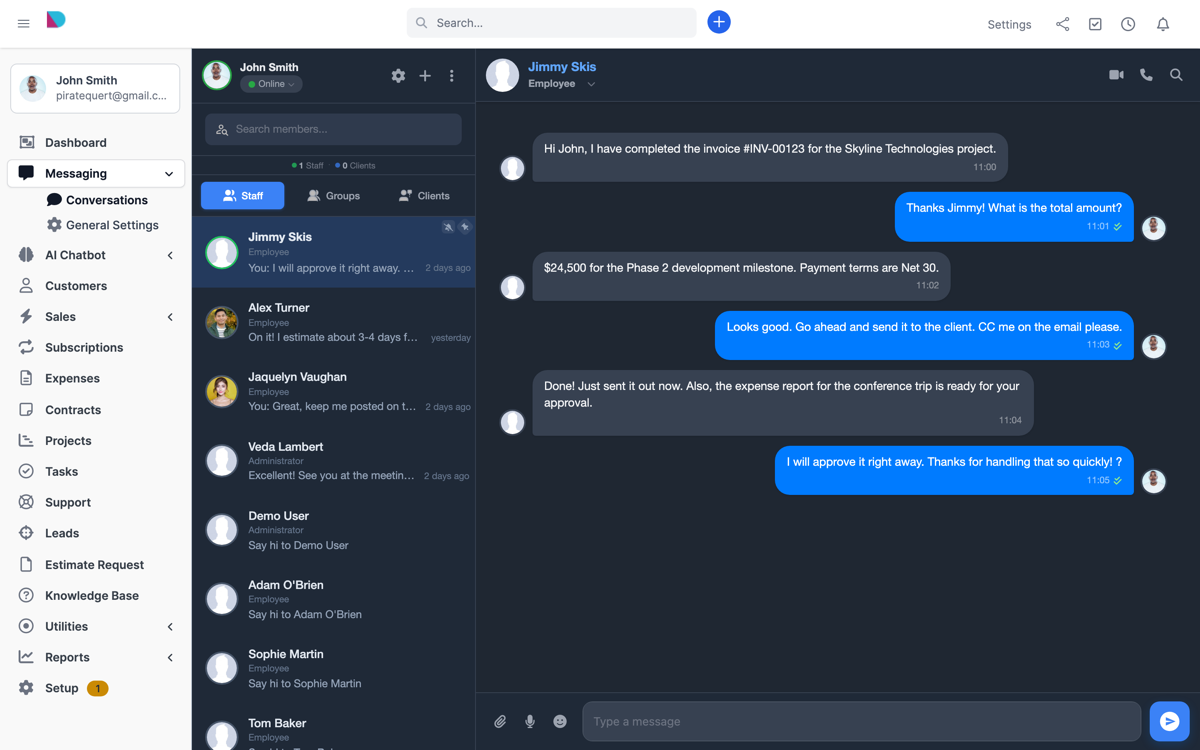
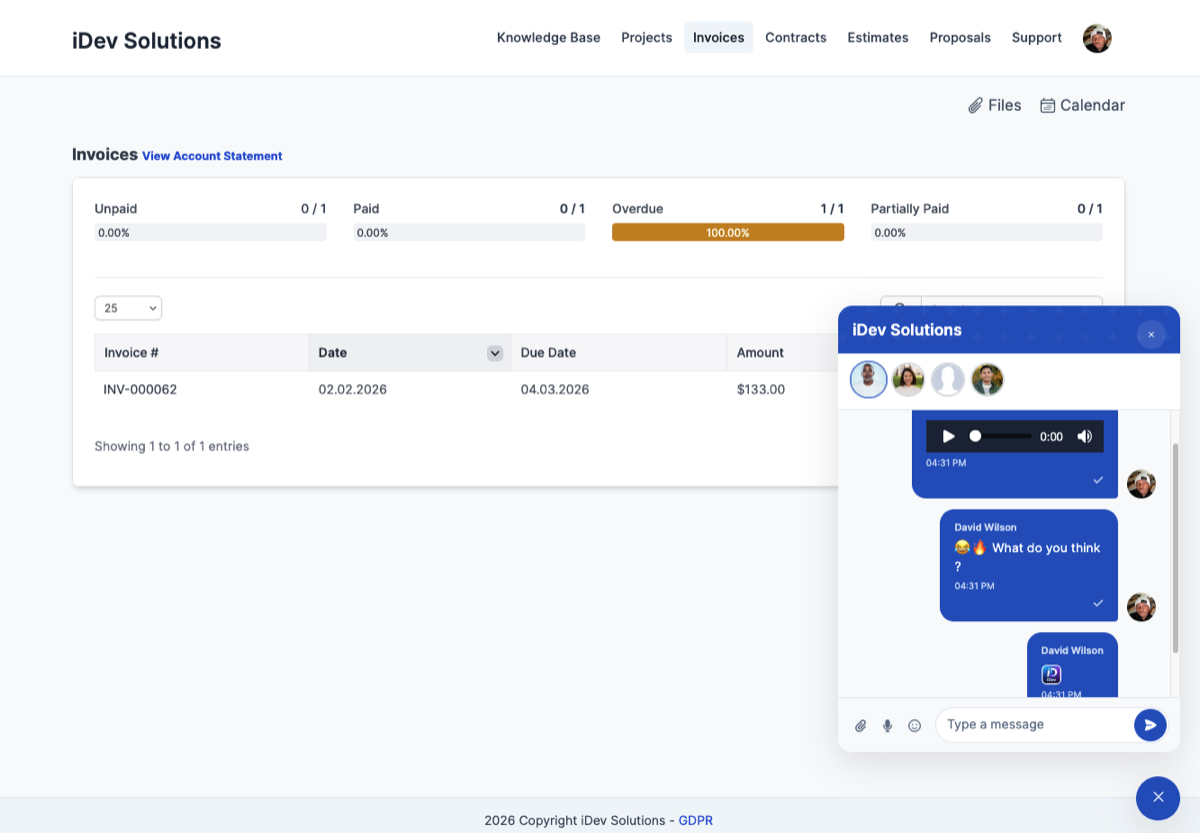
Full Browser View — dedicated full-screen chat experience with sidebar contacts, conversation panel, and shared files. Available in light and dark themes.
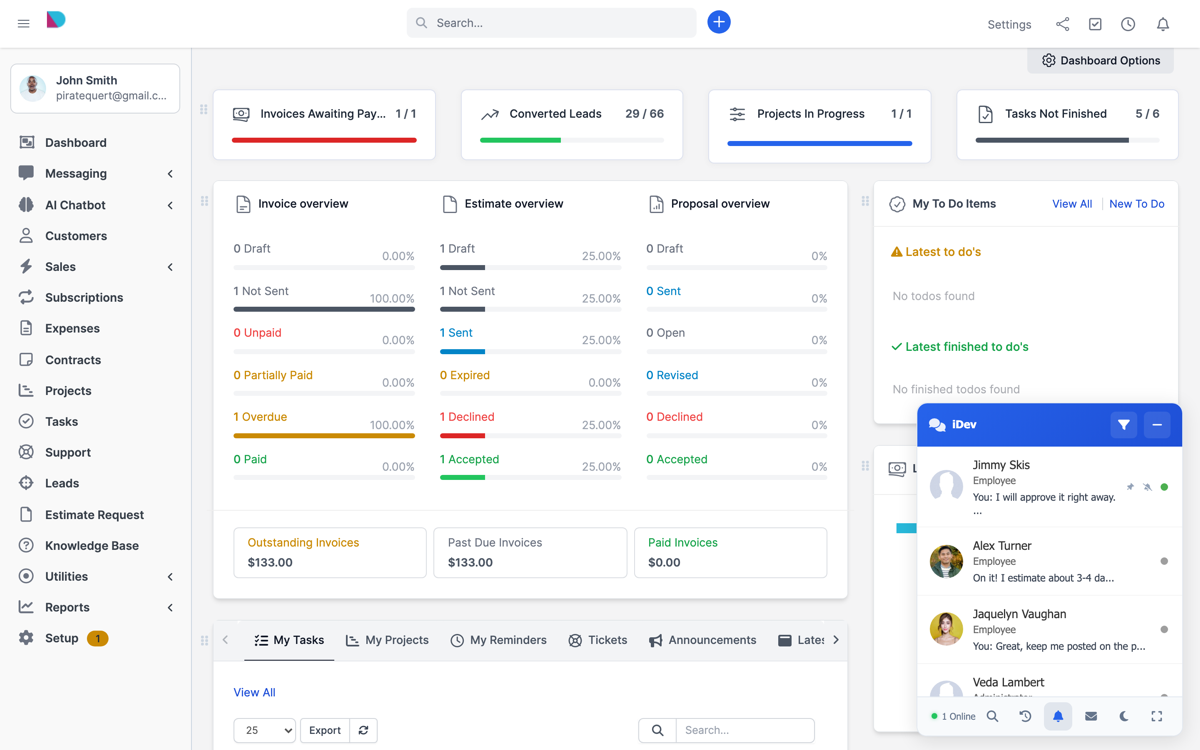
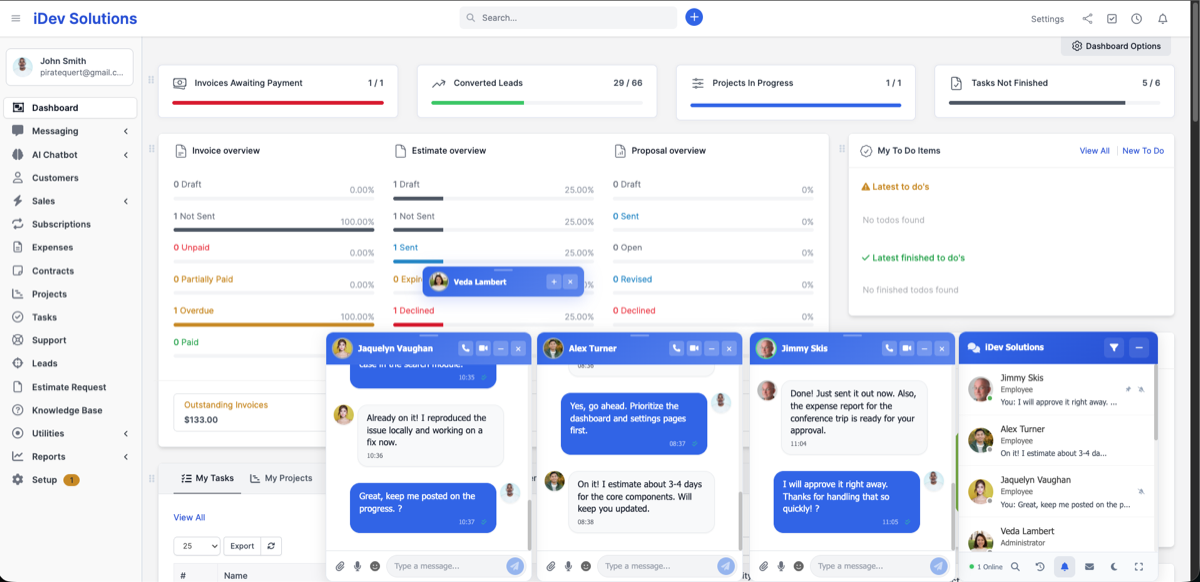
Toggled Floating Widget — a compact chat widget that floats on every admin page. Draggable, minimizable, position remembered across page navigation. Built with Vue.js 3.
Client Portal Chat — dedicated chat support inside the Perfex CRM clients area. Clients see available staff and can exchange messages and files. Can be enabled or disabled.
◆ Perfex CRM Integrations
- Convert to Support Ticket — turn any chat conversation into a Perfex support ticket with one click
- Associate with Task — create CRM tasks linked to conversations for follow-up
- Quick Mentions — reference Projects, Invoices, Estimates, Contracts, and Leads inline in messages
- Lead Conversion — create CRM leads from chatbot visitor conversations
- Client Conversion — convert chatbot leads to full Perfex CRM client records
- Export Conversations — download any conversation as CSV for records and compliance
◆ Group Chat & Announcements
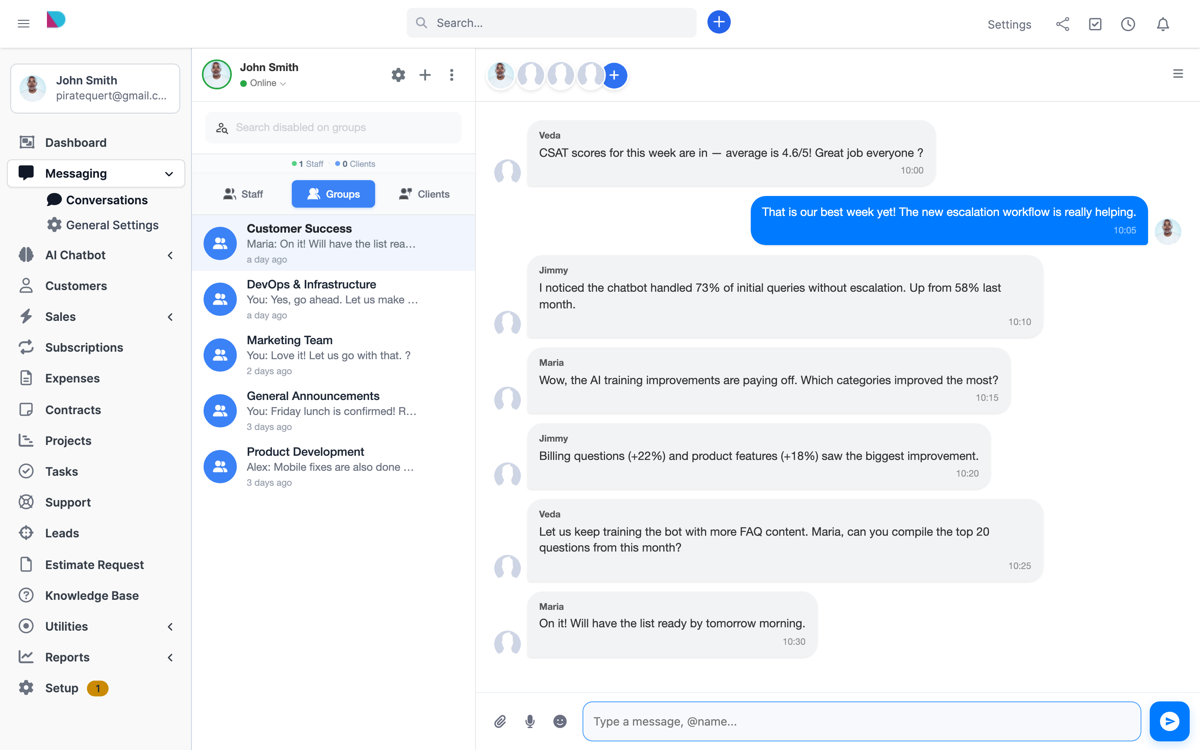
- Create unlimited group conversations
- Add and remove members dynamically
- Rename groups on the fly with live sync to all members
- Shared files and photos gallery per group
- Group-specific notifications and unread badges
- Admin full control over all groups
- Members can rejoin groups and see full history
- Staff and client announcements
◆ Permissions & Administration
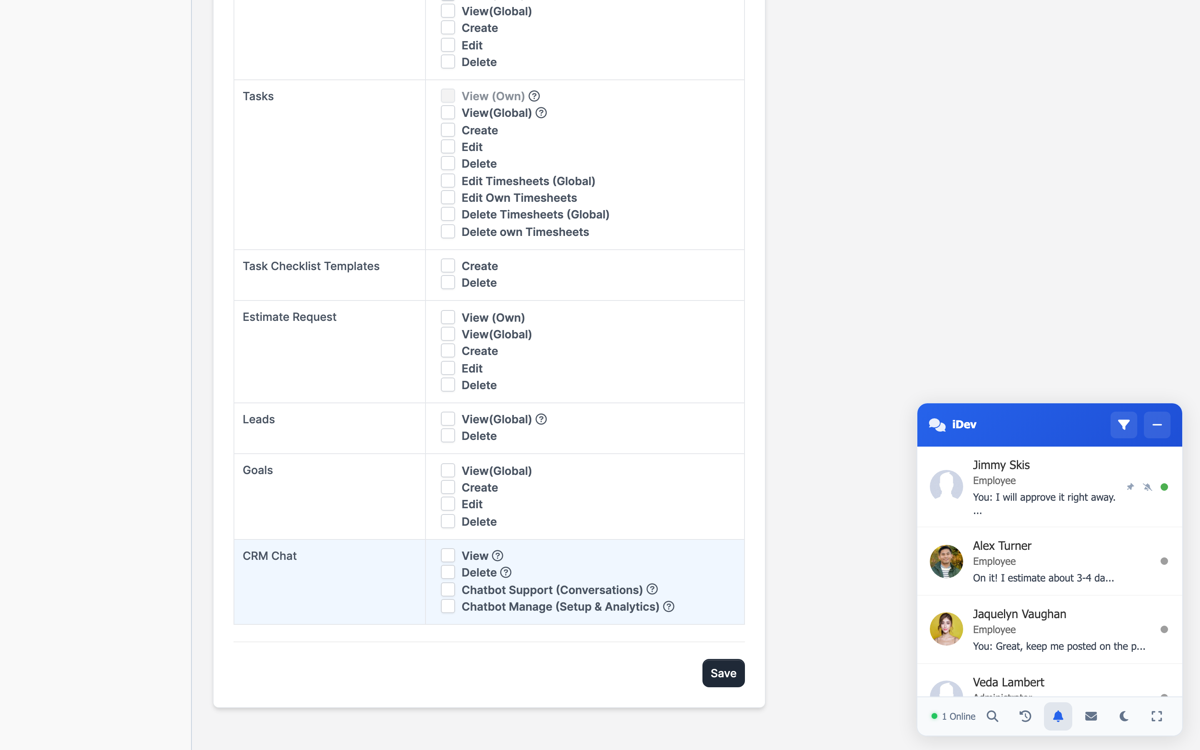
- Chat Access — grant or restrict staff chat access via Perfex permissions
- Delete Messages — allow or disallow staff message deletion
- Create Groups — control which staff members can create groups
- Convert to Ticket — permission to convert conversations to support tickets
- Chatbot Support — handle visitor conversations and escalations
- Chatbot Management — configure chatbot settings, training data, and analytics
- Enable/Disable Client Chat — toggle client portal chat on or off
- Show Permitted Staff Only — only show staff with chat access in the contact list
- Purge Conversation History — delete conversations older than 3 months (staff, clients, groups)
◆ Themes & Customization
- Light Theme — clean, bright interface for everyday use
- Dark Theme — easy on the eyes for extended sessions (full chat, toggled, and live support panel)
- Per-User Selection — each user picks their preferred theme independently
- RTL Support — full right-to-left layout for Arabic, Hebrew, and other RTL languages
◆ Mobile Responsive
Every view — full chat, toggled widget, client portal, and the AI chatbot widget — is fully optimized for mobile devices. Touch-friendly controls, adaptive layouts, and smooth scrolling on phones and tablets.
◆ Rich Media & File Sharing
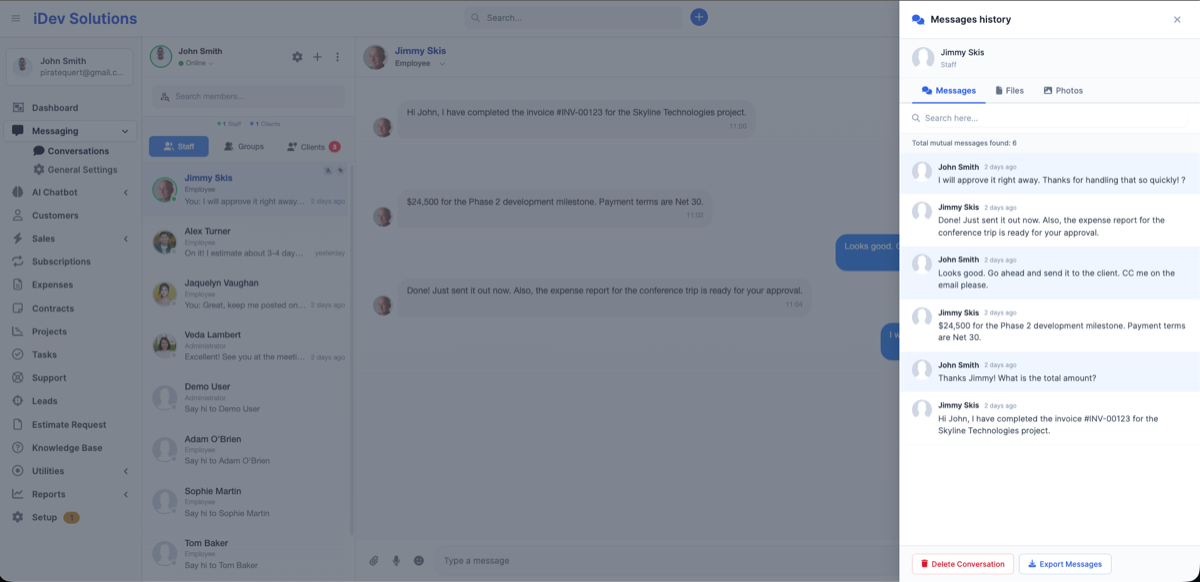
- Drag-and-drop file uploads
- Paste images directly from clipboard
- Image, video, and document sharing
- In-chat lightbox preview for photos, videos, and MP3 files
- YouTube and Vimeo link preview
- Shared files history per conversation
- Shared photos gallery per conversation
◆ More Features
- ✓ WebSocket-Powered — Pusher real-time engine, no polling, no server slowdown
- ✓ Unread Badges — unread message counters on contacts, groups, and sidebar
- ✓ Online Indicator — see who is online across staff and clients
- ✓ Live Search — search contacts and message history instantly
- ✓ Date Stamps — visual date separators in conversations
- ✓ Draggable UI — drag and reposition the toggled chat, position is saved
- ✓ Delete & Export — delete conversations with optional CSV export beforehand
- ✓ Multiline Input — press Shift+Enter for new lines in messages
- ✓ Connection Monitoring — detects network loss and notifies the user
- ✓ Skeleton Loaders — smooth loading animations for contacts and messages
- ✓ 60-Second Install — upload, activate, configure Pusher, and start chatting
◆ Supported Languages (9 Translations)
- English
- Dutch (Nederlands)
- French (Français)
- German (Deutsch)
- Italian (Italiano)
- Spanish (Español)
- Portuguese — Brazil (Português)
- Turkish (Türkçe)
- Ukrainian (Українська)
Want to contribute a translation? Contact us via Envato support or at https://support.idevalex.com
◆ Requirements
- Perfex CRM version 3.0.0 or higher
- PHP 8.0+
- Pusher.com account (free tier available)
- OpenAI API key (only required for the AI Chatbot feature)
- HTTPS recommended for audio messages and video calls
◆ Installation
- Upload the module zip via Setup → Modules
- Activate the module
- Enter your Pusher credentials in Setup → Settings → Pusher
- Start chatting!
No coding required. Install in under 60 seconds. Full documentation included.
◆ Support
We provide dedicated support through Envato. If you encounter any issues or have questions, reach out via the Support tab on this item page or email us at support@idevalex.com
◆ Screenshots
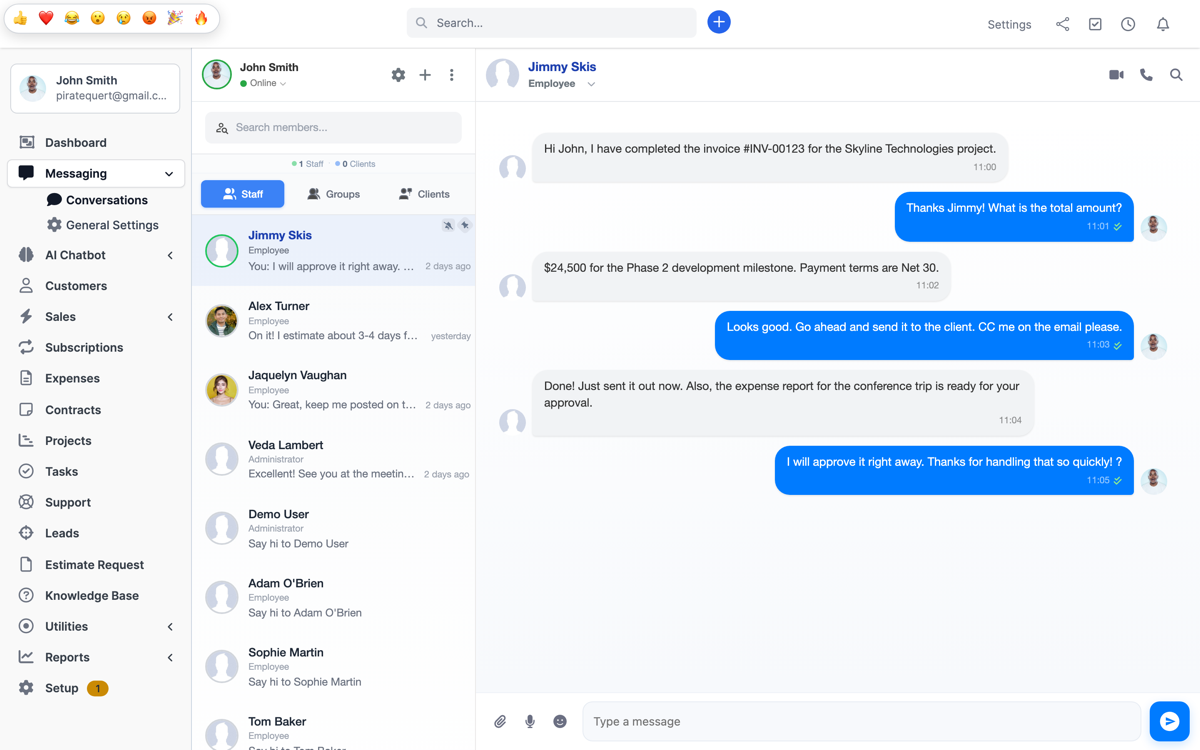
AI Chatbot configuration
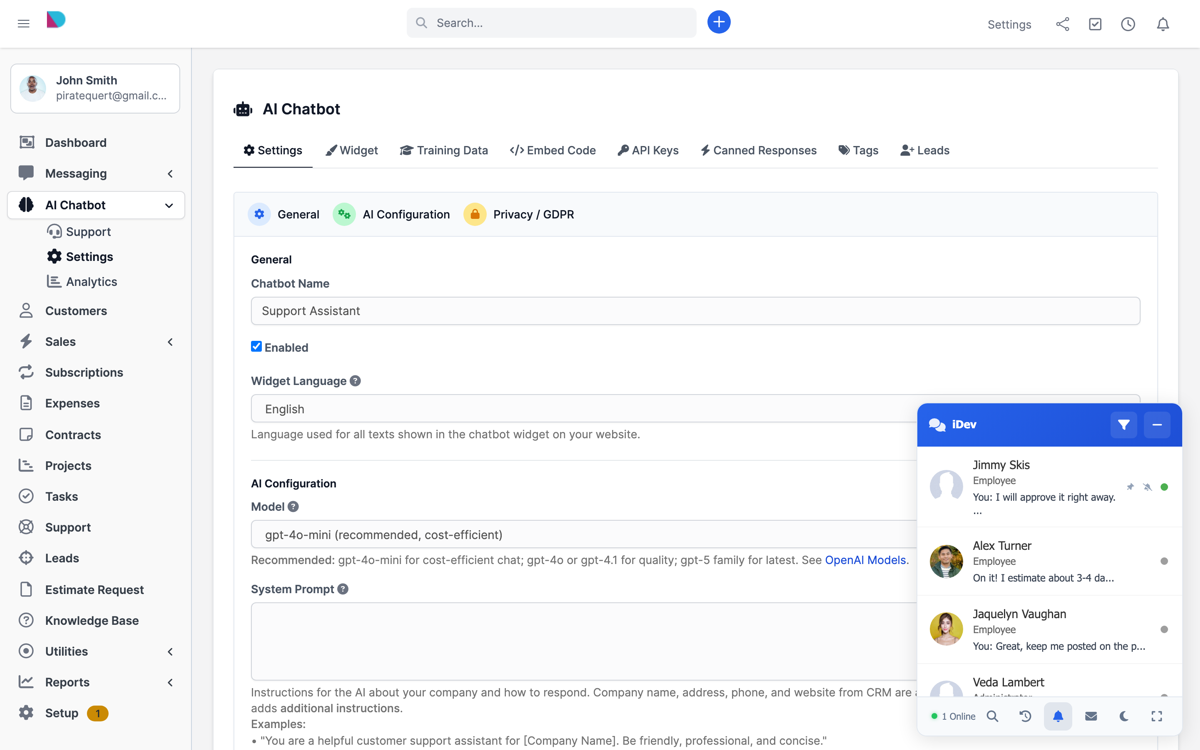
AI Chatbot responding to visitors
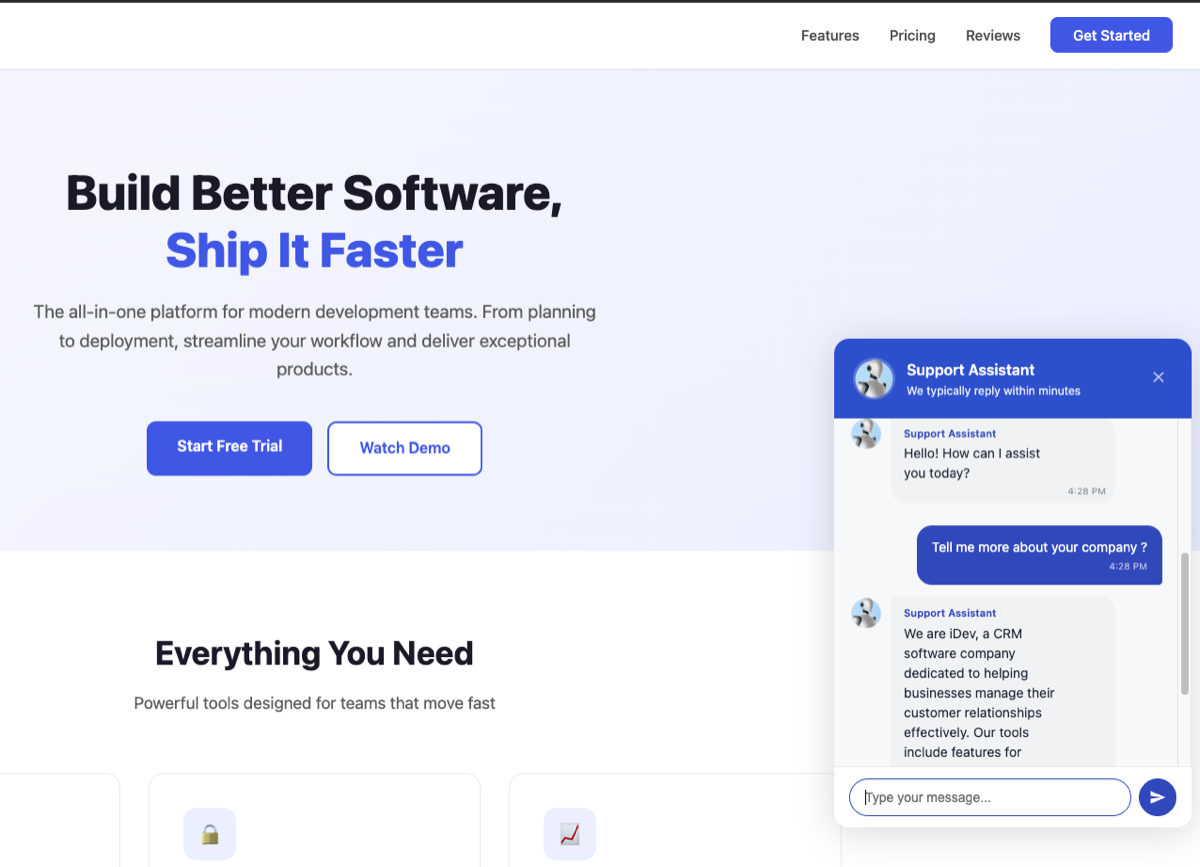
Connect with clients
Draggable chat with remembered position
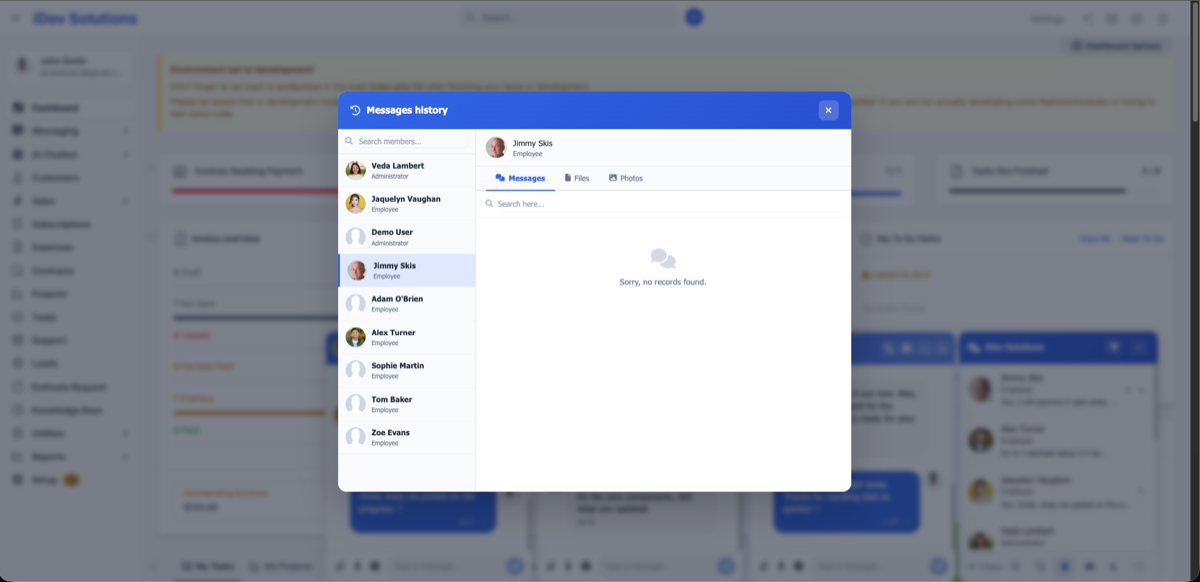
Chat with multiple members
Other Modules by i-Dev
- Perfex Appointments Module
- Perfex Office Theme
- Perfex Light Theme
- Perfex Dark Theme
- Custom JS Module
Change Log
[ IMPORTANT: AFTER UPDATE CLEAR YOUR BROWSER CACHE ]
Version 2.0.0
- New: AI Chatbot system with embeddable visitor widget
- New: RAG Training — train AI with URLs, Q&A pairs, text content, and file uploads
- New: Smart escalation from AI to live agents with lead capture
- New: Voice and video calls (WebRTC) for staff and clients
- New: Picture-in-picture video and floating voice bar
- New: Message reactions (8 quick emoji reactions on any message)
- New: Paste images from clipboard into conversations
- New: CSAT rating system (1-5 stars with comments)
- New: Analytics dashboard with staff performance metrics and trend charts
- New: Live support panel for managing chatbot conversations
- New: Conversation tags with custom colors
- New: Internal staff notes per conversation
- New: Canned response templates with shortcut codes
- New: Lead and client conversion from chatbot conversations
- New: Domain whitelisting and CORS security for chatbot widget
- New: GDPR consent collection widget
- New: Chatbot widget language selection (9 languages)
- New: Conversation priority levels (high, medium, low)
- New: Staff assignment and transfer for chatbot conversations
- New: Auto-close idle conversations via cron job
- New: Rate limiting (20 messages/minute per visitor)
- New: Real-time Pusher notifications for escalations and CSAT
- New: Dark theme for live support panel with per-user toggle
- New: Inline message editing (edit directly in the bubble)
- New: File upload and image paste support in chatbot widget and support panel
- New: Client chat staff visibility settings (customer admins only, all staff, show roles)
- New: Training data persistence in database (survives module reinstall)
- Improved: Complete UI refresh across all chat views
- Improved: Typing indicators show actual user names
- Improved: Read receipt tracking per staff per conversation
- Improved: Mobile responsive layouts with touch gestures (swipe, double-tap)
- Improved: Call messages show detailed info (who called, missed, duration)
- Improved: Performance optimizations and skeleton loaders
Version 1.5.0
- Fixed: Header statuses PHP version compatibility fix.
Version 1.4.9
- Fixed: PHP version compatibility in admin area.
Version 1.4.8
- Added: PHP 8+ support
- Updated: Turkish language fully translated
- Compatibility: Perfex CRM latest version
- Improved: Live group rename sync across all views
- Improved: Live member add/remove notifications
- Bug fix: Audio recording on subfolder installations
- Bug fix: Live notification, clients search, toggled view focus, file deletion sync
Version 1.4.7
- Added: Turkish and Italian languages
- Added: Group names with spaces, live group rename
- Added: Shift+Enter for new lines in messages
- Added: Purge conversations older than 3 months
- Improved: New message blink effect replaces auto-focus
- Fixed: Image forwarding, group notifications, sidebar scroll
Version 1.4.6
- Added: Ukrainian language
- Fixed: Scroll history seen-at dates, inactive profiles, mobile audio width
- Improved: Global CRM desktop notifications
Version 1.4.5
- Added: Dutch language, message Seen/Delivered, audio messages, Quick Mentions, forwarding, copying, client announcements, contact filtering, task association
- Updated: Pusher JS library, notification sounds
- Fixed: Scrolling, groups, audio, and client permission bug fixes
$49 |
Download |
4.6 average based on 72 ratings.

| Last Update | 2026-04-20 |
| Created | 2019-03-29 |
| Sales | 1794 |
| Discussion | Comments |
| Compatible Browsers | Firefox Chrome Edge |
| Software Version | PHP 8.x MySQL 8.x |
| High Resolution | Yes |
| Software Framework | CodeIgniter |
| Files Included | JavaScript JS JavaScript JSON HTML CSS PHP SQL |
| Video Preview Resolution |


